
ResultsAiX Surveys Is Live, Plus Mailer And WP Sync Updates

Most people who run a survey end up with a spreadsheet. They read it once, nod, and go back to sending everyone the same email. The answers never change anything.
That’s the problem three of my plugins solve together. ResultsAiX Surveys asks the question. ResultsAiX Mailer remembers the answer and acts on it. WP Sync carries the person to anywhere else they need to be. This post is about how they fit, and how to build the loop on your own site.
If you want the step-by-step on building a survey itself, question types, the opt-in step and the five ways to publish it, that’s all in how to survey your audience in WordPress. Here I’m going to stay on what happens after somebody presses submit.
One Loop: Ask, Tag, Follow Up, Measure
Here’s the whole idea in one paragraph. Someone answers your survey. Their answers tag them in your email list and send them to the right page. Those tags start the right follow-up in Mailer automatically. WP Sync copies the people you choose into the other tools you use. And WP Conversion Tracker AI shows you which link brought them in, so you know which traffic produced the answers that turned into sales.
All of it runs on your own WordPress. No monthly survey bill, no task meter, and no answers sitting in somebody else’s dashboard.
What Surveys Does In The Loop
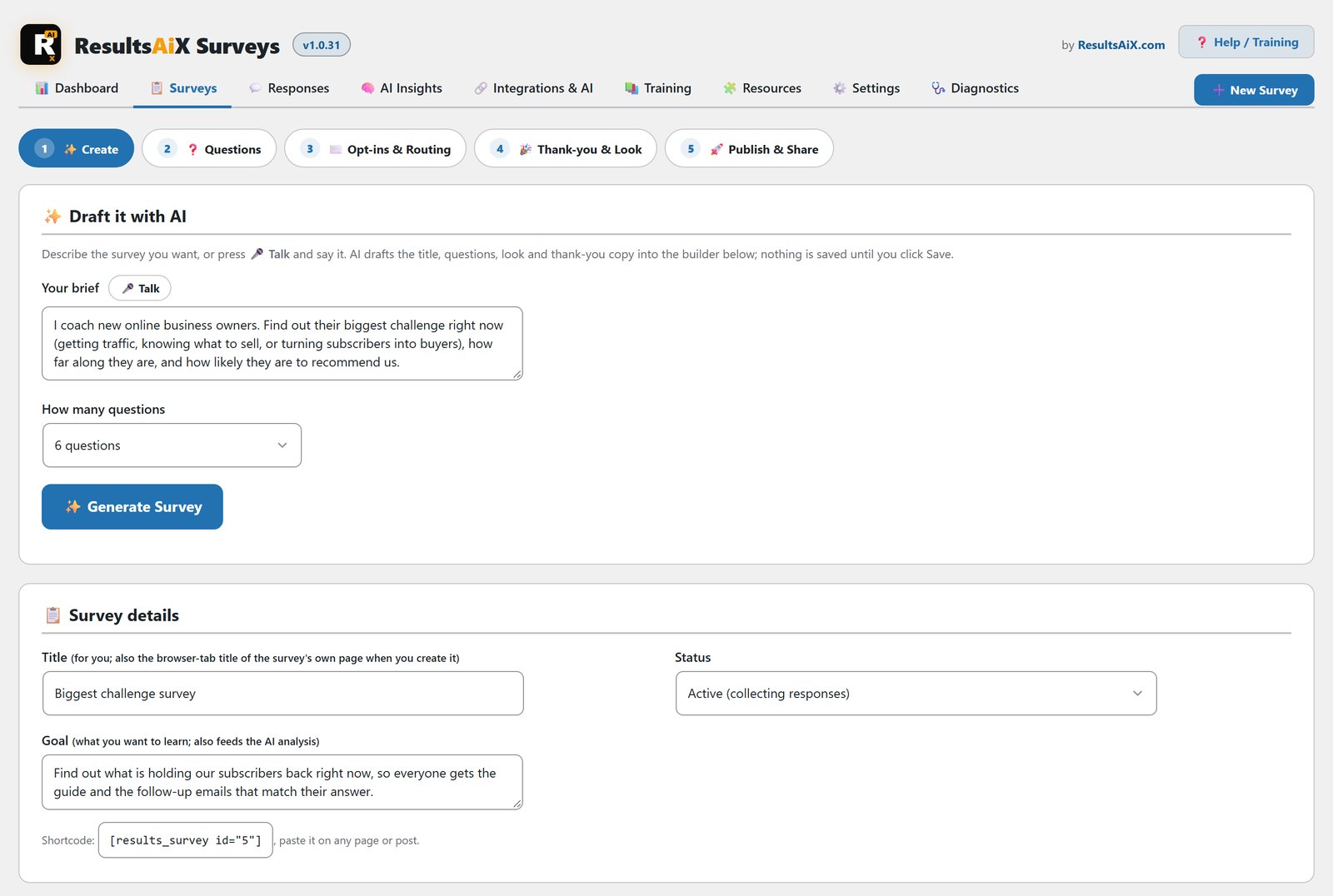
ResultsAiX Surveys is the front door. Describe what you want to find out in one sentence and the AI writes the questions, the opt-in step and the thank-you page. Visitors see one question at a time with a progress bar, so more of them finish.
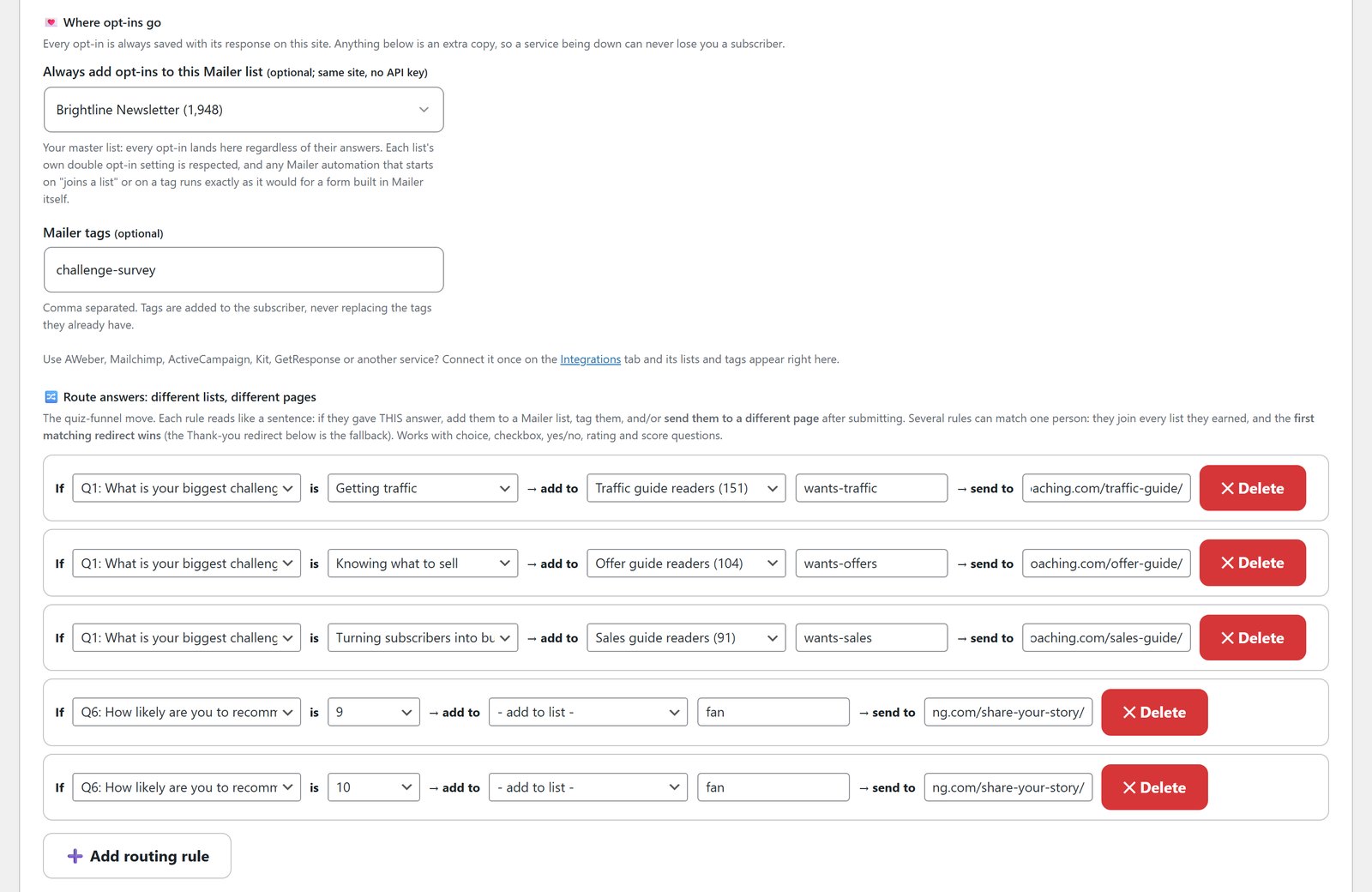
The part that makes the loop work is answer rules. You can add up to 50 per survey. “If Q1 is Traffic, tag them wants-traffic and send them to the traffic guide.” When an answer matches, the rule adds tags, adds a list and can send the visitor to a different page. Tags are always added, never replacing the tags a person already has.
Surveys has 12 autoresponders built in, with tags. Mailer is one of them, and on the same site it needs no key at all.
What Mailer Does With The Answers
Connect Surveys to ResultsAiX Mailer and two things happen. The tags land on the contact, merged with what’s already there. And every answer is saved on the contact itself as a field. Open anyone in Mailer and you can see exactly what they told you, next to what they’ve bought and what you’ve sent them.
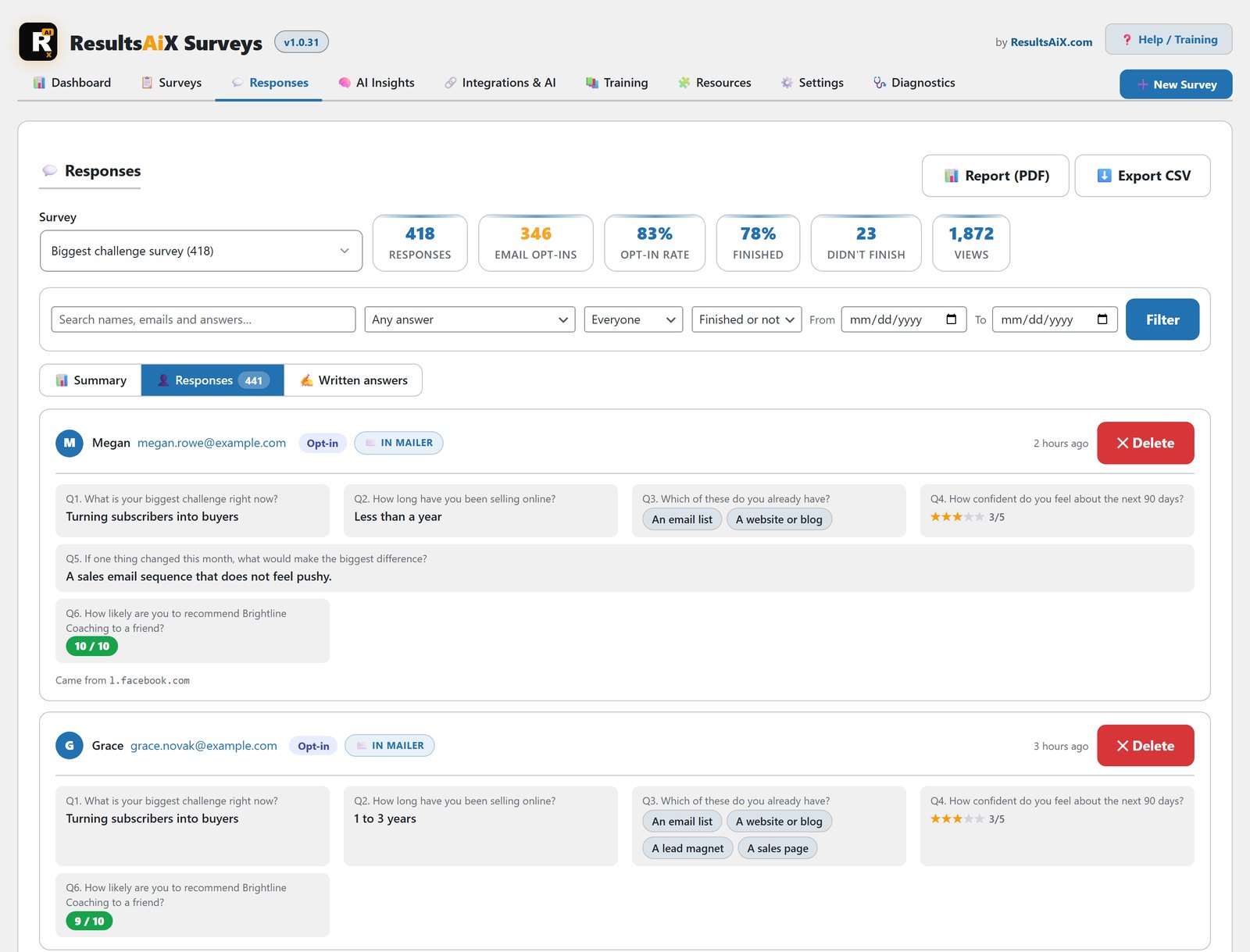
Now the answers can drive your email. A Mailer automation can start the moment someone gets a tag. So wants-traffic gets your traffic email, wants-offers gets your offer-building email, and the people who scored you 9 or 10 get a testimonial request. Different people, different emails, with nobody sorting anything by hand.
Answers also work as segments. “Tagged wants-offers and never bought” is a real audience you can broadcast to. Mailer also gives you a ready-made email link that skips the survey’s email step for people you already know, and it respects each list’s own double opt-in setting.
What WP Sync Adds
You don’t need WP Sync to get answers into your list. The autoresponders are built into Surveys. WP Sync is for everything beyond that.
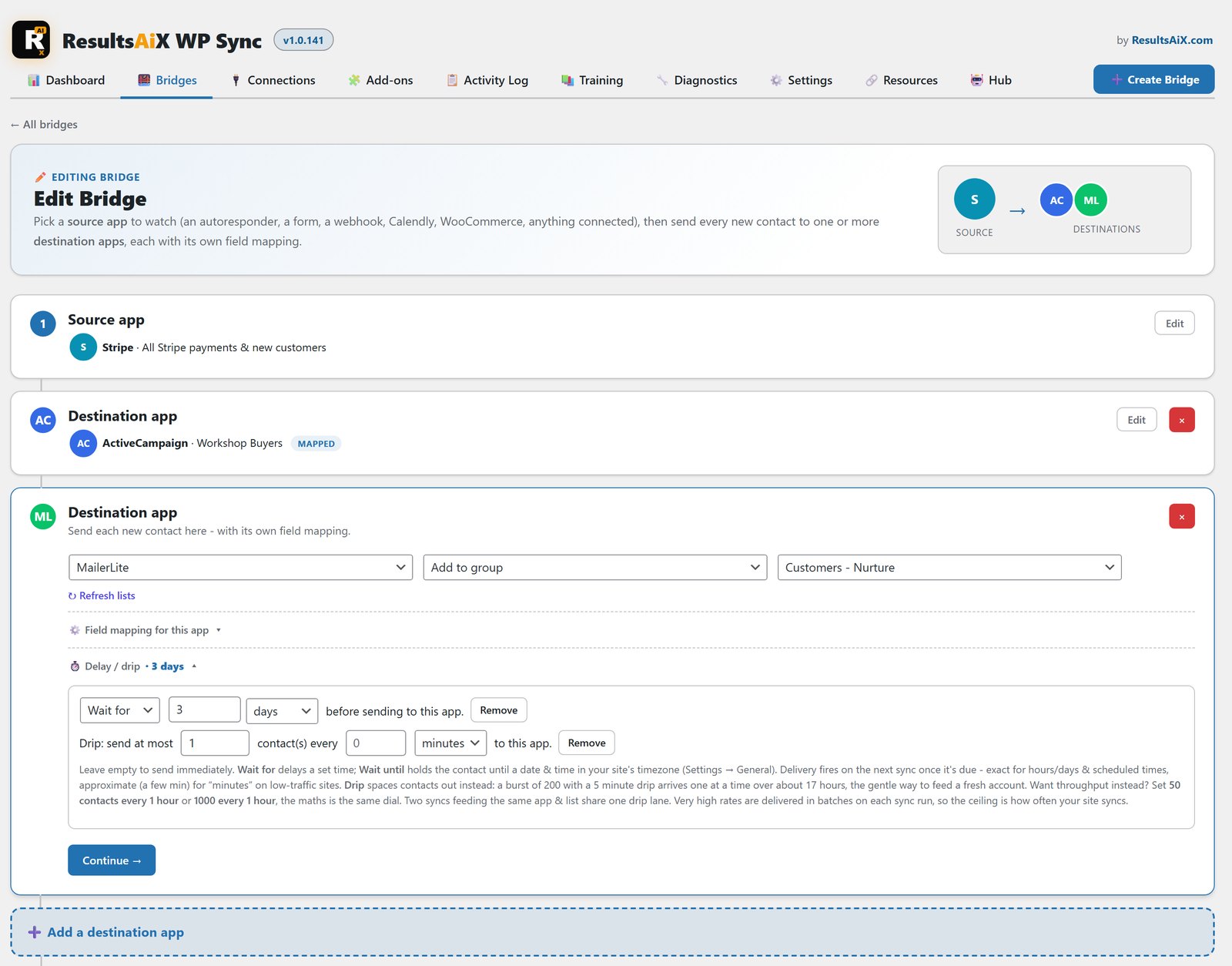
Surveys appears in WP Sync as a source automatically. From there one response can fan out to several destinations at once, each with its own action: add, tag, untag, update fields or unsubscribe. Each destination can also have its own timing. Send now, wait a few days, or hold until a set date.
That matters if you still run a second autoresponder, or you’re part-way through a move between platforms. It also matters if you want the same person in your email list and in another app you use, without a CSV ever changing hands. There’s no task meter, so a survey with ten responses and a survey with ten thousand cost the same to sync. Every run is logged, and you can dry-run a bridge before it touches live data.
Closing The Loop With Tracking
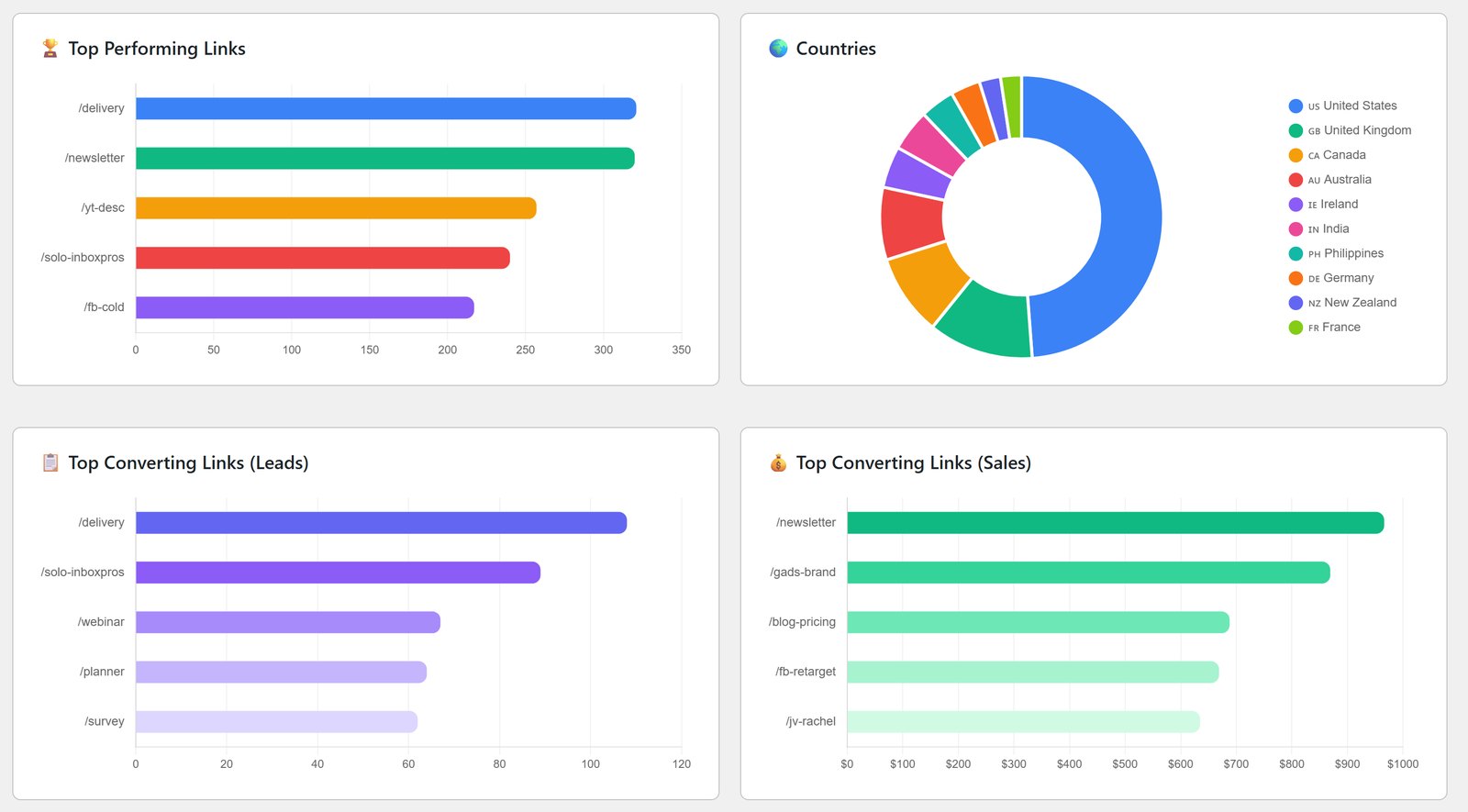
The last piece is knowing which of all this made money. WP Conversion Tracker AI shows which link brought each person to your survey, and its Audience Vault recognises people who take a survey as known visitors. Put that next to Mailer’s revenue reports and you can see which answers turned into sales, and which traffic source produced them.
Build It: A Worked Example
Here’s a loop you could set up in an afternoon. The tags and pages are examples. Yours will match your own offers.
The survey. Ask “What is your biggest challenge right now?” with three options: getting traffic, knowing what to sell, and turning subscribers into buyers. Add a 0 to 10 question asking how likely they are to recommend you. Switch on the email step.
The rules. Traffic gets tagged wants-traffic and goes to your traffic guide. Selling gets wants-offers. Buyers gets wants-sales. A score of 9 or 10 gets tagged fan and goes to your share-your-story page.
The follow-up. In Mailer, build one short automation per tag, each triggered when that tag lands. Two or three emails each is plenty. Then build a segment of “fan” contacts who haven’t left a review yet.
The sync. If you run another tool that needs to know, add a WP Sync bridge with Surveys as the source and the right tag on the destination. Add a delay if you don’t want the second tool to act straight away.
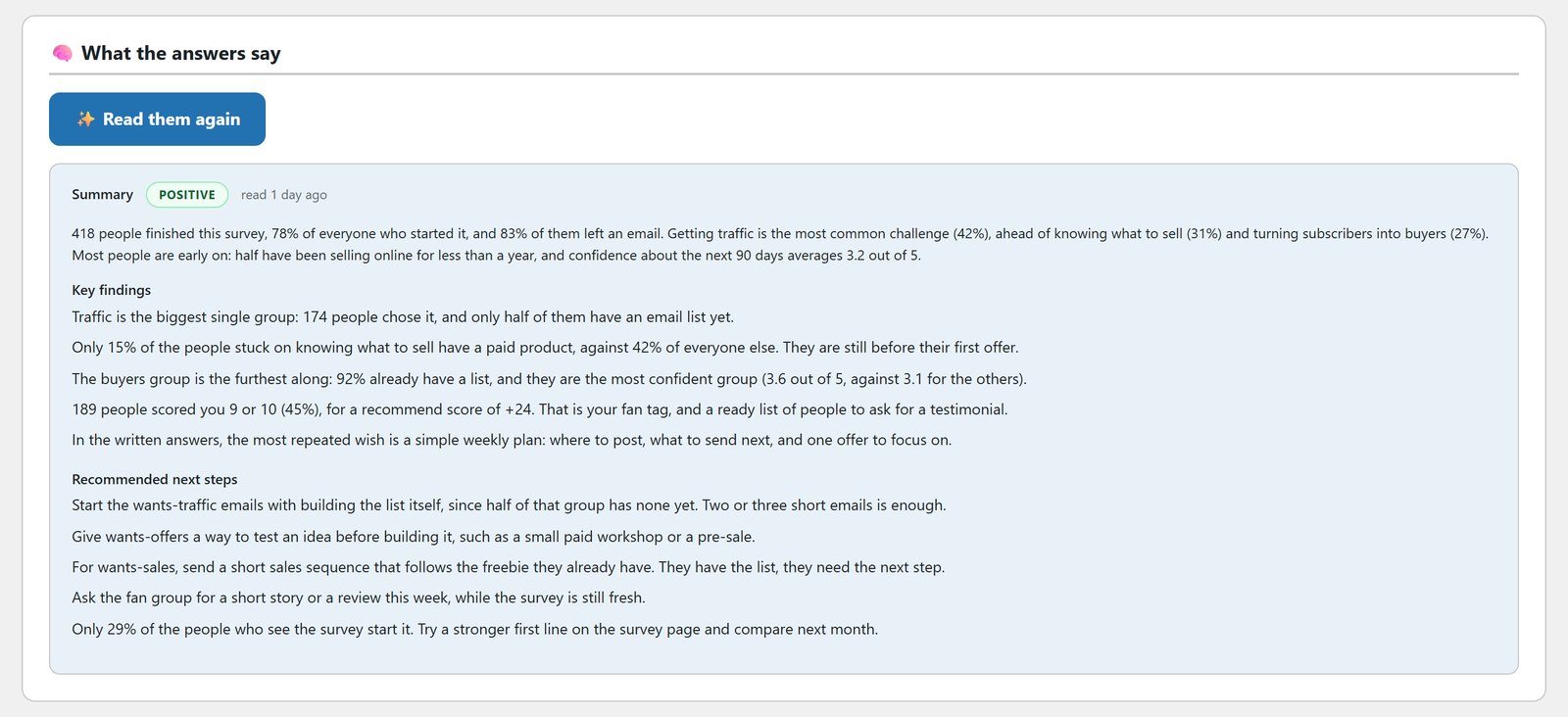
The read. After a week, open AI Insights in Surveys. It reads every response together with your survey’s funnel numbers and gives you a summary, key findings and next steps. Then check Mailer’s reports to see which group bought.
Why Owning The Loop Matters
Rent this setup and you’d normally need a hosted survey tool, an autoresponder and an automation service in the middle, each billing you monthly, each holding a piece of what you know about your customers. Here, the answers, the tags, the emails and the tracking all sit in one WordPress database. If you want the bigger picture on that, read own your marketing stack.
Questions People Ask
Do I need all three plugins?
No. Surveys works with 12 autoresponders on its own. Mailer adds answers saved on the contact and tag-triggered follow-up. WP Sync adds everything outside your email list. All three are in the ResultsAiX Bundle.
Will tags overwrite what my subscribers already have?
No. Survey tags are always added and never replace existing tags. Each autoresponder follows its own rules for tags, and Mailer merges them.
Does my data pass through your servers?
No. Surveys and Mailer store everything in your own WordPress. WP Sync connects directly from your site to each tool using your own keys.
Can different answers get different emails?
Yes. Each survey can have up to 50 answer rules that add tags, add a list and send the visitor to a different page. A Mailer automation can start the moment a tag lands, so each group gets its own follow-up.
Is there a task meter on syncing responses?
No. A survey with ten responses and a survey with ten thousand cost the same to sync. Every run is logged, and you can dry-run a bridge before it touches live data.
Can I see which answers turned into sales?
Yes. WP Conversion Tracker AI shows which link brought each person to your survey. Put that next to Mailer’s revenue reports and you can see which answers turned into sales, and which traffic source produced them.
Ask, Tag, Follow Up, Measure
Surveys asks the question, Mailer remembers the answer and acts on it, and WP Sync carries the person anywhere else they need to be, all on your own WordPress.
Every plugin, every update, every plugin still to come
One bundle covers everything mentioned in these updates and everything that ships after them, at no extra charge, running on your own WordPress site.


