
How ResultsAiX Pulse Works: See Who Is On Your Site, Know Who They Are, Talk To Them

This page explains how ResultsAiX Pulse lets you see who is visiting your website right now, learn who they are, and chat with them directly. It covers setup, the live view, visitor profiles, stats and the on-page chat assistant.
Most websites are silent.
People arrive, read a page or two, and leave. You find out a day later in a report, if you find out at all. The one person who was about to buy, and only needed a quick answer, is long gone.
I built Pulse because I wanted to see my business moving. Who is on my sites right now, who they are to me, and a way to talk to them while they are still there.
Here is how it works.
What Pulse does
Pulse is a WordPress plugin. It runs on your own site, keeps its data in your own database, and watches every site you connect to it.
See who is on your sites
A live globe and map of everyone on every site you own, as it happens, with playback for the last hour, six hours or day.
Know who they are to you
Customers, leads, VIPs and new visitors, with names, what they own and what they have spent, from the plugins you already run.
Talk to them
A chat on your pages that answers from your own help articles, hands over to you when a person is needed, and keeps every word.
Setting it up
Install Pulse on your main WordPress site and activate it with your Bundle licence key. That site becomes the hub: everything is collected and shown there.
Then connect your other sites. On the Connections tab each site gets its own ID and code, so another WordPress site joins in a minute, and a plain HTML page joins with one line of code before its closing body tag. Connect as many sites as you like.
Your own visits are never counted. Pulse recognises you from your logins, and from the internet connection you browse from on pages where you never log in. If a row ever turns out to be you, press This is me and every one of your browsers leaves the numbers at once. Search engines, crawlers and automated browsers are never counted as visitors either.
The Live View
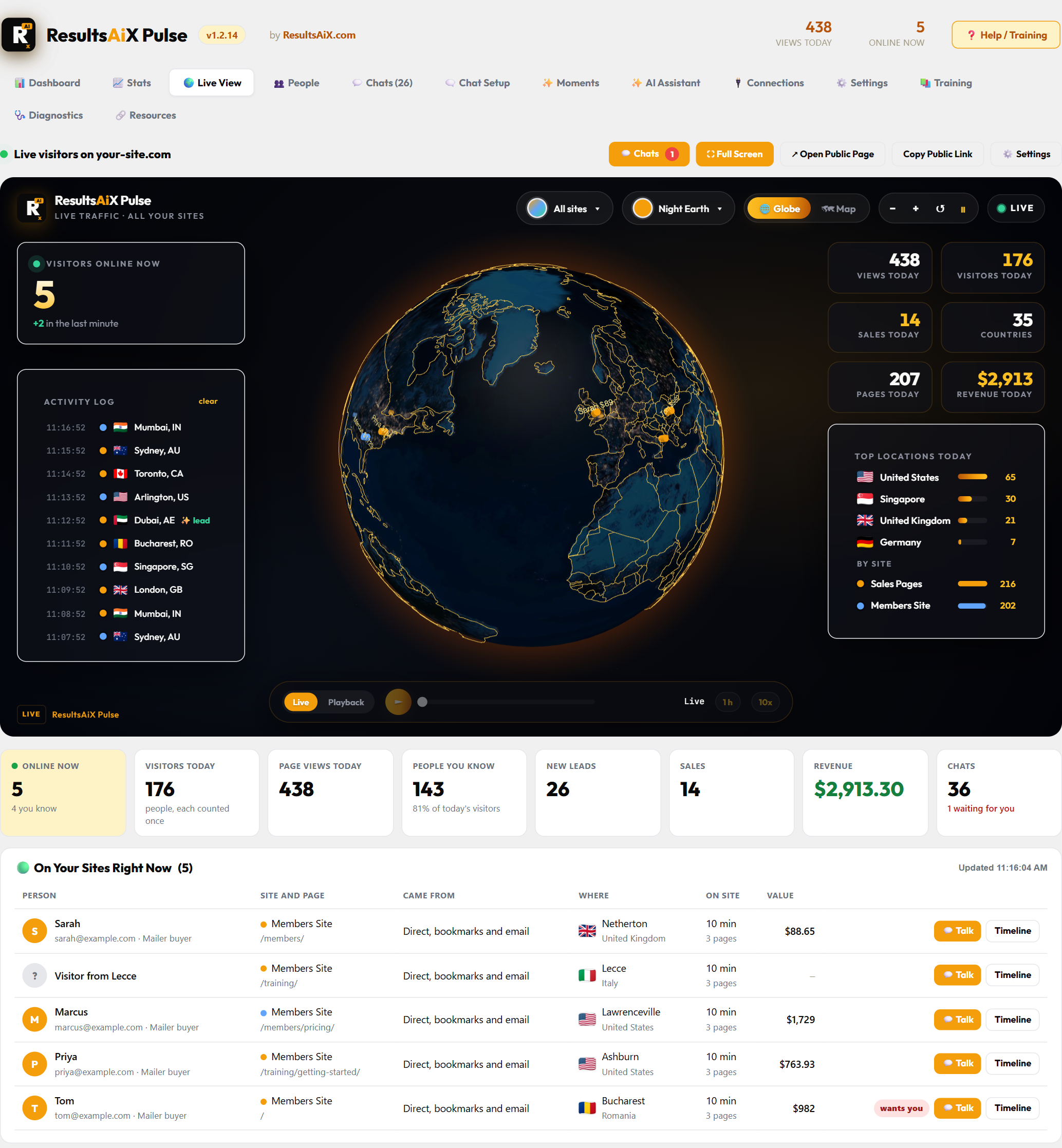
This is the screen I leave open all day.
Everyone online right now is a bright, pulsing dot on the globe, one per place. On your own Live View you see their name and lifetime value beside the dot. Earlier visitors from today stay as softer dots, so you can see the shape of the day. Switch to the flat map if you prefer, and zoom in with the mouse wheel, a double click or the plus and minus buttons.
Around the globe: who is online now, views, visitors, sales, revenue and countries for today, the top locations, and the split by site. The Activity Log on the left lists visits as they happen.
Playback replays the last hour, six hours or day in under a minute. It skips the quiet stretches and fills the Activity Log as it goes, so a whole morning of traffic plays out in front of you.
Below the globe is everyone on your sites right now: who they are, which site and page, where they came from, how long they have been there and what they are worth to you. When somebody you know arrives, Pulse pops them up with their name, their value and the page they are on, with a Talk button right on it.
People

People is everyone you know by name, across every site that reports to Pulse.
Filter to who is online now, your customers, your leads or your VIPs. Every person shows their lifetime value. When the ResultsAiX Mailer knows them, that value comes from its purchase ledger, with refunds taken off, so it is the real number. Anybody online right now has a Chat now button.
Sometimes a visitor gives a name but no email. If Audience Vault has a good idea who they are, their profile shows its guess, clearly marked as a guess. One click confirms it, and their email, purchases and Mailer record join up. One click removes it if it is wrong.
Every person’s timeline

Open anybody and you get their whole story, newest first: every visit and the pages they read, emails they clicked, chats, purchases, the day they joined your list and where they first came from.
From there it is one click to chat with them, open them in the Mailer, or see their support tickets.
This is the part that changes how you sell. When somebody asks a question in the chat, you already know whether they are a brand new visitor, a lead who has read your sales page three times, or a customer of two years.
Stats

The Stats tab is for when you want the bigger picture. Pick any period and every number is compared with the period before.
- Visitors, new visitors, visits, page views, time on site and one-page visits
- Leads, sales, revenue and conversion, with any of them on the chart
- How people find you: search, AI assistants like ChatGPT, social, email, paid ads, affiliates, video and your own sites
- Campaigns, first pages, every page with its time on page and the sales after it
- Countries, cities, devices, browsers and languages
- Ad spend from WP Conversion Tracker and ResultsAiX ADs, with return on ad spend
A visit that moves from one of your sites to another keeps the channel that really brought that person, so a sale on your members site is credited to the search, email or ad that started it. Filter everything by channel, country, device, page or kind of visitor, download any table, and ask the AI to explain the period and suggest what to do next.
The chat on your pages

This is where Pulse and the AiX Support Desk work together.
With the Support Desk installed, its assistant answers the chat on your pages from your own help articles and your product list, with links people can open. It answers “what is this?”, “what does it cost?” and “where do I get it?” in your words, and it never tells anyone what somebody else has spent.
When a question needs a person, the chat asks for an email so your answer still reaches them after they leave. Every conversation where the visitor leaves an email becomes a ticket in the Support Desk inbox, whole. Reply there and they see it in the chat while they are still on your site, and by email.
Chat Setup starts with your chats side by side: the Sales Page Chat, the Members Helper for logged-in members, Members Live Chat and Notifications, each with its status, its numbers and a button straight into its setup wizard. A logged-in member is recognised safely, so the Members Helper can see their own products.
Chat history
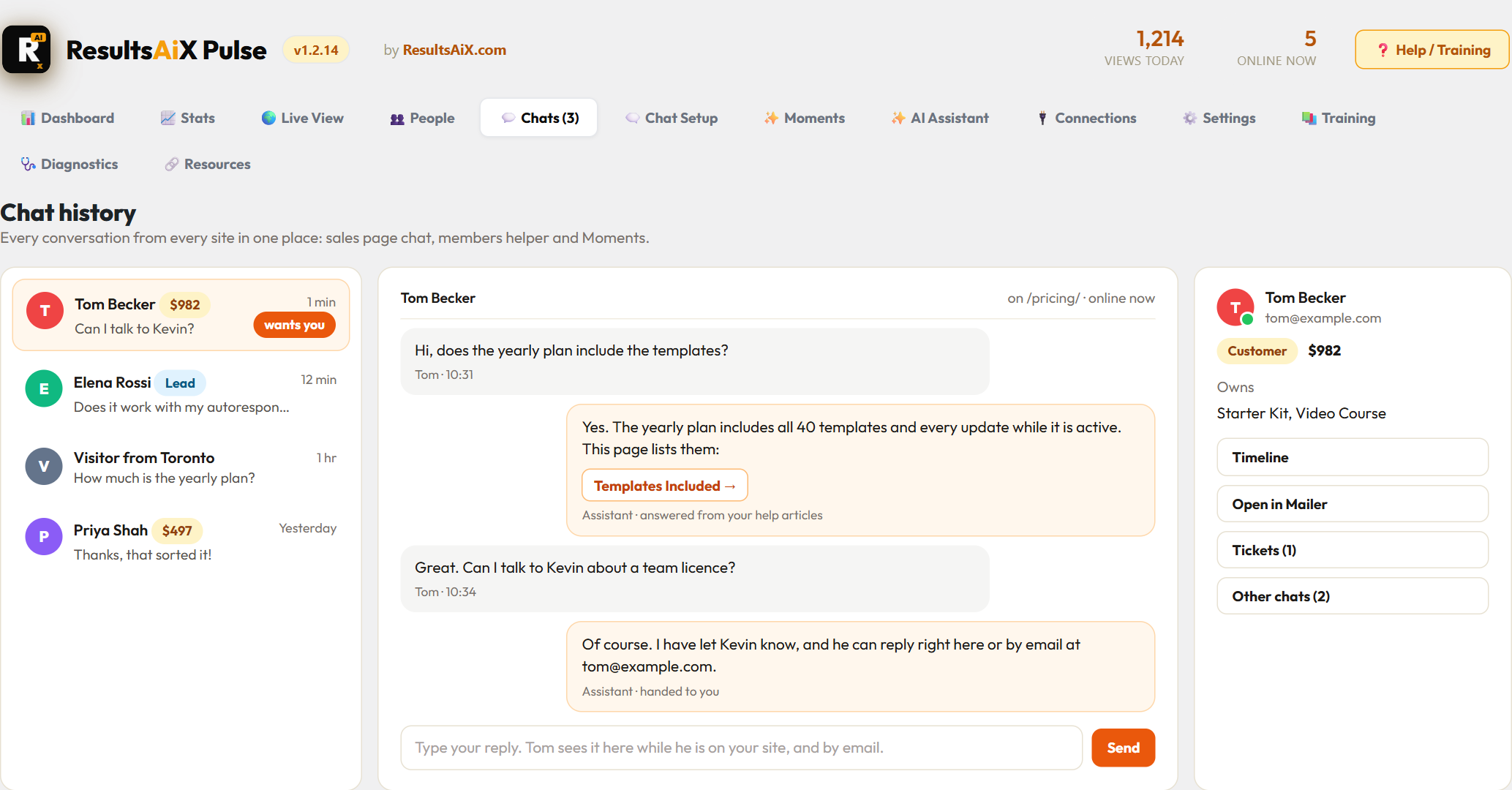
Every conversation from every site lives in one place.
There is a Chats menu in the WordPress toolbar on every screen, with your unread count, so a waiting chat is never more than one click away. On your connected sites it takes you straight to your main site.
The Chats page shows who each person is: their photo, their name, their lifetime value or a Lead badge, and anyone who has asked for you is marked “wants you”. Open a chat and the side panel shows their email and what they own, with buttons to their timeline, the Mailer, their tickets and their other chats.
Moments

Moments open the chat by themselves, for the right person on the right page.
A customer on your renewal page. A lead reading about something they do not own yet. A brand new visitor who has been on your pricing page for a while. You write the line yourself, with their first name filled in, or let the assistant write one for that page and that person.
They are built never to annoy. One Moment per person per day at most, each one only once per person every so many days, never while a chat is already open, never to you, and never a sales line to somebody who may already own the product. Each Moment card shows how often it opened and how many people answered it, and you can switch each one on or off, edit it or duplicate it.
Check a page takes the guessing out of it. Paste any page, pick a kind of visitor, and Pulse tells you which Moment would open for them, or exactly why none would.
Teaching it what to say
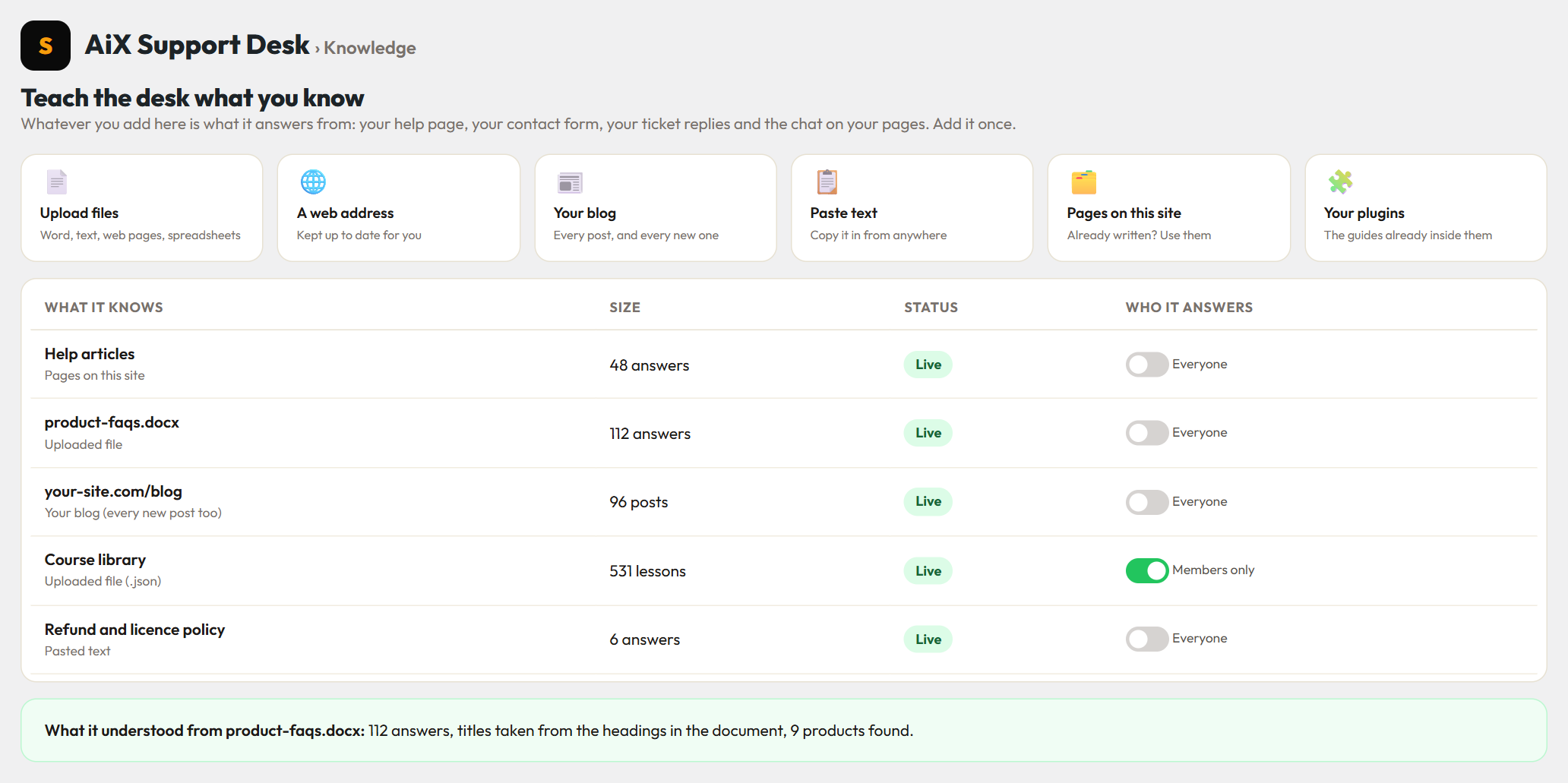
The assistant is only as good as what it knows, and it only answers from what you give it. You teach it in the AiX Support Desk, on the Knowledge screen, and you can use any of six ways.
- Upload files: Word documents, text, saved web pages and spreadsheets
- A web address, kept up to date for you
- Your blog, every post and every new one
- Paste text from anywhere
- Pages already on your site
- The guides already inside your plugins
Selling a lot of products? One JSON file can teach it everything at once, and each entry knows which product it belongs to. Upload the same file name again and the whole set is replaced, so old wording never competes with new.
Anything can be marked Members only. Those answers go to logged-in members in the Members Helper and never to the public sales chat, which is how my own members get answers from inside my courses.
After every upload, the desk tells you what it understood, right under the file’s name: how many answers it found and which products they belong to. Then test it on your help page: ask a question in your own words and you get the answer with its sources shown underneath. What you add is used in four places at once: your help page, your contact form, your replies to tickets and the chat on your pages.
Your data stays yours
Everything Pulse collects lives in your own WordPress database. Names, emails and lifetime values are only ever shown to you, inside your dashboard. If you want to share the globe publicly, the public live page shows the traffic without anybody’s name.
On your own site
No outside service holds your visitor data. It sits in your own WordPress database.
Names for your eyes only
Names and lifetime values show inside your dashboard only, never on a public page.
Real people only
Search engines, crawlers, automated browsers and your own visits are left out of every number.
Questions people ask
Do I need the Support Desk to use Pulse?
No. The globe, People, timelines, Stats and Moments all work on their own. The Support Desk adds the assistant that answers from your help articles, the tickets and the Knowledge screen.
Can it watch more than one site?
Yes, as many as you like. Each site gets its own ID and code on the Connections tab, and plain HTML pages join with one line of code.
Will my own visits mess up the numbers?
No. Your own logins and connections are left out, and This is me removes any browser that slips through.
How do I get Pulse?
Pulse is part of the ResultsAiX Bundle. It is not sold on its own.
Get Pulse with the ResultsAiX Bundle
Pulse comes with the Bundle, together with the Mailer, the Support Desk and the rest of the plugins I run my own business on.
Already in the Bundle?
Pulse is waiting for you in your members area, with the download, this video and the written guides.


3 comments