
The ClickMagick Alternative That Runs On Your Own WordPress Site

This page compares WP Conversion Tracker AI with ClickMagick. It explains how tracking clicks, leads and sales on your own server works, which sales platforms connect, and how to switch over in an afternoon without paying every month to see your own stats.
If you’re looking for a ClickMagick alternative, you probably aren’t unhappy with the tracking. You’re unhappy with the deal. You pay every month to look at numbers your own traffic created, and the day you stop paying, your history goes with it.
WP Conversion Tracker AI is the tracker I built to fix that. It installs on your own WordPress site, logs every click, lead and sale in your own database, and costs $67 once. This guide walks through what it does, how it compares, and how to switch without losing a single sale along the way.
Why People Go Looking For A ClickMagick Alternative
ClickMagick is a capable tracker. That isn’t the problem. The problem is the rent.
Their Standard plan lists at $199 a month. That’s $2,388 a year, every year, for as long as you want to see your own stats. Your click history, your conversion data and your attribution all sit on someone else’s servers.
There’s a quieter cost that only shows up later. After two years on any tracker, the archive becomes valuable. Which traffic source sends real buyers. Which angle died in March. Which links your list actually clicks. On a rented tracker, all of that sits behind a subscription. That’s a leverage problem, not a pricing problem, and it’s the real reason people type “alternative” into Google.
A Short History, Because It Matters
I built the first version of WP Conversion Tracker in 2010 because I needed to know which of my own affiliate links made money. Within months thousands of marketers were using it, and for eight years it was the tracker a lot of people in this space ran.
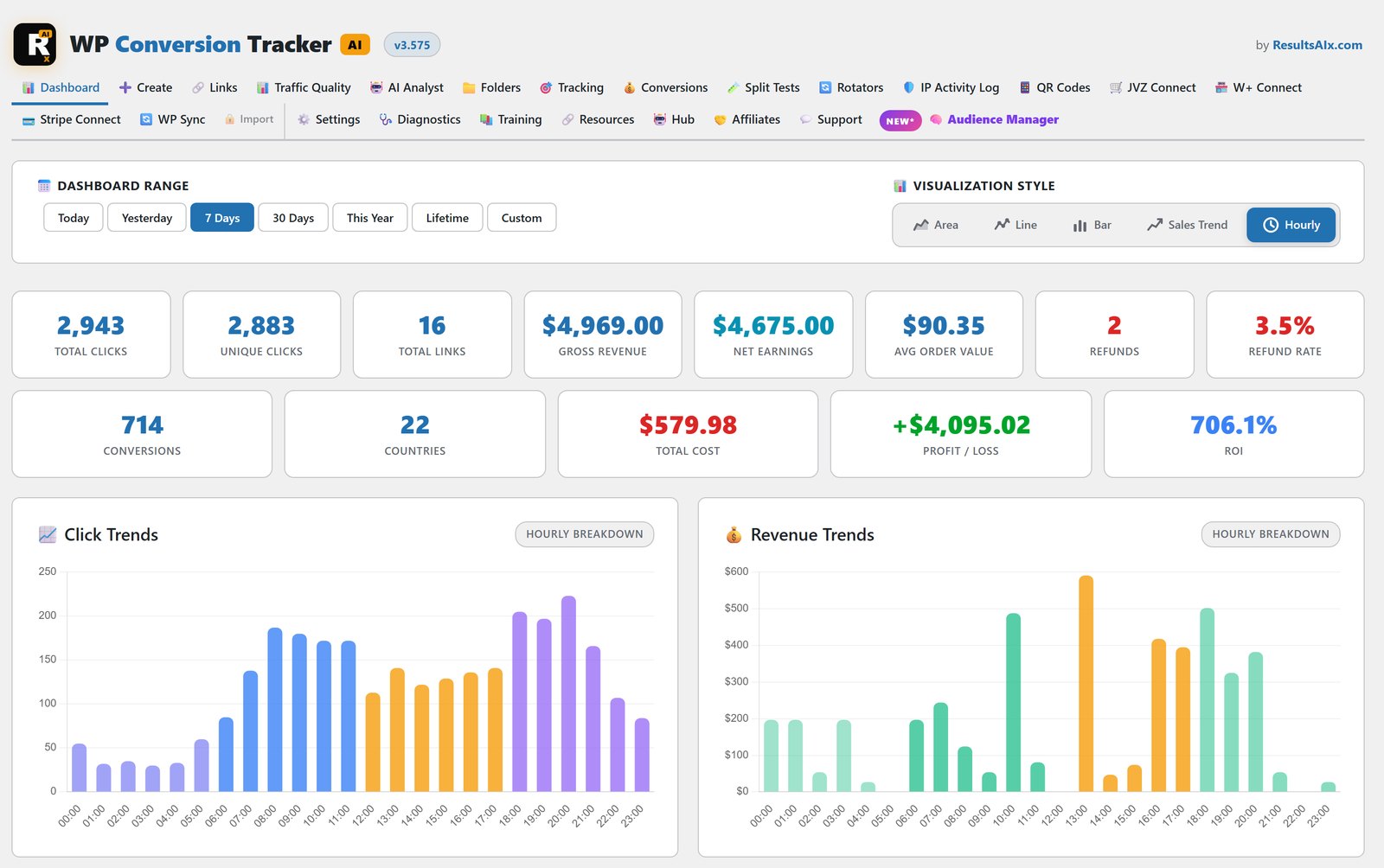
Then marketing got more complicated and I rebuilt it from scratch. Six chart modes, hourly heatmaps, country and device breakdowns, split testing, link rotation, first and last click attribution, WarriorPlus and JVZoo connections, QR codes and CSV import. More recently it picked up an AI Traffic Analyst, Traffic Quality grading, Geo Targeting and live proof pages. It runs under every campaign I send.
What A Self-Hosted Tracker Changes
A self-hosted tracker flips who owns what. You install it like any plugin, the data lands in your own WordPress database, and there’s no meter running in the background.
Your data stays yours. Every click, lead and sale is stored on your server. Nobody can put your stats behind a paywall, and there’s nothing to cancel.
There’s no monthly bill. The complete tracker with all five add-ons is $67, one payment. Against $2,388 a year, the maths isn’t close.
Your links are clean. They look like yourdomain.com/your-link/ on your own domain, with no external service in the middle of the redirect.
WP Conversion Tracker AI vs ClickMagick
Here’s the short version, side by side.
- Where your data lives: ClickMagick keeps it in their cloud. WP Conversion Tracker AI keeps it in your WordPress database.
- What it costs: ClickMagick Standard is $199 a month. WP Conversion Tracker AI is $67 once, with all five add-ons.
- Sales platforms: one-click WarriorPlus Connect, JVZoo Connect and free Stripe Connect, plus postbacks for ClickBank, PayPal, Digistore24, PayKickstart, ThriveCart, SamCart and Gumroad.
- Testing: unlimited A/B variants with your own weights, and the winner picked on sales rate, not raw clicks.
- Client reporting: a full report for every link, saved as a branded PDF in one click.
- Sites: the licence covers up to 5 domains, with Developer licences for 25, 50 or 100 sites.
The Features Doing The Heavy Lifting
An AI Traffic Analyst That Gives You Decisions
This is the part I use most. Add your own AI key from Anthropic, OpenAI or Google, press one button, and it reads every link’s clicks, conversions, revenue, refunds, geo quality and ad spend. Then it hands back a verdict on each link: scale, keep, watch or kill, plus the five most useful things to do next.
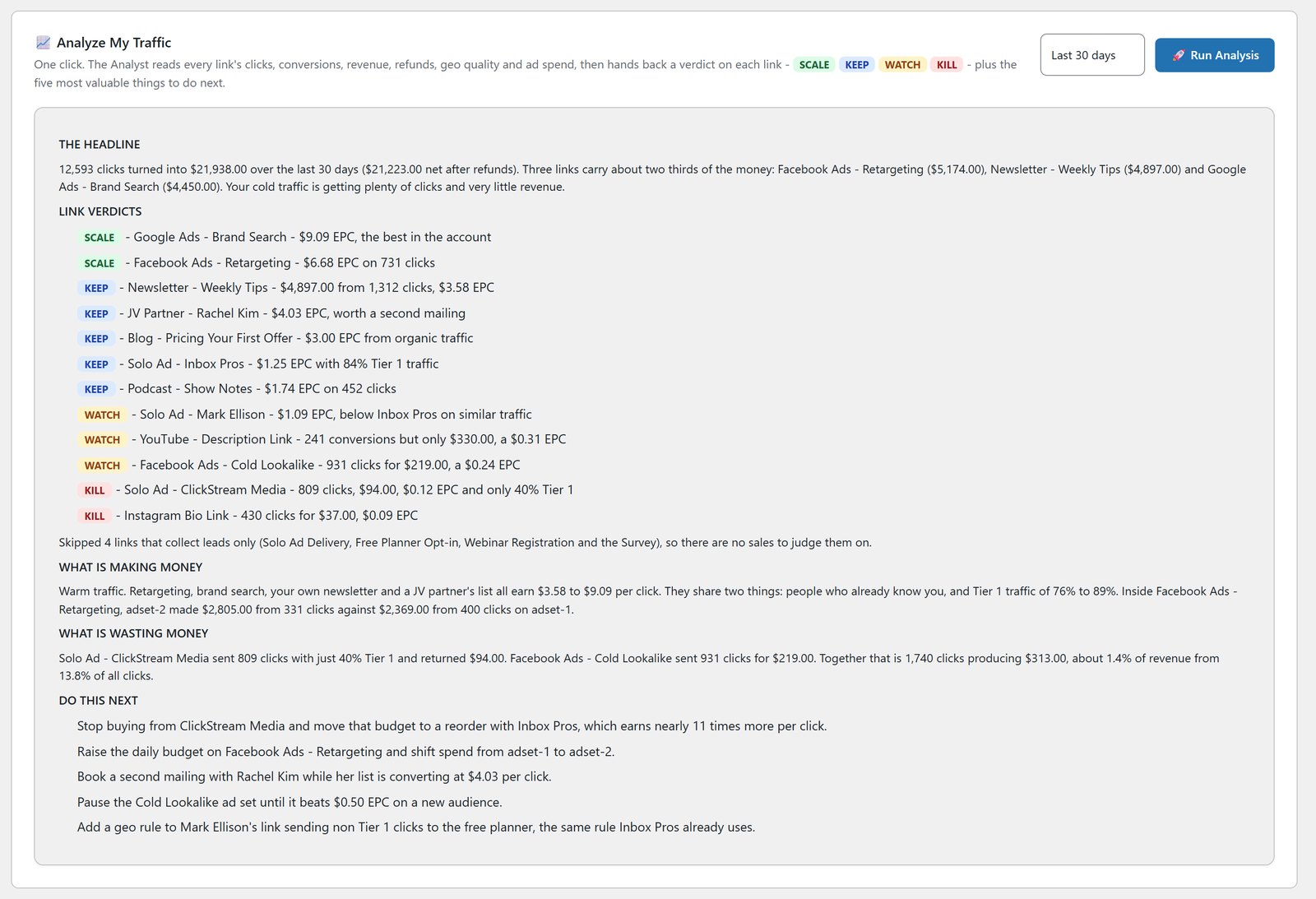
You can also ask it questions in plain English, like which solo ad vendor sent buyers and not just clickers, or which countries you should stop paying for. It’s locked to read-only queries on your own tracking tables, so it can’t change or delete anything, and there’s no fee to me for using it.
Traffic Quality And Geo Targeting
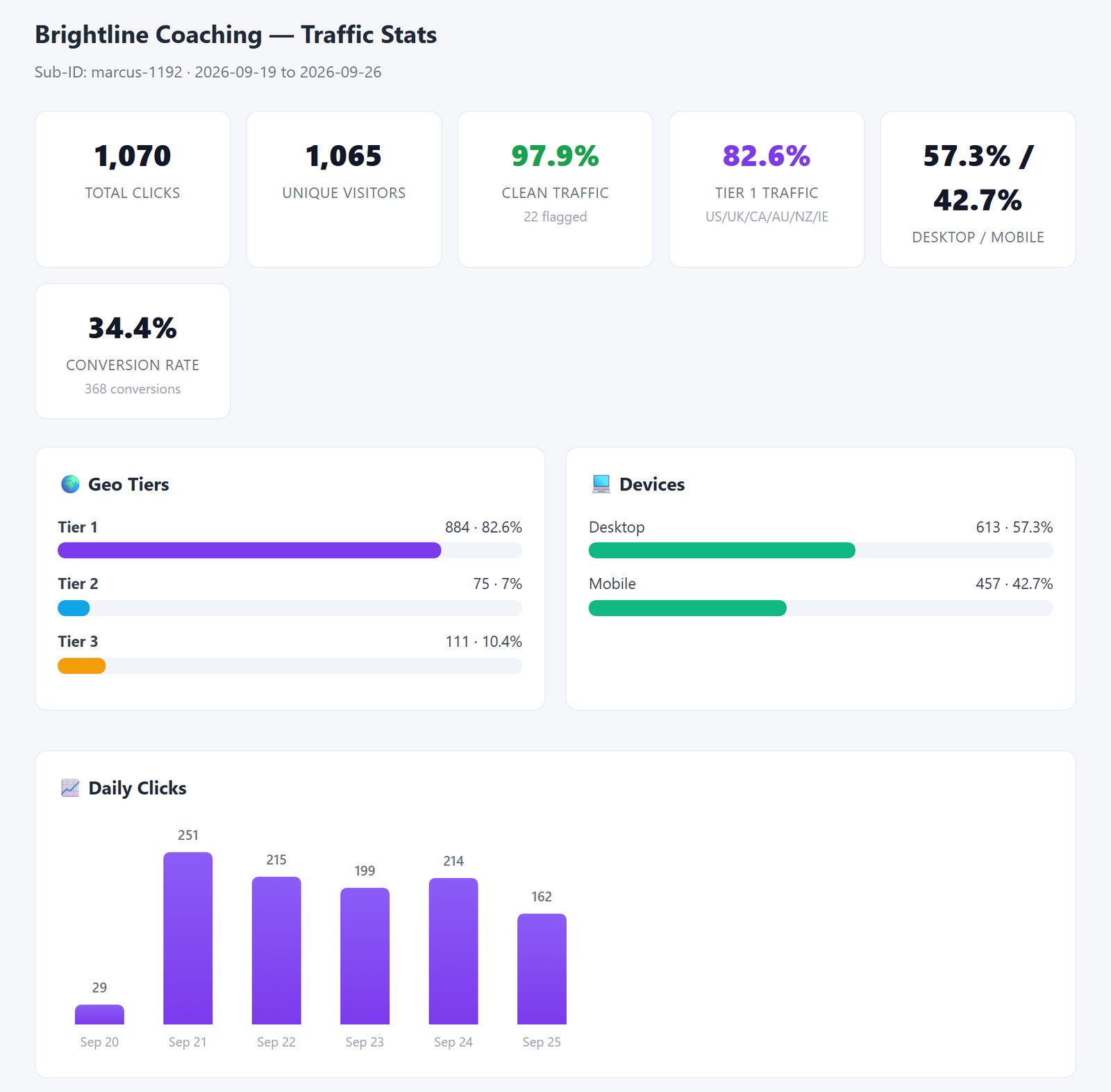
Every traffic seller says their clicks are premium. The Traffic Quality tab shows you the truth: clean clicks against flagged clicks, desktop against mobile, and every geo tier with its own conversion rate. Bot and blocked-IP hits are filtered out before they reach those numbers.
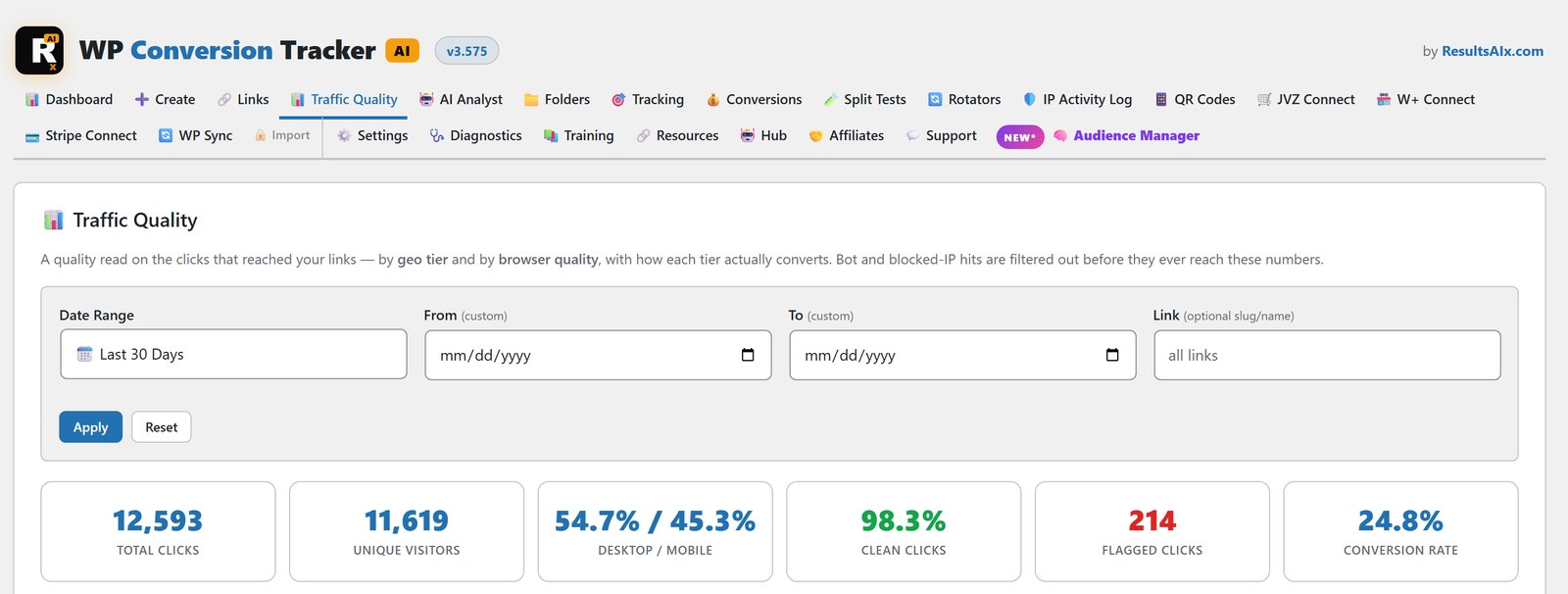
Geo Targeting lets you act on what you see. Allow or block any of 157 countries on a link, send traffic you can’t use to a fallback offer, and give any country its own destination. If a visitor’s country can’t be worked out, they go straight through to your offer, so a lookup can never cost you a sale.
Reports You Can Actually Hand Someone
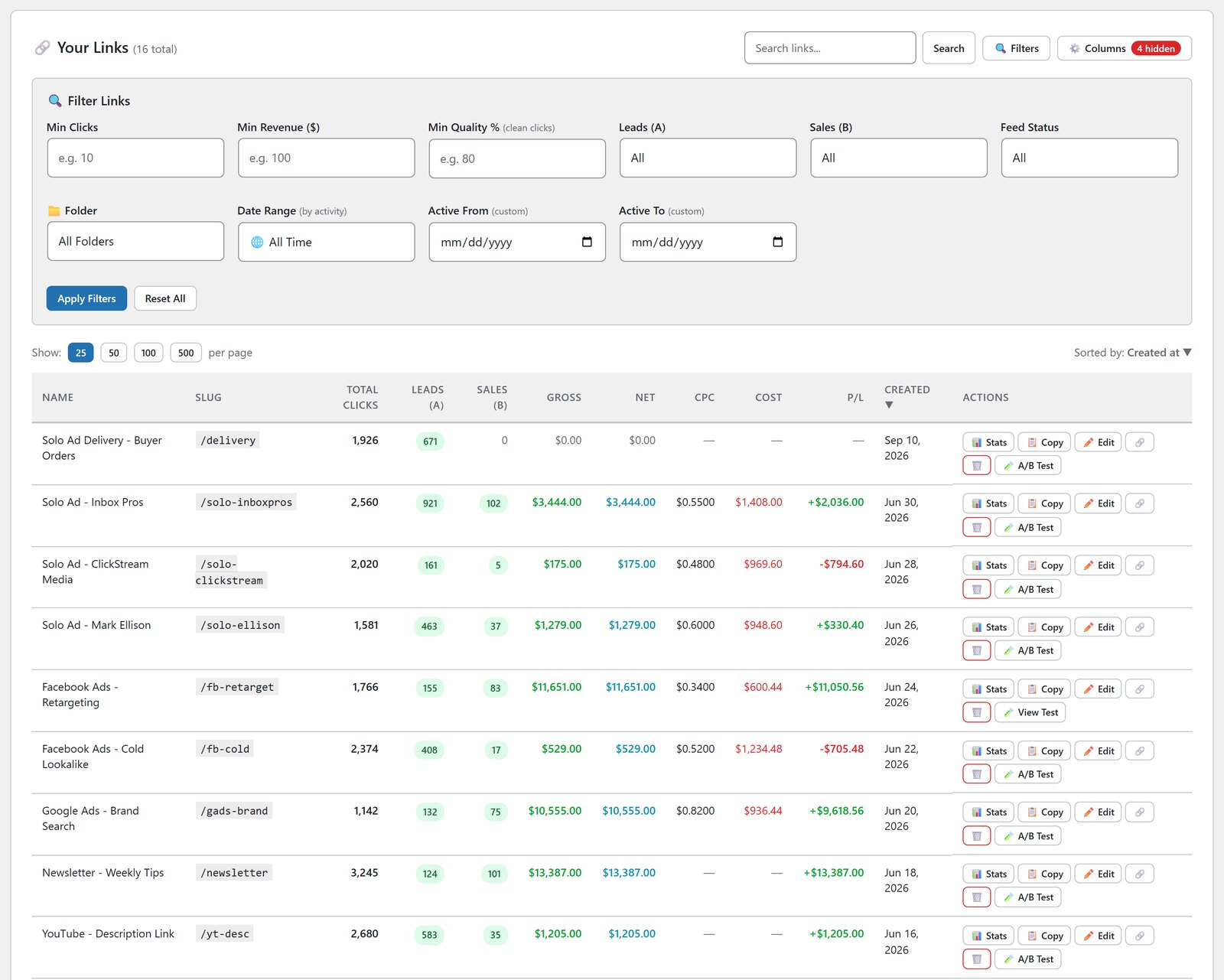
Every link has its own page with nine KPIs, five chart styles and seven date ranges, and one click saves it as a print-ready PDF. Buyer emails are masked automatically, so it’s safe to send to a client or a JV partner.
If you sell traffic, the public proof pages go one better. You send a live, branded, login-free stats page scoped to one buyer’s Sub-ID and date range. They can refresh it and watch their clicks land. They never see your revenue, your buyer emails or your other links, and you can switch the page off in one click.
The Basics, Done Properly
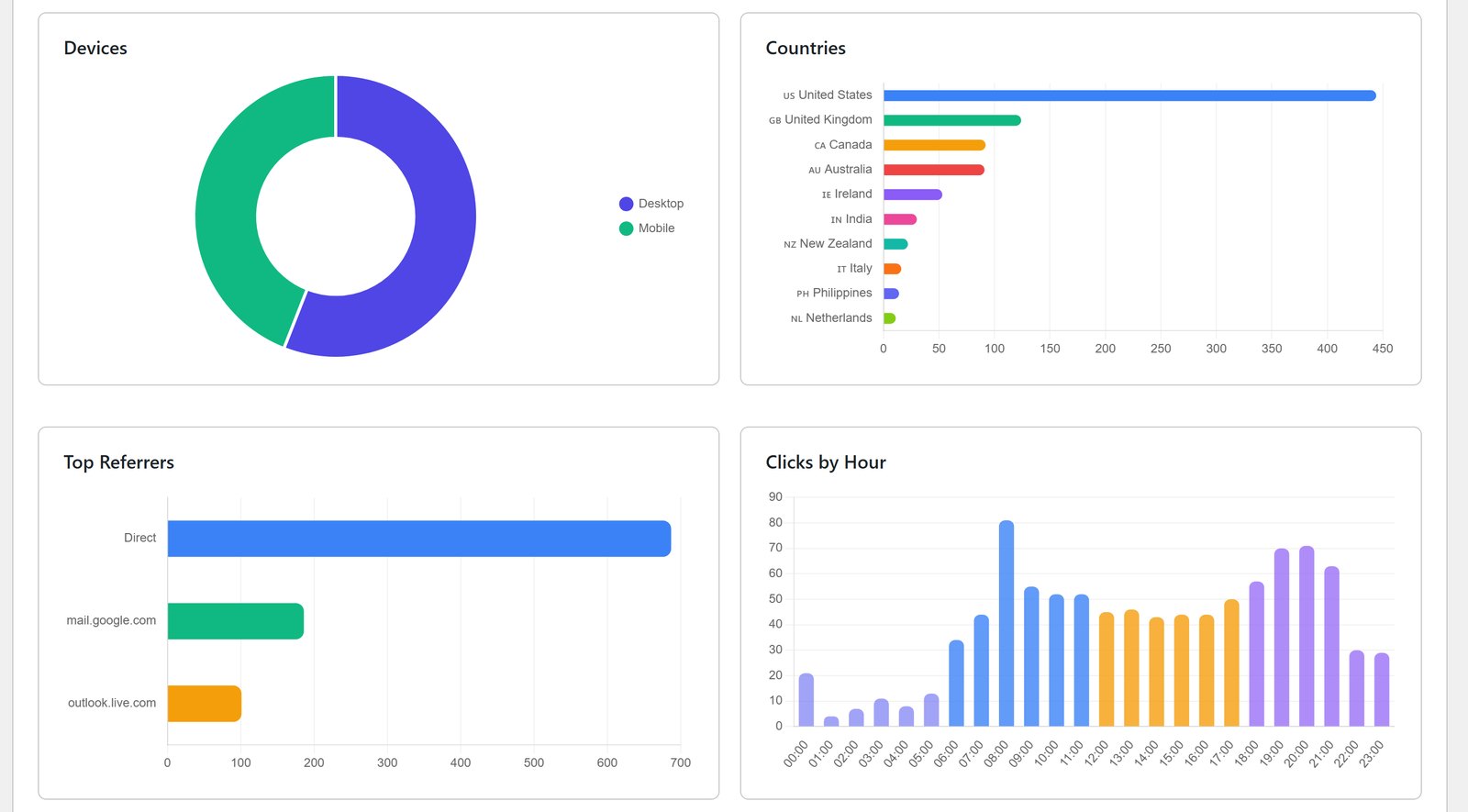
The hourly heatmap tells you whether your list clicks at 9am or 9pm before you schedule the next mailing. Cross-domain tracking uses a click ID in the URL plus local storage, so conversions still count when your checkout is on another domain, with no third-party cookies. Refunds and chargebacks come off automatically, so your revenue column is money you kept.
How It Plays Out In A Real Week
Say you mail your list on Tuesday and Thursday, run a solo ad in between, and have two WarriorPlus offers live.
The hourly heatmap shows Tuesday’s mail pulled most of its clicks in the evening, so Thursday’s send moves later. The per-link report shows the solo ad sent plenty of clicks but very few buyers, so next month that budget goes into more mailings instead. And because WarriorPlus Connect posts every sale back to the exact click, the revenue column is real money, not an estimate.
None of that needs a subscription. It needs your own database and a tracker that reads it well.
The Three-Year Maths
Subscriptions are priced to feel small in the month and disappear over the years. Put three years on the table and it looks different.
| Timeframe | ClickMagick Standard | WP Conversion Tracker AI |
|---|---|---|
| Year one | $2,388 | $67 |
| Year two | $4,776 in total | Still $67 |
| Year three | $7,164 in total | Still $67 |
That assumes the subscription price never rises. The one-time number has a nice property: it only ever happens once.
When A Hosted Tracker Still Fits
I build WordPress software, so the line is easy to draw. If you don’t run WordPress anywhere in your business, a WordPress plugin isn’t your answer. You need one WordPress site to host the tracker, but the links and pixels can point anywhere.
For affiliates, product sellers and solo ad sellers who already have a WordPress site, paying rent forever to see your own numbers is a hard habit to defend.
How To Switch In An Afternoon
Most people are tracking within 10 minutes of installing. Here’s the order I’d do it in.
First, install WP Conversion Tracker AI on a WordPress site you control, activate it and paste your licence key. The dashboard appears in wp-admin straight away.
Second, recreate your active links. You don’t need to move your old history to start. Make tracking links for the campaigns running right now and swap them into your emails, ads and bonus pages. If you have a lot of links, the Link Importer takes a CSV and maps the columns for you.
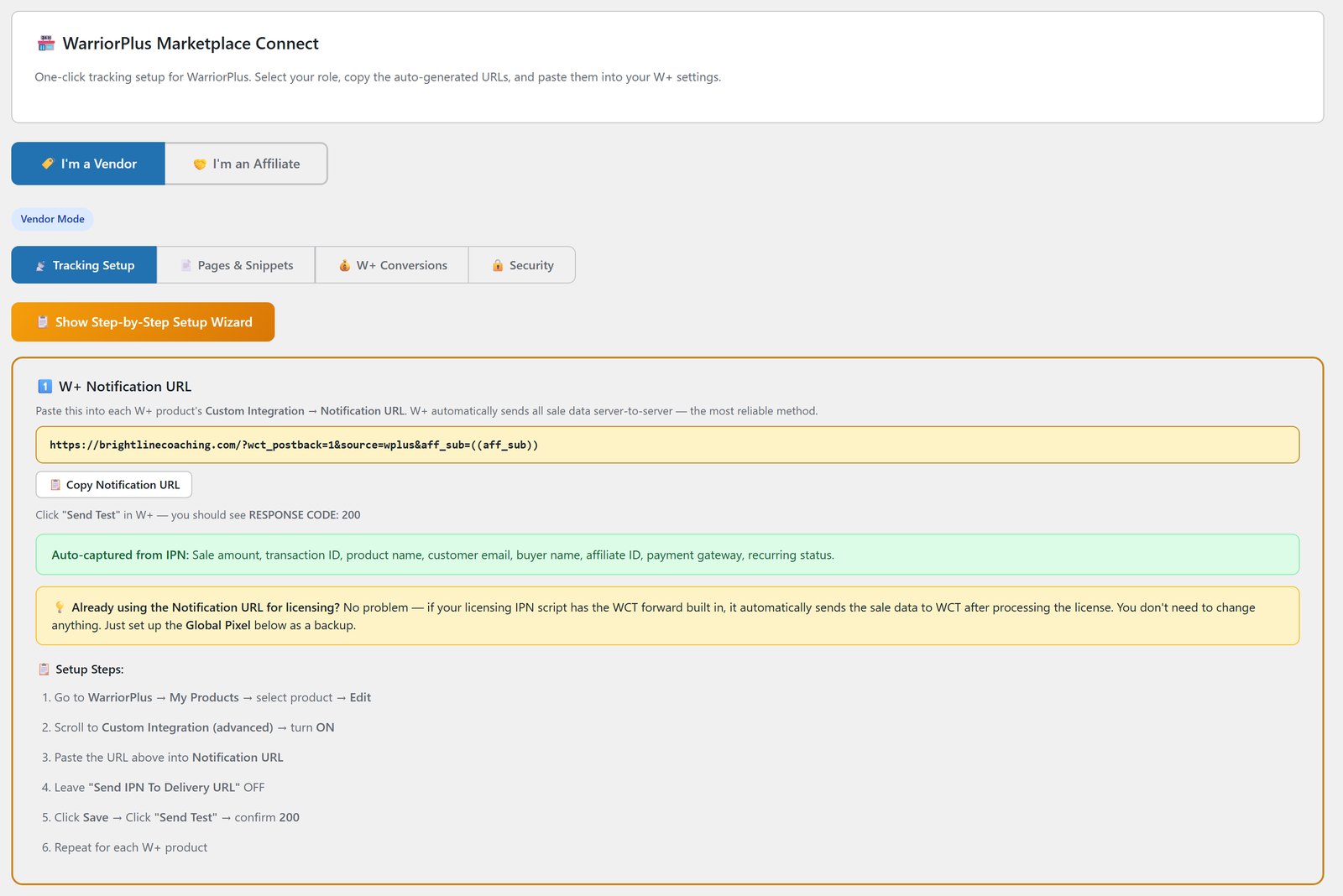
Third, connect your sales. Copy the IPN URL from WarriorPlus Connect or JVZoo Connect into your product settings, or switch on Stripe Connect, so every sale, refund and rebill comes back to the click that made it.
Fourth, run both trackers for a week. Compare the columns. When the numbers agree, cancel with confidence.
Once sales are flowing, WP Sync can put those buyers on your list automatically, and if you sell traffic, read the tools every solo ad seller needs.
Four Tracking Mistakes That Cost Real Money
Whichever tracker you choose, these are the ones I see over and over.
Judging traffic on clicks. Clicks are the cheapest thing a bad traffic source can send you. Until sales are tied back to the source, every buying decision is a guess.
Mailing at the same hour out of habit. Lists have rhythms. A send at the wrong end of the day can quietly cost you a big share of your clicks, and the heatmap shows you which end is which.
Running one version of everything. If a page has never had a challenger, you don’t know what it’s costing you. One serious split test is an afternoon of work.
Letting the tracker own your history. The archive is the asset. Two years of your own campaign data will teach you more about your business than any course. Keep it where a cancelled subscription can’t take it.
Your Numbers Belong To You
A tracker is the instrument panel of your business, and I think renting the instrument panel is daft. One customer, David Wakeman, put it simply: “All the detail and flexibility of the high-priced trackers, without the price.”
If you want the bigger picture of moving every tool you rent onto your own site, start with own your marketing stack, or see how it fits with the rest of the tools in the 10 tools I run my business on.
See It Working
Frequently Asked Questions
What Is The Best ClickMagick Alternative For WordPress?
If your business runs on WordPress, a self-hosted tracker is the one that ends the monthly bill. WP Conversion Tracker AI logs every click, lead and sale in your own database, connects to WarriorPlus, JVZoo and Stripe, and costs $67 once with all five add-ons.
Is WP Conversion Tracker AI Really Self-Hosted?
Yes. It installs as a WordPress plugin and stores every click, lead and sale in your own site’s database. No outside tracking service sits in the middle, and nothing calls out to an external API when a page loads.
Which Sales Platforms Does It Track?
WarriorPlus and JVZoo connect with an auto-generated IPN URL, in vendor or affiliate mode, and Stripe Connect is free. ClickBank and PayPal take one short postback URL, Digistore24, PayKickstart and ThriveCart take a URL with platform tokens, and SamCart and Gumroad use a snippet on the thank-you page.
Does It Do Split Testing Like ClickMagick?
Yes. You can test as many destination URLs as you like on one link, with your own weight percentages, and the winner is picked on sales rate rather than clicks. There’s also a link rotator with round-robin, fulfill and weighted modes.
How Much Does It Cost?
$67, one payment, for the complete tracker with Pro Tools, Link Importer, WarriorPlus Connect, JVZoo Connect and QR Codes. It covers up to 5 domains and has a 30-day money-back guarantee. It’s also part of the ResultsAiX Bundle.
Does The AI Analyst Cost Extra?
No fee to me. It runs on your own key from Anthropic, OpenAI or Google, so you pay the provider directly for what you use, and Google’s free tier means you can run it without spending anything.
Will It Slow My WordPress Site Down?
No. It’s lightweight, runs on your own server and makes no external calls on page load. Links without a geo rule redirect exactly as fast as any other link.
Do I Need To Move My ClickMagick History?
No. Recreate your active links, run both trackers side by side for a week, then cancel. Your new history builds in your own database from the first click.
Stop Renting Your Own Numbers
Every click, lead and sale logged in your own database. One-click IPN for WarriorPlus and JVZoo, plus free Stripe Connect. Split testing scored on sales, not clicks.


