
The Zapier Alternative For WordPress That Has No Task Meter

If your leads and sales start or end on a WordPress site, you can connect your apps from WordPress itself. This page compares WP Sync with Zapier: 175+ built-in connections, no task meter, and a one-time price instead of a monthly one.
If you’re looking for a Zapier alternative for WordPress, it’s usually because of one line on the bill: tasks. Every lead that syncs, every tag that fires, every row that lands in a sheet is a task, and the better your business does, the more you pay.
WP Sync is the plugin I built so that stops. It runs inside your own WordPress site, connects 175+ apps, has no task meter at all, and costs $147 the first year, then $47 a year. Here’s how it works, how it compares, and how to set up your first automation.
Why Marketers Go Looking For A Zapier Alternative
Zapier’s Professional plan with 2,000 tasks is $73 a month. That’s $876 a year, and it only holds while you stay under the task count. Have a good launch and the meter runs faster.
The meter also changes how you build. When every run costs something, you think twice before adding the Slack ping, the backup row in a sheet, the second tag. You start rationing your own automation. That’s backwards. The plumbing of your business should get more generous as you grow, not more expensive.
I spent more than a decade paying a monthly toll just to move my own subscribers between my own platforms. Every lead a task. Every sale a task. It’s my data and my customers, so I built the thing I wanted instead.
What Makes WP Sync Different
WP Sync starts from a simple idea. If WordPress is the centre of your business, the connections should live there too, not in a rented middle layer.
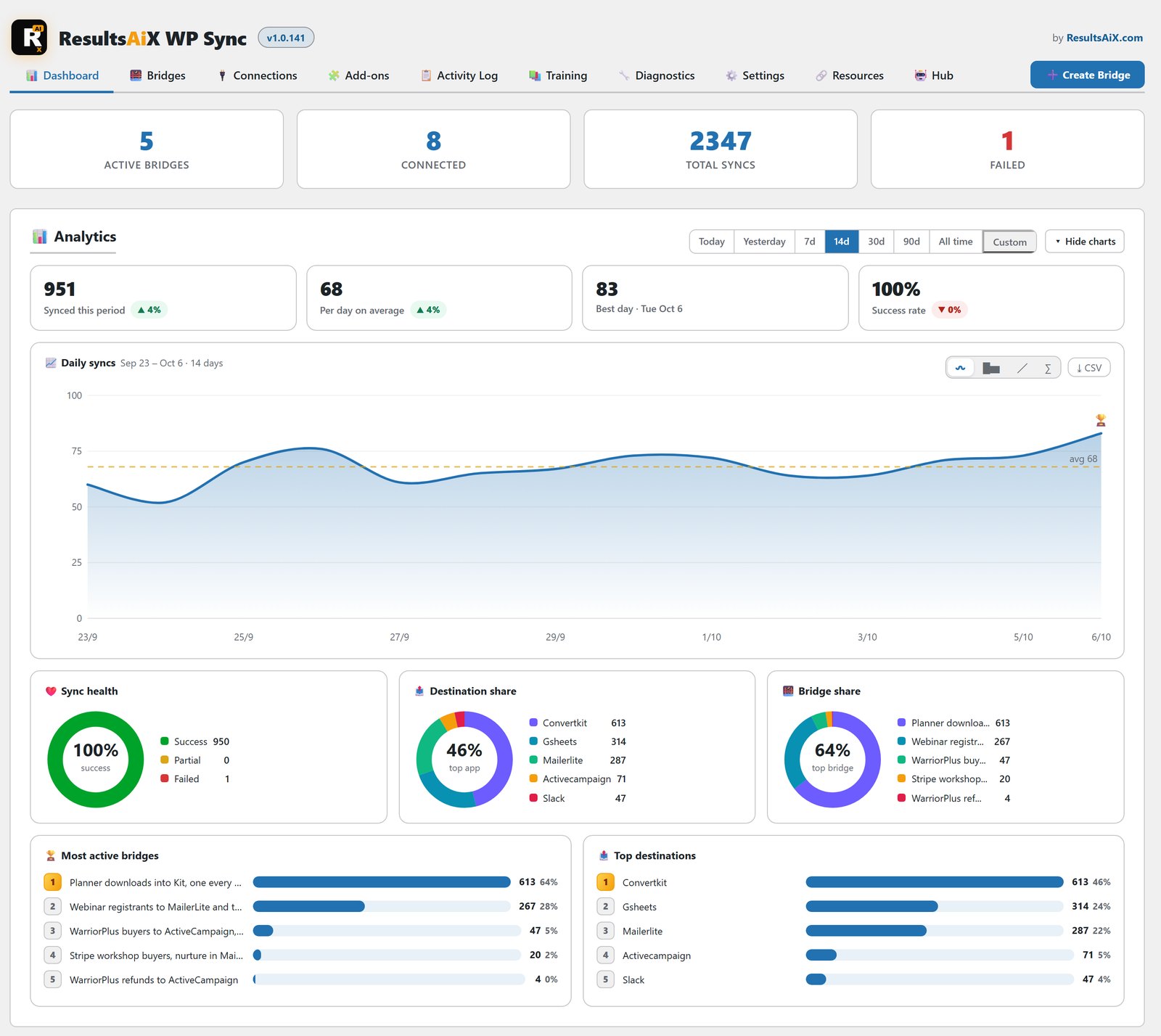
There’s no task meter. Sync 50 contacts a month or 100,000. Build one automation or a thousand. Nothing is counted and the price never moves.
It runs on your server. WP Sync makes direct API calls from one tool to the next, right from your WordPress site. Your subscriber data never touches my servers, and there’s no account or cloud relay to sign up for.
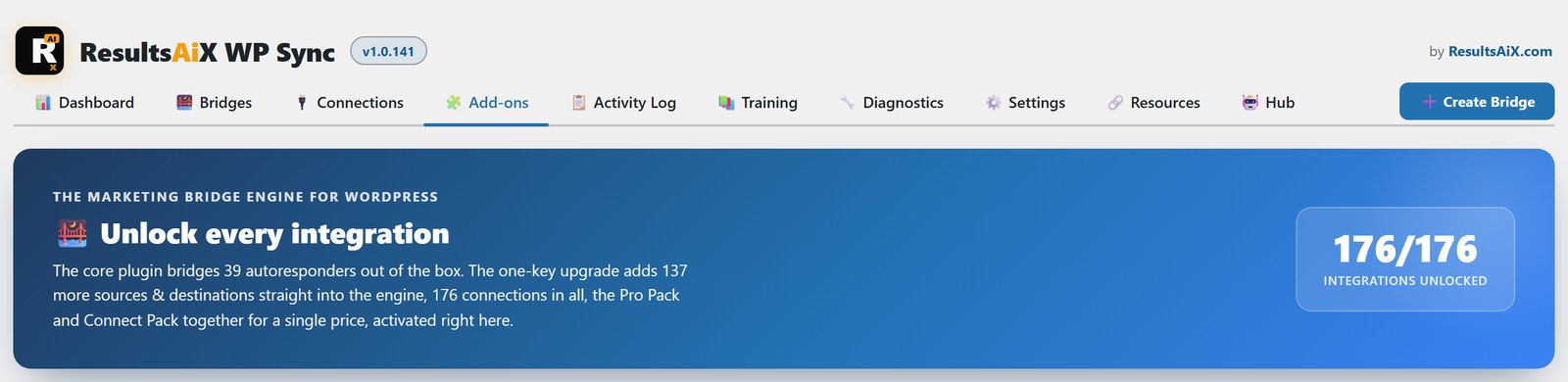
It connects 175+ apps. That’s 39 autoresponders, 13 pro connectors and 124 app integrations, all in one plan, with new connections added over time.
The Bridge: One Simple Rule
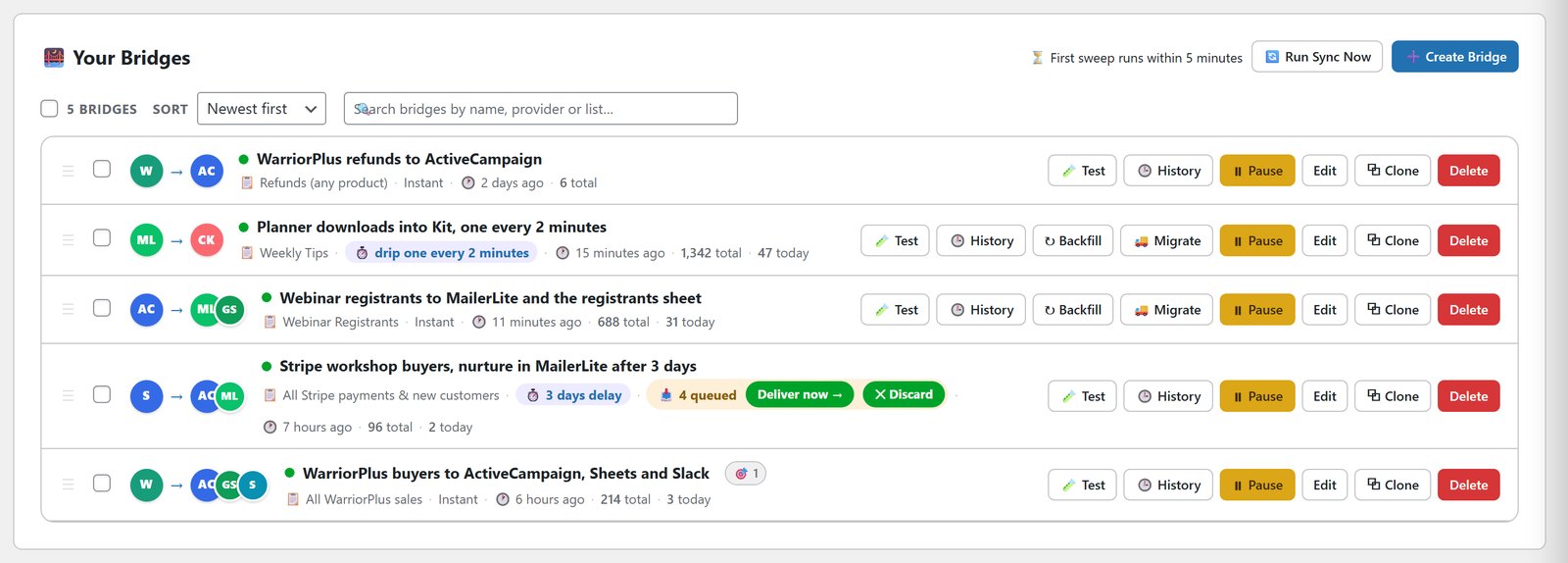
The working unit in WP Sync is a bridge. It’s one rule: when a contact appears here, send them there. Pick a source, pick one or more destinations, and you’re live.
Each destination gets its own field mapping and tags, so the same new buyer can land in ActiveCampaign tagged by product, get a row in Google Sheets, and trigger a Slack alert, all from one bridge.
WP Sync vs Zapier For WordPress Work
Here’s how the two compare for the kind of work most marketers do.
- Pricing: Zapier charges per task. WP Sync is $147 the first year, then $47 a year, with no task meter.
- Growth: on Zapier a busy month costs more. On WP Sync a busy month costs the same as a quiet one.
- Where data flows: through Zapier’s cloud, or straight from your own WordPress site.
- Breadth: Zapier connects thousands of apps. WP Sync connects 175+, chosen for marketers, plus Webhook Connect for almost anything else.
- Timing: on WP Sync every destination has its own delay or drip pace, built into the bridge.
The Features That Matter In Practice
Sales Straight Onto Your List
The moment a WarriorPlus, JVZoo or ClickBank sale lands, or a WooCommerce, Shopify, Stripe or PayPal order, the buyer goes onto the list you choose, tagged with the product they bought. Courses work the same way with Kajabi, Teachable and Thinkific, and bookings with Calendly and Cal.com. Those sale and app integrations are all included.
Scheduling, Delays And Drip
Most tools fire the instant a contact appears. WP Sync lets every destination pick its own moment. Send now, wait minutes, hours or days, or hold until an exact date and time and release everyone at once for a launch.
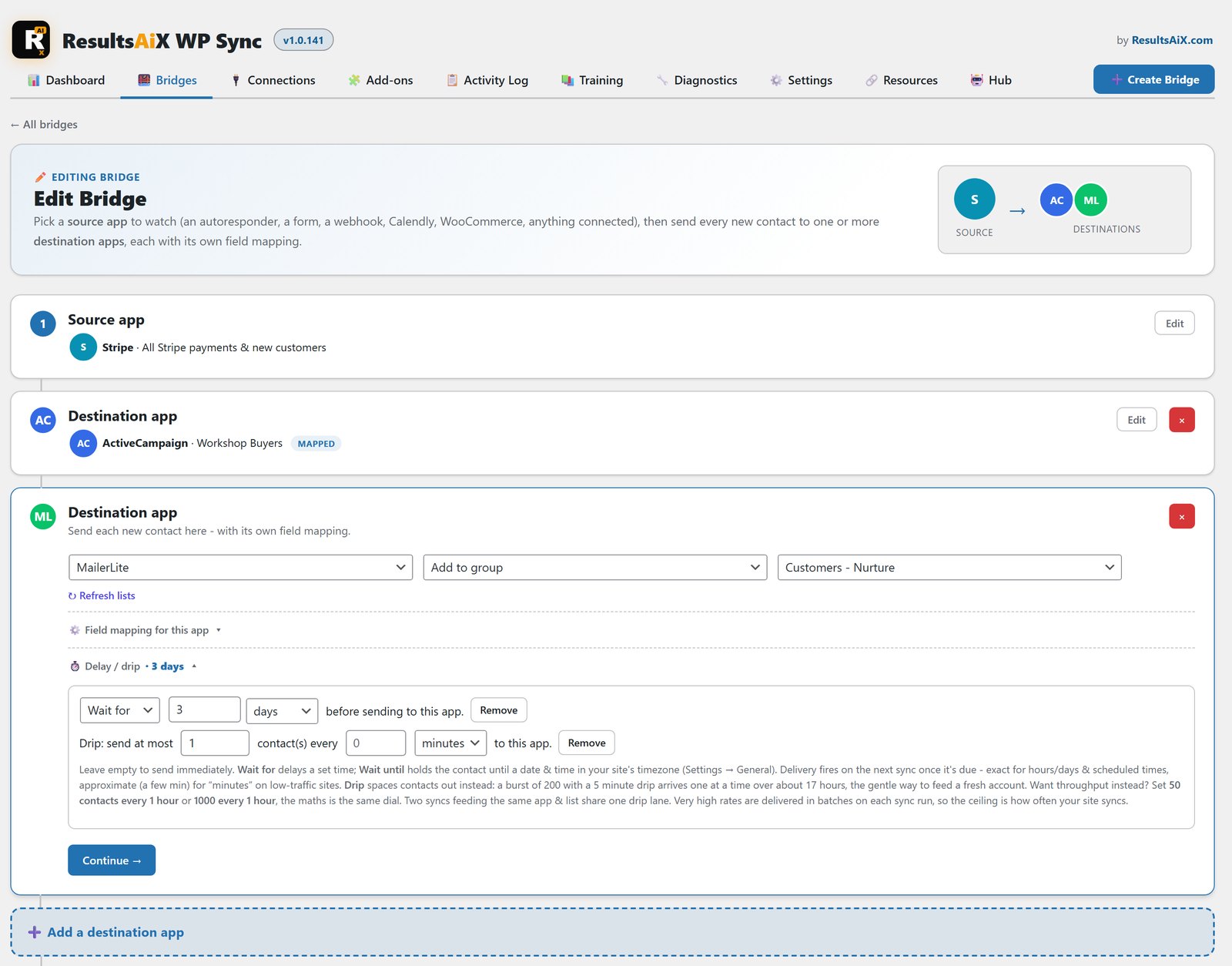
You can also set a pace, like 50 contacts an hour, so a rush of 200 buyers is spaced out gently. That’s useful for warming a new email account. While it runs you can pause it, deliver everything waiting with one click, discard what’s left, or change the pace and the queue re-spaces itself.
Tags, Custom Fields And Filters
WP Sync carries the whole contact, not just an email. Names, the custom fields you collect and the tags you choose are mapped to each app’s own fields. Tags are created if they don’t exist yet. You can filter on any field a source sends, so a bridge only takes buyers of one product, or people from one country.
Event And Click Triggers
Apps that support events can tell WP Sync the moment something happens. Someone unsubscribes in one tool and you can take them off the others. Someone clicks a link and you can drop them on your hot list. A broadcast goes out and the same story can be posted to your channels.
Clicks on your WP Conversion Tracker AI links can fire an automation too. Tag everyone who clicked your offer but didn’t buy, and drop them into a follow-up while they’re still warm.
An Audit Trail You Can Actually Read
Automation you can’t see is automation you can’t trust. Before a bridge goes live, a dry run shows exactly what each destination would receive, and nothing is sent until you’re ready.
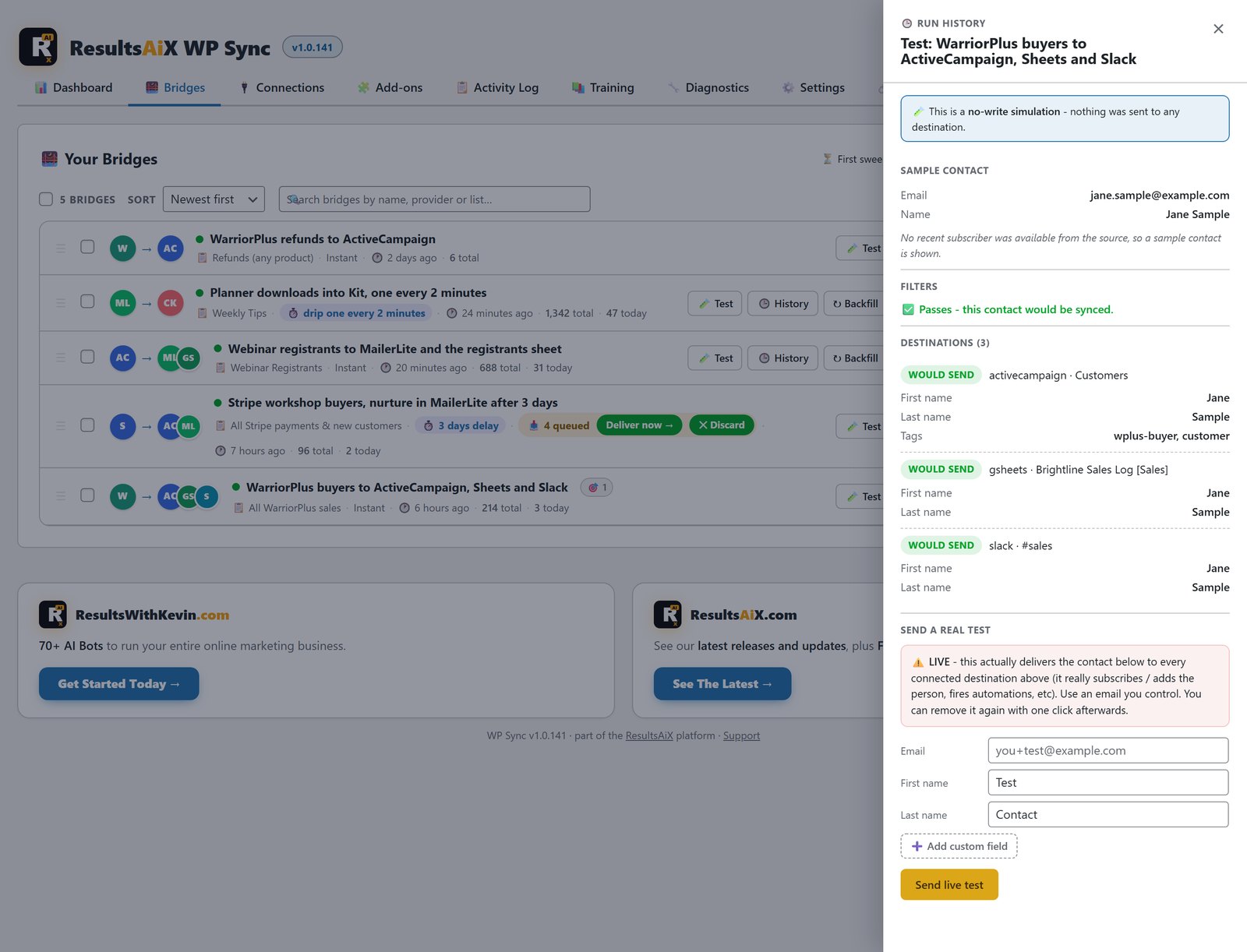
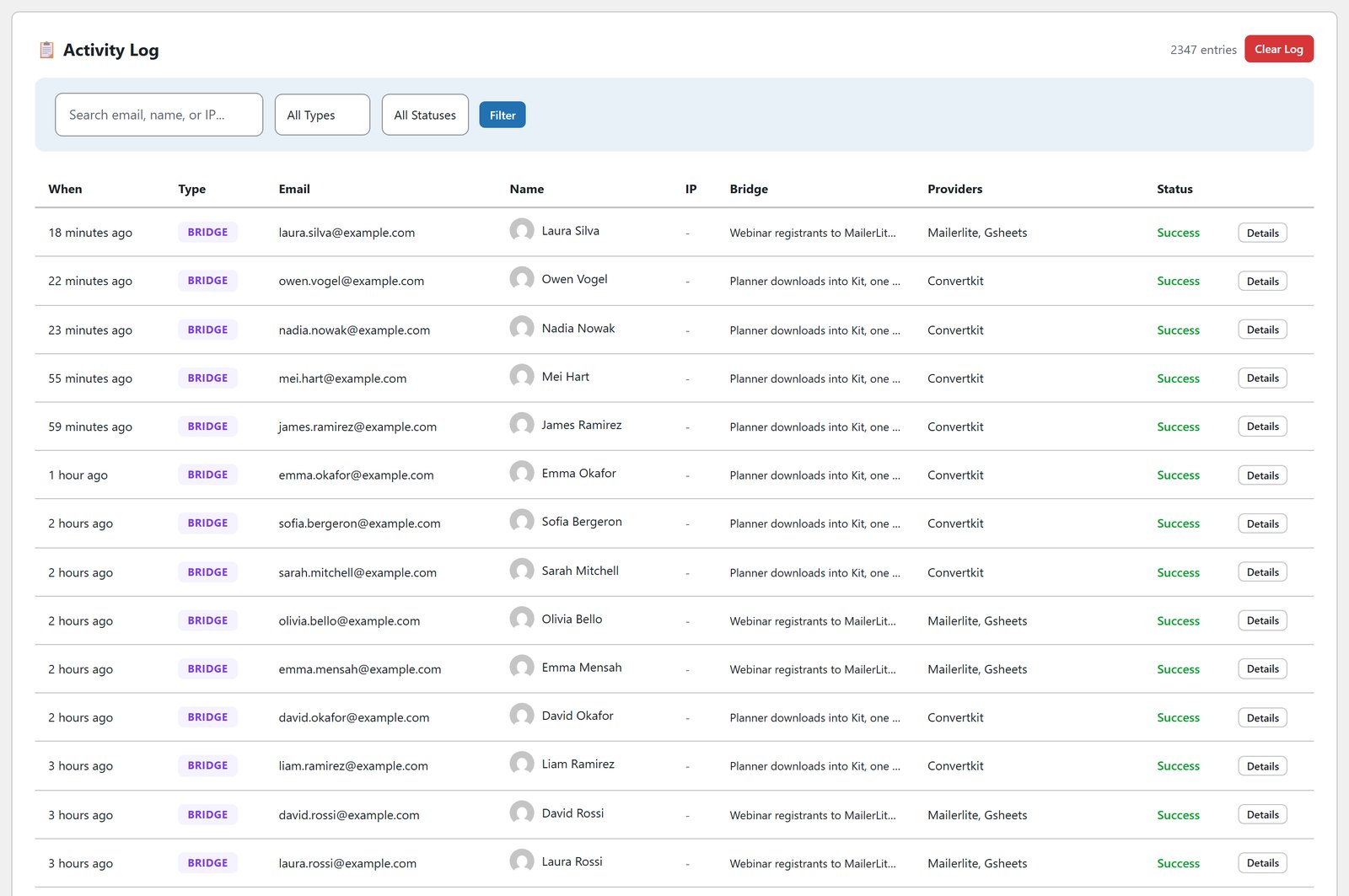
After it’s live, every run is recorded. Each bridge has its own history showing who synced, when, and where they went. The activity log records every opt-in and sync with email, name, time and status, in plain English, and you can filter it to find any contact in seconds.
A Real Example: Launch Week
Picture a launch that goes better than planned. Two thousand buyers in a week, each one triggering a list add, a tag, a Google Sheets row and a Slack ping. On a per-task platform that’s eight thousand tasks from one good week, and the invoice follows the success.
On WP Sync the same week costs exactly what the quiet week before it cost. The bridge fires, the history records every run, and the only thing that grows is your list.
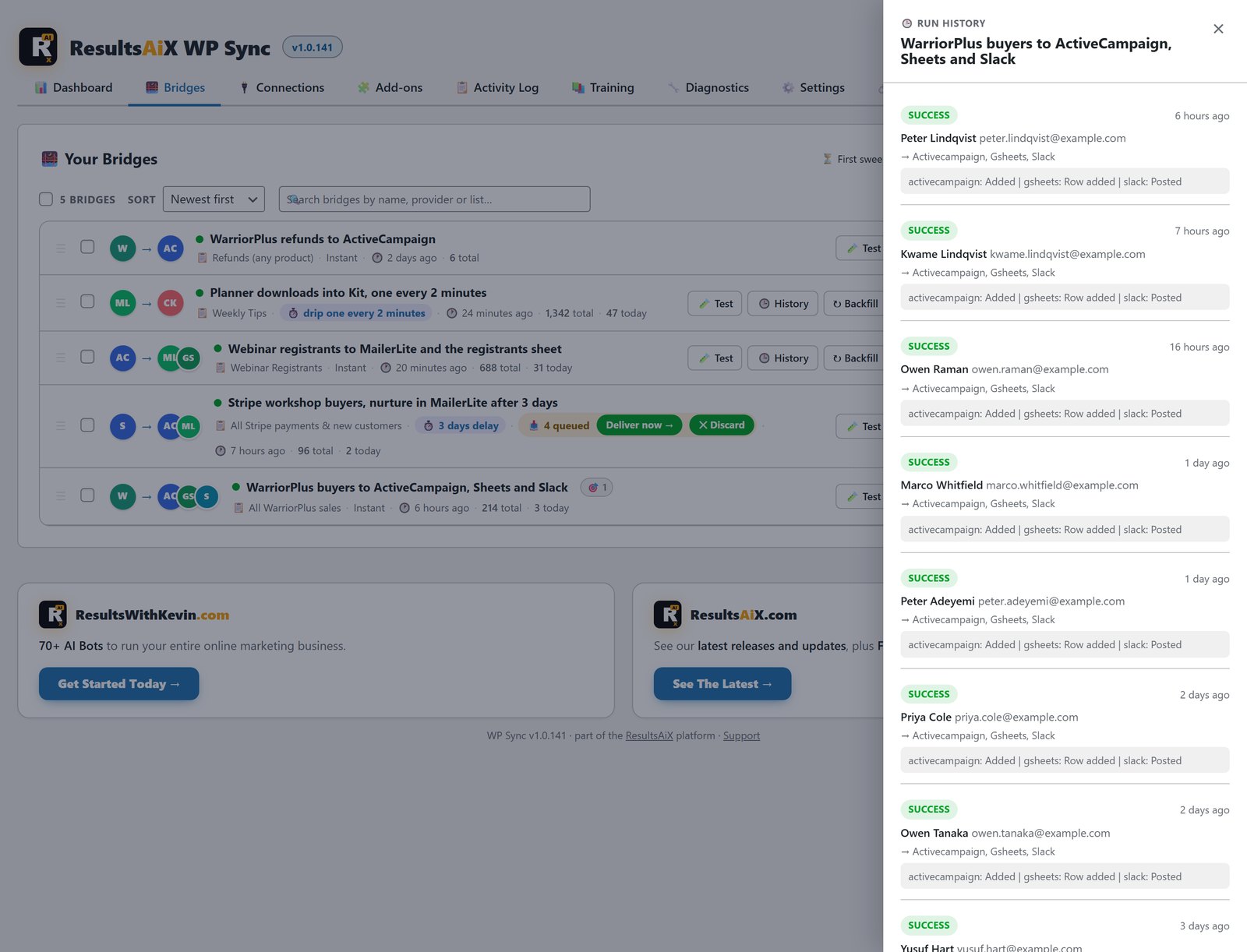
You can also hold buyers back for a few days so a payment settles or a refund window passes before they go onto the upsell list. And if you sell access to a private Telegram or Discord group, WP Sync gives each buyer a single-use invite link and revokes it on refund.
The Three-Year Maths
| Timeframe | Zapier Professional, 2,000 tasks | WP Sync |
|---|---|---|
| Year one | $876 | $147, with all 175+ connections |
| Year two | $1,752 in total | $194 in total |
| Year three | $2,628 in total | $241 in total |
That assumes your business never grows into a bigger Zapier tier. The whole point of the meter is that it does.
When Zapier Still Fits
WP Sync connects 175+ apps. Zapier connects thousands. If your automations run between two cloud tools that never touch WordPress, a WordPress plugin is the wrong shape for the job, and I’d rather tell you that now.
WP Sync is built for the marketer whose site is the hub: leads land there, sales happen there, and everything else needs to hear about it. If that’s you, the meter is the whole argument.
Getting Started In Three Steps
First, connect. Install WP Sync, paste the API key for each tool and press Test Connection. It takes about 30 seconds per account.
Second, build a bridge. Pick a source, then one or more destinations in the visual builder, and set the tags, fields and timing for each. Run the dry run and check every destination does what you expect.
Third, let it run. New contacts sync automatically every 5 minutes on WordPress cron, and you can press Run Now any time. Watch each one land in the activity log.
If you’re moving your email over at the same time, WP Sync can keep two autoresponders in sync while you switch. My guide to cleaning up list names after an import covers the next step.
Automation Mistakes That Quietly Leak Money
No cleanup when people leave. Someone unsubscribes in one tool and stays subscribed in three others. With WP Sync, one unsubscribe can take them off everywhere, so you stop paying to store and mail people who said no.
Everything fires instantly. Some actions should wait. A cross-sell that arrives two days after purchase lands very differently from one that fires during checkout. Delays are a feature, not a workaround.
Untested bridges going straight to live data. A wrong setting can tag a thousand contacts in a minute. A dry run takes thirty seconds and saves the cleanup afternoon.
Paying for tidiness. The Slack ping, the backup sheet, the extra tag all cost money on a metered platform, so people skip them. With no meter, the tidy setup is free.
See It Working
Frequently Asked Questions
What Is The Best Zapier Alternative For WordPress?
If your leads and sales already live on WordPress, a plugin that runs on your own site removes the middle layer and the task bill. WP Sync connects 175+ apps from inside WordPress, has no task meter, and costs $147 the first year, then $47 a year.
Does WP Sync Really Have No Task Limits?
Correct. There’s no task meter anywhere. Unlimited bridges, unlimited destinations per bridge and unlimited contacts synced, for the same price.
How Many Apps Does WP Sync Connect To?
175+ in all: 39 autoresponders, 13 pro connectors and 124 app integrations, in one plan. Webhook Connect covers almost any tool that can fire a webhook.
What Does The Plan Include?
Everything, in one plan. The core bridges your 39 autoresponders to each other, the 13 pro connectors add Webhook, Forms for 6 form plugins, Zoom, Google Sheets two-way, ClickUp, GoToWebinar, Pipedrive, Trello, Airtable, Notion, monday.com, Circle and Heartbeat, and 124 app integrations add everything else, including WarriorPlus, JVZoo and ClickBank. It is $147 the first year, then $47 a year, on 3 sites, with a 30-day money-back guarantee.
How Quickly Do Automations Run?
Every bridge checks for new contacts every 5 minutes and moves them automatically, and you can press Run Now to fire one on demand. Event triggers react the moment something happens in apps that send events.
Can I Pause Or Slow Down A Drip That's Already Sending?
Yes. Pause it and everyone waiting simply waits. Change the pace and the queue re-spaces itself. You can also deliver everything waiting at once, or discard what’s left without sending it.
Is My Customer Data Safe?
WP Sync talks straight from your WordPress site to each tool’s API using your own keys. Your contacts never pass through my servers.
Is WP Sync Part Of The Bundle?
Yes. WP Sync is in the ResultsAiX Bundle along with the Mailer it feeds and the tracker that finds your buyers. For the bigger picture, read own your marketing stack.
Do I Still Need Zapier?
If your automations run between two cloud tools that never touch your WordPress site, Zapier still fits. If WordPress is the hub, WP Sync replaces the middle layer and the task bill.
Automation That Never Sends A Bigger Bill
175+ connections, 39 autoresponders built in. No task meter and no overage fees, ever. Scheduling built into every bridge and a full audit trail.


