
The 3 WordPress Tools Every Solo Ad Seller Needs

Solo ad selling runs on three things: proof your clicks are real, a way to send at volume without being blocked, and a simple way to move buyer and lead data around. This page shows how those three fit together on one WordPress site.
Solo ad sellers need three things from their tools: proof that buyers can check for themselves, a way to send big volume without getting blocked, and a way to move every new lead to the right list without paying per task. Most marketing tools only do one of those, and they’re built for one funnel at a time.
This guide covers the three WordPress plugins I’d use for solo ad selling, what each one does in a real delivery day, and how they fit together on one site: WP Conversion Tracker AI for proof and rotation, ResultsAiX Mailer for sending, and WP Sync for moving leads.
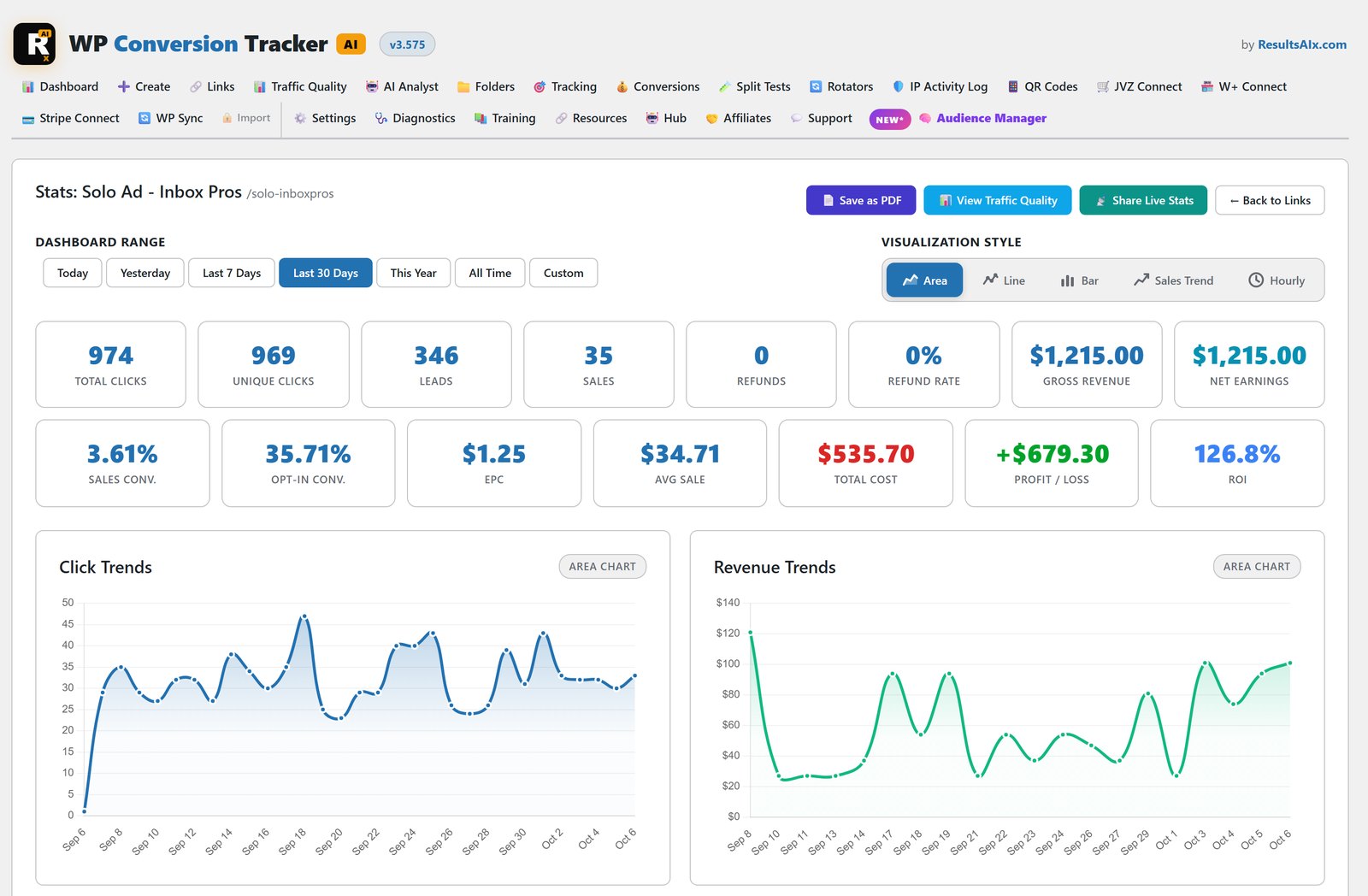
Why Solo Ad Selling Breaks A Normal Marketing Stack
Most marketing tools are built around one list, one funnel and one send at a time. Solo ad selling isn’t that shape.
You’re running one list against several buyers, each wanting proof the clicks were real before they order again. You’re mailing your list, sometimes more than once a day, to fill the orders on the board. And every click, every swap and every new subscriber from a list-building offer needs to land in the right place without you copying rows between spreadsheets at midnight.
That’s three different jobs. Here’s the combination that covers all three on one WordPress site, without three monthly subscriptions.
Proof: Buyers Want To See The Traffic Themselves
The biggest source of friction in solo ads is trust. Buyers have been burned before, so a screenshot of your dashboard isn’t proof. It’s a claim, and anyone can fake one in thirty seconds.
WP Conversion Tracker AI answers that with live proof pages. Open a link’s stats, press Share Live Stats, pick the buyer’s Sub-ID and the dates of their order, and you get a branded, login-free page on your own domain. The buyer can refresh it and watch their clicks land.
They see total clicks, unique visitors, the clean traffic percentage, the Tier 1, 2 and 3 split, a country breakdown, desktop against mobile, and daily clicks. They never see your revenue, buyer emails, destination URLs, link names or any of your other links. The page is set to no-index, you can see how many times it’s been opened, and you can revoke it in one click when the deal is done. There’s no cap on how many proof links you create.
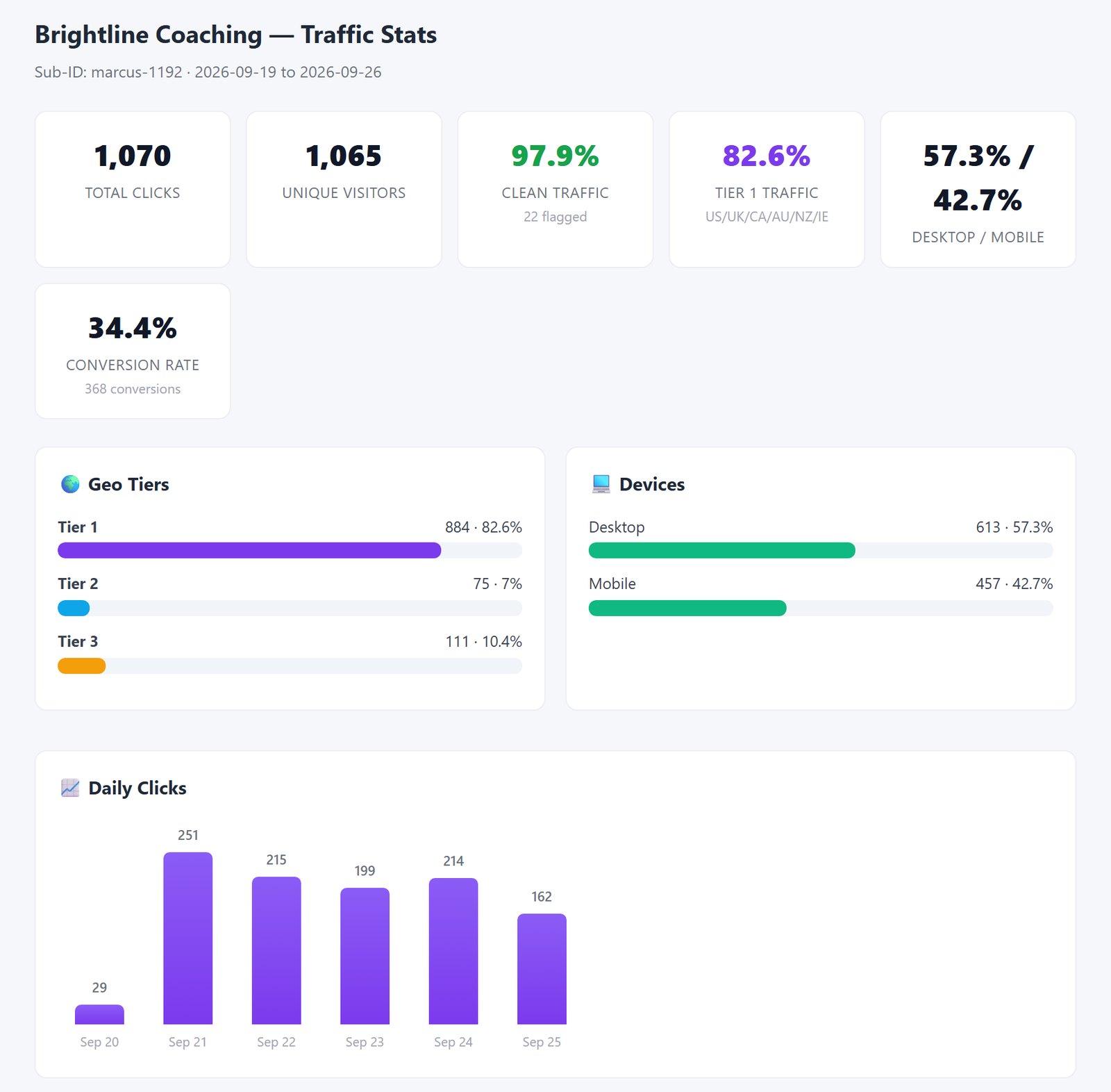
Behind that proof page is the Traffic Quality report: clean clicks against flagged clicks, and every geo tier with its own conversion rate. Bot and blocked-IP hits are filtered out before they reach those numbers. When a buyer questions quality, that’s the report that ends the conversation.
Rotation: Splitting Traffic Between Buyers And Offers
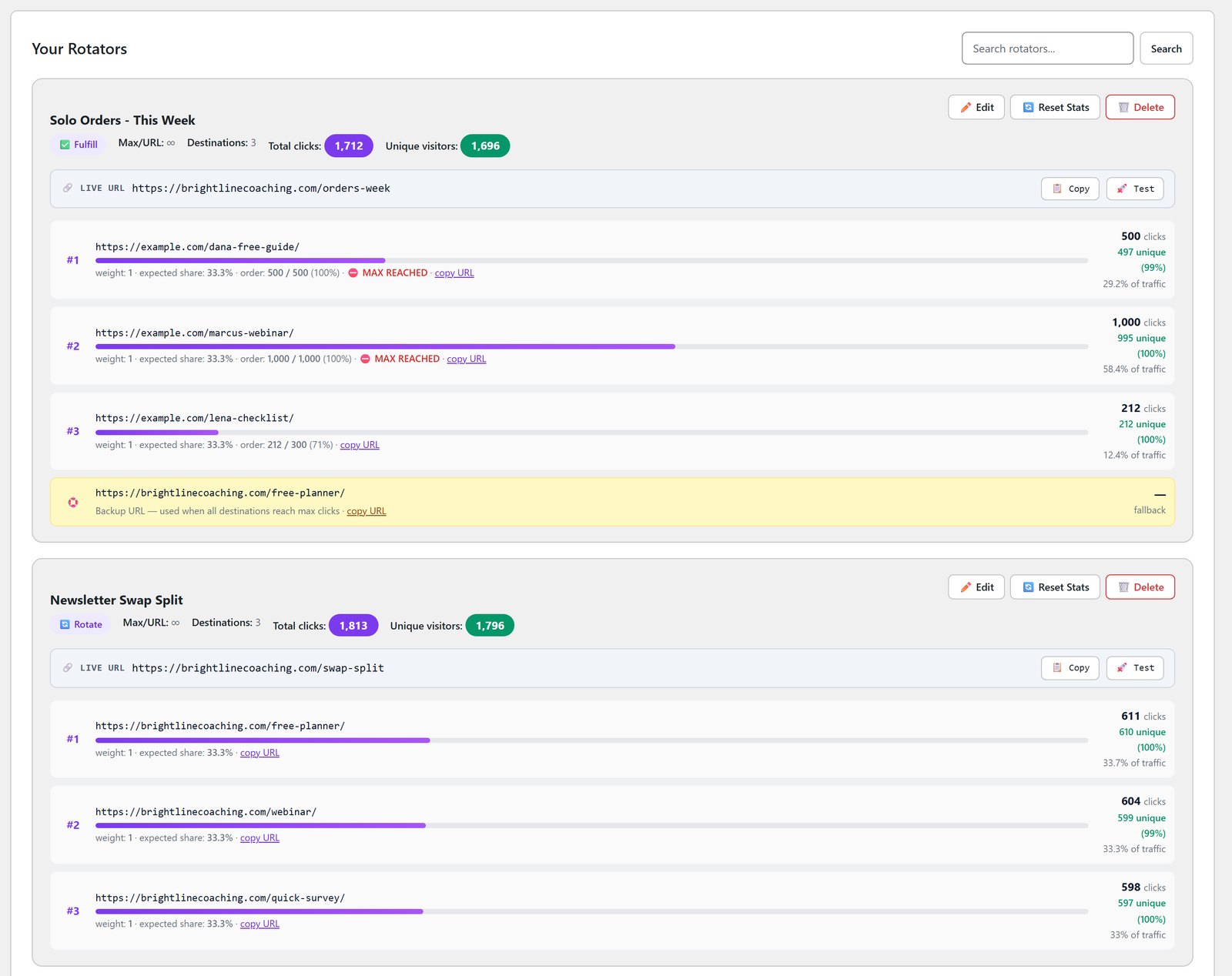
A delivery day rarely goes to one place. The link rotator has three modes. Round-robin cycles through your URLs in order. Fulfill sends everything to the first URL until its cap, then moves on. Weighted shares traffic out by percentage.
So you can cap a buyer’s link at the clicks they paid for, with a backup URL for anything over, or share a swap by percentage. Every rotated click is still tracked to its conversion, so the report and the proof page stay accurate however many links sit behind the rotator.
When a delivery closes, every link has its own full report, rotators and QR codes included, saved as a branded PDF in one click with buyer emails masked automatically. That’s the receipt you hand a buyer without them ever touching your dashboard.
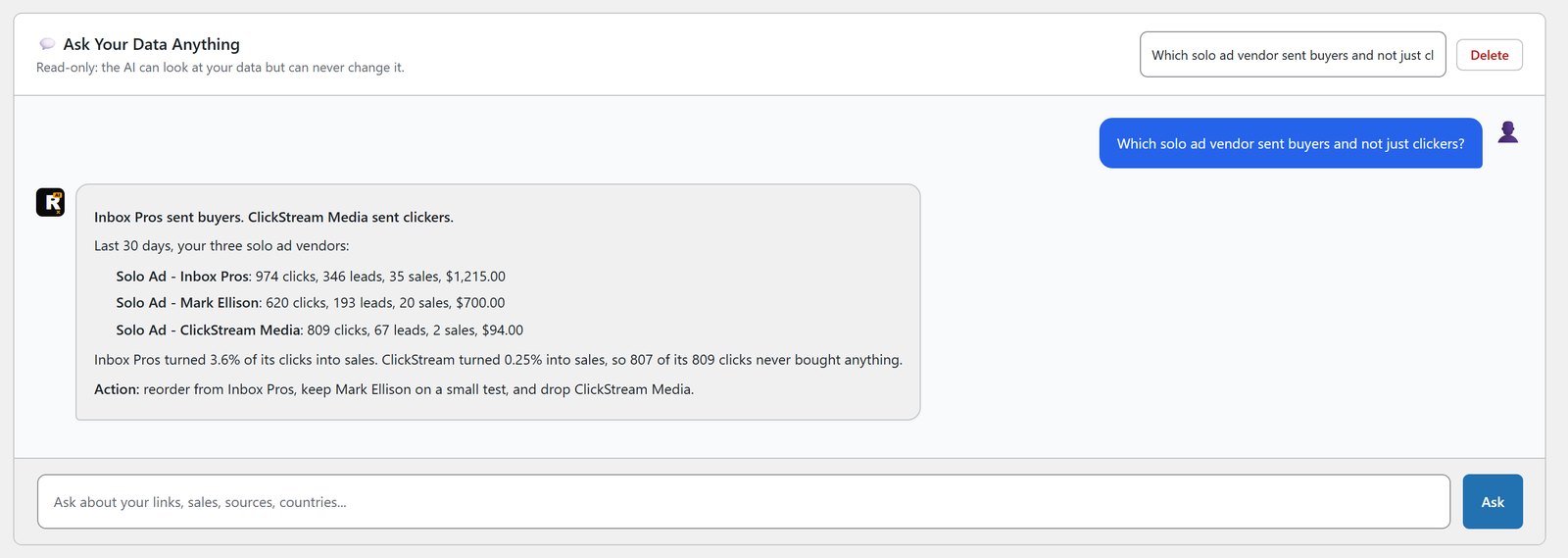
The AI Traffic Analyst helps on the buying side too. Ask it which solo ad vendor sent buyers and not just clickers, and it answers from your own data, on your own AI key.
Volume: Sending Without Getting Blocked
Delivering solo ads means mailing your list, often more than once a day, and that’s exactly the pattern mailbox providers watch for. One connection carrying every send, with no ramp, is the easiest way to get flagged.
ResultsAiX Mailer spreads sends across as many sending connections as you add, from any of 12 services, including several accounts on the same one. Rotate mode shares sends evenly. Weighted mode lets you set your own shares. A brand new connection warms up gradually instead of taking full volume on day one, and anything over its cap waits and goes out as capacity grows. Nothing fails.
A DKIM guard checks each connection’s sending domain, and in strict mode only properly authenticated connections rotate. Failover sits under every mode, so one provider having a bad day never costs you a send. The full detail is in my guide to SMTP rotation and email warmup.
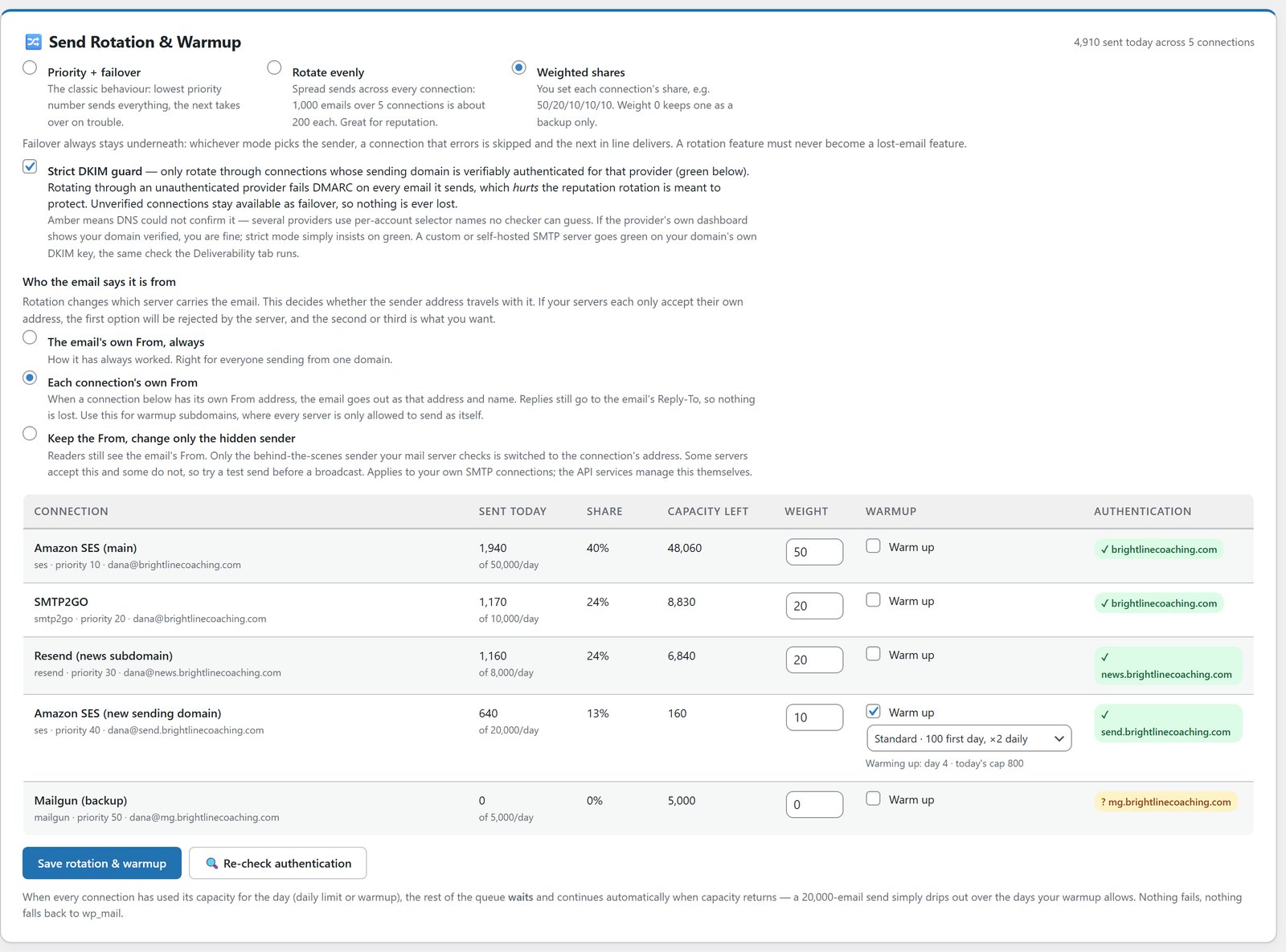
There’s no subscriber limit from me, and you pay your sending service directly for what you send.
Movement: Getting Leads Where They Need To Go
Every list swap, every list-building offer and every buyer who opts in downstream needs to land in the right autoresponder, tagged properly, without you doing it by hand.
WP Sync connects 175+ apps, including 39 autoresponders in the core plugin. It carries the whole contact across, with names, custom fields and the tags you choose, so every swap partner’s leads can land tagged with the swap they came from.
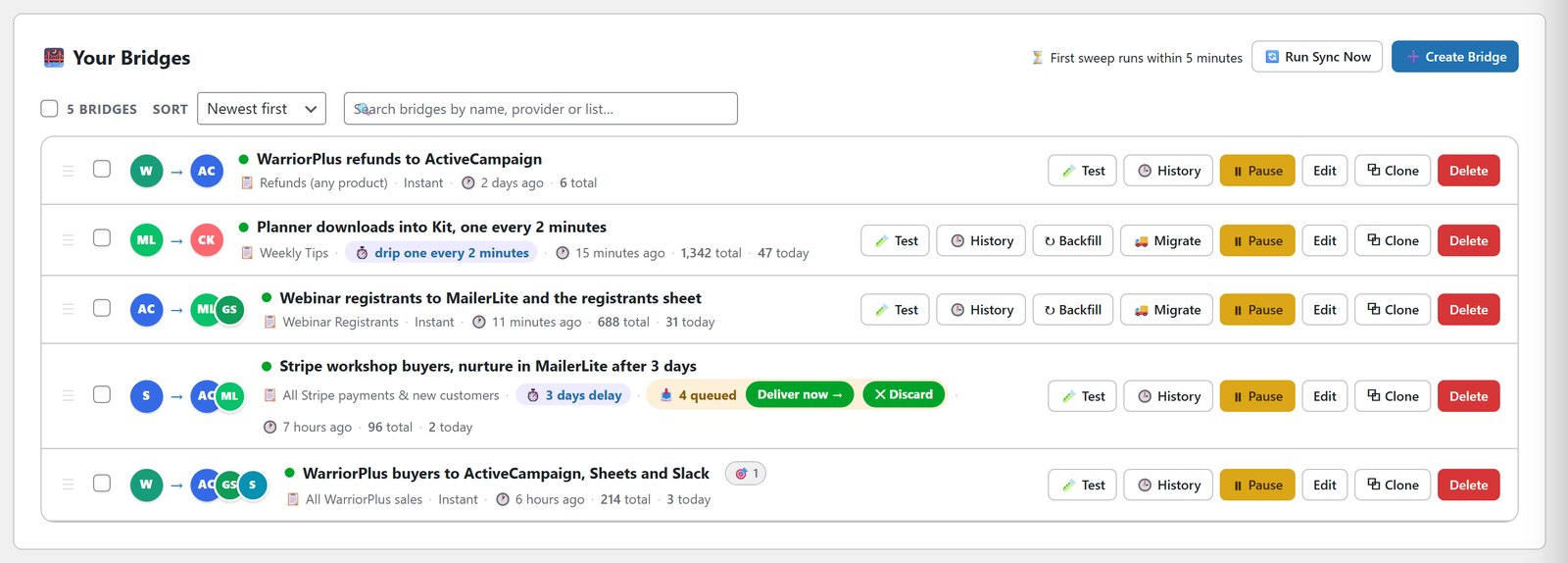
The part that matters most for a business that runs on daily volume: there’s no task meter. Move 1,000 leads a day or 10,000, the price is the same. You can also pace a rush, like 50 contacts an hour, which is handy for feeding a new email account gently.
Clicks can start automations too. A click on one of your WP Conversion Tracker AI links can add someone to a list or tag them, as long as WP Sync can recognise the visitor.
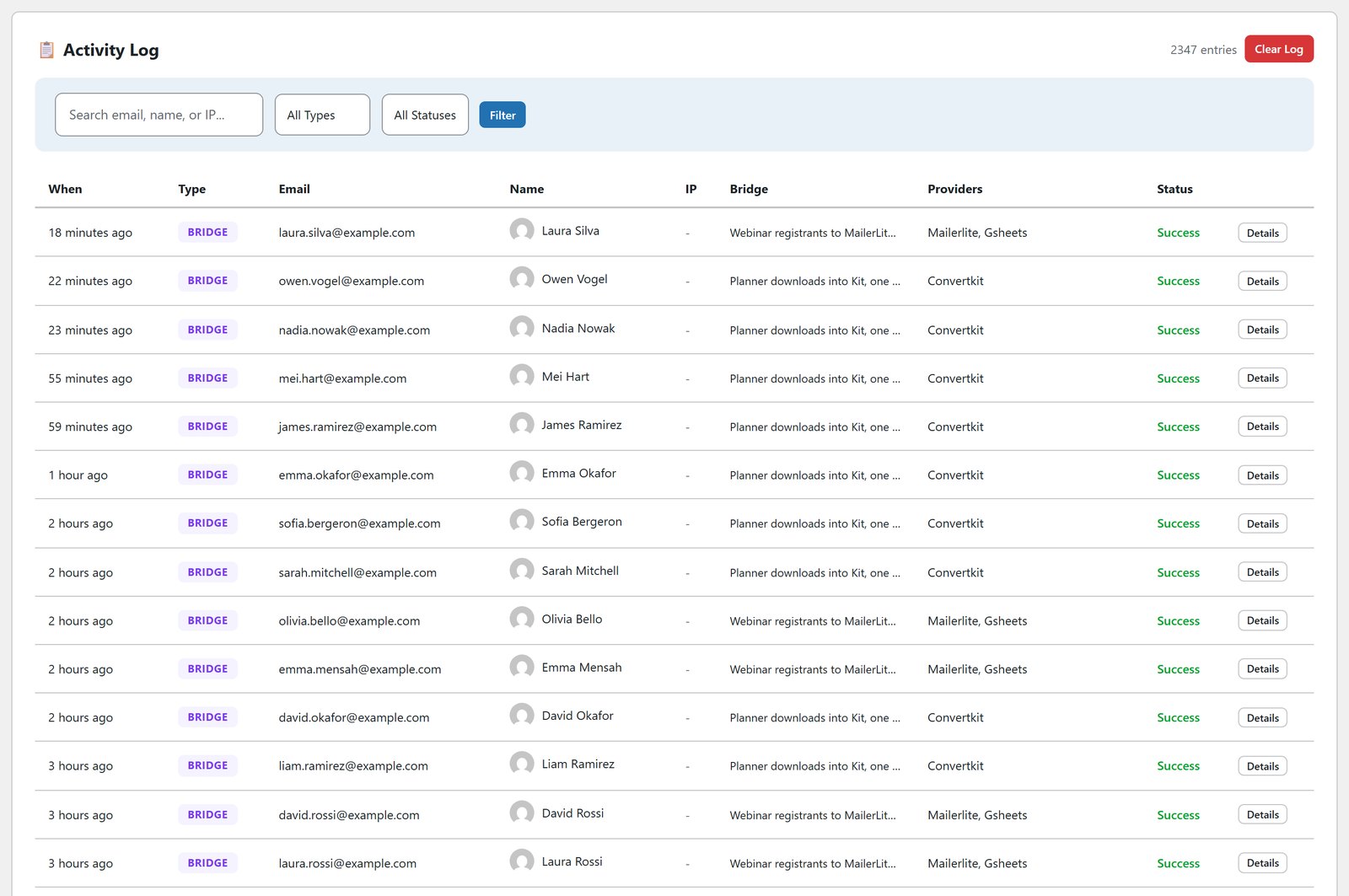
Every run lands in an activity log you can read, so a busy delivery day is something you can check rather than something you have to trust.
How The Three Work Together
Here’s a delivery day with all three running. A buyer’s link goes live through a rotator with a click cap. Their proof page is on, scoped to their Sub-ID, so they can watch it fill. The send goes out through the Mailer, rotating across your sending connections so the volume never sits on one. Anyone who opts in through a list-building offer in that send is picked up by WP Sync and put on the right list, tagged by source.
That’s one WordPress site, three plugins, and no exporting between them.
How It Works For Everyday Solo Ad Sellers
The Daily Seller
Sells clicks to two or three buyers a day off the same list. Each buyer gets their own rotator link with a cap and their own live proof page. When the cap hits, the rotator moves on, and the proof page shows exactly what they paid for.
The List Swap Partner
Runs swaps with other list owners most weeks. Each partner’s opt-ins arrive through their own bridge, tagged by swap, so the next mailing to that group is accurate without any sorting by hand.
The High-Volume Mailer
Delivers orders across several sends a day on a big list. Sends rotate across several connections, with warmup on any new one, so the volume never comes from a single connection that a provider starts watching.
What Each One Costs
WP Conversion Tracker AI is $67, one payment, with all five add-ons, including Pro Tools for the rotator, proof pages and the AI analyst. It covers up to 5 domains.
ResultsAiX Mailer is $97 a year for 3 sites. Your sending service is paid directly to that provider.
WP Sync is $147 the first year, then $47 a year, for everything, on 3 sites.
All three come inside the ResultsAiX Bundle as well, along with every other ResultsAiX plugin. Each one has a 30-day money-back guarantee.
Getting Started
First, install the tracker. Add WP Conversion Tracker AI, create a rotator for your next delivery, and switch on a proof page for the buyer. The solo ads tracking page shows the proof page in detail.
Second, set up sending. Connect at least two sending services in ResultsAiX Mailer, switch on rotate or weighted mode, and let warmup handle anything new.
Third, automate the handoff. Build a bridge in WP Sync from your opt-in form or sale to the list it belongs on, run the dry run, then set it live.
Fourth, run one real delivery through all three and watch the proof page, the send report and the activity log fill in together.
Mistakes That Cost Solo Ad Sellers Repeat Buyers
Sending screenshots as proof. Buyers have seen too many fakes. A live page they can refresh wins the reorder.
Delivering more than they paid for, or less. A click cap on the rotator delivers exactly the order.
Sending everything from one connection. That’s the pattern that gets flagged. Spread it and warm new connections up.
Losing swap leads in a spreadsheet. If a partner’s leads aren’t tagged on arrival, your next mailing to them is a guess.
For the bigger picture on owning these tools instead of renting them, read own your marketing stack.
See It Working
Frequently Asked Questions
What Tools Does A Solo Ad Seller Need?
A tracker with live proof pages and a click-capped rotator, a sender that can rotate and warm up connections, and a way to move leads to the right list without per-task fees. On WordPress, that’s WP Conversion Tracker AI, ResultsAiX Mailer and WP Sync.
What Makes Solo Ad Selling Different From Regular Affiliate Marketing?
You’re running one list against several buyers, each wanting proof the clicks were real before they order again, and you’re mailing that list, sometimes more than once a day, to fill the orders. Most marketing tools are built for one funnel at a time, not that combination.
How Do I Prove Traffic Quality To A Solo Ad Buyer?
Send them a live proof page instead of a screenshot. WP Conversion Tracker AI creates a branded, login-free page scoped to the buyer’s Sub-ID and dates, showing clicks, unique visitors, clean percentage and the geo tier split, without your revenue or any other private data.
How Does The Rotator Handle More Than One Buyer?
Round-robin, fulfill or weighted rotation splits traffic between links, with a click cap and a backup URL, and every rotated click still tracks to its conversion.
Will Delivering Solo Ads Get My Sending Blocked?
Providers flag one connection carrying all the volume with no ramp, not volume on its own. ResultsAiX Mailer rotates across your connections, warms new ones up, and keeps unauthenticated connections out of the rotation in strict mode.
Does WP Sync Limit How Many Leads I Move?
No. There’s no task meter. Moving 1,000 leads a day or 10,000 costs the same.
Do I Need All Three, Or Can I Start With One?
Start with the one fixing your biggest headache. Most solo ad sellers start with the tracker for proof and rotation, add the Mailer as volume grows, then WP Sync once swaps need automatic routing.
Do They All Run On The Same Site?
Yes. All three install on the same WordPress site, so they share the same leads and click data without exporting anything.
Everything A Solo Ad Business Runs On
Live, login-free proof pages buyers can check themselves. SMTP rotation and automatic warmup built for high volume sending. 175+ apps connected with no task meter, ever.
Start With The Tracking
Proof buyers can check for themselves, sending built for volume, and lead movement with no meter running.


