
20 Things ResultsAiX Mailer Can Now Do That Other Autoresponders Only Dream Of

This page explains how ResultsAiX Mailer handles big broadcasts while they send: pausing, resuming, finishing early and guarding your delivery. It also covers the resend system that works out who to reach again at the moment it sends, so more of your list sees each email.
Sending email at scale is a different job from sending a newsletter. A broadcast to a big list runs for hours, sometimes days, and a lot can happen in that time. An urgent email needs to jump the queue. A provider starts bouncing. The plan you made at 9am stops being the right plan by 2pm.
Most autoresponders treat a broadcast like a light switch: on or off, then a number creeping up while you refresh and hope. ResultsAiX Mailer treats it as something you can watch and steer the whole way through. This guide covers 20 things it does for sending at real volume: 12 controls for while a send is running, and an 8-part resend system for the second touch afterwards.
One Send Is Never The Whole Story
There are two halves to the same problem. The first is what happens while a big broadcast is going out: can you see it, control it, and trust it not to hurt your reputation while your back is turned? The second is what happens after it lands: who still needs a second touch, and how do you reach exactly them without guessing?
Rotation, warmup and the DKIM guard that protect your sending domain have their own guide: SMTP rotation and email warmup. This one covers everything else.
Sending At Real Volume Without Losing Control
Here are the 12 controls, in roughly the order they matter while a broadcast is running.
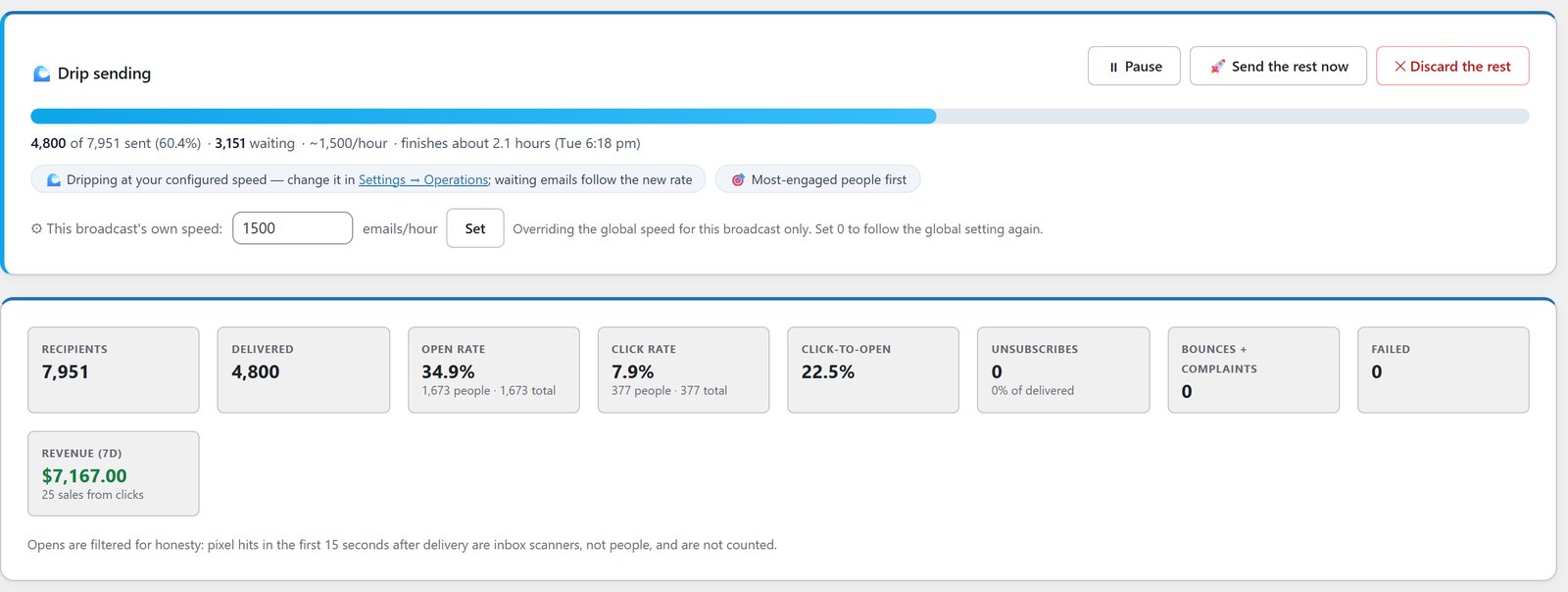
1. A Live Status Card For Every Sending Broadcast
Every broadcast report shows a status card the moment sending starts: a progress bar, how many have gone, how many are waiting, the current sending speed, and a finish time in plain English, not a timestamp you have to work out.
Say a 60,000-email broadcast goes out at 9am. By 11am the card shows how many have gone, the speed it’s holding, and when it’ll finish. One glance answers the only question that matters.
2. Pause And Resume, Per Broadcast
One click freezes just that broadcast. Nothing else notices. Other broadcasts keep sending, automations keep firing, and your site keeps running. Resume picks up exactly where the queue stopped, at the speed it was set to.
3. Send The Rest Now
Sometimes a drip is the right call in the morning and the wrong call by lunch. One click finishes the send at full speed. Your daily sending caps and any warmup limits still apply underneath, so it can never push a warming connection past what it can safely handle. It finishes faster, not recklessly.
4. Discard The Rest, Without Losing Anyone
On most platforms, stopping a broadcast halfway means the remaining people are simply never contacted. In the Mailer, Discard sets them aside. They stay visible on the report, and you can bring them back later with Backfill, even after the broadcast has finished.
So if a sale announcement gets pulled halfway through, those remaining people aren’t a dead end. When a similar offer goes live, you can reach exactly them without rebuilding the audience.
5. Fair Lanes: An Urgent Email Never Waits Behind A Big Drip
Queue a small urgent send while a two-day drip to 100,000 people is already running, and the two don’t wait in line. They interleave, each taking a fair share of every sending batch. The urgent email goes out quickly, and the big drip still finishes close to its original schedule.
Automation emails have their own lane too. Someone who just opted in expects the welcome email straight away, so automation emails are never held back behind a broadcast drip.
6. A Sending Window And Per-Broadcast Speed
Tell the Mailer to send broadcasts only between, say, 8am and 8pm site time, or leave it open around the clock. Outside the window nothing fails or gets dropped. The queue waits and starts again on its own when the window opens, and a window that crosses midnight, like 22:00 to 06:00, works properly too.
Separately, any running broadcast can have its own emails-per-hour speed, set right on its card. Automation emails and Send The Rest Now are never held by the window, so a genuinely urgent send is never delayed by a rule meant for routine broadcasts.
7. Most-Engaged People Go First
Dripped sends don’t go out in whatever order your database happens to return them. Your best openers and clickers go to the front of the line.
That matters more than it sounds. The first hours of a big send are when Gmail, Microsoft and Yahoo are forming an opinion of it. Leading with the people most likely to open and engage is a real deliverability technique, not a cosmetic choice.
8. The Delivery Guard
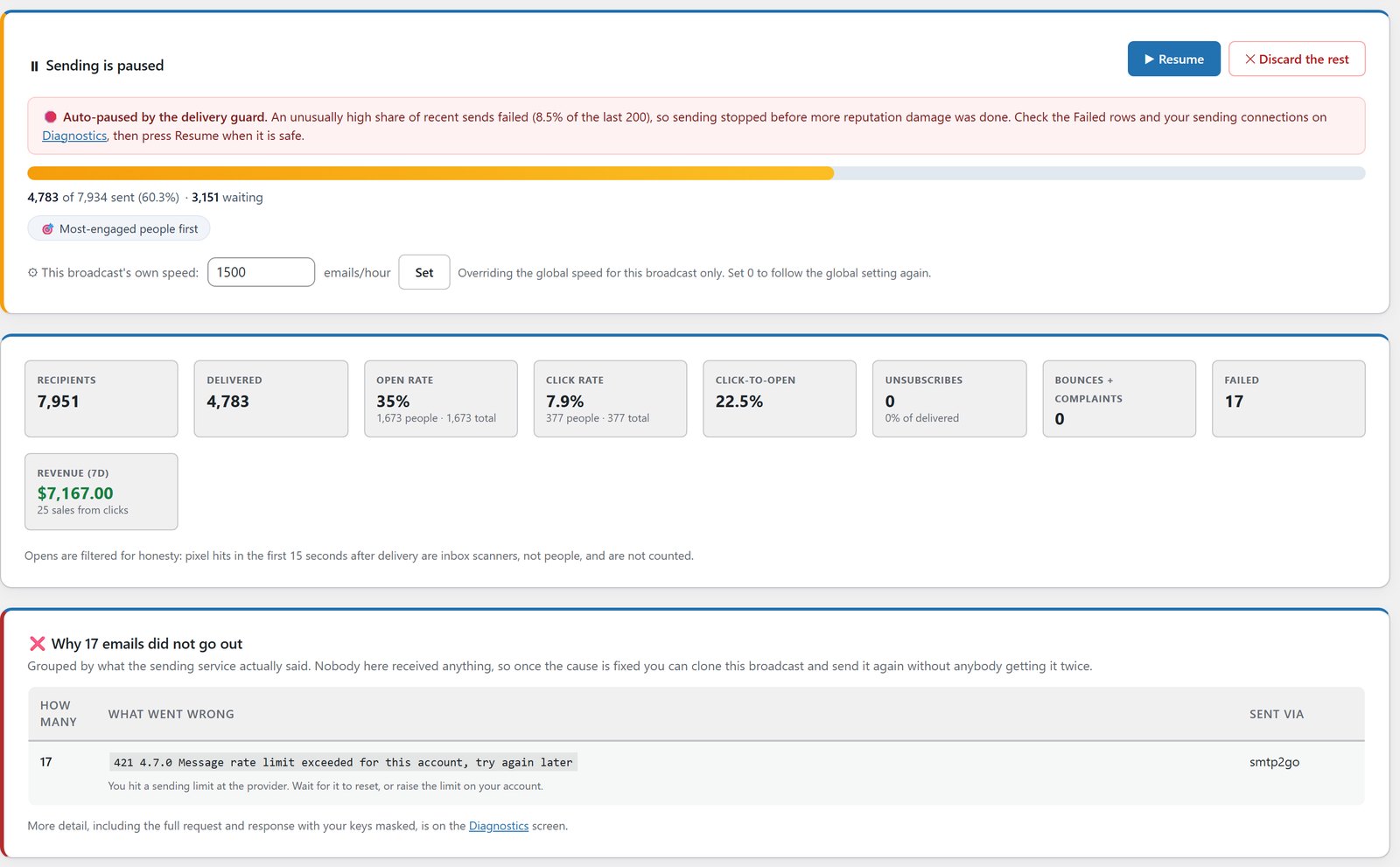
Most tools keep sending, blind, until the queue is empty, however badly it’s going. The delivery guard watches a broadcast’s recent results instead. If too high a share of the latest sends fail, that broadcast pauses itself and emails you, instead of pumping hours more bad sends into a damaged reputation.
You set the failure percentage and how many recent sends it judges. The card shows why it stopped, and Resume is one click once you’ve looked.
9. Informed, Never Spammed
You get an email when a big broadcast finishes, with delivered, opened, clicked and revenue so far, and links to the full report, who opened, and your resend options.
An hourly watchdog also checks for the two silent killers of unattended sending: WordPress cron going quiet while mail is waiting, and a connection sitting at its cap for hours without anyone noticing. Either one shows as a dashboard warning and at most one email a day, and it clears itself when the problem does.
10. The Composer Shows You The Plan Before You Press Send
The broadcast composer is a four-step wizard: Start Here, Audience, Tagging, then Review And Send. That last step is a full checklist of everything the send depends on, with anything wrong shown in red: the subject, who it’s from, exactly how many people match, tagging, which sending service will carry it, and a Speed row that spells out the plan, full speed or dripped, with a plain finish time.
11. A Full-Speed Guardrail
Queue 20,000 or more emails at full speed with no drip set, and the Mailer gives you a friendly heads-up suggesting a drip first. It never blocks you. If you really mean full speed, you can still send. It just catches the usual mistake at the one moment a warning can help.
12. Seed Checkpoints, Mid-Send
List your own mailboxes at the providers that matter to your list, like Gmail, Outlook and Yahoo, and a seed copy goes to each one automatically every 10,000 sends during a drip. You can check real inbox placement while the send is still running, not after it’s finished. Seed copies never touch your open or click stats.
So if your Outlook seed lands in junk at the 20,000 mark, you can change connections right then, before the rest of the list follows it.
The Resend Suite: Smarter Second Touches
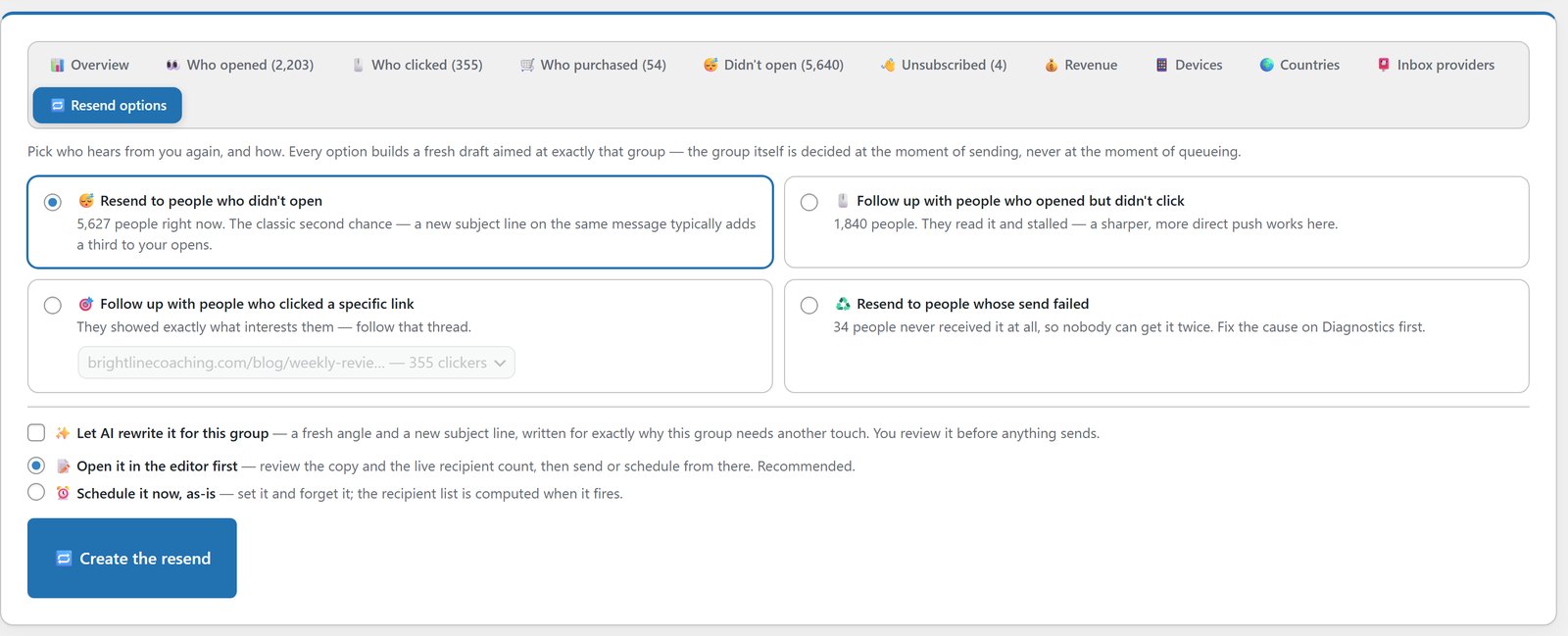
Every broadcast report has resend options. The clever part isn’t the list of audiences. It’s that who qualifies is worked out at the moment the resend actually sends, not the moment you set it up.
1. Resend To People Who Didn’t Open
The classic second chance, done properly. The screen shows exactly who still hasn’t opened at the moment you look, and you can send the same message with a new subject line.
2. Follow Up With People Who Opened But Didn’t Click
They read it. They just didn’t act. This group gets a sharper, more direct follow-up, which is a very different message from the one you’d send to someone who never opened at all.
3. Follow Up With People Who Clicked A Specific Link
Pick any link from the original email, from a list showing how many people clicked each one, and follow that thread of interest. Clicked the pricing link but didn’t buy? That’s its own follow-up, built around the one thing you already know they cared about.
4. Resend To People Whose Send Failed
They never got the original, so nobody risks getting the same email twice. This recovers deliveries you’d otherwise lose without noticing.
5. The Audience Is Worked Out When It Sends
This is the one that makes the other four trustworthy. Schedule the “didn’t open” resend for 9am tomorrow, and anyone who opens the original tonight drops out of that audience automatically. Nobody gets an awkward “did you see this?” for something they read hours ago.
6. AI Rewrites The Email For That Exact Group
Tick one box and the AI writes a fresh angle and a new subject line aimed at why this group needs another touch. Non-openers get a subject line built to earn a first look. People who opened but didn’t click get a more direct push. Link clickers get the thread they were already pulling on. It writes the draft. It doesn’t send on your behalf, and it writes in the voice you trained it on.
7. Review First, By Default
Every resend builds a fresh draft rather than firing blind. The recommended path opens it in the composer with the live recipient count showing, so nothing goes out unseen. If you’d rather not review it, you can schedule it as it is, with your site’s time zone shown clearly.
8. A Clean Paper Trail
The resend is its own broadcast with its own report: its own opens, clicks and revenue. The original’s numbers stay untouched, so you can see exactly what the second touch earned on its own.
Resending to non-openers isn’t new on its own. What matters is having four separate audiences, worked out at send time, with AI rewriting for each group, all on one screen instead of four manual jobs.
How ResultsAiX Mailer Handles The Moments That Usually Go Wrong
| What happens mid-send | ResultsAiX Mailer |
|---|---|
| Pausing a broadcast | One click, per broadcast, while everything else keeps running. |
| Stopping a send early | Reversible. The remaining people stay on the report and can be brought back. |
| An urgent send during a big drip | Fair lanes send both at once. |
| A failure spike mid-send | The delivery guard pauses that broadcast and emails you. |
| Checking inbox placement | Seed copies every 10,000 sends, while the drip is running. |
| Resend audiences | Worked out at the moment the resend sends. |
More Controls Worth Knowing
Choose your exact speed. Batch size and interval live in the settings. A batch of 2,000 with a 3,600-second interval gives a steady 2,000 emails an hour, spread out at roughly 34 a minute, so 100,000 emails go out over about two days without you touching anything. Small, steady batches also keep each run comfortably inside shared-hosting time limits.
Pick your sender in the composer. A Send As list of sender profiles fills in the From fields for both test sends and the real send. Automations can each have their own sender profile too.
Imported scores work everywhere. If you brought lead scores from your old platform, they’re filters on the Audience step, in saved segments and on the Subscribers screen. My guide to lead scoring for email marketing explains how they’re kept.
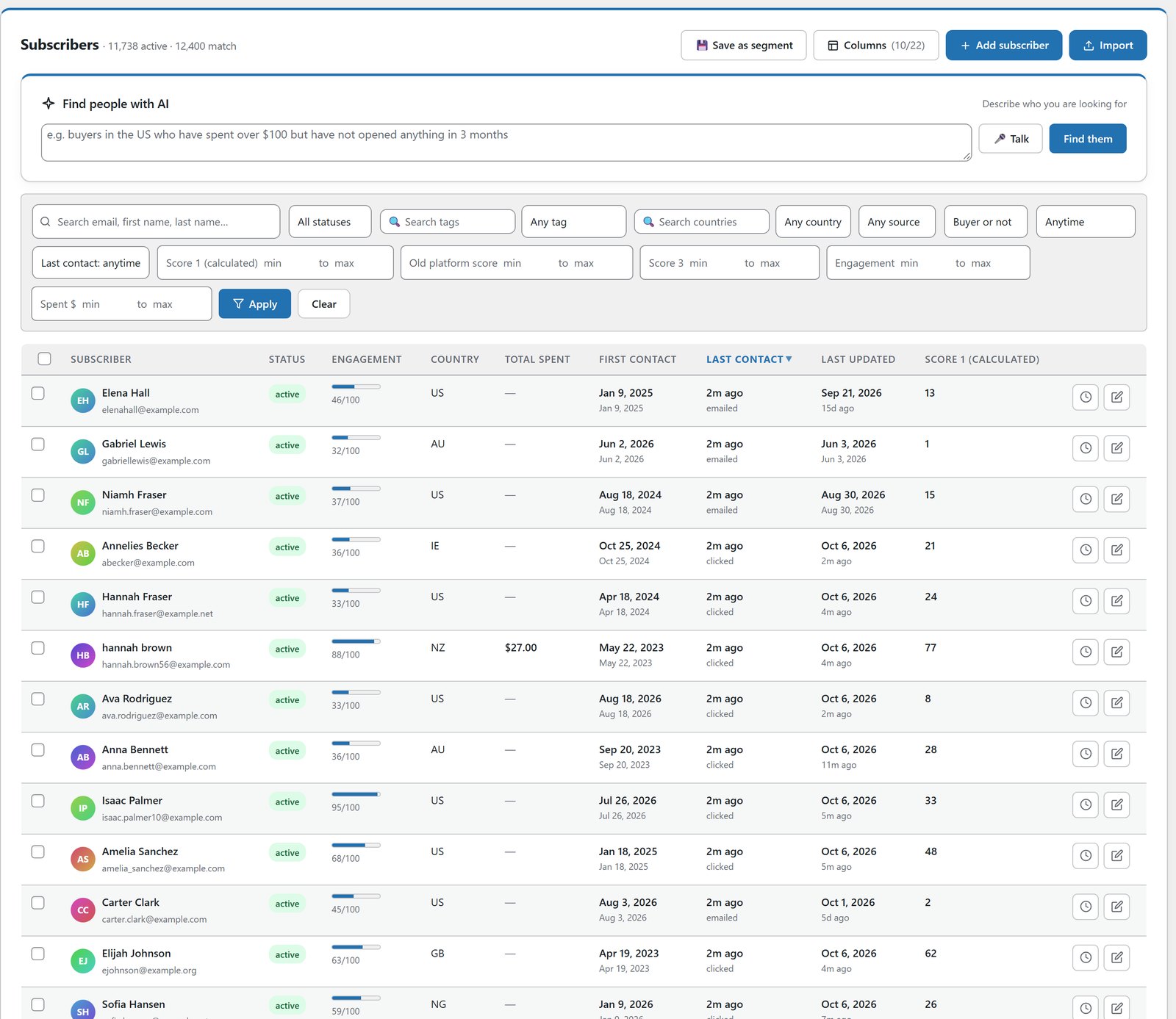
The AI audience builder knows your scores. Ask for “anyone with a score over 5, excluding buyers in the last 180 days” and it maps that to your real score fields and tells you which one it used.
A wide-net warning. Every AI-built audience shows what share of your whole list it matches, and anything matching 80% or more despite your filters gets a warning before you send. That catches the audience that quietly stopped filtering anything.
Saved segments sit beside your lists on the Audience step, with instant search, so a long list of segments is never a scroll.
Nothing changes by default. Classic sending and failover behave as they always have until you choose to switch a feature on.
A Week In The Life Of A Send
Put these on a real calendar and an ordinary week looks different. Monday, a 100,000-email promotion goes out on a drip, most-engaged first, with a sending window so nothing lands at 3am. Wednesday afternoon, an urgent correction needs to reach 500 people. Fair lanes gets it out without touching Monday’s drip. The delivery guard was watching all week and never had to step in.
Thursday, Monday’s promotion finishes, and the resend suite goes to work. Non-openers get an AI-rewritten subject line. People who clicked the pricing link but didn’t buy get their own follow-up. By Friday, three sends have gone out, one urgent email slipped in ahead of the queue, and nobody had to sit and watch a progress bar.
How It Works For Everyday Businesses
The Launch-Week Sender
A 100,000-email drip is under way when an urgent notice needs to go to 500 people. Fair lanes sends it without pausing the drip. That evening, a resend goes to everyone who opened the launch email but never clicked.
The Weekly Newsletter Sender
Sets a sending window of 8am to 8pm and lets most-engaged-first do the rest. If a send goes wrong, the delivery guard catches it before it spreads.
The Affiliate Running A Promotion
Sends the main email, then two days later resends to non-openers with an AI-written subject line. A separate follow-up goes only to people who clicked the bonus link.
The Agency Sending For Clients
One client’s flash sale needs to go out while another client’s newsletter is dripping. Fair lanes sends both, and seed checkpoints show inbox placement while each send runs.
The Business That's Been Burned Before
A previous platform let a bad batch keep sending for hours before anyone noticed the bounces. With the delivery guard, a failure spike pauses the broadcast and sends you an email first.
Getting Started
First, open the report for a broadcast that’s sending and look at the status card: sent, waiting, speed and finish time.
Second, try Pause on something low-stakes, then Resume, so you’ve seen the queue pick up exactly where it left off before you rely on it during a launch.
Third, queue a small test while something else is sending, and watch fair lanes interleave the two.
Fourth, after your next broadcast finishes, open its resend options and look at the live counts. Pick the group that matters most and try the AI rewrite.
Fifth, if you send at real volume, set a sending window and a speed once, add a couple of seed mailboxes, and let the Review And Send step confirm the plan before every send.
Before you scale up, clean the list. My guides to tidying names and verifying leads without losing customers cover it. If you sell solo ads, see the tools every solo ad seller needs.
What It Costs
ResultsAiX Mailer is $97 a year for 3 sites, with no per-contact pricing and no subscriber or sending limits from me. Every feature in this guide is included. Emails go out through your own sending service, such as Amazon SES, Resend or SMTP2GO, which you pay directly, and the AI features run on your own Claude or OpenAI key with no markup. There’s a 30-day money-back guarantee, and the Mailer is also part of the ResultsAiX Bundle.
Frequently Asked Questions
How Do I Send Email At Scale Without Losing Control?
Drip the send at a set speed, lead with your most engaged people, keep a sending window, and use a tool that can pause, speed up or stop a single broadcast and pause itself when failures spike. ResultsAiX Mailer does all of that from inside WordPress.
Can I Pause A Broadcast That's Already Sending?
Yes. One click freezes just that broadcast while other broadcasts and automations keep going. Resume picks up exactly where it stopped.
If I Discard The Rest Of A Broadcast, Are Those People Lost?
No. They’re set aside and stay visible on the report, and you can bring them back later with Backfill, even after the broadcast shows as finished.
What Are Fair Lanes?
When an urgent send is queued while a big drip is running, the two share each sending batch instead of the urgent one waiting behind. Automation emails have their own lane and are never held behind a broadcast.
What Does The Delivery Guard Do?
If too high a share of a broadcast’s recent sends fail, it pauses that broadcast and emails you the reason. You set the threshold and resume with one click.
How Is A Resend Audience Different From A Normal Segment?
A normal segment is a snapshot. Resend audiences are worked out when the resend actually sends, so anyone who opens the original in the meantime drops out automatically.
Does The AI Rewrite The Whole Email Or Just The Subject?
Both. It writes a fresh angle and a new subject line for that group, and you can review the draft before anything sends.
Does Seeding Affect My Stats?
No. Seed copies to your own mailboxes never count toward your opens or clicks.
Does Send The Rest Now Ignore My Sending Limits?
No. It finishes at full speed, but your daily caps and any warmup limits still apply.
Will Any Of This Change How My Broadcasts Send Now?
No. Classic sending and failover behave as they always have. Each feature here is something you switch on.
Can I Set A Sending Window And Still Let Urgent Sends Through?
Yes. A sending window, for example 8am to 8pm site time, applies to routine broadcasts. Automation emails and Send The Rest Now are never held by the window.
Do The Original Broadcast Stats Change When I Send A Resend?
No. The resend is its own broadcast with its own report, with its own opens, clicks and revenue. The original’s numbers stay untouched, so you can see exactly what the second touch earned.
Send More, Miss Nobody, Lose No Sleep
Pause, resume, speed up or discard any broadcast mid-send. Resend to non-openers, stalled readers or link-clickers, decided at send time. A delivery guard that pauses a broadcast before your reputation takes the hit.


