
Lead Scoring For Email Marketing, Before And After A Migration

This page explains lead scoring in plain terms. Keep the scores you bring from your old platform, then build a live score from what people actually do, with purchases counting most and older points fading over time, so you know who is ready to buy.
Lead scoring for email marketing gives every subscriber a number based on what they actually do, so you can see who’s worth emailing now. Done well, opens count a little, clicks count more, money counts most, and points fade with age so last year’s launch doesn’t crowd out this month’s buyers.
The tricky part is the move. If you’re migrating a list that already has scores on it, most platforms throw them away or overwrite them. This guide covers how to keep the scores you bring, how to build a live score that people can trust, and how lead scoring works in ResultsAiX Mailer.
The Migration Problem Nobody Plans For
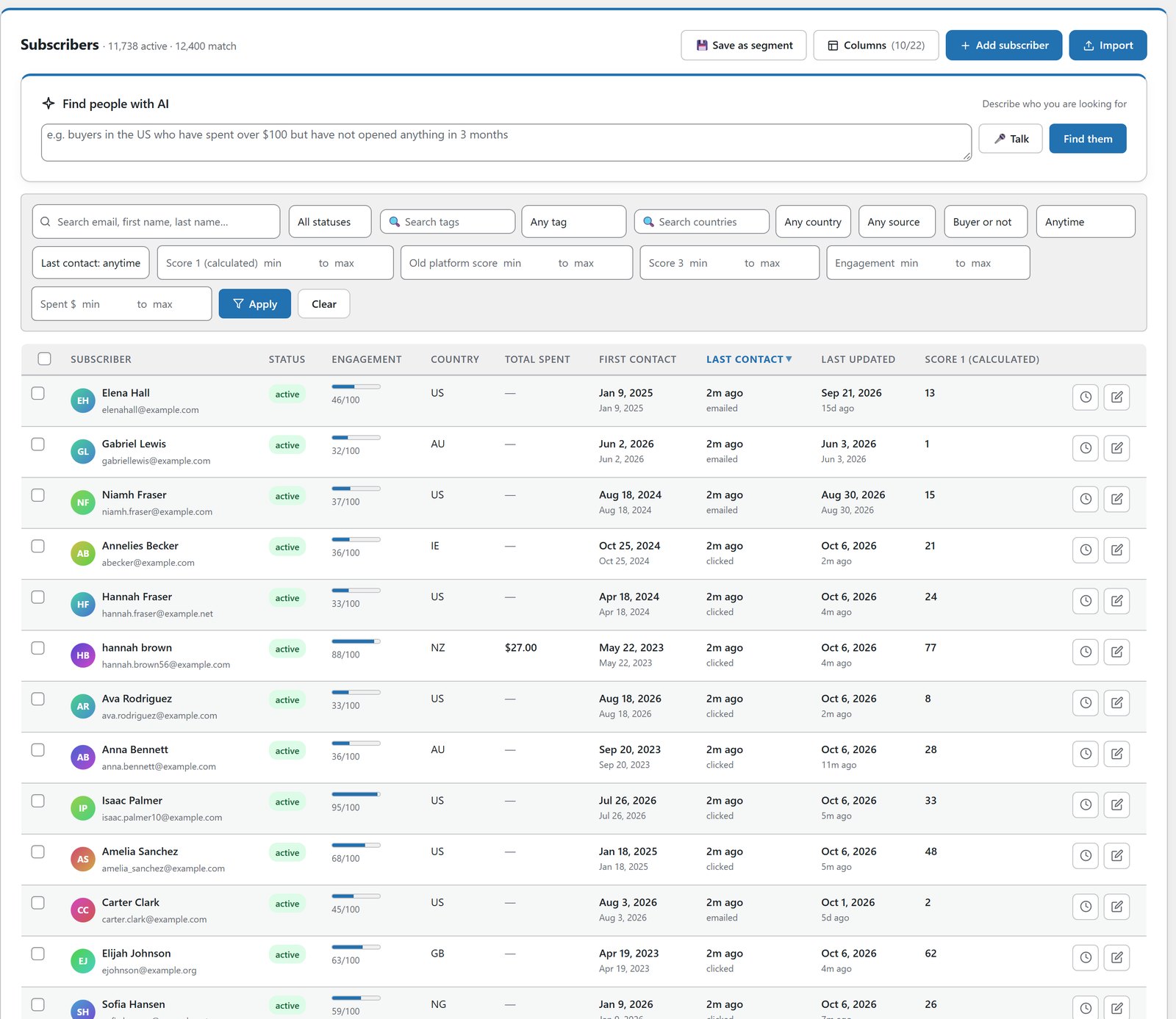
If you’ve been running a list on a platform that scores contacts, that score is real work. It’s months or years of behaviour. Then you migrate, and almost every destination does one of two unhelpful things. It ignores the column, or it drops the number into the field it calculates itself and overwrites it straight away.
The answer isn’t complicated, it just has to be decided on purpose. Keep imported scores in their own slots, and never let the rules touch them.
ResultsAiX Mailer has three score fields. Score 1 is the live, calculated score. The other two hold numbers you bring with you, kept exactly as they arrived and never recalculated, so you can still segment on them.
What Lead Scoring Should Actually Measure
A score that only counts opens is a popularity contest with a faulty scoreboard. A useful score weighs things in the order they matter to your business.
An open is worth a little. It’s weak evidence, because image pre-fetching creates some opens and image blocking hides others.
A click is worth several times an open. Somebody deliberately did something.
A purchase is worth many times a click, and a bigger purchase is worth more than a small one. This is where most scoring gets lazy.
Bounces, spam complaints and unsubscribes take points away. A score that only ever goes up isn’t really a score.
Here’s the example set of rules shown on the Mailer page. Every number is a box you type in.
- Opens an email: plus 1. Clicks a link in an email: plus 5. Clicks a tracked link on your site: plus 3.
- Buys anything: plus 20. Buys over $100: plus 40. Buys over $250: plus 100.
- Address bounced: minus 20. Unsubscribed: minus 30. Marked it as spam: minus 50.
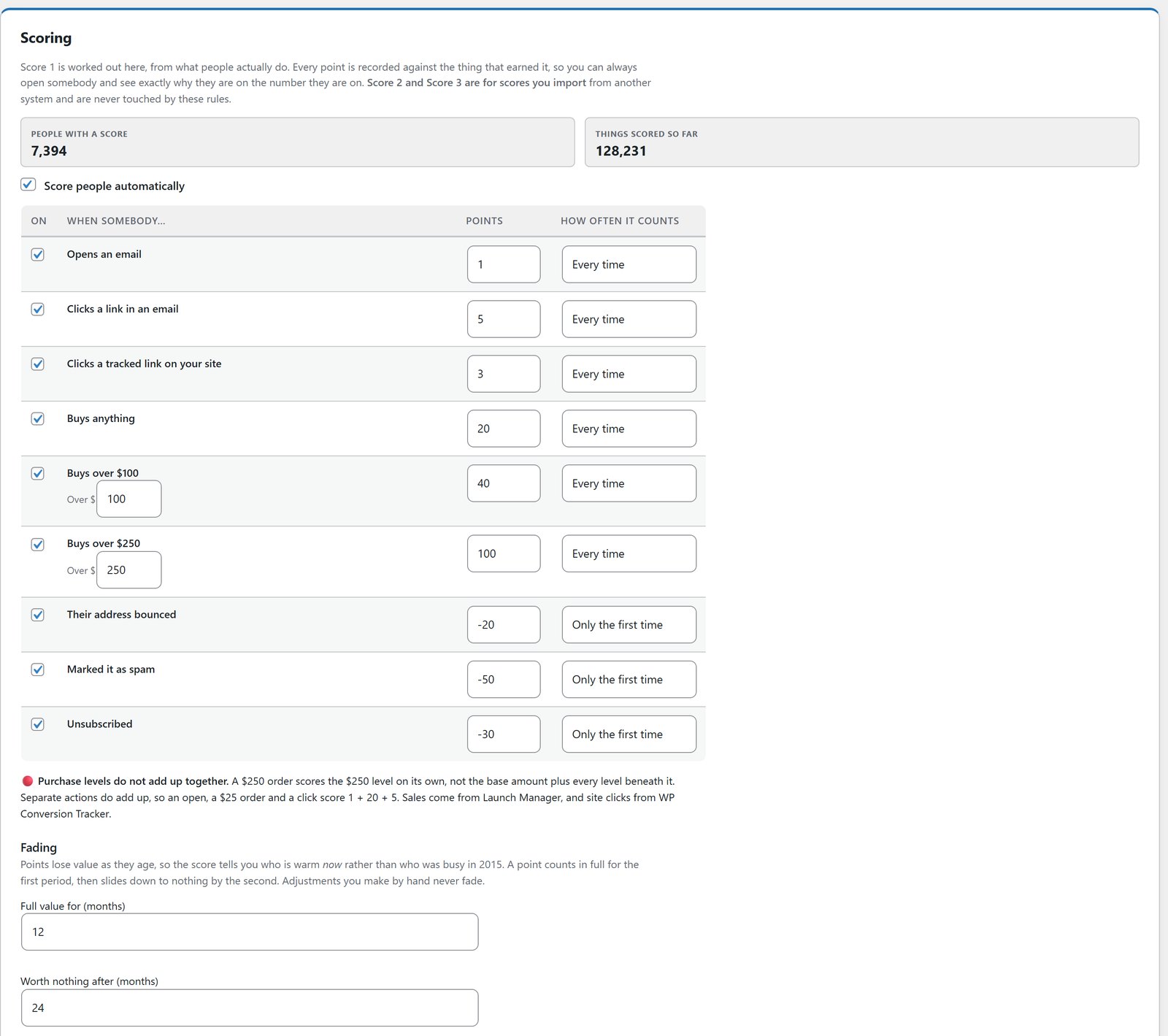
Two details matter more than they look. Purchase tiers don’t stack with each other, so a $250 order scores its own tier, not the sum of every tier below it. Separate actions do stack, so someone who opened, clicked and bought collects all three.
Count Once, Or Count Every Time
Each rule can count once or every time, and the right answer differs. Opening thirty emails should probably keep adding points. A bounce should count once, not thirty times.
Points Should Fade
Someone who was busy on your list two years ago and silent since isn’t a hot lead. If points never fade, your top scores fill up with people who were interested during an old launch.
Scores that fade with age answer a more useful question: who’s interested now. By default, points keep full value for 12 months and fade to nothing by 24 months, and you can change both. Manual adjustments never fade, because a score you set by hand is a decision, not an observation.
Show Your Working
A score you can’t explain is a number you won’t trust, and a number you don’t trust won’t get used.
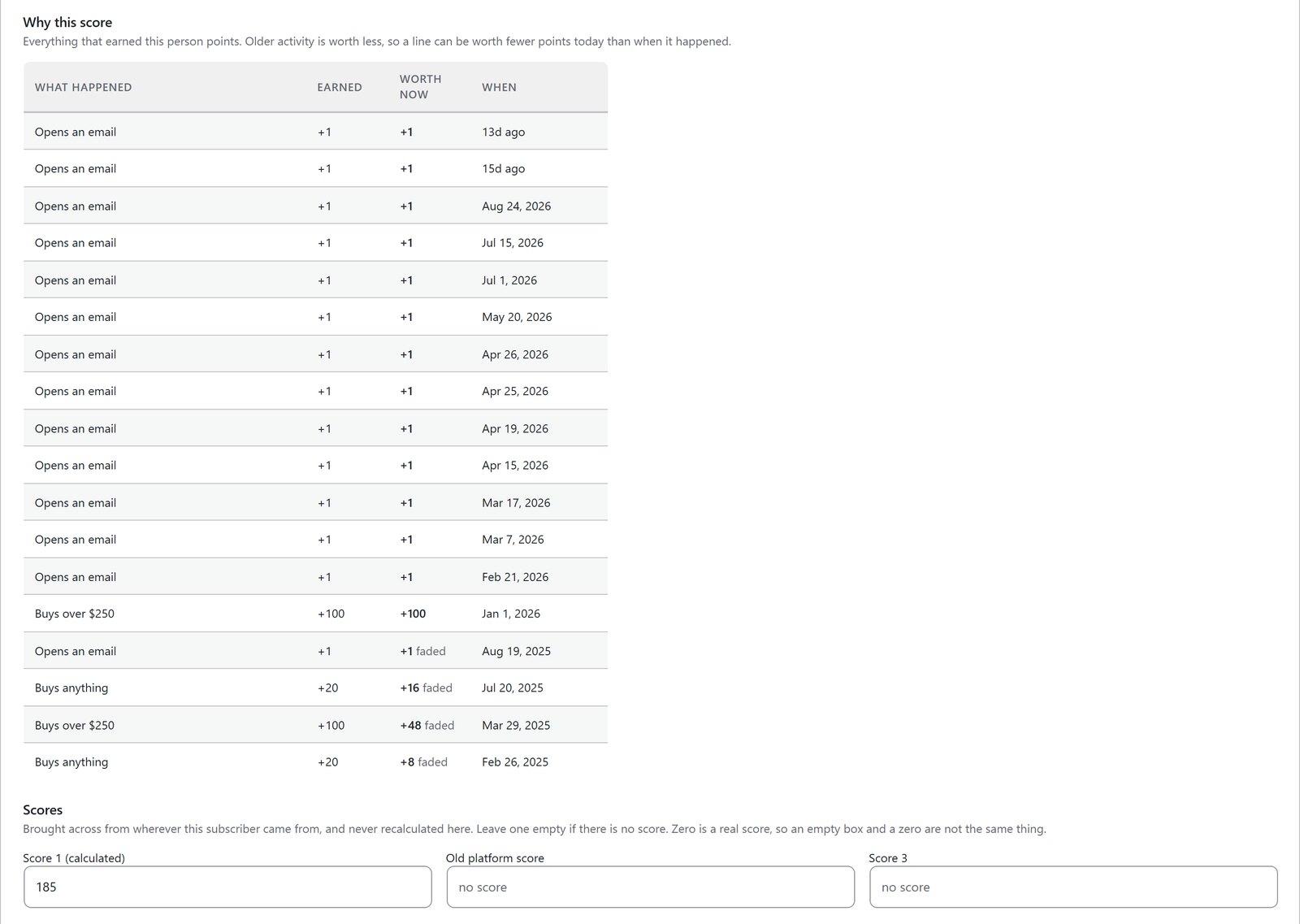
Open any subscriber in the Mailer and there’s a plain list of everything that earned them points. “Bought the annual plan, clicked 4 links, opened 11 emails, faded 9 points with age” tells you something. “68” on its own doesn’t.
Score On More Than Email
The behaviour that predicts a sale often happens outside the inbox. Somebody clicking through to your pricing page is a stronger signal than one more open.
In ResultsAiX Mailer, sales and tracked clicks on your own site count too, not just what people did inside an email. With WP Conversion Tracker AI on the same site, its Audience Vault also hands the Mailer 14 ready-made buyer segments built from real spend, recency and frequency.
The Things Rules Can’t See
You know things about your list that no rule can work out. A segment you tagged during a launch. People who came from a particular partner. A group who replied to you personally.
You can give a whole list or segment points in one go, with the reason recorded. That’s what turns scoring from an automated toy into something that carries your own judgement. It’s also how you seed sensible starting numbers on a freshly imported list before enough live behaviour has built up.
Put The Score To Work
A score only matters if something happens because of it. In the Mailer you can segment on it, sort your audience by it, and start automations from it.
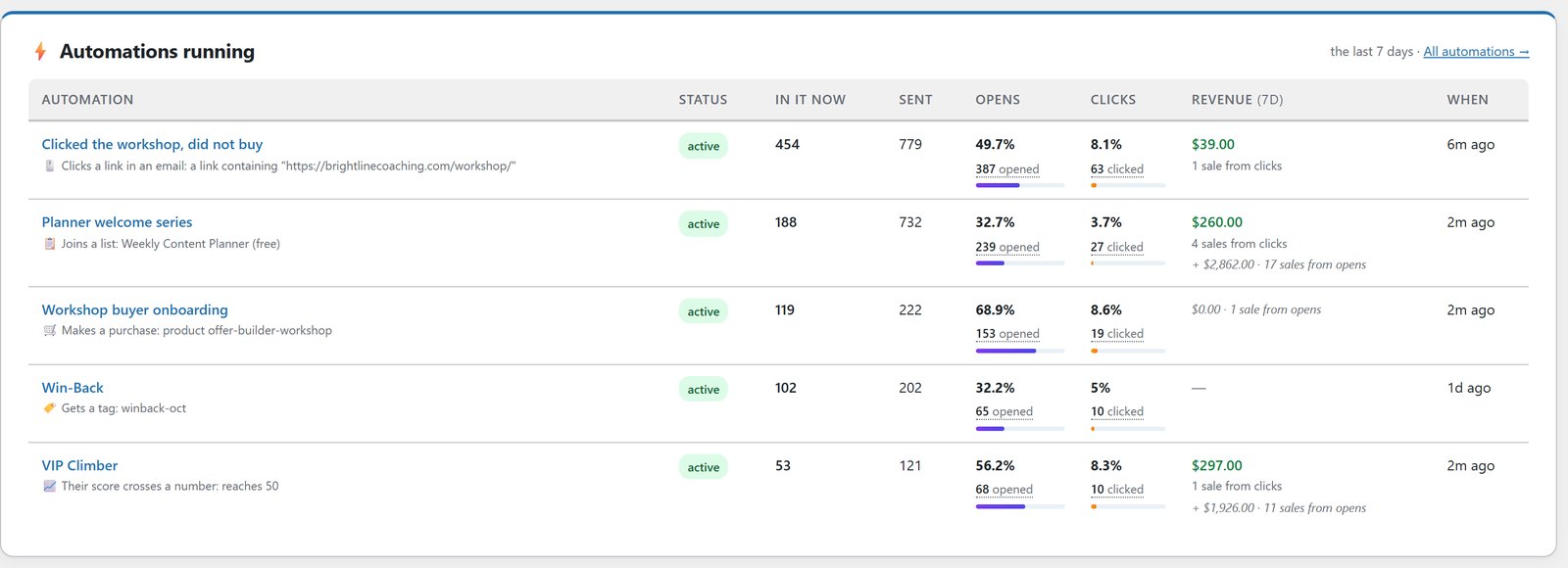
One of the 25 prebuilt automations, VIP Climber, does exactly that. When someone crosses an engagement score, it tags them VIP, thanks them, and gives them something nobody else gets. It arrives as a draft with every email written, so you read it and switch it on.
Imported Scores Work Everywhere
The scores you bring with you aren’t just stored. They’re filters on the Audience step when you send a broadcast, in saved segments, and on the Subscribers screen, and you can give each slot your own name, so “Old platform score” means something when you see it.
The AI audience builder knows about them too. Ask for “anyone with a score over 5, excluding buyers in the last 180 days” and it maps that to your real score fields and tells you which one it used, so you can check it picked the right one before you send.
A Sensible Order To Do This In
First, import your list, and map the old score column into one of the import slots. Don’t let it land in the calculated field.
Second, switch on the calculated score and leave the defaults alone for a couple of weeks.
Third, look at the top and bottom of the list. If the wrong people are at the top, change the rule that put them there, not the score.
Fourth, seed anything you know that the rules can’t see, using list or segment adjustments with a reason.
Fifth, start segmenting on it, and check the reasoning on a few subscribers before you trust it with a campaign.
The test is simple. Could you explain to somebody else why a particular subscriber has the number they have? If not, the scoring is decoration.
Before you score a freshly imported list, it’s worth doing the name cleanup and verifying your leads first. For everything else the Mailer does, read 20 things ResultsAiX Mailer can do.
Lead Scoring Mistakes To Avoid
Scoring opens like they’re sales. It rewards whoever’s mail client fires images, not whoever buys.
Letting scores only go up. Without negatives for bounces, complaints and unsubscribes, your “best” leads include people who asked you to stop.
Never fading points. Interest from two years ago isn’t interest now.
Overwriting the score you migrated. Keep the old number in its own slot. You may want it later.
Frequently Asked Questions
What Is Lead Scoring In Email Marketing?
It’s a number on each subscriber built from what they do: opens, clicks, purchases and the size of them, with points taken away for bounces, complaints and unsubscribes. It tells you who’s most worth emailing, and when.
Can I Keep The Lead Scores From My Old Platform?
Yes. Imported scores go into their own slots, and the calculated rules never touch them, so the number you migrated with stays exactly as it arrived.
What Earns And Loses Points?
Opens earn a little, clicks earn several times more, and purchases earn most, with higher tiers for larger orders. Tracked clicks on your own site count too. Bounces, spam complaints and unsubscribes subtract points. Every number is editable.
Do Purchase Tiers Stack?
No. A large order scores its own tier rather than adding every tier beneath it. Separate actions do stack, so an open, a click and a purchase add up together.
Why Do Points Fade Over Time?
So the score shows who’s interested now. By default points keep full value for 12 months and fade to nothing by 24, and both are adjustable. Scores you set by hand never fade.
Can I See Why Somebody Has Their Score?
Yes. Every subscriber has a plain list of everything that earned them points and what age has taken off.
Can I Score A Whole Segment At Once?
Yes. You can adjust a whole list or segment in one go, with a reason recorded.
What Does It Cost?
Lead scoring is included in ResultsAiX Mailer, which is $97 a year for 3 sites with a 30-day money-back guarantee. The Mailer is also part of the ResultsAiX Bundle.
Know Who Is Worth Emailing Today
Imported scores kept exactly as they arrived. A live score built from opens, clicks and real purchases. Every point explained on the subscriber record.


