
SMTP Rotation And Email Warmup: How To Send High Volume Without Getting Blocked

Big senders get blocked when one connection carries every email, or when a new connection is hit with full volume on day one. This page explains SMTP rotation, warm-up, failover and the DKIM guard in ResultsAiX Mailer, and how to set each one up.
SMTP rotation spreads your sends across several sending connections instead of pushing everything through one, and email warmup builds a new connection’s daily volume up gradually instead of hitting it with your whole list on day one. Together with a check that every connection is properly authenticated, they’re what lets you send high volume without getting blocked.
This guide explains how each piece works, the order to set them up in, and how ResultsAiX Mailer handles rotation, warmup and failover across 12 sending services from inside your own WordPress.
The Real Problem Is Never The List Size
Nobody gets a domain flagged just for sending a lot of email. They get flagged for sending a lot of email through one connection, on one identity, with no ramp-up and no backup. A mailbox provider doesn’t see your volume as such. It sees a pattern, and one connection carrying every send for a big list is the easiest pattern in the world to flag.
The answer isn’t sending less. It’s spreading the same volume across more than one connection, warming each new one up properly, and making sure every connection in the pool is authenticated before it’s trusted with real sends.
Where Your Email Actually Goes Out
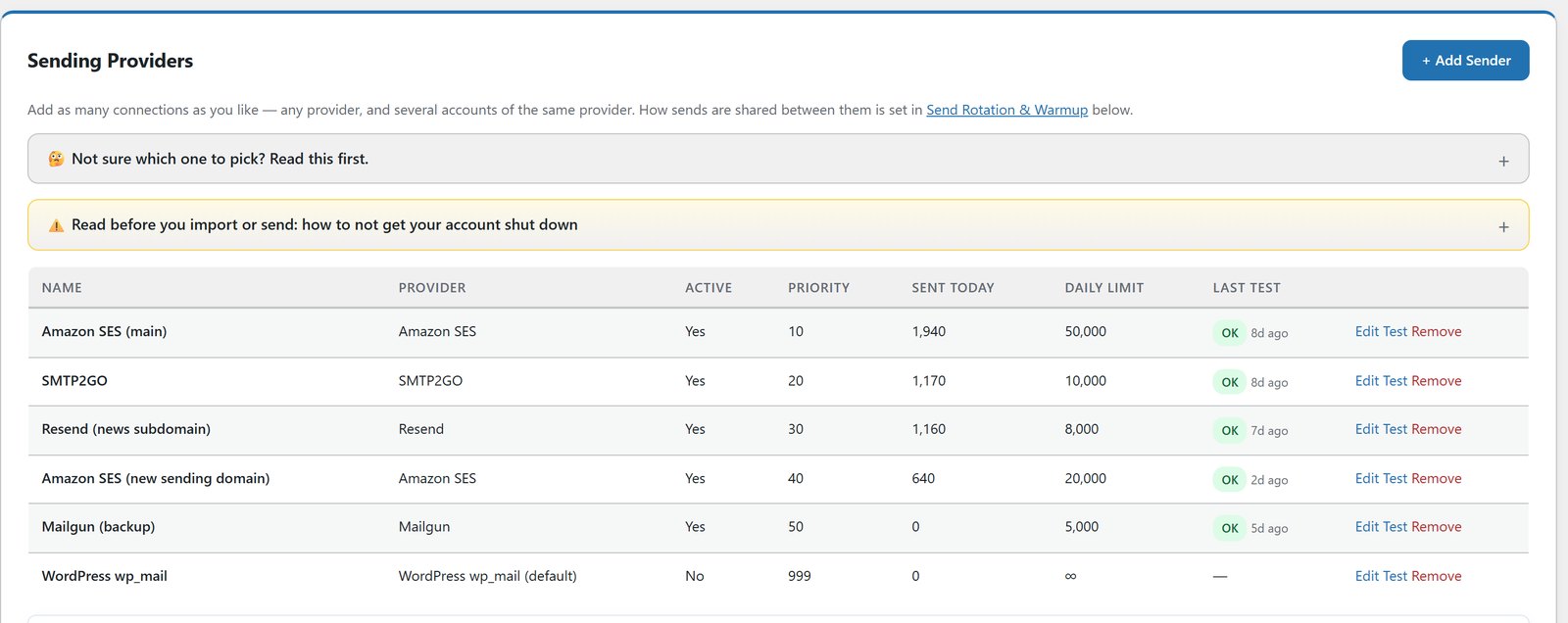
ResultsAiX Mailer runs on your own WordPress, but it doesn’t send the email itself. It sends through the services you connect, and you pay those providers directly. There are 12 built in: WordPress mail, your own custom SMTP server, Amazon SES, SendGrid, Mailgun, Postmark, Resend, SparkPost, Mailjet, Brevo, Elastic Email and SMTP2GO.
Each one has step-by-step setup beside it and a written guide covering DNS, keys and regions, plus a guide to picking the right service for your list size and budget. Several of them have free tiers for low volume, which is a fine place to start. Watch out for free tiers with a daily limit, not just a monthly one, because a daily cap can stall a big broadcast halfway.
What SMTP Rotation Actually Does
Connect as many sending accounts as you like, from any provider, including several accounts on the same provider. Then choose how sends are shared out.
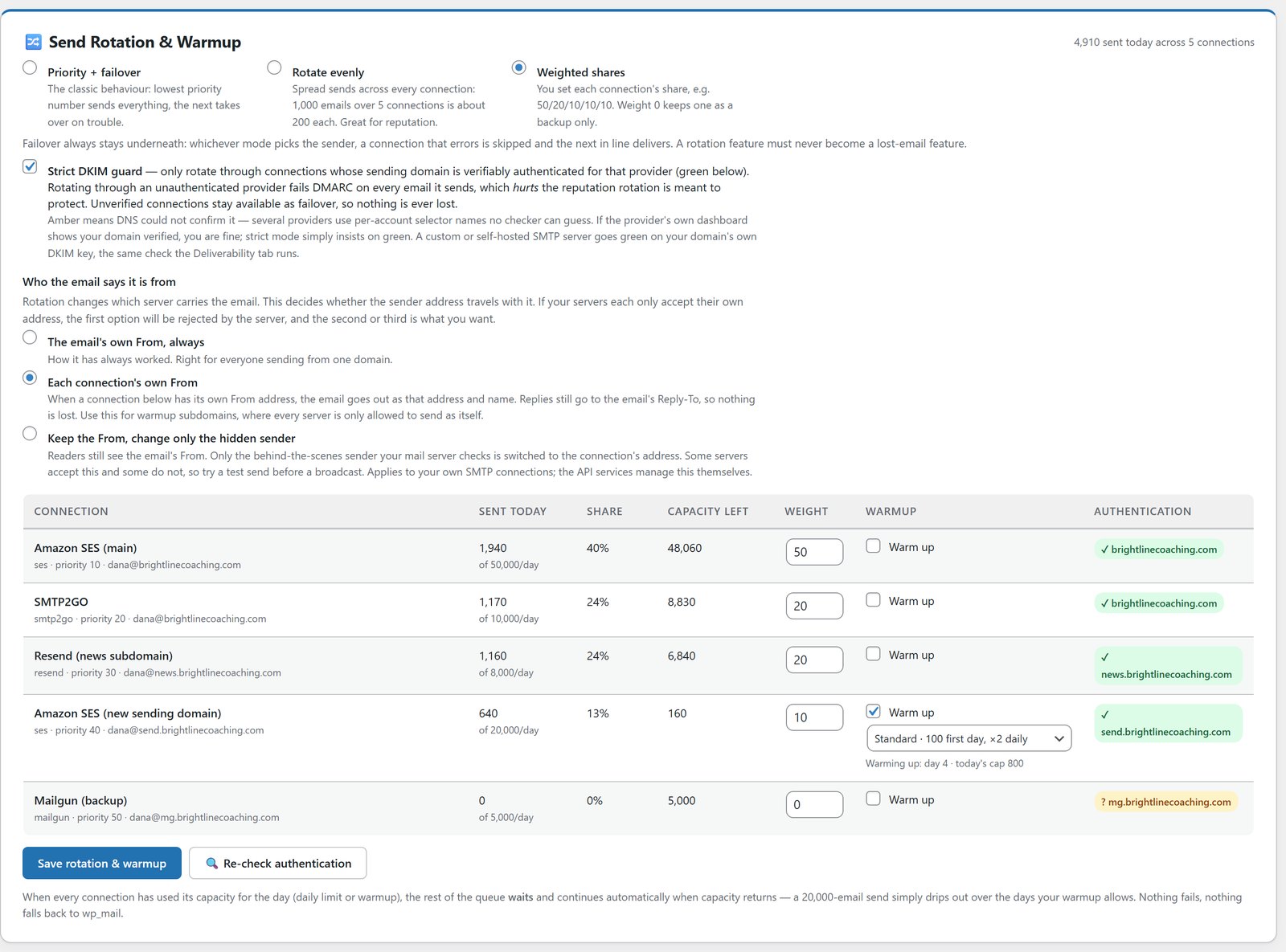
- Failover: one main connection, the rest in reserve in priority order. This is the default, so nothing changes until you choose otherwise.
- Rotate: sends are spread evenly across every eligible connection. A 1,000-email broadcast over 5 connections works out at about 200 each, with no manual splitting.
- Weighted: set your own shares, like 50/20/10/10/10, when one account can handle more than the others, or to ease a new account in slowly.
The picker always looks at what each connection has actually sent that day relative to its share, and the lowest goes next. So one connection never quietly ends up doing all the work while the others sit idle. A connection that’s full or paused simply drops out of the pool until it’s available again.
Warmup: The Part Everybody Skips
A brand new server or a freshly connected account has no sending history. Point 20,000 emails at it on day one and you’re not testing deliverability, you’re asking for a block.
Warmup is set per connection. There are three presets and a custom option. Conservative starts at 50 a day and grows by half each day. Standard starts at 100 and doubles daily. Fast starts at 500 and doubles daily. Custom lets you set your own starting number and growth.
Queue a big send against a connection that’s still warming up and nothing fails and nothing is dropped. The rest of the queue politely waits and goes out as that connection’s daily capacity grows. If every connection hits its cap, the remainder carries on tomorrow.
That’s the difference between “I added a new sending account and it got flagged in two days” and a connection that’s still healthy a month later.
The DKIM Guard: Rotation Without It Is Reckless
Spreading sends across five connections only protects your reputation if all five are properly authenticated for your sending domain. One that isn’t fails authentication on every send it gets, and drags the rest down with it.
The DKIM guard checks each connection’s sending domain. A connection shows as ok when authentication is found, or unknown when nothing can be detected from DNS, which happens with some providers. By default both are eligible, because no proof isn’t the same as proof of a problem.
Switch on strict mode and only connections showing ok take part in rotation. The rest stay in the failover tail, so no email is ever lost to the guard. And every send checks your suppression list before a single email is released.
Who The Email Says It’s From
When rotation picks a connection, you choose what the reader sees. The email’s own From for every connection, which is the default. Or each connection’s own From name and address, with Reply-To kept, so replies still reach the same inbox. Or the email’s From for the reader, with only the envelope sender carrying the connection’s address.
That matters more than it sounds. Some sending services reject an email whose From doesn’t match the account it’s sent through, so being able to choose keeps rotated sends from being turned away.
Failover Sits Under All Of It
Whatever mode you run, a connection having a bad day never costs you an email. A timeout, a provider issue or a hit daily cap and the queue moves to the next healthy connection in the pool. Rotation and warmup decide who sends first. Failover decides what happens when one of them can’t.
Sending runs from a queue in batches, so if PHP times out mid-send, the next run carries on where the last one stopped.
Watch Who’s Actually Delivering
Rotation and warmup are only as good as your ability to see whether they’re working. Every broadcast report in the Mailer breaks opens down by device, country and inbox provider. If one provider starts opening far below the others, that’s the fastest way to spot a spam folder problem, early, instead of three months later when the list has gone quiet.
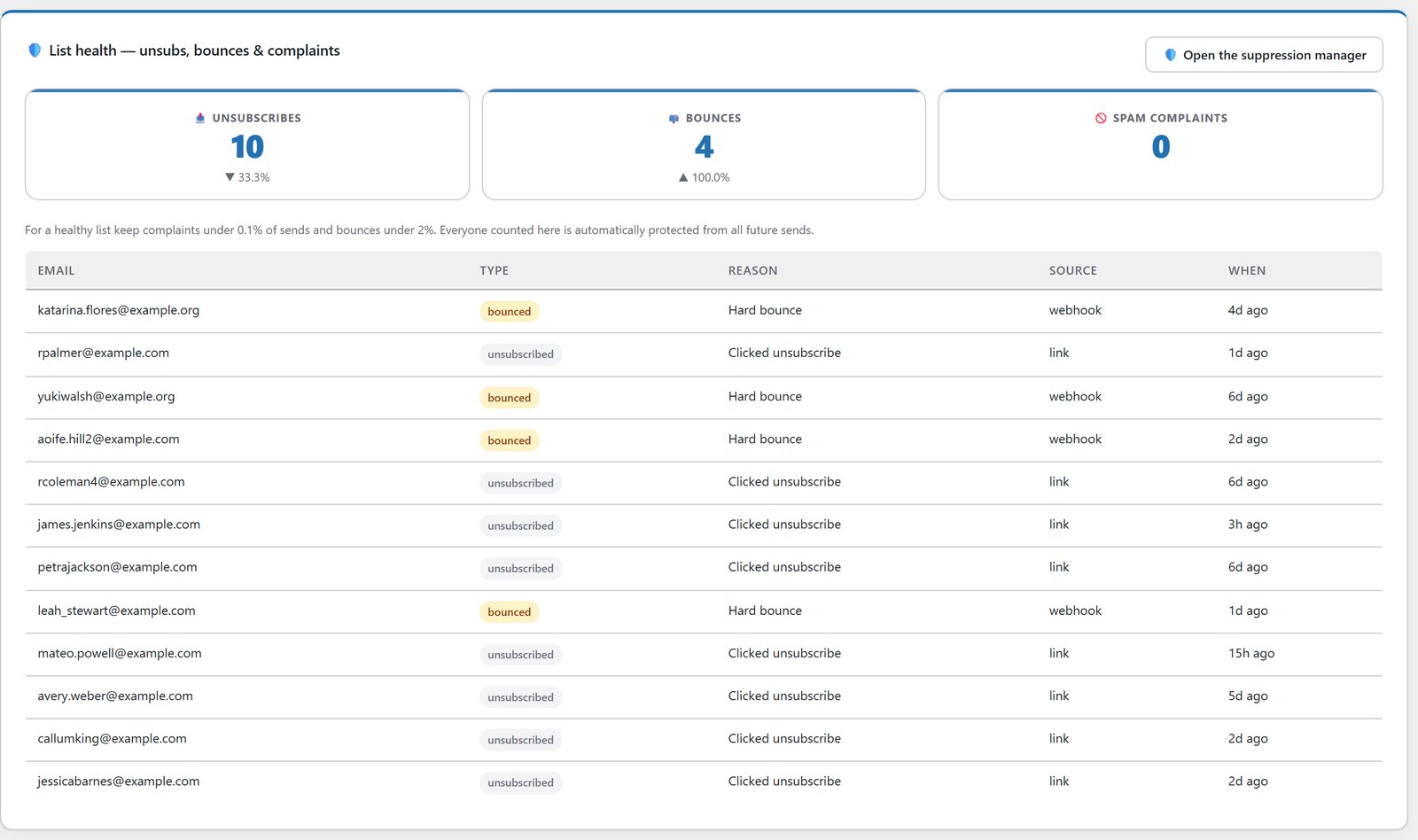
List Health shows unsubscribes, bounces and spam complaints for any date range, with trends and the benchmarks that decide whether you keep reaching the inbox. And every email is scored out of 100 before it leaves, with a plain-English list of what to fix.
Protect The Sends You’re Rotating
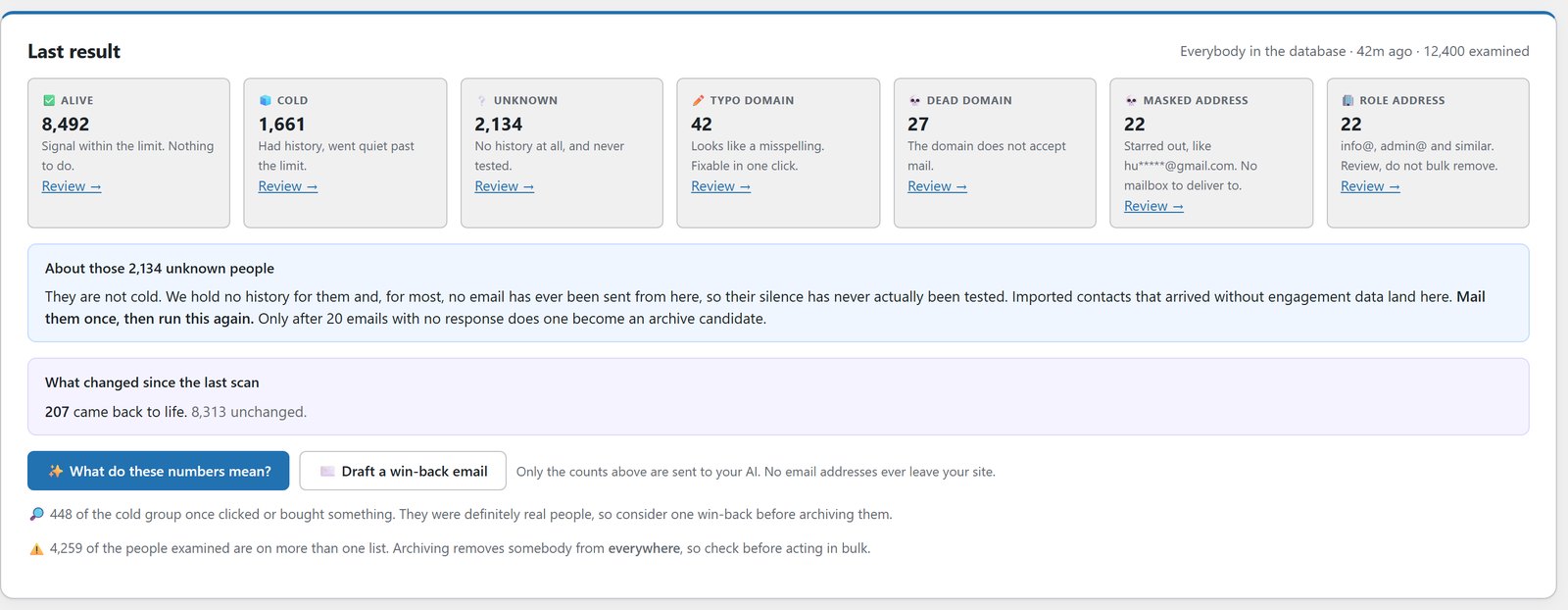
None of this helps if the list behind it is full of dead domains and typos dragging every connection down together. Run a list verification pass before you scale up, and clean up the names while you’re there, so the reputation you’re protecting isn’t quietly undone by the addresses you’re sending to.
A Sensible Order To Set This Up In
First, connect your first sending service and confirm your domain’s DKIM is authenticated.
Second, add a second connection before you need it, not after the first one gets flagged.
Third, switch on warmup for any new connection, and let the preset run rather than pushing it faster.
Fourth, move from failover to rotate or weighted once you have two or more healthy, authenticated connections.
Fifth, switch on strict DKIM mode once every connection in the pool shows ok, so a connection you forget to check can never quietly join the rotation.
Sixth, watch the inbox provider breakdown for the first few sends on any new connection. That’s where a problem shows up first.
High-volume senders don’t get in trouble for the volume. They get in trouble for sending all of it from one place, with no ramp and no authentication check. If you sell solo ads, my guide to the tools every solo ad seller needs shows how this fits with tracking and proof, and 20 things ResultsAiX Mailer can do covers the rest of the Mailer.
Frequently Asked Questions
What Is SMTP Rotation?
SMTP rotation spreads your email across several sending connections instead of one. In ResultsAiX Mailer you can rotate evenly, set your own shares per connection, or keep simple failover, with automatic failover underneath every mode.
How Does Email Warmup Work?
A new connection starts with a small daily cap that grows each day, like 100 on day one and doubling from there. Anything queued beyond the cap waits and goes out as capacity grows, so nothing fails or gets dropped.
Do I Need Several Sending Accounts?
You need one to send at all. Rotation and weighted shares only apply once you add a second connection. Failover, the default, works with just one.
Is Sending Through Several Accounts Allowed?
Using several legitimate accounts to send your own mail is common practice. Always check the limits and acceptable use terms of each provider you connect.
Does The DKIM Guard Stop A Connection From Sending?
No. By default, connections showing ok or unknown both rotate. In strict mode, only ok connections rotate, and the rest stay in the failover tail as a last resort.
Can I Set My Own Warmup Ramp Instead Of Using A Preset?
Yes. There are three presets, Conservative, Standard and Fast, plus a Custom option where you set your own starting number and daily growth.
Do I Need A Big List Before Rotation Is Worth Using?
No. Warmup matters most on a fresh connection whatever your list size, and adding a second connection before you need it means you have a backup ready. Several sending services have free tiers for low volume, which is a fine place to start.
Does Anything Change If I Never Switch Rotation On?
No. Failover is the default, so nothing changes until you choose rotate or weighted.
Is Sending Included In The Price?
No. The Mailer sends through your own sending service, such as Amazon SES, Resend or SMTP2GO, which you pay directly. ResultsAiX adds no subscriber or sending limits of its own.
What Does ResultsAiX Mailer Cost?
$97 a year for 3 sites, with all 12 sending connectors, rotation, warmup and failover included, and a 30-day money-back guarantee. It’s also part of the ResultsAiX Bundle.
Send More Without Torching Your Reputation
Rotate across unlimited SMTP connections, any provider. New connections warm up automatically, nothing fails or drops. A DKIM guard keeps unauthenticated domains out of the pool.


