
How To Verify Email Leads Without Deleting Your Best Customers

Opens are the wrong way to decide who is a real lead. This page shows how ResultsAiX Mailer separates addresses that no longer work, addresses that were typed wrong and real people who have simply gone quiet, so you clean your list without losing buyers.
To verify email leads without deleting your best customers, judge people on what they’ve done, not just on opens. A purchase outranks a click, a click outranks an open, and someone you’ve never actually mailed hasn’t gone quiet. They’ve never been tested.
Most list cleaners get this backwards, and it’s how a cleanup ends up binning a buyer with years of orders behind them. This guide shows the six groups worth sorting your list into, why “cold” and “unknown” need different treatment, and how Verify Leads in ResultsAiX Mailer shows you what each person spent before you touch anything.
Why Most Tools Verify Email Leads Badly
Almost every list cleaner scores people on opens. That one decision is why cleanups so often make things worse.
Opens are unreliable in both directions. Apple Mail pre-fetches images and creates opens that never happened, which makes dead addresses look alive. Meanwhile, anyone reading with images turned off never registers an open at all, which makes some of your most careful readers look dead.
Picture a subscriber flagged as cold who has 166 orders and $3,910 of lifetime spend behind them. They just haven’t opened anything lately, in a mail client that doesn’t report opens. A cleaner working from opens alone would delete them without a word.
So the first rule of verifying leads: a purchase counts most, then a click, then an open. Silence on its own never condemns anybody.
Six Groups, Not One Verdict
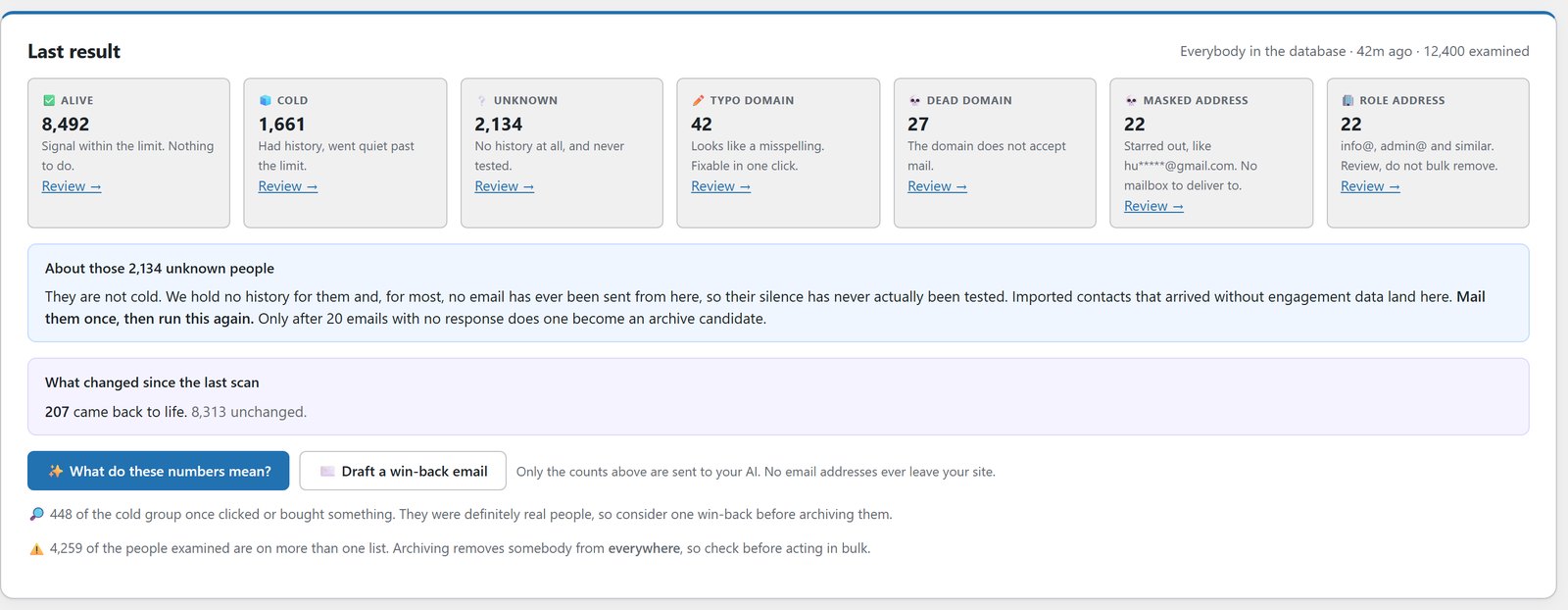
“Good address” and “bad address” is too blunt to act on. Verify Leads sorts people into six groups, and each has a different right response.
- Alive: recent evidence of a real person. Leave them alone.
- Cold: history, then silence. Worth one win-back email before anything else.
- Unknown: never actually mailed from here. More on this group below.
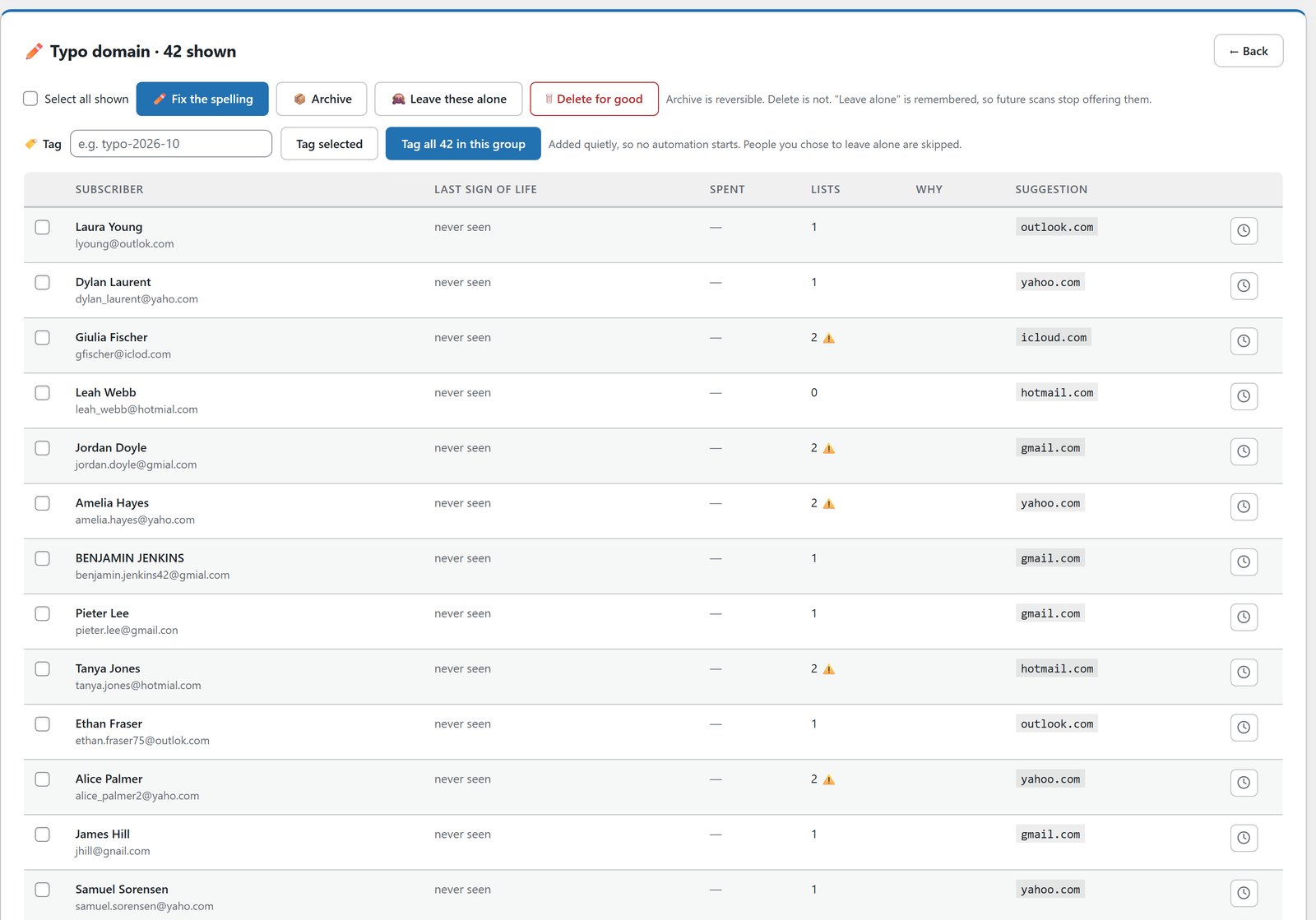
- Typo domain: someone typed gnail.com. That’s a subscriber you keep, corrected in one click.
- Dead domain: the domain doesn’t accept mail at all. These really do have to go.
- Role address: info@, sales@, admin@. Not a person, and worth a review.
It also picks up masked addresses, like hu*****@gmail.com, which can never be delivered.
Cold And Unknown Aren’t The Same Thing
This is the distinction that saves lists. Cold means you mailed them and they went quiet. That’s evidence. Unknown means you never actually mailed them from here, so their silence has never been tested.
Imported contacts that arrived without engagement data land in Unknown. Treating them as cold and archiving them would delete people who were never given a chance to respond. Mail them once, then run the check again.
Show Me The Money Before I Act
The screen that stops a cleanup becoming an expensive mistake is the review table. Every flagged subscriber arrives with their lifetime spend, their order count, how many of your lists they’re on, and the exact reason they were picked up.
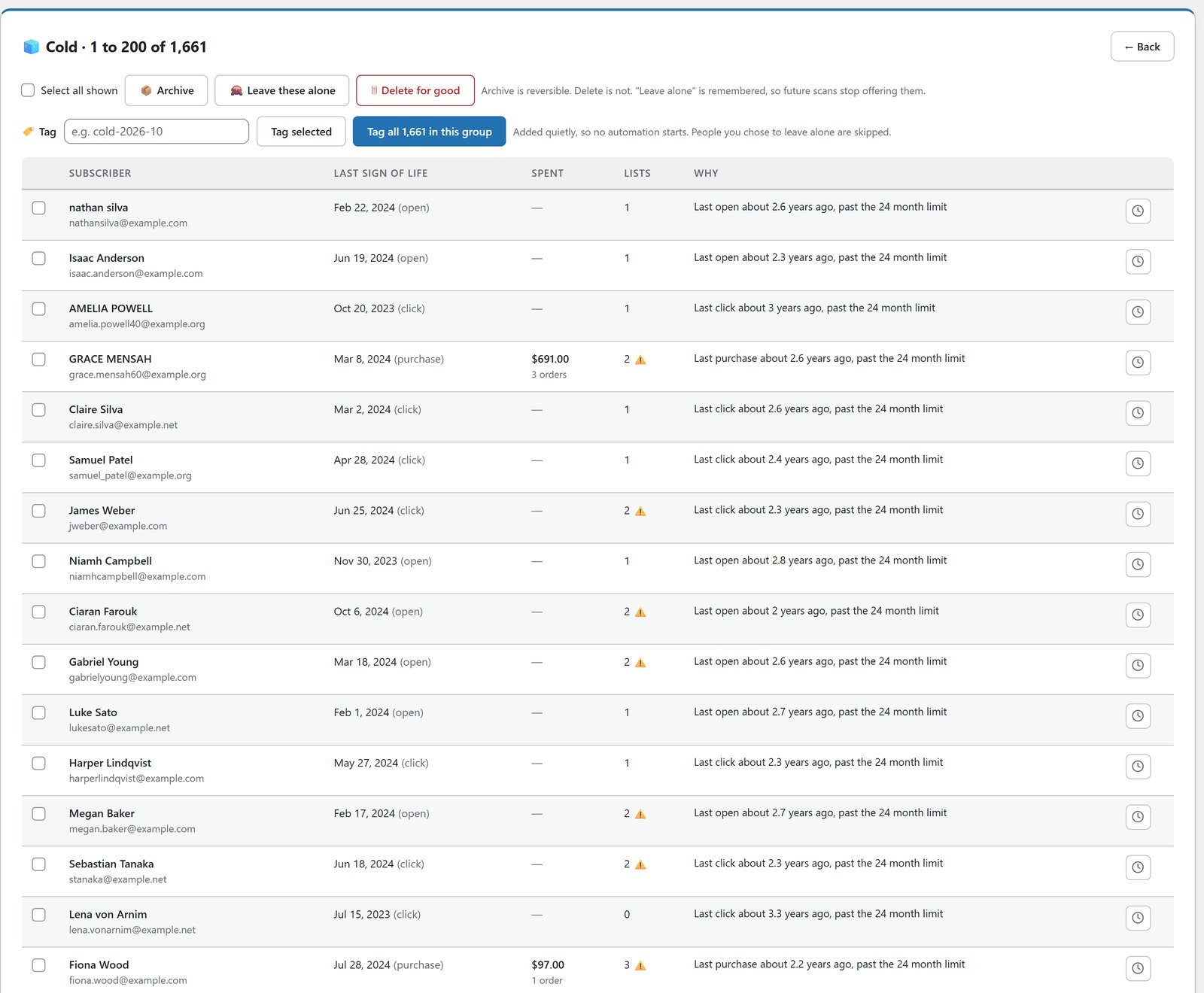
Two warnings on that screen matter more than they look.
People on more than one list. Archiving removes somebody from everywhere, not just the list you’re looking at, so it warns you before you act in bulk. In the example run on the Mailer page, 14,821 of the 24,715 people examined sat on more than one list.
Cold people who once clicked or bought. They were definitely real. That’s a win-back email, not a delete. If you have an AI key connected, you can ask it to draft that win-back email for the people worth one more try. Only the totals are sent, and no email address ever leaves your site.
Archive, Don’t Delete
Deleting is permanent and almost never necessary. Archiving does the job that actually matters for deliverability: archived people are never emailed and never counted, so your sending reputation and your open rates both benefit straight away.
The difference is that everything is kept. Their history stays intact, and if one of them clicks, buys or opens something later, they come back automatically. You can also mark people as “leave alone”, and future checks stop offering them up.
Delete is still there as a separate, deliberate choice, for the addresses that really have to go.
Masked Addresses: The Quiet Ones
Masked addresses, like hu*****@gmail.com, sometimes arrive on a list with an import. They look like real subscribers in a spreadsheet, but no email can ever reach them.
Verify Leads picks them up, so they don’t sit on your list dragging your numbers down. It’s one of those checks that sounds minor until you see how many of them an old export can hold. Treat them like dead domains: they’re not people you can reach, so there’s nothing to win back.
Reading Your Own Tags As Evidence
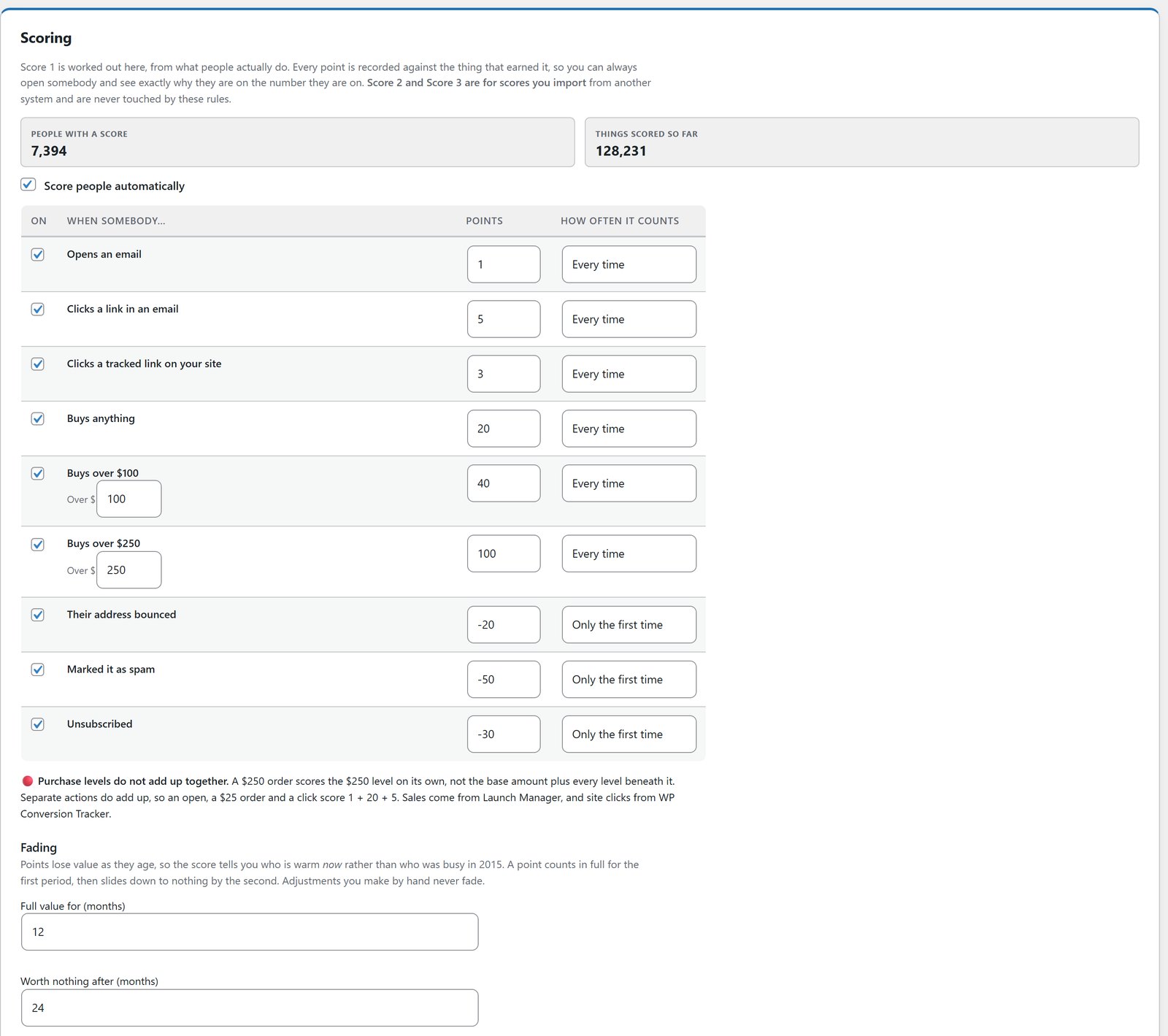
If you’ve run a list for years, you’ve probably tagged engagement by hand at some point: a tag for people who opened in a certain year, a click tag, a year marker. That’s real history, and most tools ignore it.
Verify Leads reads those tags as dates, so years of evidence you already recorded counts, instead of starting from whatever your current platform happens to know.
The check also looks at the person, not just the list you picked. Someone quiet on one list who bought something last month through another list still comes back as alive.
Limits Set Per Provider
Not every mailbox provider punishes dead addresses equally. The strict ones are harder on old, unengaged addresses than the rest. So a single “inactive after 24 months” rule is too harsh for some and too soft for others. In Verify Leads, the limits are set per provider, and every one of them is yours to change.
Run It On A Schedule, But Only As A Report
Automatic cleanup sounds efficient and is a bad idea. You can schedule the check weekly or monthly, but a scheduled check only ever reads and reports. It never archives, removes or deletes anybody on its own.
Each run tells you what changed since last time, including who came back to life. A person decides what happens next.
What To Do With Your Own List
Run the check on your whole database. It only reads, so there’s nothing to lose by looking.
Deal with dead domains and masked addresses first. Those are clear-cut.
Fix the typo domains, one click each. Those are subscribers you keep.
Mail the Unknown group once, then run the check again. Don’t archive them before that.
Sort the Cold group by spend. Anybody with real money behind them gets a win-back email, not an archive.
The point of verifying leads isn’t a smaller list. It’s to stop sending to addresses that hurt your reputation, while keeping every person who’s still worth something to you.
If you’ve just imported a list, do the name cleanup first, and once the list is healthy, lead scoring tells you who’s worth emailing next. If deliverability is the bigger worry, read my guide to SMTP rotation and warm-up.
Frequently Asked Questions
How Do I Verify Email Leads Without Losing Customers?
Use purchases and clicks as well as opens, keep never-mailed contacts in their own group, see each person’s lifetime spend before acting, and archive rather than delete. Verify Leads in ResultsAiX Mailer does all of that and changes nothing until you choose.
How Is This Different From An Email Verification Service?
A verification service checks whether an address can receive mail. Verify Leads also weighs whether the person behind it is still engaged, using purchases and clicks as well as opens, and it runs on your own site instead of uploading your list to a third party.
Why Are Opens Unreliable?
Apple pre-fetches images and creates opens that never happened, which makes dead addresses look active. People who read with images turned off never register an open, which makes real readers look dead. That’s why a purchase or a click always outranks silence.
What's The Difference Between Cold And Unknown?
Cold means you mailed them and they stopped responding. Unknown means no email has been sent to them from here, so their silence hasn’t been tested. Mail Unknown people once before you decide anything.
Is Archiving Reversible?
Yes. Archived people keep their full history, are never emailed or counted, and come back automatically the moment they click, buy or open something. Deleting is a separate, deliberate action.
Will It Archive People Automatically On A Schedule?
No. A scheduled check only ever reports. You always make the decision.
Does My Subscriber Data Leave My Site?
No. The check runs on your own database inside WordPress. If you use the AI to explain the numbers or draft a win-back email, only the totals are sent, never an email address.
What About People Who Are On Several Of My Lists?
The review screen shows how many of your lists each person is on, and it warns you before a bulk action, because archiving removes somebody from everywhere, not just the list you’re looking at.
What Does It Cost?
Verify Leads is included in ResultsAiX Mailer, which is $97 a year for 3 sites with a 30-day money-back guarantee. The Mailer is also in the ResultsAiX Bundle.
Verify Your List Without Losing Buyers
Six groups, not one blunt yes or no. Lifetime spend shown on every flagged subscriber. Archive is reversible and brings people back automatically.


