
The ResultsAiX Theme: One WordPress Theme That Writes, Designs And Runs The Whole Business

This page is the full guide to the ResultsAiX Theme, one WordPress theme that runs a blog, sales pages, funnel pages or a members area. It walks through the AI tools on every edit screen, Post From A Link, the AI Publisher, layouts, SEO, pictures, cookie notices and legal pages, so you can see everything it does before you choose.
This blog runs on the ResultsAiX Theme, and so does my members area. Many of the posts you’ll find here were drafted, illustrated and SEO-filled inside the theme’s own writing room, on the normal WordPress edit screen, before I read them and pressed Publish.
It’s an AI WordPress theme in the plain sense of the words. One theme that runs a blog, sales pages, funnel pages and a full members area, with an AI workstation built into every edit screen. No page builder, no separate SEO plugin, and no membership plugin needed for the basics.
This is the complete guide to what it does. If you’d rather go step by step from a blank install, read the getting started walkthrough instead.
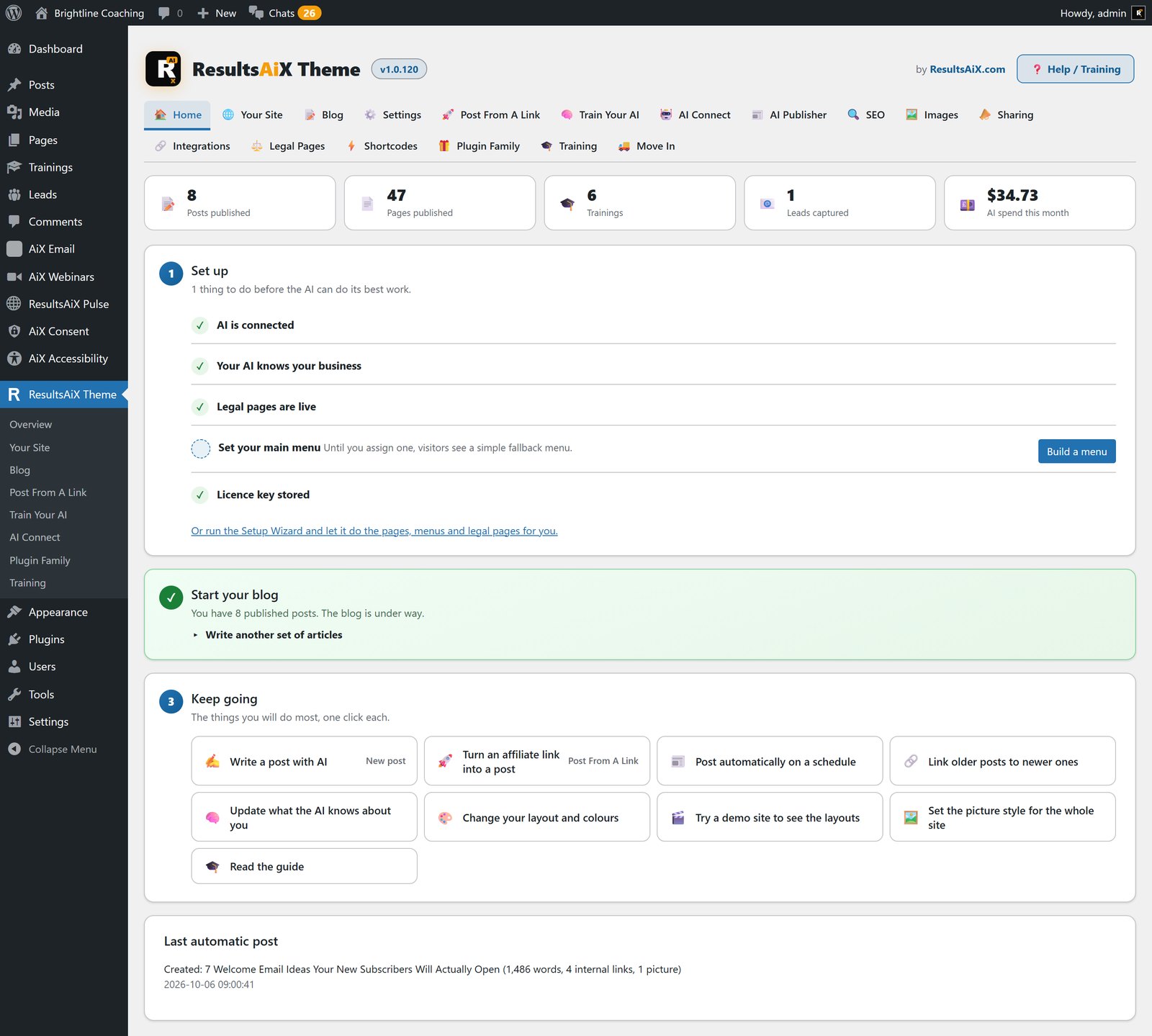
One Theme Instead Of Five Plugins
Most WordPress sites are a theme with plugins bolted on afterwards: a page builder, a membership plugin, an SEO plugin, a form plugin, and an AI tool in another tab that has never seen your site. Five settings screens and five bills.
The ResultsAiX Theme puts those pieces inside the one thing you have to choose anyway. It installs like any WordPress theme and needs WordPress 6.0 and PHP 7.4 or newer. A Setup Wizard asks what you’re building, a business or blog site, a membership or course site, or a funnel site, and creates the pages, menus and legal pages to match.
An AI Workstation On Every Edit Screen
Open any post or page and there’s a gold Create With AI button. Press it and a full workstation opens over the editor. Type what you want, press Talk and say it, or leave the brief blank and the title becomes the brief. Stuck for an idea? Give Me Ideas reads your business and what you’ve already published, then suggests eight articles.
You choose the length, the voice, a target keyword, and whether you want pictures, internal links, an FAQ, a key takeaways box, a comparison table and a call to action. What comes back is a finished article as proper WordPress blocks: headings, pictures in your media library with alt text, links to your own published posts, a category picked from the sections you already use, and the SEO title and description filled in.
Improve What's Already There
Once a page exists, the button reads Edit With AI. Improve the writing, make it longer, add pictures, internal links or an FAQ, working on the page as it stands. A reply that comes back shorter than your article is refused, so your work is never swapped for a stub, and any link the AI tries to invent is removed before you see it.
It Asks Before It Spends
Anything that costs money or overwrites something asks first, in plain English, with the picture cost shown. Tick several steps and they run in order with Step 3 of 7 on screen. Pictures are made one at a time, each in its own short request, and Stop keeps everything already made.
Change The Layout By Describing It
Say it in words. Pictures smaller and on the left. An opt-in box after the second section. Pricing above the FAQ. The AI reads a numbered outline of your blocks, never your writing, and answers with a short list of moves you read before pressing Apply. One press undoes the lot.
Post From A Link
This one is for affiliates. Paste the affiliate link you were given and add a line of your own if you like. The theme follows the link to the offer’s own page, reads what it says, and writes a finished post around it: key takeaways, the sections, an honest who-should-skip-it, a FAQ, pictures, links to your other posts, a category, tags and the SEO.
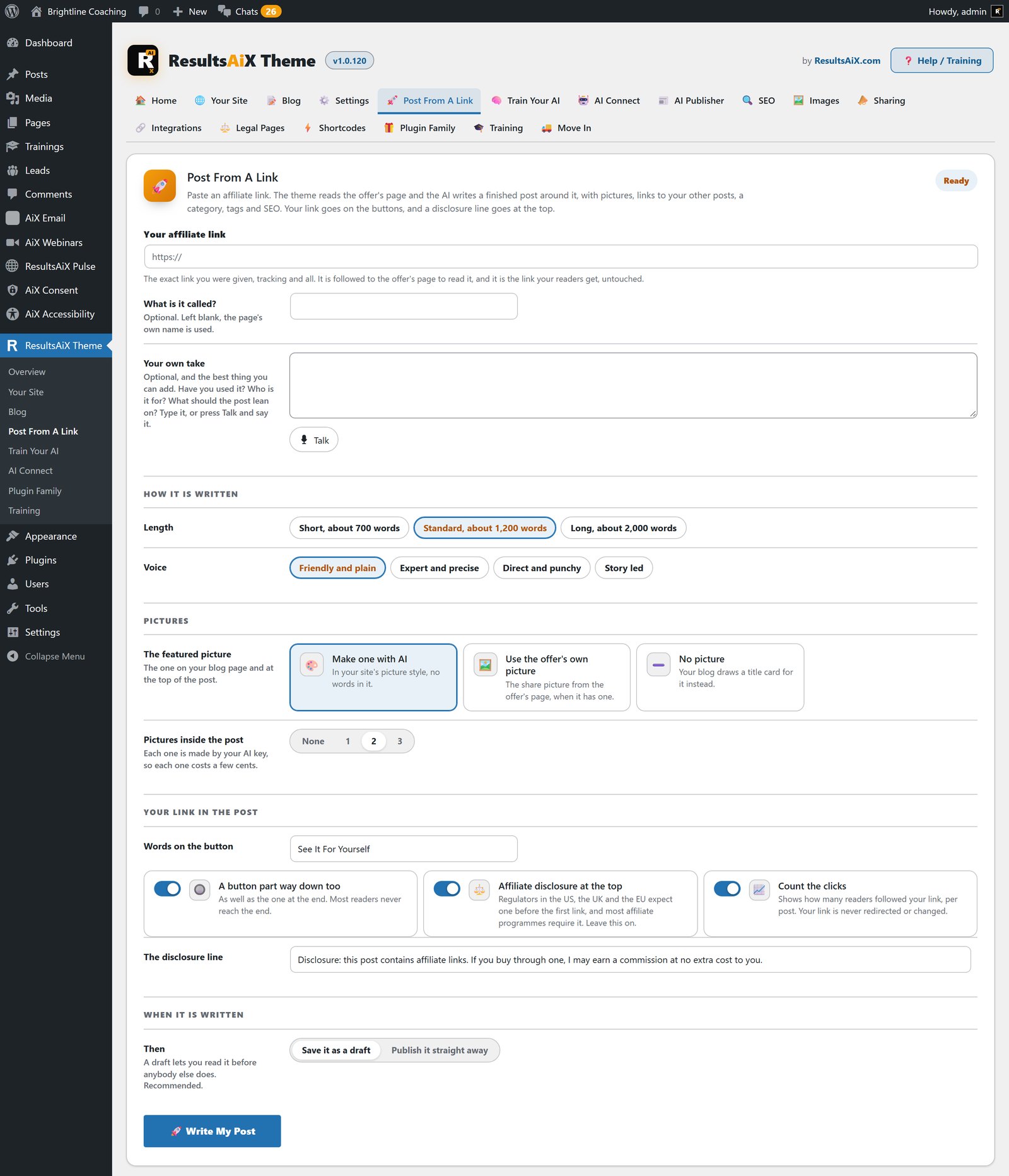
It writes only from the offer’s page and your notes, so there are no invented prices, bonuses or income claims. Your exact link goes on the buttons, never shortened or cloaked, marked sponsored the way Google asks, with a disclosure line at the top. Each post counts the readers it sent to your link, and it lands as a draft for you to read first unless you choose otherwise.
Posts On A Schedule With The AI Publisher
Give the AI Publisher your topics, a daily or weekly schedule, and a choice of publishing or saving as draft. Each post is written to your brand brief, illustrated, SEO-filled and internally linked.
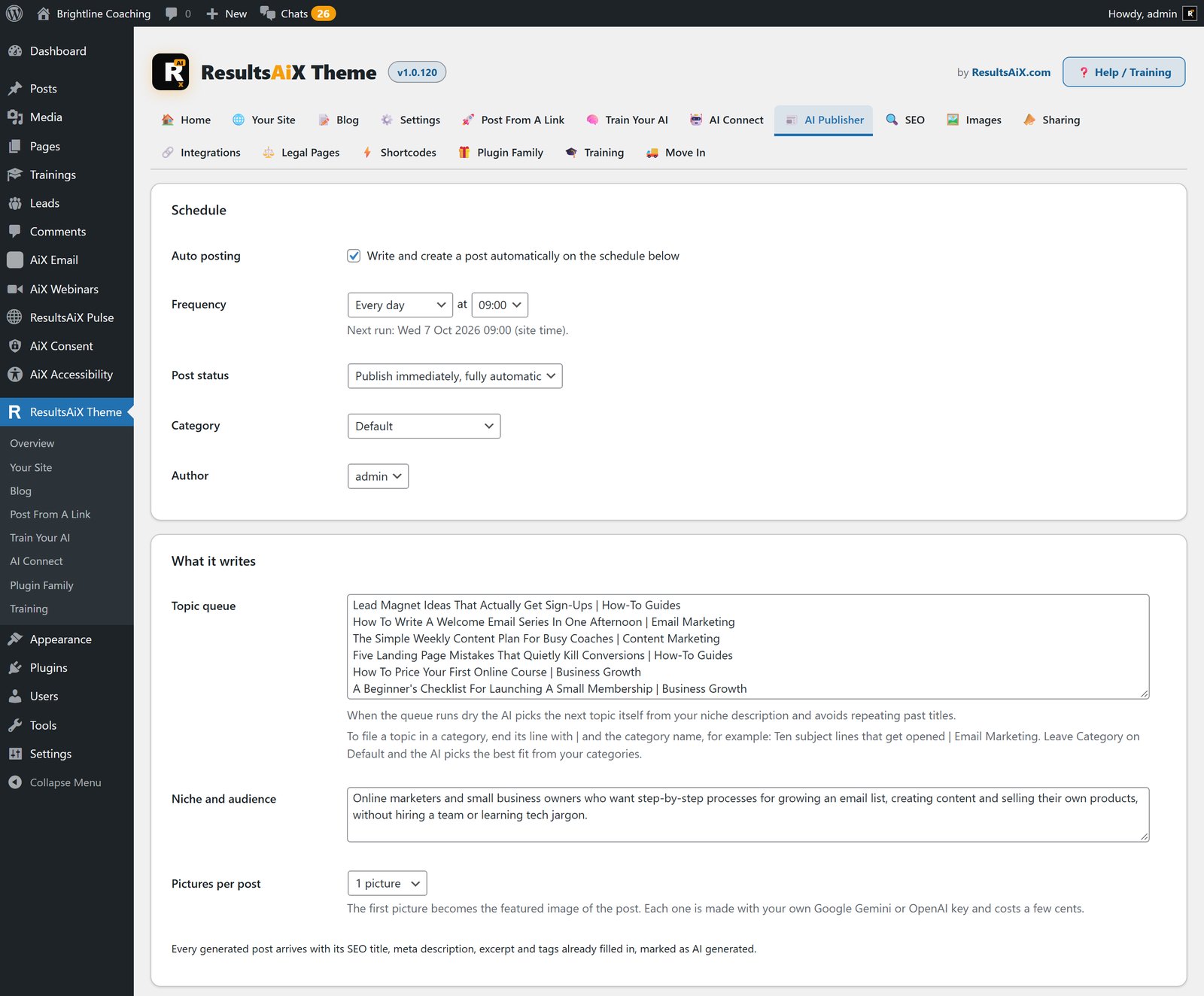
It files posts properly. Add a bar and a category name to the end of a topic line and that’s where the post goes, or leave Category on Default and the AI picks the best fit from your own categories. Every post gets a title of its own, written around its main search phrase. You choose how many pictures go in each post, from none to three, and the first becomes the featured image.
One tick puts a short headline on the featured picture: a banner-style picture with a bold hook of a few words, drawn in your own picture style, while the pictures inside the article stay free of text. It works in the Publisher, Create With AI and Post From A Link.
Starting from an empty blog? Auto Start My Blog plans three to ten articles, shows you the plan before a penny is spent, then writes them one at a time.
Train Your AI: Why It Sounds Like You
Every AI feature in the theme writes from one brand brief: who you are, who you serve, how you talk, the words you never use, and what you sell. Fill it in by hand, or paste your website address and let it read your own pages and fill itself in.
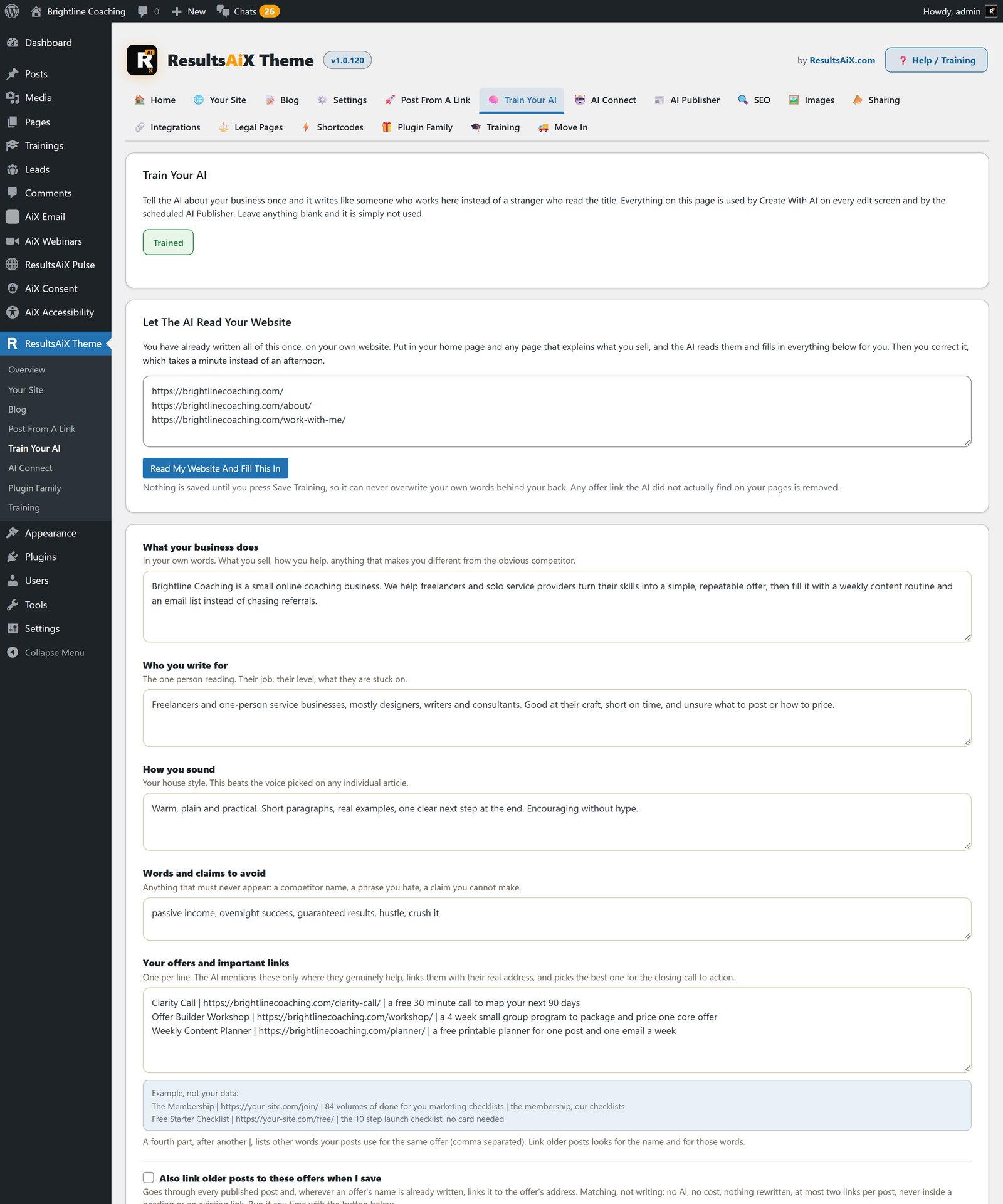
An offers list tells the AI which products and links it may mention, so a call to action always points at a real page. The prompts ban the usual AI phrasing, and internal links go to pages that exist. Pictures follow one house style that you try on a sample first.
Writing runs on Anthropic, OpenAI or Google Gemini, and pictures on OpenAI or Gemini, all on your own key at the provider’s price. Every AI feature stays out of sight until a key is added.
Layouts, Colour Schemes And Your Login Page
Four kinds of site from one theme: a classic site with top navigation, an app-style member portal with a left sidebar, a boxed classic, and a minimal, distraction-free layout. Pick a default in the Customizer, and any single page can pin its own.
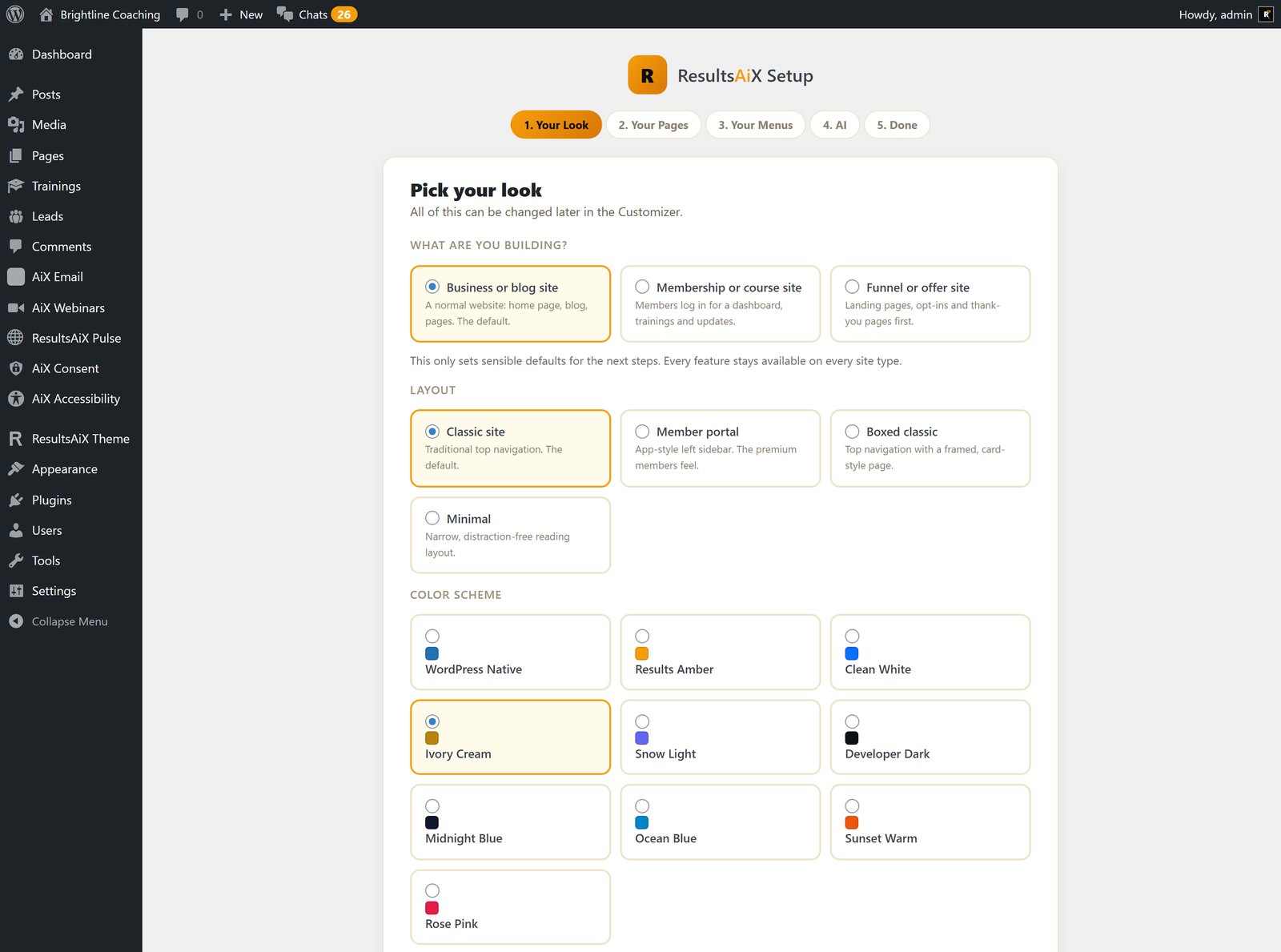
There are ten colour schemes, from Clean White to Developer Dark, and every colour in a scheme can be overridden on its own. The blog has four layouts too, list, card grid, magazine and a classic narrow list, and visitors can switch to the view they prefer with icons above the list.
Your login page gets the same care: four layouts, your logo, a background in your colours or a picture you choose or make with AI, and your own welcome line. Nothing on it says WordPress.
Landing Pages With The Header And Footer You Choose
The Landing template is a blank, full-width canvas for offer pages, thank-you pages and anything a funnel plugin draws. The header can be none, your logo only, or the full site header. The footer can be none, a quiet Landing footer, or the full site footer. Set it for the whole site or page by page.
The Landing footer is one line of your links with your small print underneath, which is exactly what an ad platform wants to see: Privacy and Terms links, and nothing else to click. And the Checkout Button turns any checkout link you already have into a proper buy button with the price, a note and trust chips.
A Members Area Without A Membership Plugin
A Trainings post type holds topics and an ordered lesson list, with progress bars on every lesson. A Member Dashboard template gives members a welcome, a Browse Trainings button and their own trainings. Shortcodes show content only to signed-in or only to signed-out visitors and greet members by name.
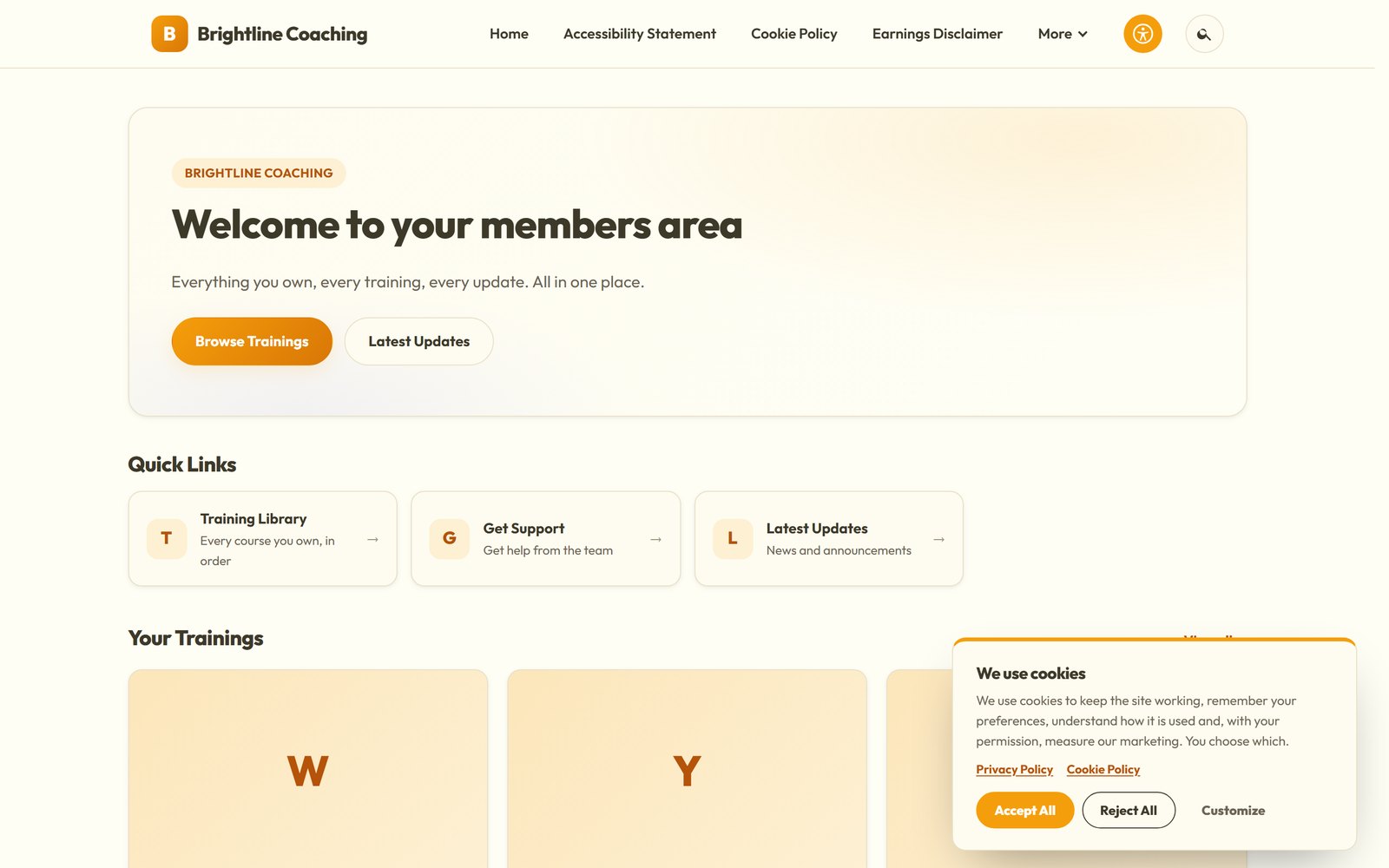
It all reads WordPress’s own login, so it works with whichever membership plugin you run. If you want levels, content protection and payments too, that’s ResultsAiX Membership, and the two work together. The theme does the look; the plugin does access and money.
SEO, Sitemap And Internal Links Built In
Every page gets a document title, meta description, canonical link, Open Graph and Twitter cards, robots rules, structured data and visible breadcrumbs. The SEO box on each post holds the title, the description and a noindex switch, and a noindex page is left out of the sitemap too.
The WordPress XML sitemap is kept and narrowed rather than replaced, and you decide what it carries. If a dedicated SEO plugin is active, the theme’s own SEO output steps aside on its own, so nothing is printed twice.
Internal links are handled without AI at all. New posts link to older ones on publish, and a queue works back through your archive so older posts point forward to newer ones. It costs nothing, and Unlink takes a post’s links back out. Google Analytics 4, Tag Manager and the Meta pixel go in by ID, and your own admin visits are never tracked.
The Images Tab: Lighter Pictures, Same File Names
Large pictures are the heaviest thing on most websites. The Images tab reads your media library and tells you what it weighs, which pictures are heaviest, and roughly what you’d get back. Reading changes nothing.
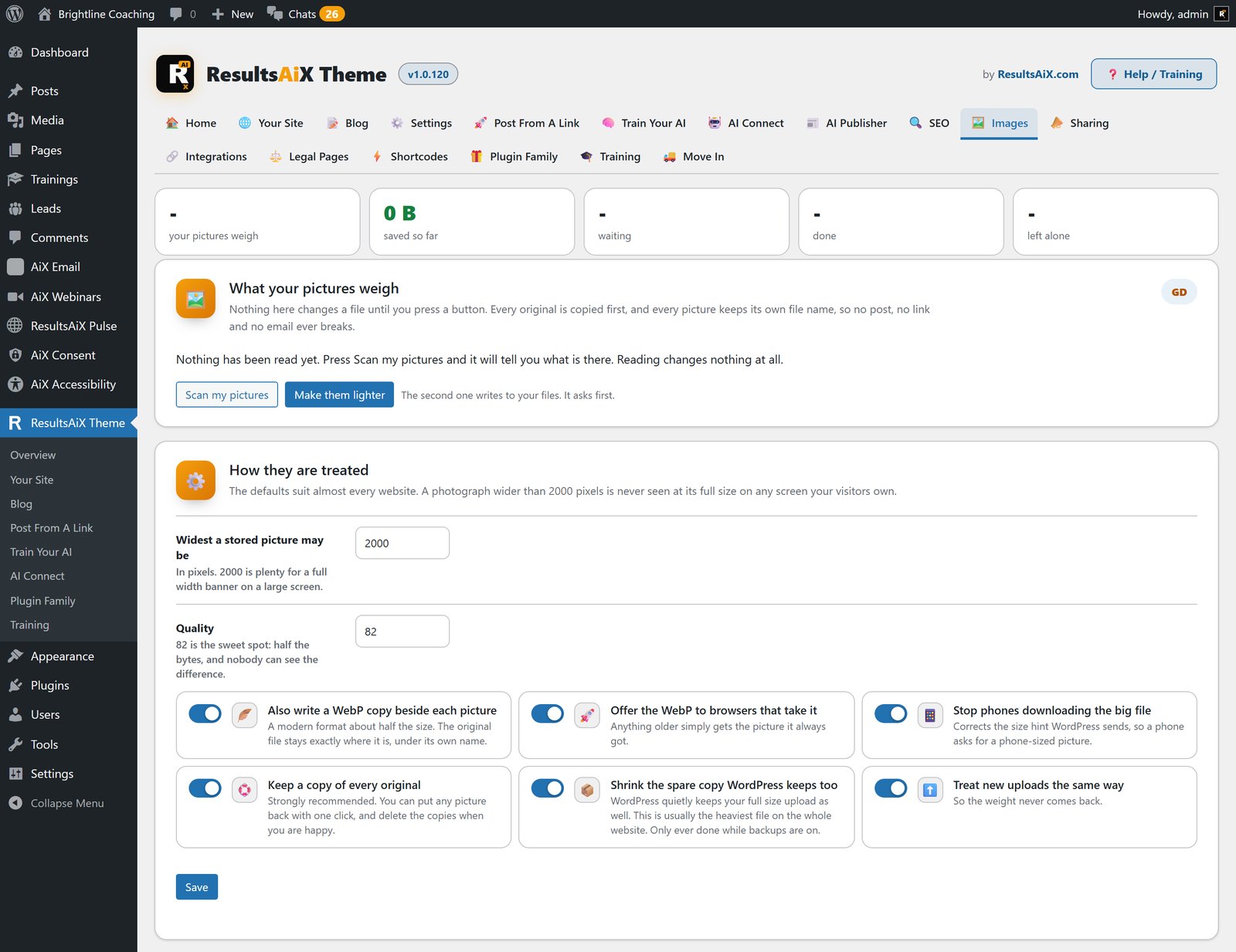
Press the button and each picture is brought down to a sensible size and saved under exactly the same file name, so posts, emails and anyone linking to you carry on as they are. A WebP copy goes in beside it, and phones stop downloading the full-size file. Every original is backed up first, any picture goes back with one click, and nothing leaves your server.
Sharing, The Sliding Banner And The Sticky Bar
Share buttons cover twelve ways to share, from X and Facebook to WhatsApp, email and a phone’s own share sheet, with no network scripts loading. Every post also gets a share card, the picture a link shows on social media, drawn by the theme from the title, your mark and your colours in six designs, at no cost.
Above the blog list, a sliding banner shows your posts, each slide the whole post as one click. Once a reader scrolls into a post, a slim sticky bar slides in with their progress, the title, share buttons and a button of yours.
Sidebar, Footer And Widgets
The sidebar is off by default to keep a comfortable reading width. One tick in the Customizer turns it on, any post or page can show or hide it, and it only appears once it holds a widget. The footer takes widget columns with ready-made patterns, from Join the list to Latest articles and Get help, and the Legal column takes a Legal menu of your own.
Cookie Consent And Legal Pages
The cookie notice is built for the EU and EEA, the UK, Canada, the US state laws and Brazil. Accept All, Reject All and Customize carry equal weight. Analytics, Tag Manager, the Meta pixel and video embeds wait for the matching category, with Google Consent Mode v2, and every choice can be logged and downloaded as CSV. Scan Now reads your pages and writes the real cookie table into your Cookie Policy.
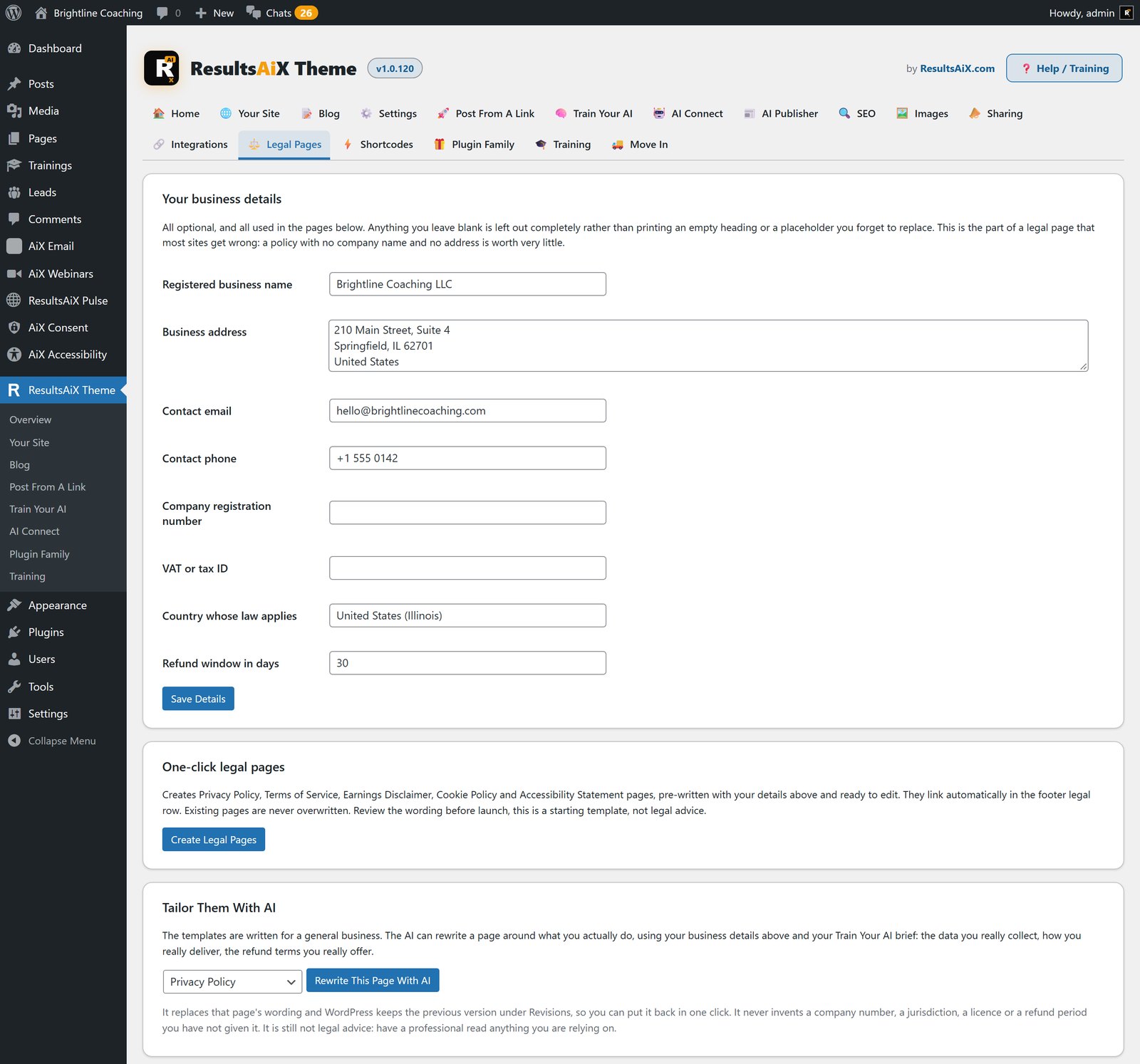
The legal pages come from your real business details: Privacy Policy, Terms of Service, Earnings Disclaimer, Cookie Policy and an Accessibility Statement. AI can then tailor each one to what you actually do.
Accessibility Built In, Not Painted On
Every template has a skip link, one heading structure, landmarks and visible keyboard focus, and all ten colour schemes are contrast-checked to WCAG 2.1 AA before every release.
On the front end, an Accessibility button opens a full panel: reading profiles, dark and high contrast modes in your own scheme, text controls, reading aids, and Listen, which reads the page aloud in the visitor’s own device voice at no cost to you. Every save checks what you wrote, and Fix with AI writes alt text by looking at the picture itself. It’s all covered in my accessibility guide.
Emails From Your Own Address
Password resets, new account emails and every other email WordPress sends on its own go out from your site’s name and your own address. Set them yourself, or leave them blank and the theme uses your business email on your own domain.
It Already Knows Your Other Plugins
The theme recognises every plugin in the ResultsAiX family and shows a live Installed or Get It state for each. Every lead the opt-in form captures is stored on your own site first, then handed to ResultsAiX Mailer, WP Sync and WP Conversion Tracker AI when they’re installed. Funnels draws inside the Landing template, and Testimonials, Forms, Surveys and Search draw in the theme’s own layout. None of them are required.
Editions And Prices
There are three ways in.
Free
$0 for one site, with a key that never expires. Layouts, schemes, the members area, the sliding banner, legal pages, the cookie notice, share buttons and search. The AI is left out.
The full theme
$47 a year for three of your sites. Everything in this guide, including every AI feature, the Images tab and the accessibility panel.
Developer and Agency
The same theme on more sites, $147 a year for 25 sites and $297 a year for 100.
The full theme installs over the free one and keeps everything you’ve set up. It’s also included in the ResultsAiX Bundle with every plugin in the family. Every paid licence carries a 30-day money-back guarantee.
Before You Switch A Big Site
Frequently Asked Questions
What is the ResultsAiX Theme?
A WordPress theme that runs a blog, sales pages, funnel pages and a members area from one install, with an AI workstation on every edit screen that writes from your own brand brief.
What are the requirements?
WordPress 6.0 or newer and PHP 7.4 or newer.
Do I need an AI key?
Only for the AI features. Layouts, the members area, SEO, sharing, legal pages and the cookie notice all work without one. You bring your own key and pay the provider directly. We never mark it up.
How much does it cost?
The full theme is $47 a year for three of your sites. Developer is $147 a year for 25 sites and Agency is $297 a year for 100. The free edition is $0 for one site, without the AI. It’s also included in the ResultsAiX Bundle, and every paid licence carries a 30-day money-back guarantee.
How many sites can I use it on?
Three on the standard licence, 25 on Developer and 100 on Agency. The free edition covers one site.
What happens to my site if my licence lapses?
The public website keeps working. Layouts, templates, menus, legal pages and everything you’ve published stay as they are. Only the paid AI features pause.
Does it replace my SEO plugin?
It can. If you’d rather keep yours, the theme’s own SEO output steps aside on its own when a dedicated SEO plugin is active.
Does it work with my membership plugin?
Yes. The members area reads WordPress’s own login, so it works with any membership plugin.
Is there a members area without a separate plugin?
Yes. Trainings with an ordered lesson list and progress bars, a Member Dashboard template and member-only shortcodes are all in the theme. If you want levels, content protection and payments as well, that’s ResultsAiX Membership, and the two work together.
Will it work with my other ResultsAiX plugins?
Yes. It recognises every plugin in the ResultsAiX family and shows a live Installed or Get It state for each. Leads from the opt-in form go to ResultsAiX Mailer, WP Sync and WP Conversion Tracker AI when they’re installed. None of them are required.
Can I switch a large existing site to this theme safely?
Run the free Theme Switch Audit plugin first. It scans every page and post for what your old theme leaves behind and gives you a short, plain English digest to check before you switch.
Get it with everything else
The ResultsAiX Bundle covers the theme, every plugin in the family, and every new plugin while your Bundle is active, running on your own WordPress site.
Or just the theme
Three of your sites for $47 a year. Developer and Agency licences are on the page.


