
The 10 Tools I Run My Whole Business On, Every Single Day

People ask me what I use. Not a list of logins with a monthly bill each: ten tools inside my own WordPress that talk to each other. Here is every one of them, what I use it for daily, and what the stack saves me a year.
People ask me what I use to run my business. They expect a list of logins: an email platform, a link tracker, a webinar tool, a membership site on somebody else’s server, Zapier holding it all together, and a monthly bill for each one.
That’s not how my business runs. It runs on ten tools, all inside my own WordPress, all talking to each other. Nine plugins and one theme. I built every one of them because I needed it, I use them every day, and not one of them sends me a bill based on how big my list got this month.
The video above shows the real thing, screen by screen. This is the written version. For each tool you get what it does, what I actually use it for, and which of the other nine it talks to. That last part matters most, and I come back to it near the end.
The Whole Stack On One Page
I think about the business in five layers. A visitor comes in the front door, becomes a member, hears from me in my own voice, turns into a sale I can trace, and ends up on a list I own. Every layer is one or two of these tools.
- The front door: ResultsAiX Theme, and ResultsAiX Search & Member Activity
- The members area: ResultsAiX Membership
- My voice: ResultsAiX Video, ResultsAiX Webinars and ResultsAiX Testimonials
- The money: WP Conversion Tracker AI and Launch Manager AI
- The wiring and the list: WP Sync and ResultsAiX Mailer
1. ResultsAiX Theme
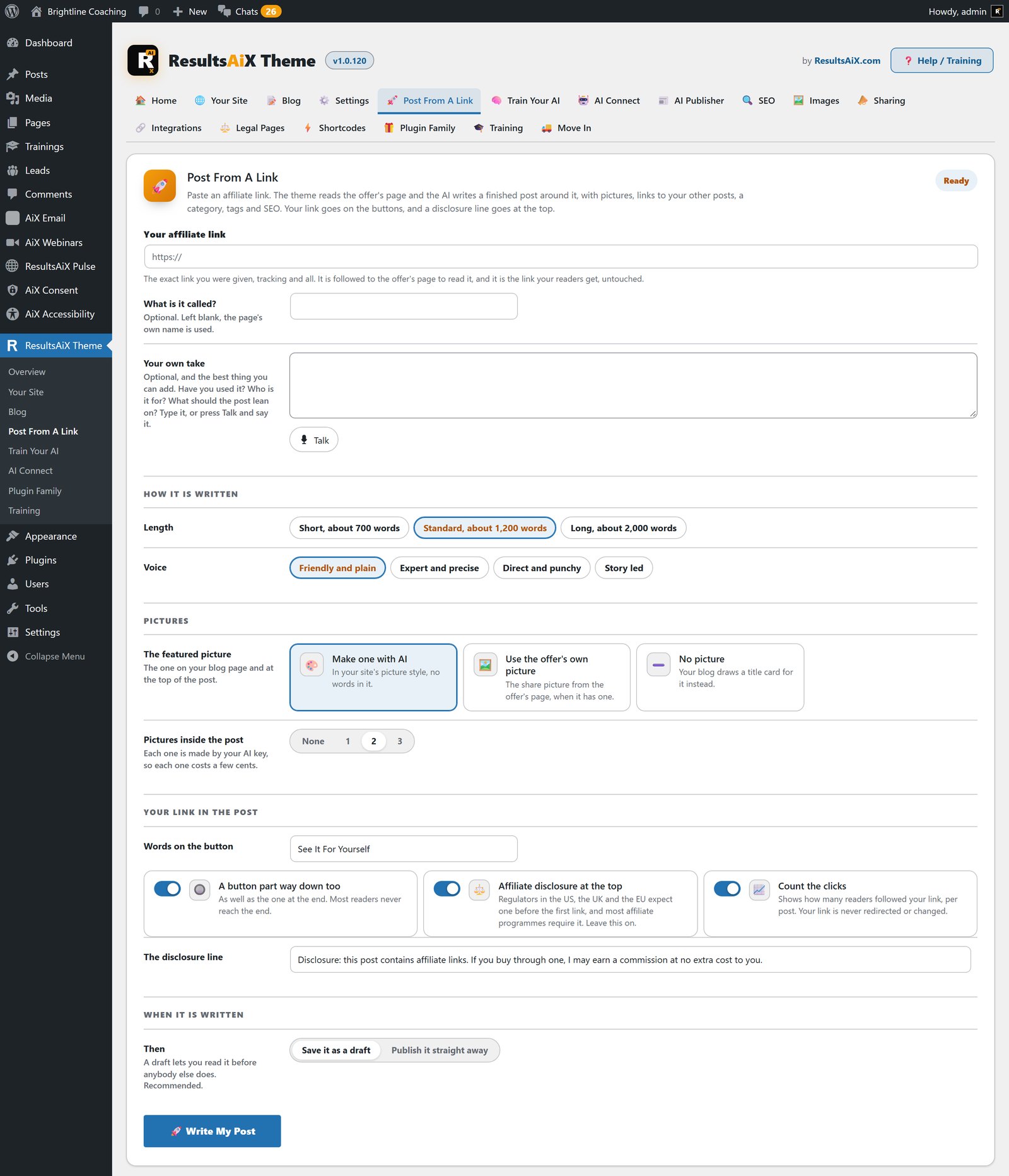
This is the first thing anybody sees. It runs this blog and my members area, the same theme doing two very different jobs. On most sites that would take two themes, a page builder and a pile of add-ons.
The part I use every day is the writing room. It sits on every edit screen, it writes from a brief about my business rather than like generic AI, and it has two rules I insisted on: any link it invents is removed, and a reply shorter than the article it’s improving is refused. If you’ve ever had an AI tool quietly shrink a 3,000 word post to 900 words, you know why.
When I promote somebody else’s product, Post From A Link reads the offer from my affiliate link and writes the post around it, with my link on the buttons and a disclosure at the top. The AI Publisher keeps the blog moving on a schedule, files each post in the right category and gives it a title of its own. Around all that sit four site layouts, ten colour schemes, a members area with trainings and progress bars, built-in SEO, a cookie notice with Google Consent Mode v2, and an accessibility panel with read-aloud, with the theme itself checked to WCAG 2.1 AA.
Talks to: every opt-in lead is stored on my site and handed to Mailer, WP Sync and WP Conversion Tracker AI. Search, Testimonials and Webinars draw inside its layout.
On its own, the ResultsAiX Theme is $47 a year for three sites. Everything it does is in my theme feature guide.
2. ResultsAiX Search & Member Activity
Default WordPress search is where good content goes to hide. Somebody types a word, waits for a page reload, and gets excerpts in the wrong order. This replaces it with one shortcode. Results drop down as people type, grouped by content type with their words highlighted, and Ctrl+K opens it from anywhere on the site. It builds its own index, so it stays quick across thousands of pages, with pictures in the results, synonyms and pinned results.
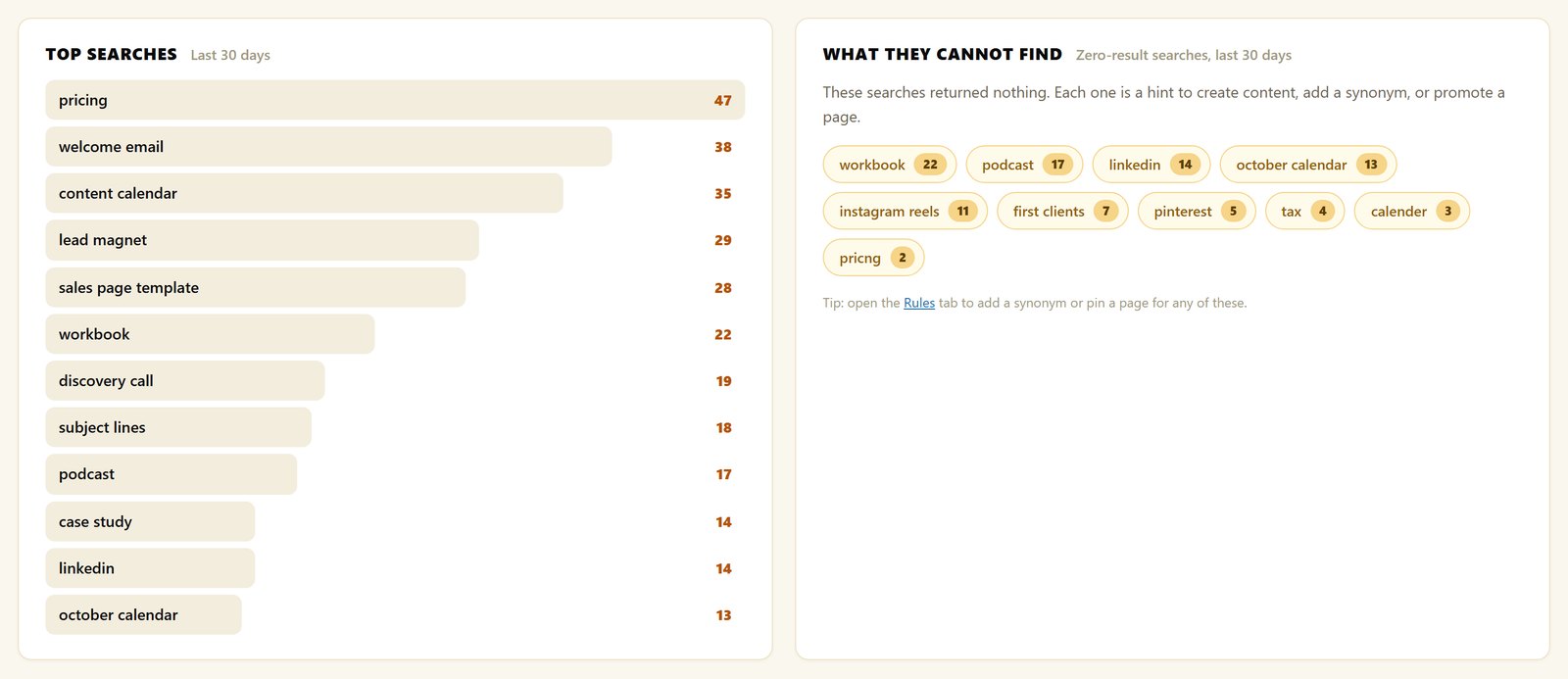
Its Insights screen shows me the searches that came back empty. That’s simply a list of the content people want and I haven’t written yet.
The half nobody else does is Member Activity. On my membership site it records what signed-in members read, gives every member a pick-up-where-you-left-off list, and shows me a live report of who’s inside and what they’re reading. The AI Analyst Report reads the search log and the activity together and tells me what’s working and what to do next. Ask AI answers questions about my own data, and it all runs on a free Gemini key.
Talks to: each member’s reading history shows up inside the Membership member panel, next to what they bought. The theme’s own search hands over to it when it’s installed.
Search & Member Activity is only available inside the Bundle.
3. ResultsAiX Membership
My membership site holds years of customers, so moving it had to be safe before it could be anything else. The importer reads the old plugin’s tables without writing to them, then checks the counts line by line until they match. It moved 8,520 members holding 39,853 memberships across 138 levels in one afternoon, with 531 protected pages carried over and original join dates kept. Zero pages needed editing, because 17 legacy shortcode names keep answering.
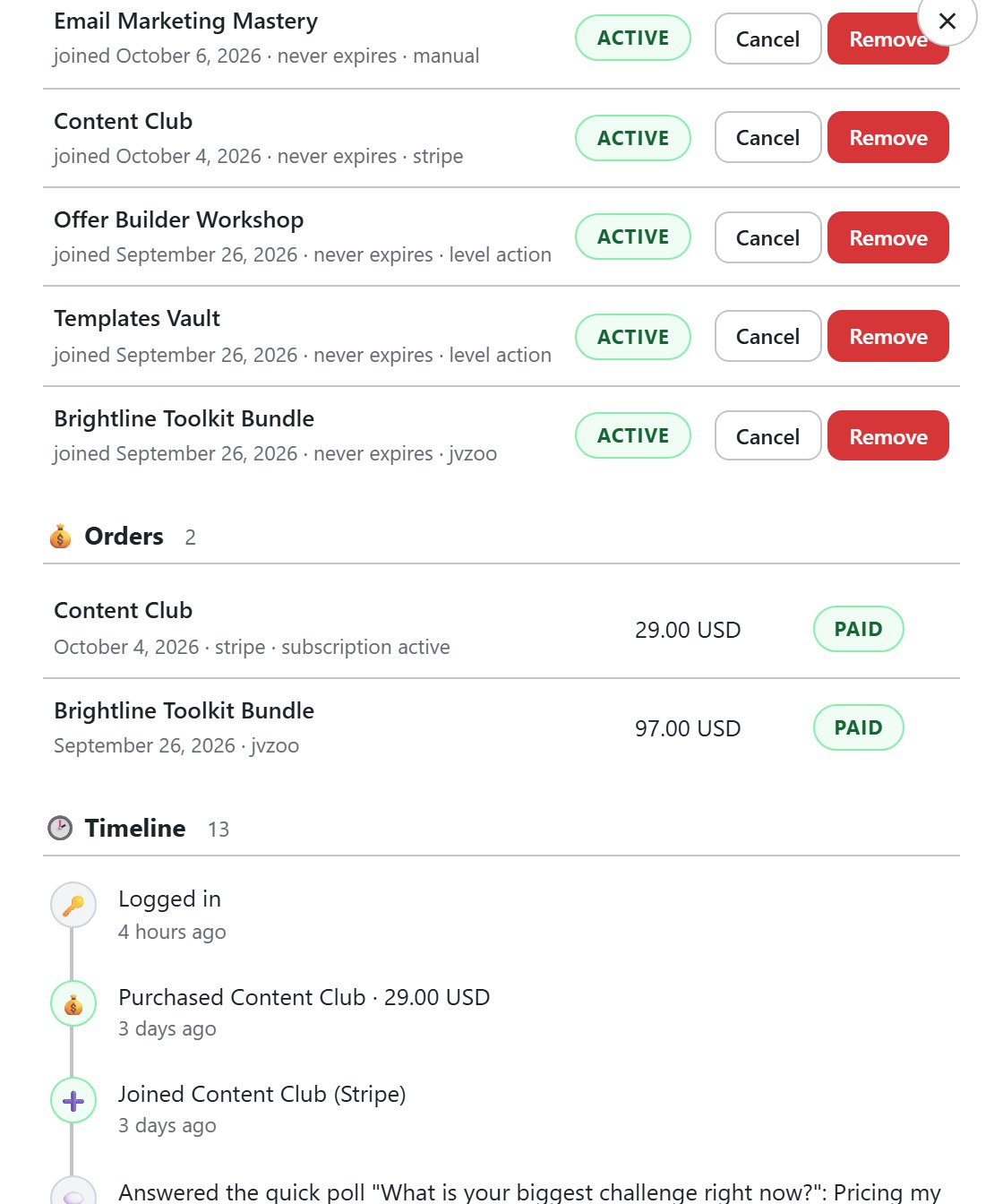
What I use every day is the member timeline. Most membership plugins know an email address, a level and a join date. This one knows what somebody bought across five gateways (Stripe, JVZoo, Warrior Plus, ClickBank and PayPal), what they read, and, with Mailer and the tracker installed, which email they opened and which link the sale came from. When somebody writes in, their whole story is on one screen.
There are no limits on levels, members, protected pages or courses. The only number on the licence is the site count. The AI Helper builds a course from one sentence, up to 60 lessons at 1,200 words each, dripped 30 days apart by default. Protected files stream through a secured endpoint in 512KB chunks rather than sitting on a bare link. And protection keeps working even if the licence lapses: the admin screens pause, and the members never notice.
Talks to: Mailer gets a different list for each level, WP Sync gets new members, cancellations and refunds, and the tracker’s data appears on the timeline.
ResultsAiX Membership is $67 a year for three sites, and it takes no cut of anything you sell.
4. ResultsAiX Video
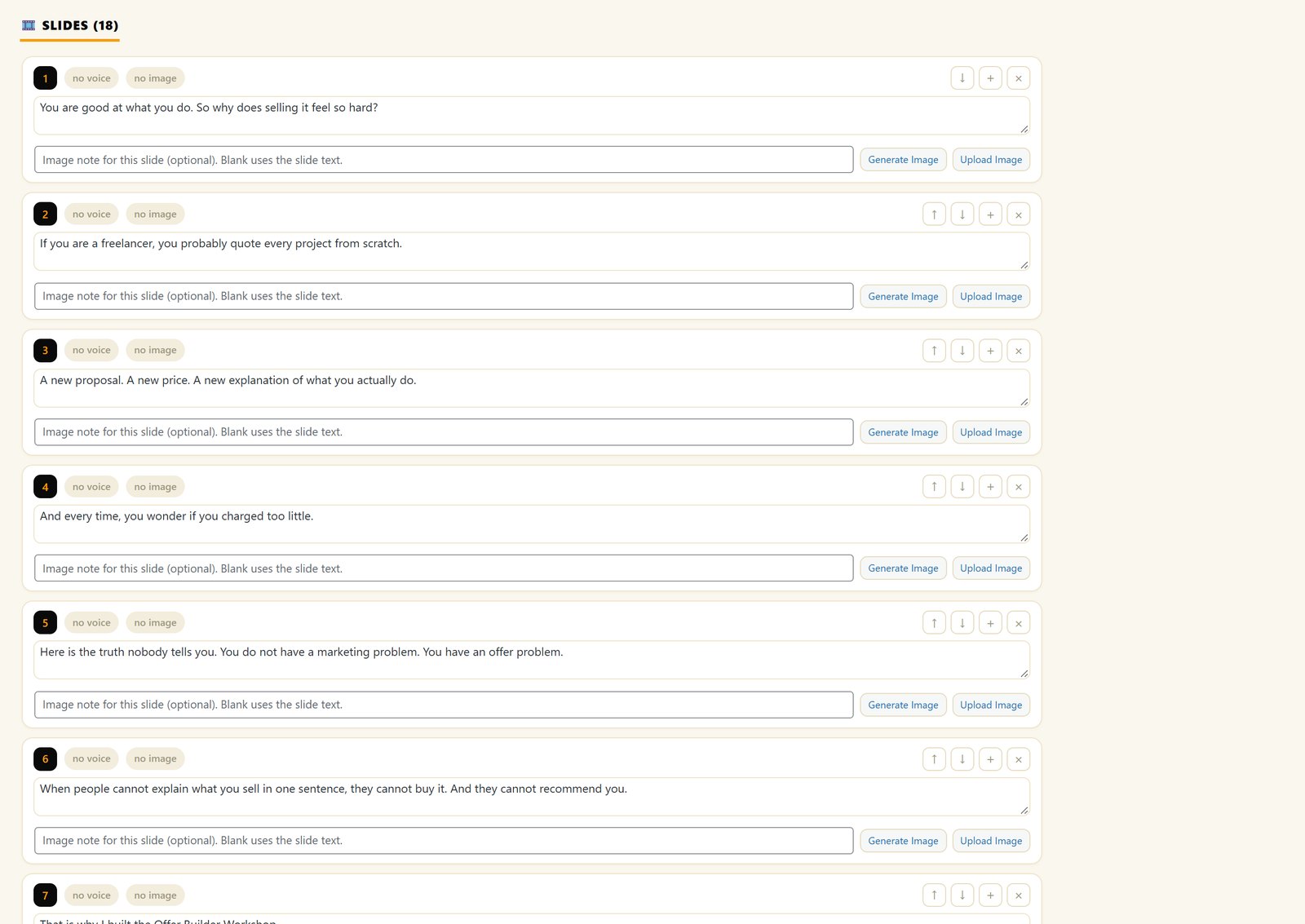
Recording is the part that stops most people making videos. With this, I write the script, pick my cloned voice, and the video builds itself: a slide for every line, a matching picture for every slide, narration, and an MP4 at the end, either widescreen for YouTube and sales pages or upright for Reels, Shorts and TikTok.
Cloning took two minutes of reading samples aloud. My voice lives on my own computer through the free Voice Engine app, and nothing is uploaded. There’s no per-video, per-word or per-minute meter, which is what changes how often you actually make videos. If I don’t want my voice on something, there are over 40 others, including native speakers in Spanish, French, Italian, Portuguese, Hindi and Chinese.
Slides build themselves with no length limit, and it’s been tested on videos of more than 250 slides. The AI Image Director draws a picture for every slide with no key needed. And the Living VSL embed puts a video on any page with one shortcode, with the buy button appearing on the slide I choose.
Talks to: the tracker tells me what a video converts, Mailer follows up with the buyers, and Launch Manager runs the launch around it. My cloned voice narrates my webinars too.
ResultsAiX Video is $47 a year for three sites, or $67 a year for PRO with music, motion, captions and a brand kit.
5. ResultsAiX Webinars
Webinars sell. Webinar platforms charge monthly for the privilege and keep your registrants on their servers. This runs all three kinds from my own site: an AI-built deck narrated in my voice, a recording played on a schedule as if it were live, or a real live session from the browser with camera and screen share.
The thing I’d never give up now is the AI assistant in the chat. On an automated webinar nobody’s in the room to answer questions, so it answers them. Anything personal goes as a private message only that person can see, including their own buy link with their tracking attached. It knows what they already own, so it doesn’t sell them something they’ve got. It never mentions what anybody spent, and it passes anything it can’t answer to me.
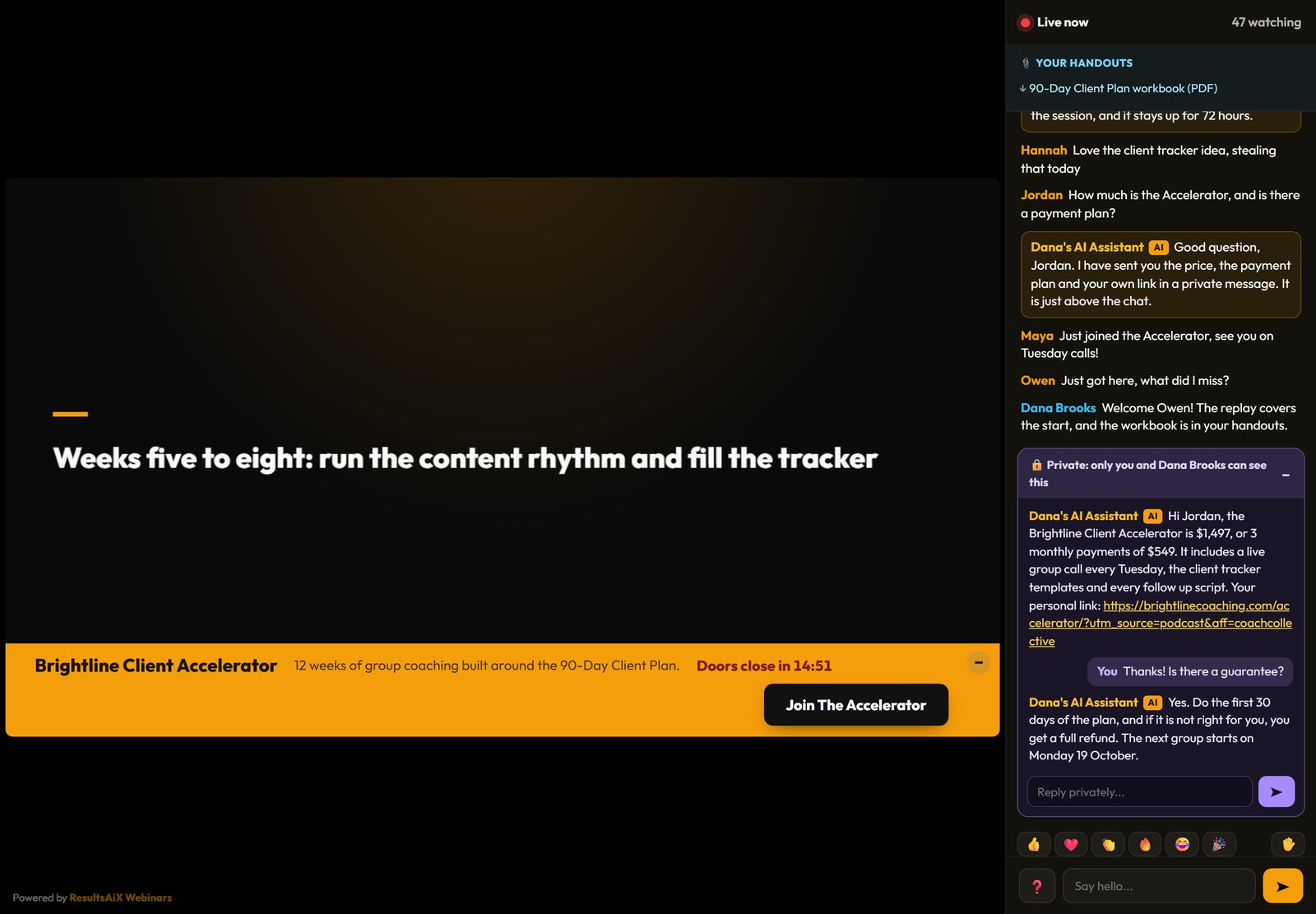
When a live show goes well, one click makes an automated copy that plays the recording every day, with the live chat appearing at the moment each message was posted, and the assistant learns every question and the answer I gave. Add split testing on the registration page, a timed offer I design myself, eight page styles and the follow-up emails written for me, and it’s the whole webinar business in one plugin.
Talks to: registrants land on a Mailer list with no API key, tagged by what they did: registered, attended, saw the offer, clicked, watched the replay. WP Sync can send them anywhere else, and every offer click carries its affiliate and campaign tags.
ResultsAiX Webinars is $147 a year for three sites, with no per-attendee charge.
6. ResultsAiX Testimonials
My voice isn’t enough on its own. People believe other buyers. The review walls on my sales pages run on this plugin, and reviews imported from Warrior Plus carry a verified badge, so a visitor can see the person really bought.
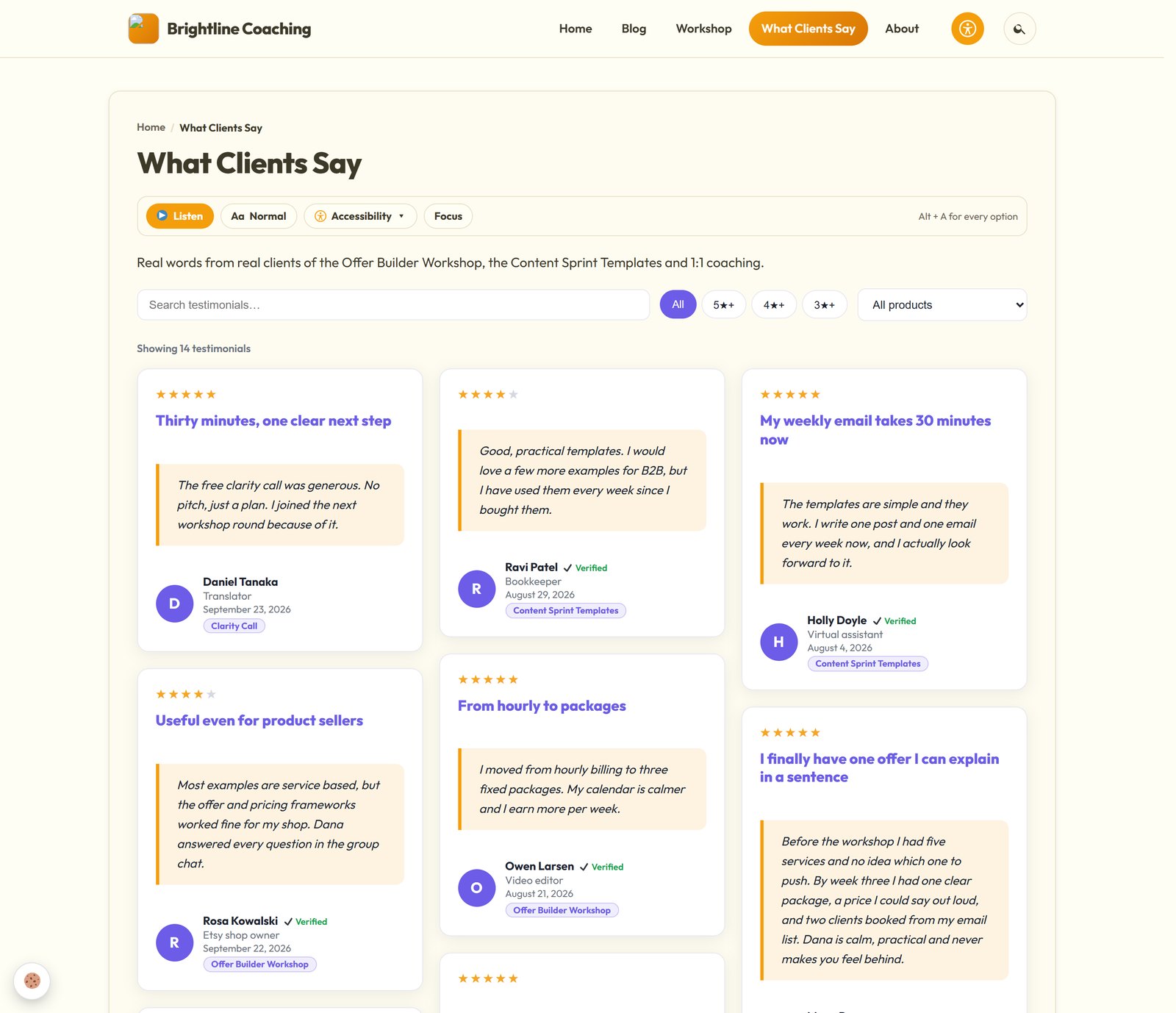
One click imports my Warrior Plus reviews, de-duplicated and badge-stamped. I collect new ones with a form, including video reviews recorded in the browser, and put them on any page as a wall, a carousel, a popup or a sidebar. There’s a script embed for pages that aren’t WordPress, and an automated gift thanks people for leaving a review, so the wall keeps growing without me chasing.
There’s no monthly fee and no charge per review, and the reviews stay mine.
Talks to: the theme recognises it and draws the walls inside its own layout.
ResultsAiX Testimonials is $47 a year.
7. WP Conversion Tracker AI
This is the oldest tool in the stack. I built the first version in 2010 to track my own affiliate links, and it’s been running my tracking ever since. Every link I send, from a solo ad to an email to a YouTube description, goes through it, and every click, lead and sale is logged on my own server. The live install figures on its page show 67,652 clicks, 8,470 conversions and $269,653 in revenue.
The newer part is the AI Traffic Analyst. It reads every link’s clicks, conversions, revenue, refunds, country quality and ad spend, then gives each one a verdict: scale, keep, watch or kill. It uses my own AI key.
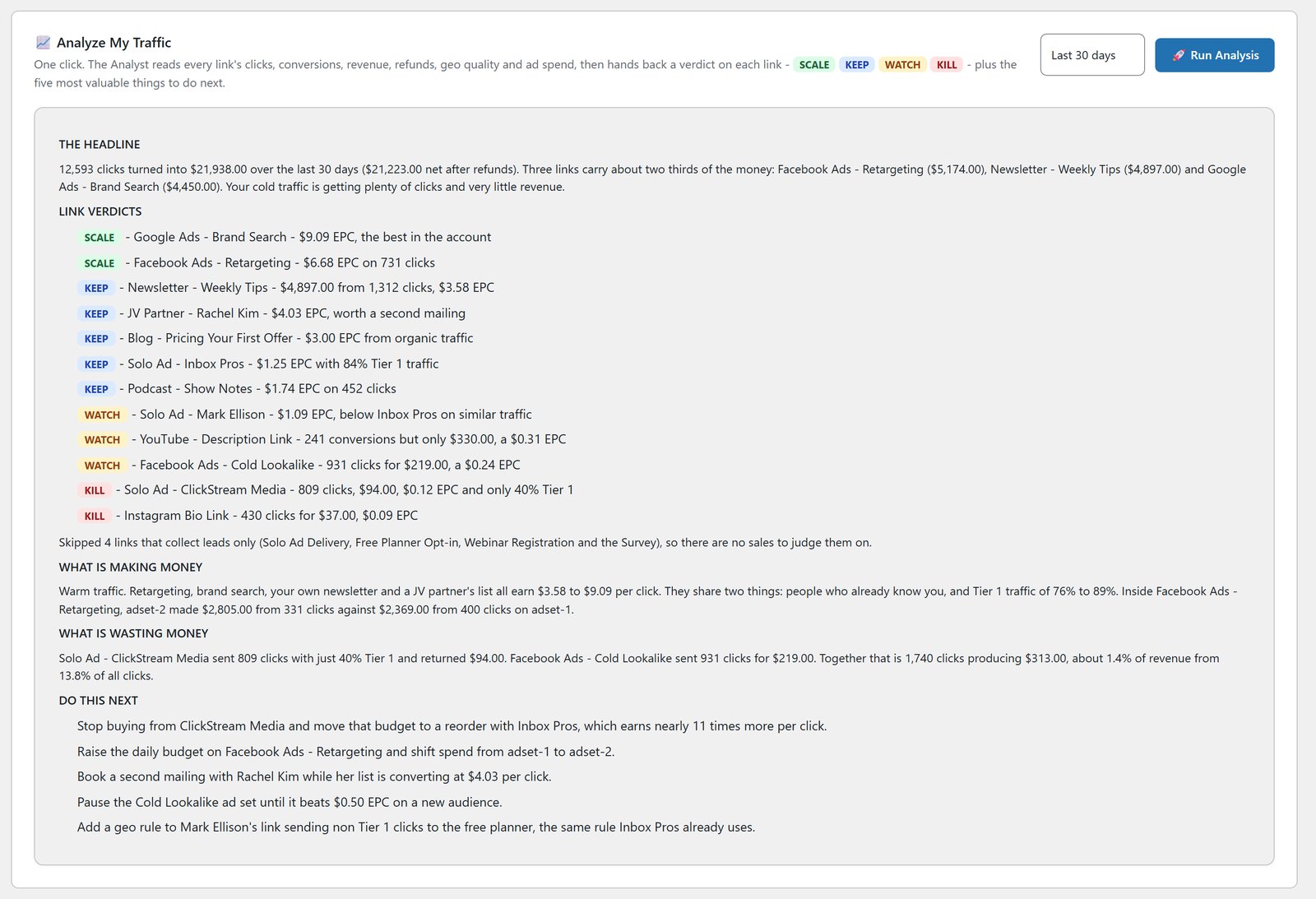
Every link can allow or block any of 157 countries and send each one its own offer. There are split tests across 2, 5 or 10 destinations, three rotator modes, first-click or last-click credit, tracking across domains, and postbacks from ten sales platforms including Warrior Plus, JVZoo, ClickBank, PayPal and Stripe. Public Proof Pages let me show anybody the quality of the traffic I sent.
Talks to: it feeds Launch Manager live through the Launch Manager Bridge, gives Mailer 14 buyer segments built from real clicks and spend (with Audience Vault), and a tracked click can fire a WP Sync automation.
WP Conversion Tracker AI is $67 once, with all five add-ons, on up to five domains.
8. Launch Manager AI
If you launch products or promote other people’s, you know the mess. Two platforms, the same partner under three account names, and no idea who you owe a promo to. Launch Manager merges all of it. It’s tracked over $2.2 million of my JV sales across more than 17,000 transactions and 2,500 partners on Warrior Plus and JVZoo.
Before a launch, I scrape a contest leaderboard with one click and import every affiliate on it. On the demo it pulled 63 JVZoo affiliates in 30 seconds. Every partner gets a Smart Value Score from 0 to 100, and the AI Brain ranks who to contact first and writes the outreach from our real history. After the launch, one click gives each partner a PDF report showing exactly who sent what in both directions, so reciprocity is a number, not a feeling.
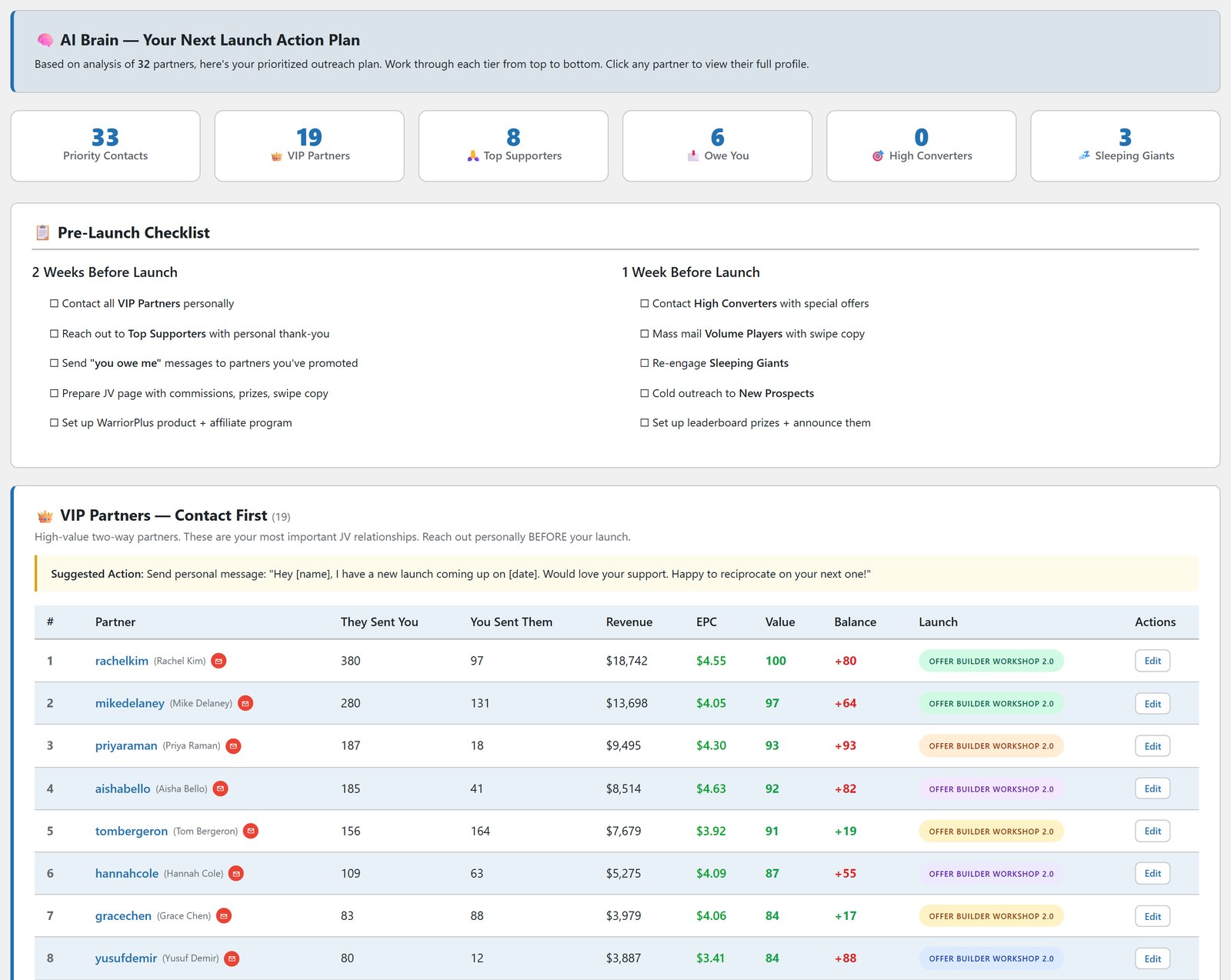
AI Brain Chat answers plain-English questions about my partners with read-only queries, and live IPN sync on both platforms keeps everything current, refunds included.
Talks to: the tracker feeds it sales through the Bridge, and Mailer can target people by the exact products they bought, their spend and how recently they bought.
Launch Manager AI is $247, then $97 a year for updates and support.
9. WP Sync
This is my Zapier replacement. A sale lands on Warrior Plus, JVZoo or ClickBank, somebody registers for a webinar or fills in a form, and within seconds WP Sync has them on the right list with the right tag and in every other app that needs them. No CSV exports, no copying lists by hand.
The difference is the bill. Fifty contacts a month or 100,000, the price doesn’t move. There’s no task counter, and automations are unlimited. Each destination can have its own timing: send now, wait minutes, hours or days, or hold until an exact date. A dry run shows exactly what each destination would receive before anything goes live. Someone who unsubscribes in one tool can be taken off the others too, and a click can fire an automation, not just a sale.
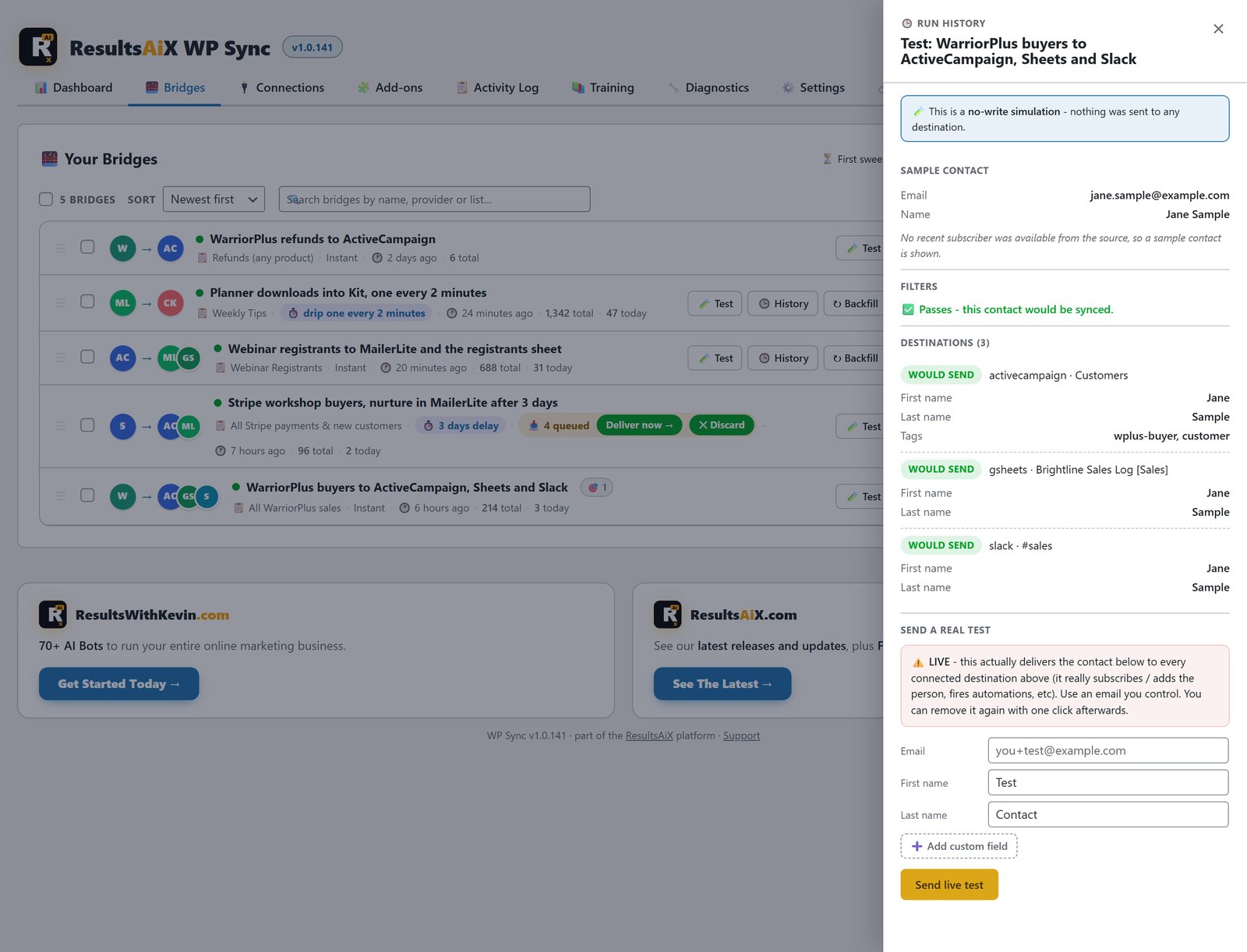
It connects to more than 175 apps, starting with 39 autoresponders. The calls go directly from my site to each tool, so subscriber data never touches our servers, and every move lands in a searchable activity log.
Talks to: Mailer is a source and a destination, Membership and Webinars are native sources, and the tracker can trigger it.
WP Sync is $147 the first year, then $47 a year, for everything, including the Warrior Plus, JVZoo and ClickBank sale bridges.
10. ResultsAiX Mailer
I saved this for last because everything above ends up here. Every opt-in, every buyer, every webinar registrant, every member. The list is the business, and for years mine lived on somebody else’s server with a price that went up every time it grew.
Mailer is a complete email platform inside WordPress: broadcasts, automations, forms, segments and reports, with the list in my own database. There are no subscriber or sending limits from us. Email goes out through your own sending service, such as Amazon SES or your own SMTP server, paid to that provider directly. Twelve connectors are built in, with failover if one has a bad day.
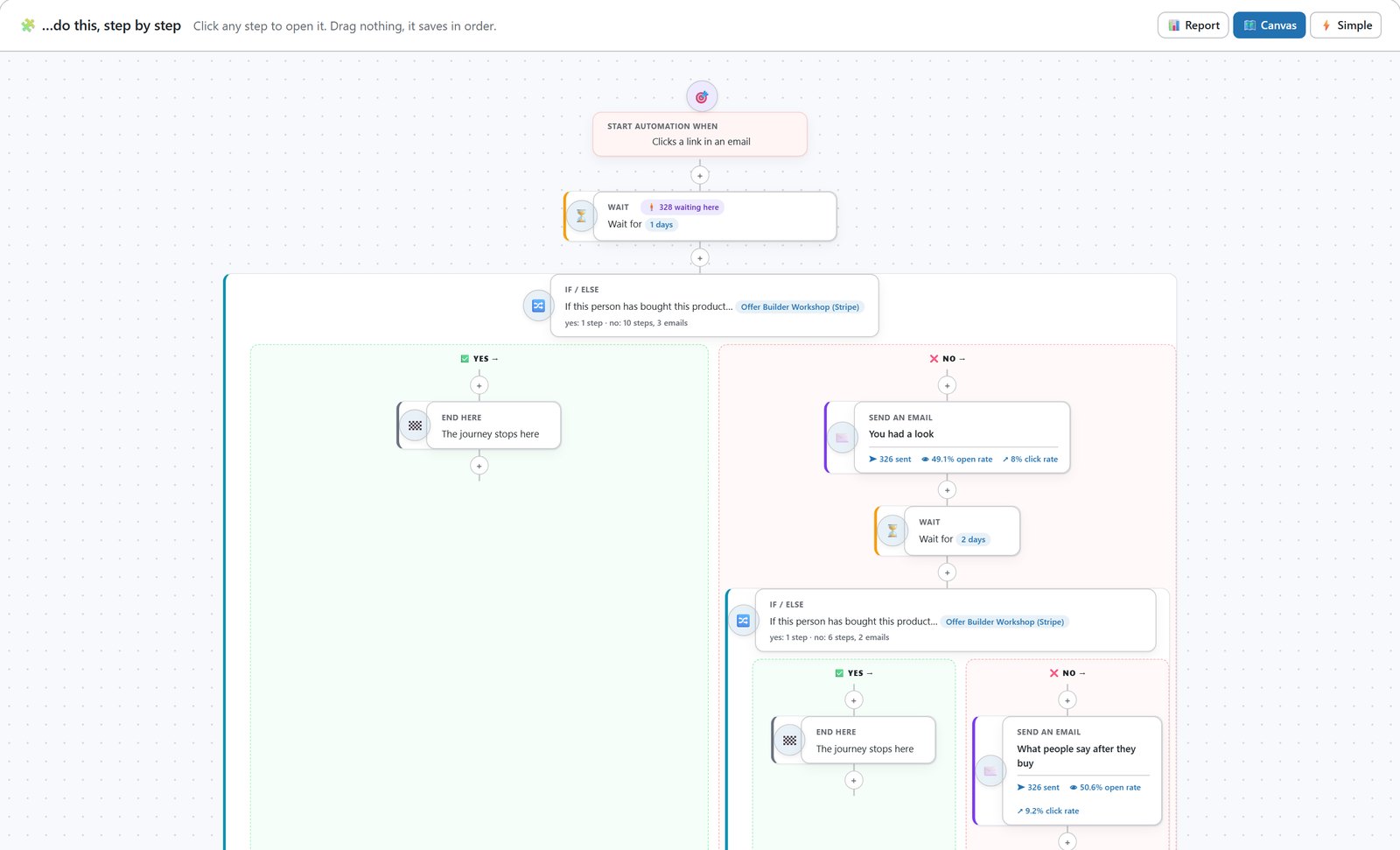
Automations are where I live. Eight triggers, if/else branches, waits and tags, with a live count of how many people sit at every step. Twenty-five finished flows come with it, every email already written, ready in two clicks. Broadcasts get A/B subject testing that sends the winner to everyone left on its own.
The AI runs on my own key with no markup. I gave it up to 150 of my own emails and it wrote a style guide of how I write, so what it drafts sounds like me. It writes broadcasts, suggests subject lines, builds whole automations from a sentence, scores each email out of 100 for inbox placement before it goes, and learns each subscriber’s best hour to send. Segments come from 21 filters or a plain-English sentence.
The cleaning is why I trust the rest. Tidy Names found 7,243 names that needed tidying out of 66,921 on my own list and previewed every change before writing it. Verify Leads reads buyer data before it calls anybody cold, so a big customer is never binned for not opening. Imports run in Safe Mode by default, resume after a timeout and roll back in one click. I built it while moving a 50,000+ subscriber business, so none of that was optional.
Talks to: the tracker’s 14 buyer segments, Launch Manager’s purchase data, WP Sync, a list per membership level, webinar registrants, and every theme opt-in.
ResultsAiX Mailer is $97 a year for three sites.
How They Talk To Each Other
Here’s the part no feature list shows you. Ten separate tools, even good ones, are ten logins, ten exports and ten places your data goes stale. These share what they know.
Follow one buyer through my business. They click a link in a solo ad, and WP Conversion Tracker AI records the click, the country and the source. They land on a page built with the theme, watch a sales video narrated in my cloned voice, and scroll past a verified review wall. They register for the webinar and go straight onto a Mailer list. During the webinar, the assistant answers their question and sends them their own buy link.
They buy on Warrior Plus. The tracker credits the link, and Launch Manager credits the partner who sent them. WP Sync fires in seconds: buyers list and product tag in Mailer, and a row in my Google Sheet. Membership grants the level straight from the Warrior Plus notification, they log in, and Search & Member Activity records what they read and where they stopped. Mailer knows what they bought and what they read, so the next email fits.
One click, one sale, no exports and no Zapier chain to babysit. And when that buyer writes in with a question, I open their member timeline and see the click, the purchase and the lessons in one place.
What This Saves Me Every Year
I won’t invent numbers to cross out. These are published prices for the services each tool replaces, the same figures quoted on our own sales pages, and I’ve taken the lowest one every time.
| Tool | Instead of | A year |
|---|---|---|
| Mailer | AWeber at 5,000 subscribers, $90 a month | $1,080 |
| WP Conversion Tracker AI | ClickMagick at $97 a month | $1,164 |
| WP Sync | Make, $9 a month | $108 |
| Membership | Teachable, $89 a month | $1,068 |
| Video | A cloud video subscription at the low end | $360 |
| Webinars | GoTo Webinar, $69 a month | $828 |
| Every year, at the low end | $4,608 |
That’s $4,608 a year at the low end, and the Theme, Search, Testimonials and Launch Manager AI aren’t counted at all. It’s the floor, not the ceiling. Pick the bigger plans, ActiveCampaign instead of AWeber or Zapier instead of Make, and it climbs fast. Every one of those services goes up as you grow, because growth is what they charge for.
All ten tools are in the ResultsAiX Bundle: 25 WordPress plugins plus the ResultsAiX Theme on one licence, three sites on every plugin, and every plugin I release while your bundle is active included at no extra cost.
All ten tools, plus 16 more, on one licence
The ResultsAiX Bundle: 25 WordPress plugins and the ResultsAiX Theme. No per-subscriber, per-task or per-video fees. Everything on your own site.
Why Owning Your Data Matters More Than The Money
The money is the easy argument. This is the one that kept me up at night.
When your list, your members, your buyers and your click history live on other people’s servers, you’re renting your own business. They can raise the price, change the rules, close an account or get bought, and your only option is to export what they let you export and start again.
Here, the list sits in my own WordPress database. The click history is on my own server. WP Sync moves people between tools without their data touching our servers. Membership protection keeps working even if a licence lapses. My cloned voice is stored on my own computer. The reviews are mine, with no charge per review.
And because it’s all in one place, it adds up to more than the sum of the tools. The tracker knows who clicked. Launch Manager knows who bought and who sent them. Mailer knows who opened. Membership knows who logged in and what they read. On a stack of rented apps those are four strangers. Here they’re one record.
Questions People Ask Me About This Stack
Do I need all ten to get started?
No. Every one works on its own. Most people start with whatever costs them most, usually email or tracking, and add the rest as they go. The connections switch on as each tool arrives.
Are all ten really in the Bundle?
Yes, all ten, along with the rest of the family. Search & Member Activity is only available there.
Does Mailer include the sending?
No, and I’d rather you knew up front. Mailer sends through your own sending service, such as Amazon SES, and you pay that provider directly, often cents per thousand emails. We add no subscriber or sending limits on top.
I already use another email platform and Zapier. Is moving painful?
Mailer’s imports run in Safe Mode by default, resume where they stopped and roll back in one click. And you don’t have to move everything at once. WP Sync connects to 39 autoresponders, so it can feed your current platform while you decide.
Where does my data actually live?
On your own WordPress. Your list, your members, your clicks and your buyers stay on your site.
Is there a monthly AI fee?
No. The AI features run on your own key, paid to the provider at their price, with no markup from us. Some run on free options: Search on a free Gemini key, and the Video image director with no key at all.
Can I see them working first?
Watch the video at the top of this post. It’s the real stack, on my real business, screen by screen.
The Short Version
For years I paid a monthly bill for every part of my business, and every bill grew as the business grew. Now it runs on ten tools inside my own WordPress, the data is mine, and the tools talk to each other so I don’t have to.
You can run yours the same way.
Stop renting your business. Own it.
Get all ten tools in this post, plus sixteen more plugins and the theme, in the ResultsAiX Bundle. One licence, your own data, and apps that actually talk to each other.
To your results,
Kevin Fahey


1 comment
Comments are closed.