New: ResultsAiX Pulse is here, and it is only available inside the ResultsAiX Bundle.
Only In The ResultsAiX Bundle

Feel Your Business Moving. See Who Is On Your Site, Know Who They Are, And Talk To Them.

Right now there are people on your pages and you cannot see one of them. Pulse puts every visitor on every site you own onto one live globe, a street map or Google's 3D Earth, tells you which of them are already your subscribers and buyers, and opens a chat on their screen with one click. When you are away, your own AI assistant answers for you.

Pulse is not sold on its own. It comes with the ResultsAiX Bundle, and every Bundle owner already has it.
✅Every Site You Own, On One Screen. A live globe, a real street map or Google's photorealistic 3D Earth. WordPress sites connect with a pairing code, plain HTML pages with one line of code.
✅It Knows Who They Are. A subscriber or a buyer arrives with a first name and what they are to you, straight from your own ResultsAiX plugins.
✅One Click Opens A Chat On Their Screen. Or a Moment opens it for the right person on the right page, such as a lead reading your pricing.
✅Replay A Whole Week In A Minute. Every visit, sale and new lead from the last hour up to everything Pulse keeps, then share a link that opens your live page the same way.
✅The Chat Builds Your List. It asks for a name and an email, and adds the person to the ResultsAiX Mailer list you choose.
✅Your Own AI Assistant. It answers from what you teach it, hands over the moment somebody asks for a person, and keeps spam out.
✅Every Chat, From Any Screen. One Chat history for every site you own, with who each person is and what they bought, one click from the WordPress toolbar.
✅Your Data Stays On Your Site. Self-hosted, with no raw IP addresses stored and nothing about your visitors sent to us.
✓ Included with the Bundle ✓ 3 sites per plugin ✓ Updates inside WordPress ✓ No per-visitor or per-seat fees
1
Dashboard For Every Site You Own
3
Ways To Watch: Globe, Street Map And Google 3D
1
Click To Open A Chat On A Visitor's Screen
7
Playback Windows, From 1 Hour To Everything Kept
10
Themes That Colour Every View
0
Raw IP Addresses Stored

This Is The Real Thing, Running On This Page

Not a video. This is the same Live View the plugin draws inside your WordPress, fed with sample visitors so you can see it move. Drag the globe, switch to the Map and zoom into a city, try a theme, then press Playback and pick a window.

Sample data. On your own site every dot is a real person, the feed names the page they are reading, and a sale bursts on the map the moment it happens.

Or Watch Them Land On Google's 3D Earth

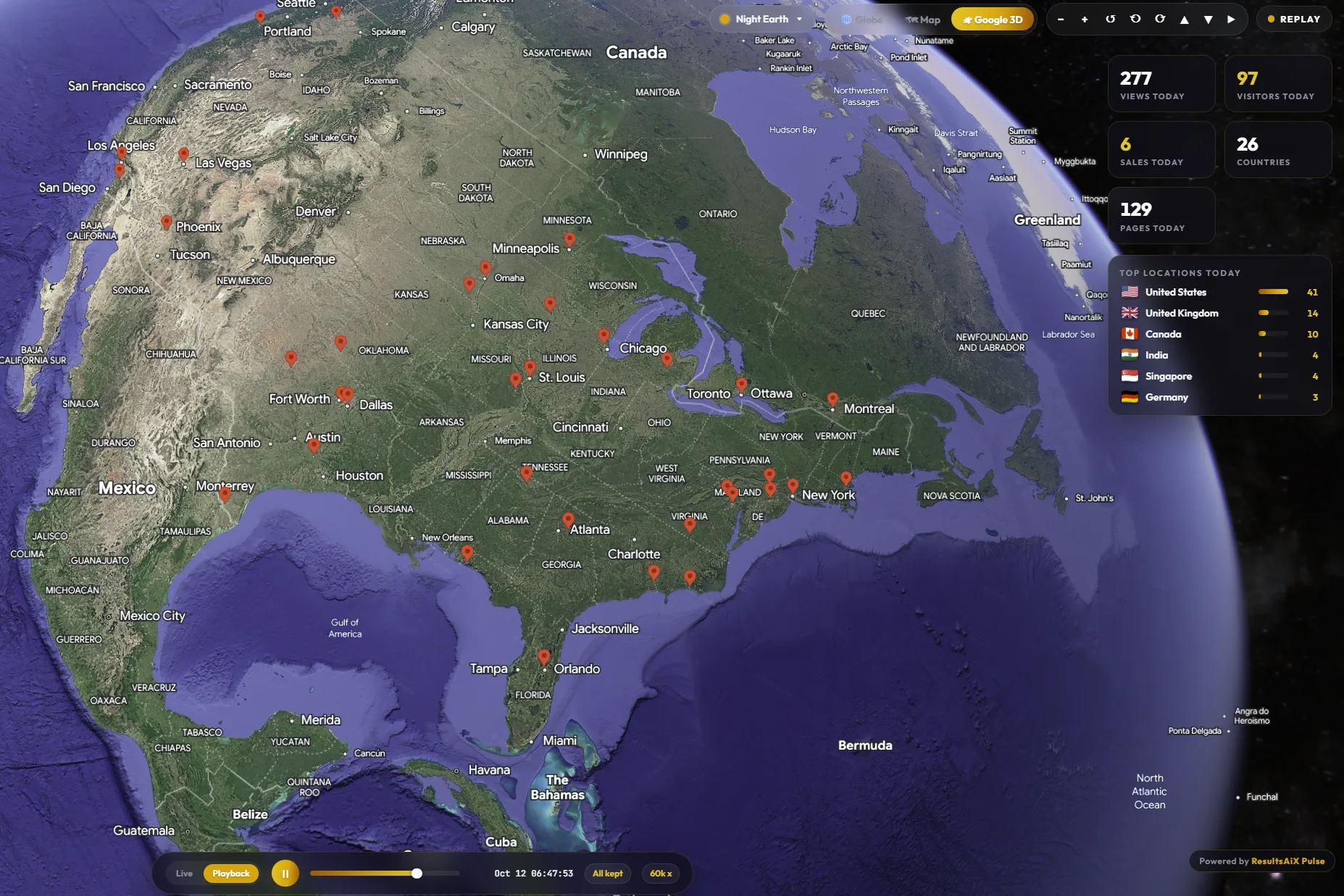
Save a Google Maps key in Settings and a third button appears beside the globe and the map: Google's photorealistic Earth, with real terrain and buildings and a pin on every place your visitors came from.

ResultsAiX Pulse on Google 3D: a replay of every visit across North America, with today's numbers and top locations A real screen from our own Live View

A replay of everything Pulse keeps, at 60,000 times real speed. Every pin is a place people visited from.

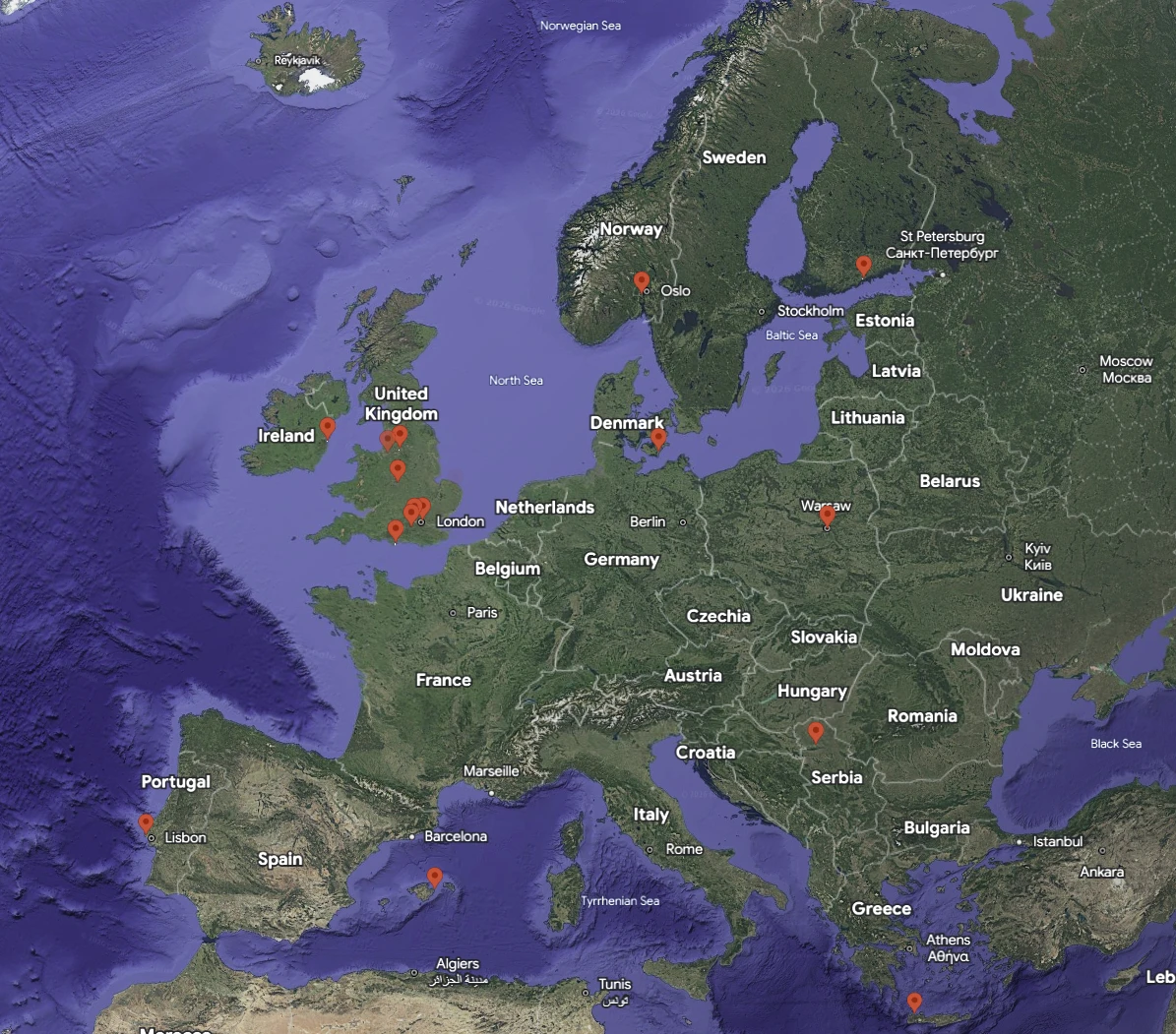
ResultsAiX Pulse on Google 3D: visitor pins across Europe, from Dublin and London to Oslo, Warsaw, Lisbon and Crete
Zoom in and every pin sits on its city. Dublin, London, Oslo, Warsaw, Lisbon, Mallorca, Crete. Online now stands taller, and on your own screen it carries their name.
🌐

The Globe

Drawn entirely on your own server, so nothing loads from anywhere else. Drag it to spin it, and it turns to where your visitors are when it opens.

🗺️

The Street Map

A real map with country and city names. Zoom from the whole world down to a visitor's city, click a dot to see who is there, and the colours follow your theme.

🛰️

Google 3D

Flies down to your newest visitor, then orbits slowly. If Google ever refuses the key, Pulse tells you why in plain words and goes back to the globe.

−+ Zoom ↺↻ Turn ▲▼ Tilt ▶ Orbit

Choose what your Live View opens on, and separately what your public page opens on. Google 3D stays off the public page until you switch it on.

Press Playback. Watch A Week Happen In A Minute.

Pick how far back: the last hour, 6 hours, today, 24 hours, 7 days, 30 days, or everything Pulse keeps. The replay starts at once and plays the whole window in under a minute, with the quiet stretches skipped.

Pick a window above. The speed sets itself so the replay takes under a minute.

⏱️

Under A Minute, Whatever The Window

An hour plays at 120 times real speed, a month at 60,000. Change the pace with the speed button, click the timeline to jump, press Live to come back to now.

💰

Sales And Leads Where They Happened

Every sale bursts and every new lead pops up on the spot it came from, in order, and every visit is listed in the Activity Log as it plays.

🔁

Loop It On A Screen

Set the replay to loop and leave it running on a second monitor, in your office or on a launch-day stream. When it reaches now, it starts again.

Share It

A Live Page Of Your Own, Opened The Way You Want

Your globe gets a full screen page at an address you choose, for a second monitor, a launch day or a link in an email. Pick what it opens on and whether it shows live visits or a replay.

  • Opens on the globe, the street map or Google 3D
  • Live visits, or a replay from the last hour up to everything kept, on a loop if you like
  • Visitors from all your connected sites on one page, if you tick it
  • The same choices on the [raix_pulse] shortcode, for any page
  • Never a name, an email or what anybody spent. The public sees what your switches allow and nothing more
🔗 Make a link that opens the page your way
Opens on
And shows
Loop
your-site.com/live-visitors/?view=map&replay=7d&loop=1
[raix_pulse view="map" replay="7d" loop="yes"]

The same link builder sits under Settings, Live Visitor Page, with your own address filled in.

Now Play Both Sides. You Are The Owner And The Visitor.

On the right is your screen. On the left is a visitor on your pricing page. Press Talk and watch what happens on theirs, then type as either of you.

1 Your visitor's screen
your-site.com/pricing/
Simple pricing
Starter$49
Pro$99
2 Your screen, inside WordPress
Online nowOpen chats

A working model of the real thing. The assistant here answers from a short script. Nothing you type on this page is sent or stored anywhere.

Every Screen, Up Close

The globe you just played with is one of them. Here is the rest of Pulse, the way you see it inside your WordPress.

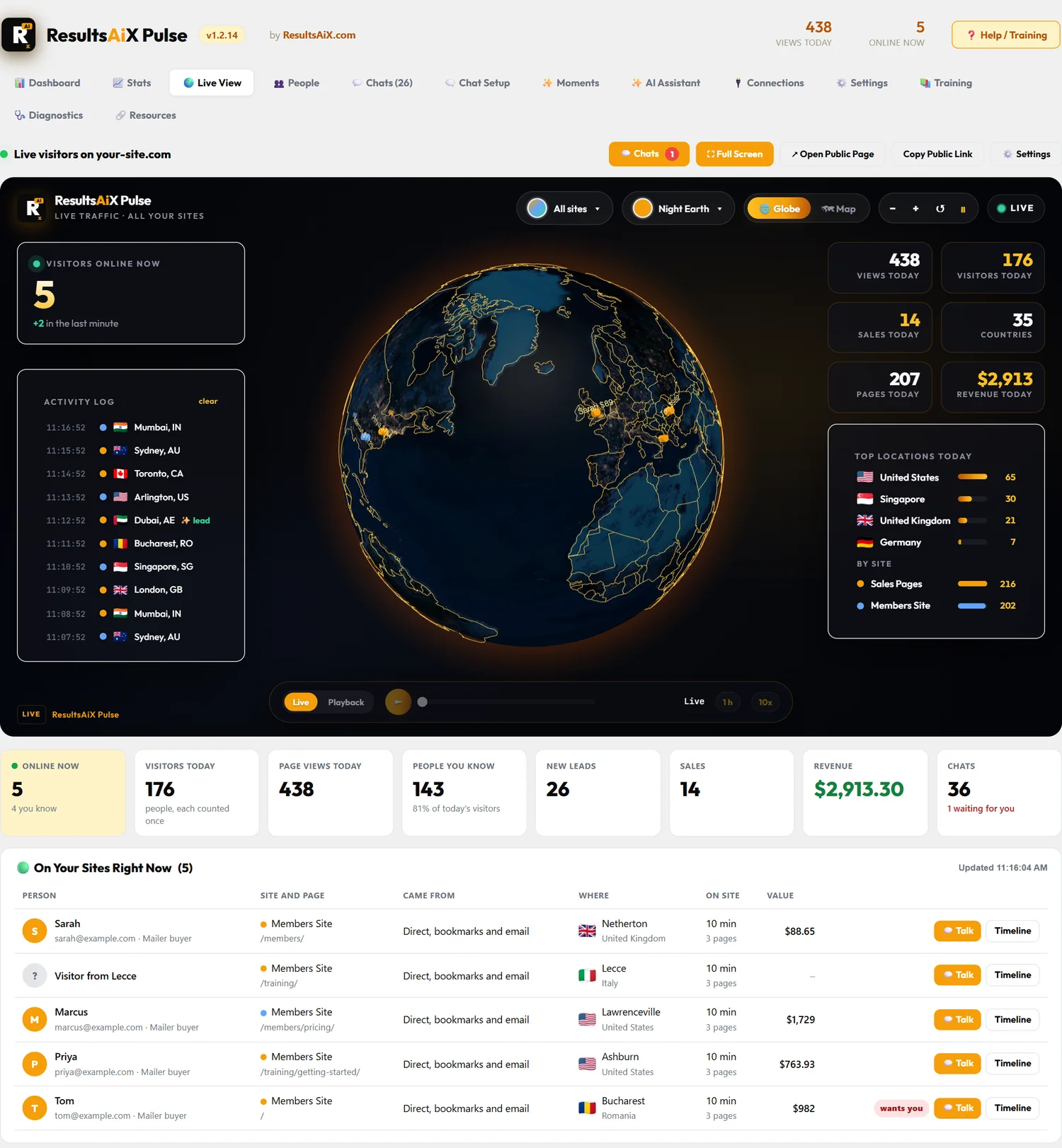
ResultsAiX Pulse: The Live View
The Live View. Everyone online right now on a live globe, with their name and value beside the dot on your screen, today's numbers around it, and who is on your sites underneath.
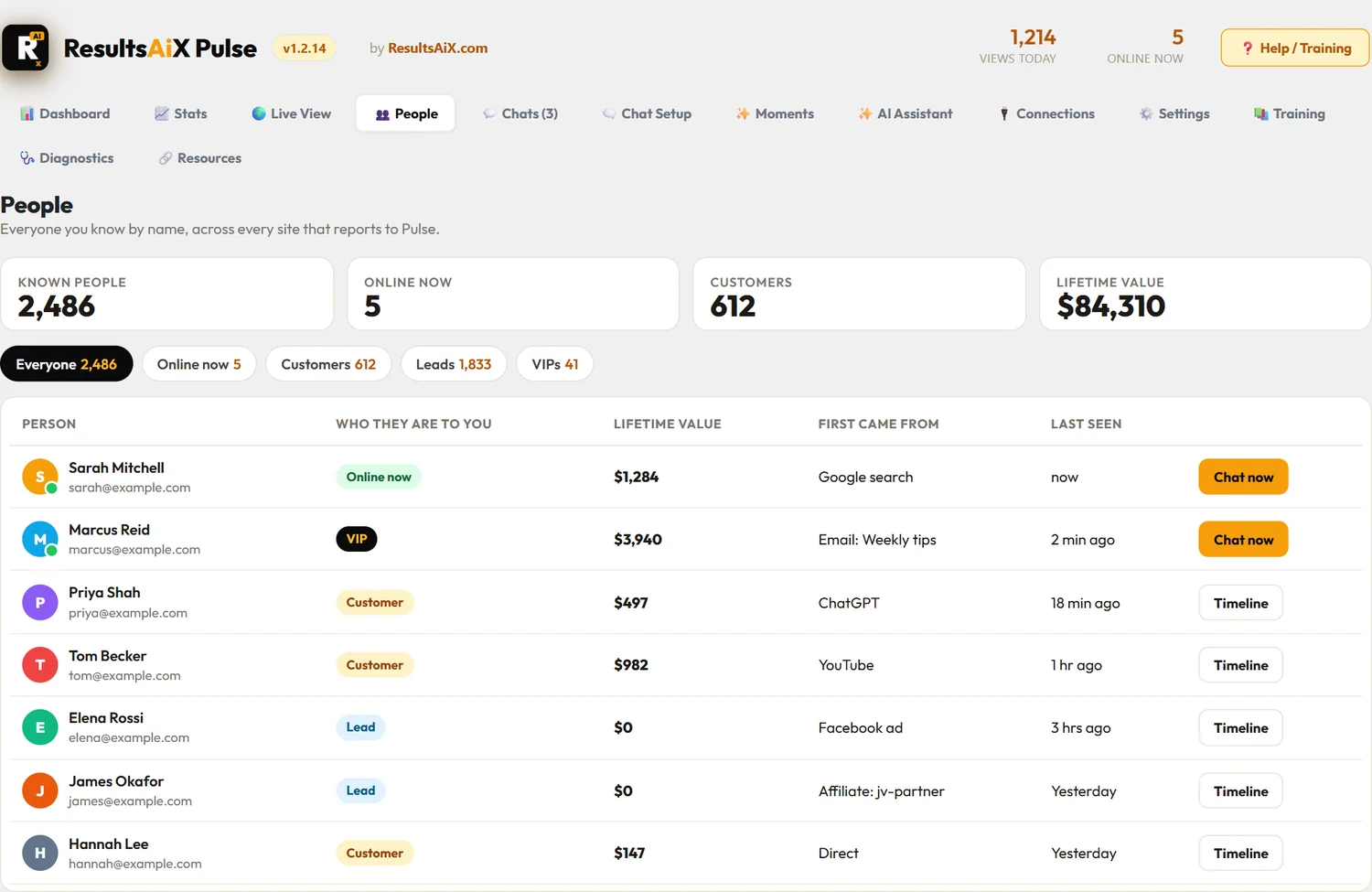
ResultsAiX Pulse: People
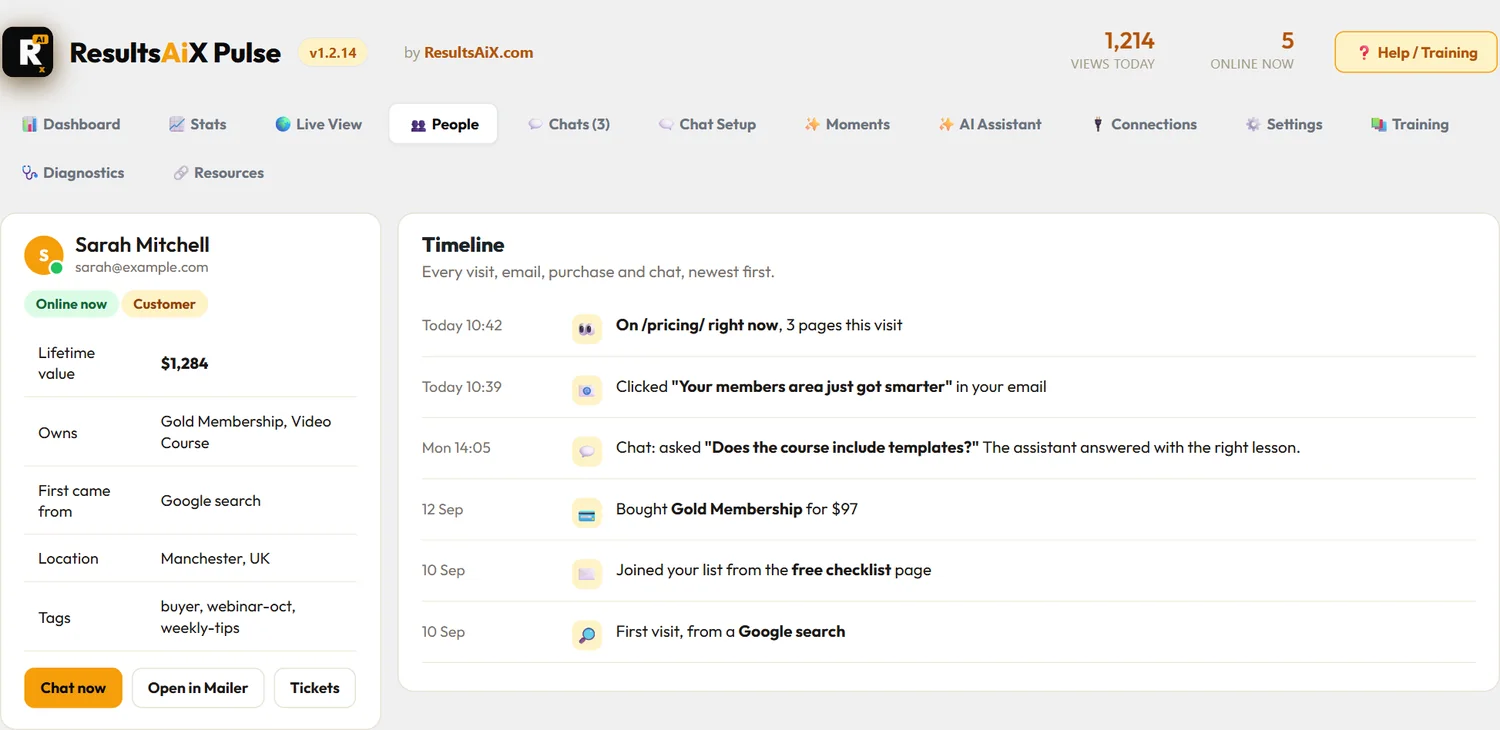
People. Everyone you know by name: who is online, customers, leads and VIPs, each with their lifetime value and a Chat now button.
ResultsAiX Pulse: One Person, Their Whole Story
One Person, Their Whole Story. What they own, what they are worth to you, and every visit, email click, chat and purchase, newest first.
ResultsAiX Pulse: Stats
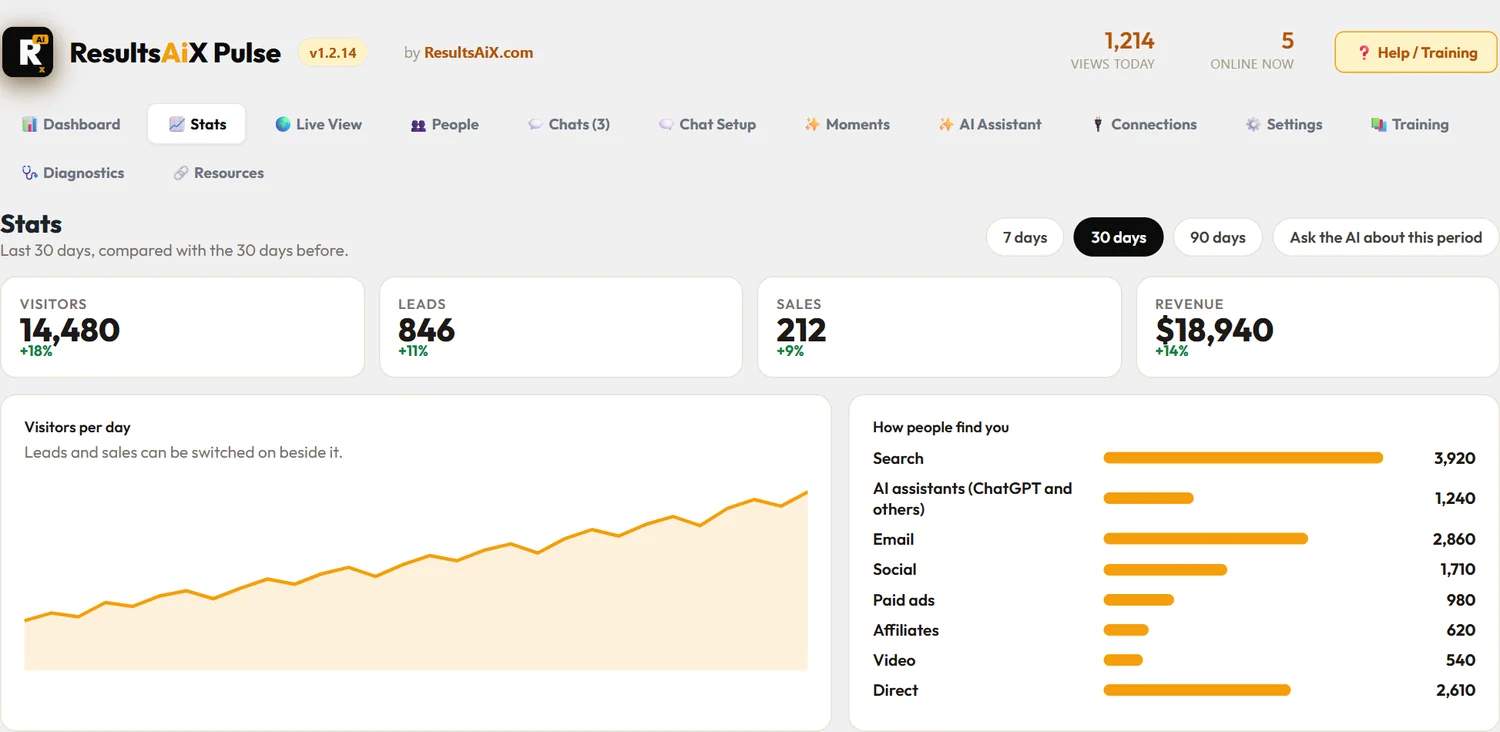
Stats. Visitors, leads, sales and revenue against the period before, and how people find you, AI assistants included.
ResultsAiX Pulse: The Chat On Your Pages
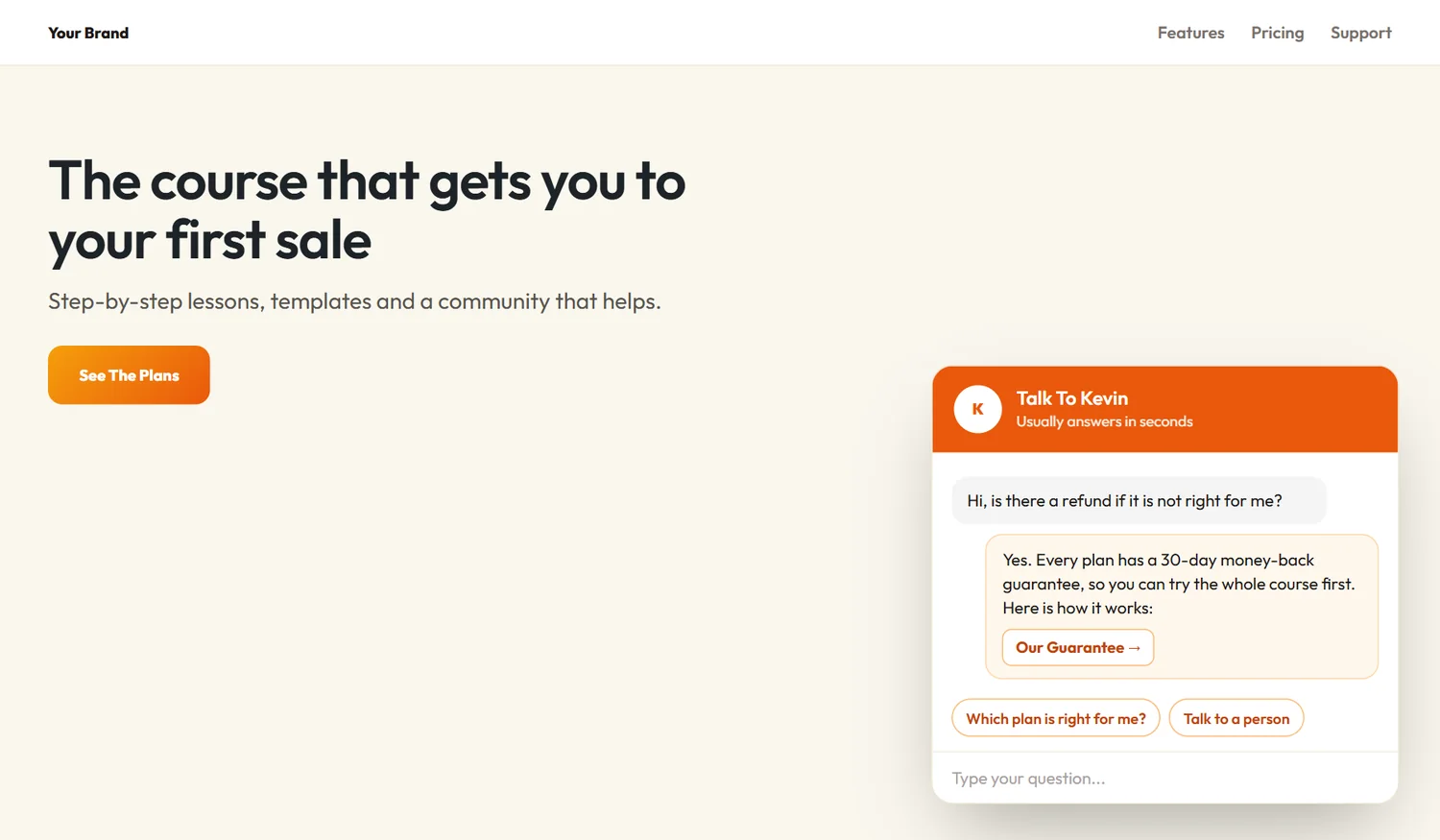
The Chat On Your Pages. With the Support Desk it answers from your own help articles, with a link to the answer, and hands over to you when a person is needed.
ResultsAiX Pulse: Chat History
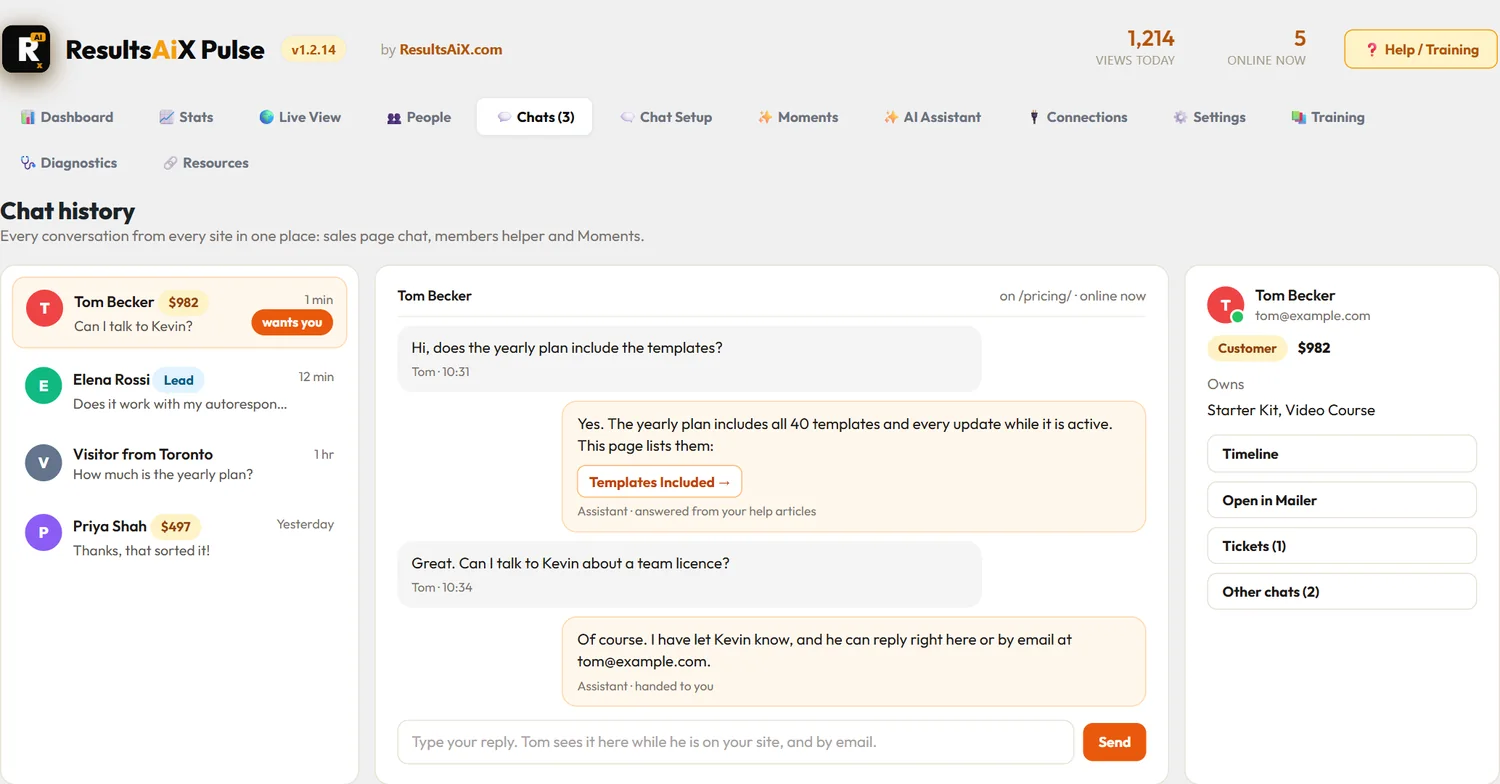
Chat History. Every conversation from every site in one place, with who each person is, what they own and who is asking for you.
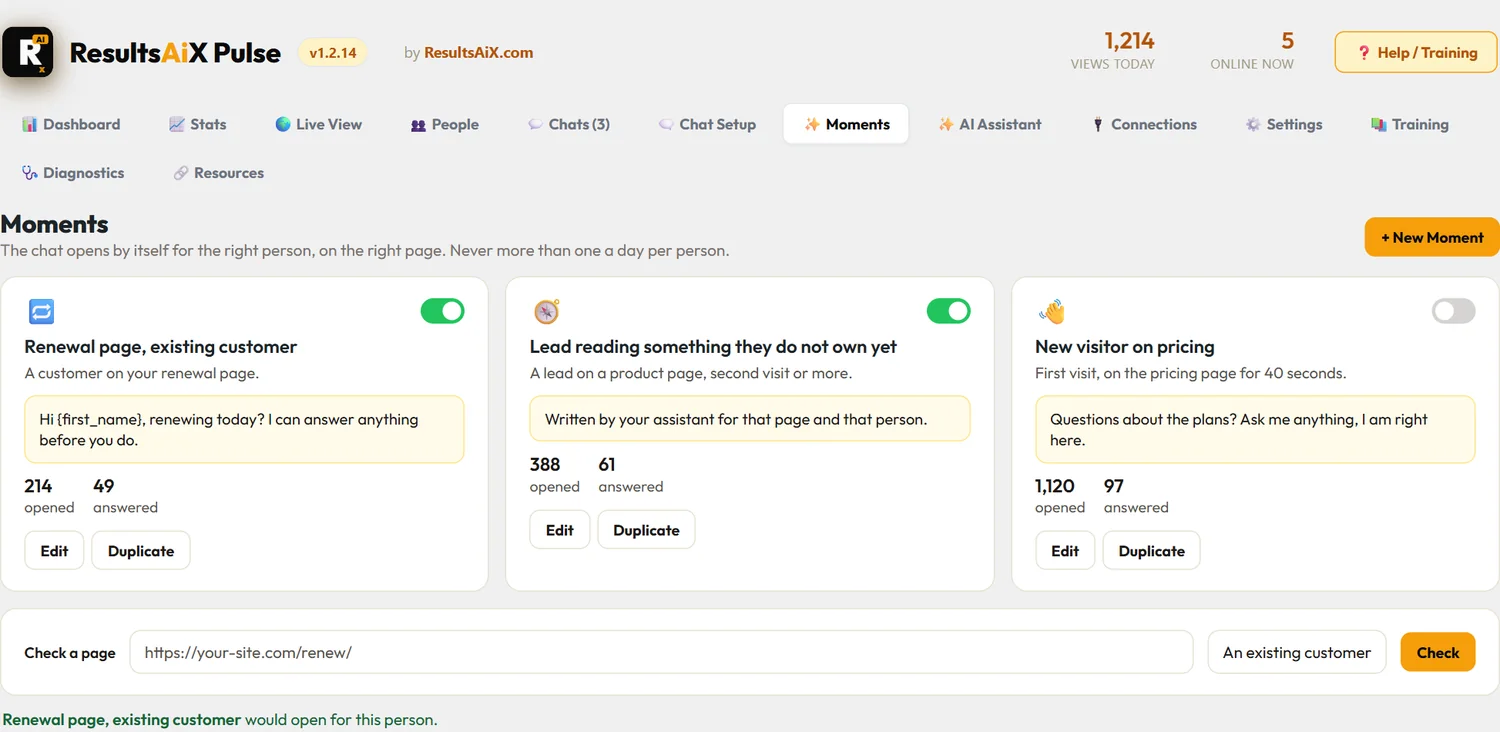
ResultsAiX Pulse: Moments
Moments. The chat opens by itself for the right person on the right page. Check a page tells you which Moment would open, or why none would.
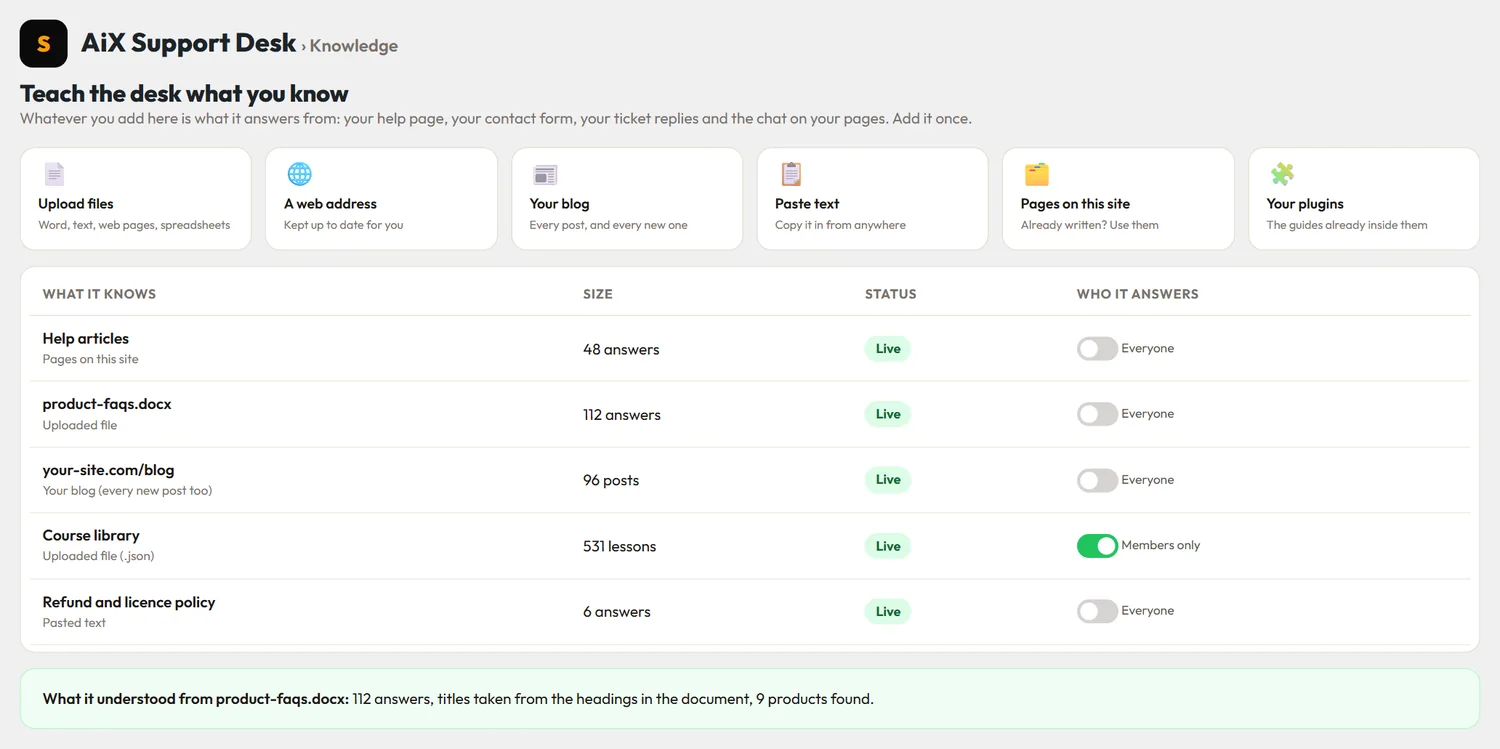
ResultsAiX Pulse: Teach It What To Say
Teach It What To Say. Six ways to give the assistant your knowledge in the Support Desk, with a Members only switch for anything just for your members.

Sample people and numbers. Click any screen to see it full size.

Your Stats Tell You What Happened Yesterday. Nobody Tells You Who Is Here Now.

Three things go wrong on almost every site, every single day.

👻

Your Best Customer Walks In And You Do Not Notice

Somebody who has bought from you four times is reading your new sales page right now. To your site they look exactly like a stranger from a search engine.

A shop owner would walk over and say hello. Your website says nothing.

⏳

The Question That Costs You The Sale Never Gets Asked

People hover on a pricing page with one small doubt. There is nobody to ask, so they close the tab. You see a bounce in next week's report and never learn what the doubt was.

Most lost sales are one short answer away.

🧩

Five Sites, Five Logins, No Single Picture

A blog here, sales pages there, a members area somewhere else, a few HTML pages on another host. Each has its own numbers and none of them know about each other.

You run one business. You should be able to watch it as one.

Live chat tools solve one third of this, and they do it blind.

They put a bubble on your page and wait. They do not know the person typing bought your course last year, they do not know about your other sites, and they charge you by the seat, by the month, to keep your conversations on their servers.

Pulse runs on your own WordPress and reads your own data. That is the whole difference, and it is why it lives inside the Bundle: every ResultsAiX plugin you switch on teaches it more about who is standing in front of you.

See Them. Know Them. Talk To Them.

Three jobs, one screen. These are recreated screens from the plugin with example data.

1 · See Them

Every Visitor, On Every Site, The Moment They Arrive

The Live View is a full command centre inside WordPress: who is online, a live feed of the pages being read, top countries, today's numbers, and a playback bar that replays anything from the last hour to everything Pulse keeps.

  • One site is the hub. Every other site you own reports to it
  • Each site gets its own colour, with a picker to watch one or all
  • The globe, a street map or Google 3D, and a public Live Visitors page you can share
2 · Know Them

A Name And A History, Not An Anonymous Dot

When somebody clicks a link in one of your Mailer emails, opts in on any page or logs in, Pulse recognises them. In your admin feed they appear with a first name, what they are to you and what they are worth to your business.

  • Reads Mailer, Funnels, Forms, Webinars, Membership, Surveys, Support and more
  • Sales and new leads appear on the globe as they happen
  • Only an administrator ever sees it. Your visitors and your public page never do
3 · Talk To Them

Click Talk. A Chat Opens On Their Screen.

You start the conversation, not them. Pick anyone on the list and the popup appears on their page within a few seconds, on WordPress or a plain HTML page. Or write a Moment, and the chat opens by itself for the right person on the right page.

  • The popup asks for a name and an email, once, and can be skipped or required
  • Every lead joins the Mailer list you choose, tagged, with that list's own welcome email
  • Every conversation from every site lands in one Chat history, one click from the toolbar on any screen

You Cannot Be There All Day. Your Assistant Can.

Connect your own AI key, write down what your business sells and how you help people, and the assistant takes it from there.

Your Key, Your Assistant

It Answers From What You Taught It

Google Gemini, Anthropic Claude or OpenAI. One key is enough, and Gemini has a free tier, with a 60 second walkthrough on the screen. There is a Talk button, so you can simply say what your business does instead of typing it.

  • Answers first, or only after you have had a head start. You choose
  • Hands over to you the moment somebody asks for a person
  • Reads every message for spam and abuse before anybody sees it
  • Every call is logged with its estimated cost, against a monthly budget you set

Everything In The Box

One plugin. No add-ons to unlock, no seats to buy and no visitor limits.

🌍

Globe, Street Map And Google 3D

Three ways to watch, with zoom on every one. Ten themes colour all of them, two layouts, and full screen for a second monitor.

⏪

Replay Any Window

The last hour up to everything Pulse keeps, played in under a minute, with every sale and lead where it happened.

🔗

Hub For All Your Sites

One pairing code connects another WordPress site. One line of code connects any HTML page. Each site in its own colour.

🧠

Family Identity

First name and what they are to you, from your own ResultsAiX plugins. Works on its own too, and gets smarter with each plugin you switch on.

💰

Sales On The Globe

Every sale from your ResultsAiX tools bursts on the map where that buyer was last seen. Outside systems can post sales to a signed webhook.

💬

Visitor Chat

Start a chat with anybody online, from the Live View, the People list or Stats. It opens on their screen within a few seconds.

👋

Moments

The chat opens by itself for one kind of person on the pages you pick, with your line. Check a page tells you which Moment would open, or why none would.

📧

Email Capture Into Mailer

Ask, require or never. Leads join your chosen Mailer list with a tag, and a known buyer is recognised the moment they type their email.

📜

Chat History Everywhere

Every conversation from every site in one place, with who it was, what they own and what they bought after. One click from the toolbar on any screen.

✨

AI Assistant

Answers private chats and Moments from what you taught it, writes opening lines for a page, and hands over to you the moment somebody asks for a person.

🛡️

Spam And Abuse Screening

Link floods, shouting and your own blocked words are caught instantly. Held messages never reach your unread count.

🧩

Sidebar Widget And Shortcodes

A live card for your sidebar and inline counters such as "12 people here right now", yours to switch on, plus the full globe on any page.

📈

Stats That Know The Money

Where people came from, AI assistants and your own campaign links included, with sales, revenue and ad spend against the period before.

📺

A Live Page You Can Share

A full screen page of your own that opens on the view and the replay you pick, with a link builder for every occasion.

📱

Works On Your Phone

The Live View, the chats and the public page all fit a phone screen, so you can watch from anywhere.

🔒

Privacy First

No raw IP addresses stored, a one-press local location database, your own retention period, and Do Not Track honoured.

There Is One Way To Get Pulse. The ResultsAiX Bundle.

Pulse is not for sale on its own, and that is deliberate. It is at its best when it can read the rest of your ResultsAiX tools, so it ships with them.

Only In The Bundle

ResultsAiX Pulse

Includedwith the Bundle

The Bundle is 25+ WordPress plugins plus the ResultsAiX Theme, each licensed for three sites.

  • ResultsAiX Pulse, everything on this page
  • ResultsAiX Mailer, so chat leads land on a real list
  • Funnels, Forms, Webinars, Membership, Surveys and Support, which tell Pulse who your visitors are
  • The ResultsAiX Theme, with a sidebar ready for the Pulse widget
  • Every plugin released going forward, included
  • Updates and support included
SEE THE BUNDLE DEAL →

The Bundle is $397 for the first year, then $197 a year. The full details, the guarantee and everything else that is included are on the Bundle page.

Already own the ResultsAiX Bundle? Pulse is already yours. Download it from your member area and activate it with your bundle key.

What Happens In The First Ten Minutes

No account to make on anybody else's server, and no script to paste on your WordPress site.

  1. Upload it and open Pulse in your menu. Paste your ResultsAiX Bundle key and the Live View starts showing visitors straight away. There is nothing else to configure first.
  2. Press Download The Free Geo Database. One press, and visitor locations are worked out on your own server from then on.
  3. Add your other sites. Paste a pairing code into each WordPress site, and one line of code into any HTML page.
  4. Switch on chat and choose your Mailer list. Then, if you want the assistant, paste an AI key and tell it about your business.
  5. Want Google 3D? Paste a Google Maps key under Settings, Map And Google 3D, and the third view appears beside the globe and the map.

Then open the Live View on a second screen and leave it there. That is the moment it makes sense.

What It Does Not Do, So You Know Before You Buy

Here it is in plain sight.

  • It only knows people your own site already knows. A name appears when somebody has clicked one of your emails, opted in, bought or logged in. A first-time stranger stays an anonymous dot with a city, which is exactly how it should be.
  • The assistant needs your own AI key. Gemini has a free tier. Without any key, the chat, Moments, the spam rules and everything else still work, and the AI parts simply stay out of the way.
  • Chat messages arrive in seconds, not instantly. It checks for new messages every few seconds instead of holding a connection open, which is why it runs on any ordinary hosting account.
  • Location is a city, not an address. It is worked out from the visitor's network, it can be wrong for people on a VPN, and with privacy mode on it is rounded to the city centre.
  • The assistant only says what you taught it. If the answer is not in what you wrote, it says so and offers to fetch you. It does not invent prices or promises.
  • Google 3D needs your own Google Maps key. The key sits in a Google Cloud project with billing switched on, and Google charges that account by its own prices, not us. The globe and the street map need no key at all.
  • Replays go back as far as you keep. Visits are kept for 30 days unless you choose more, so Everything Kept means exactly that.

Questions People Ask First

Can I Buy Pulse On Its Own?

Not at the moment. Pulse is only available inside the ResultsAiX Bundle. It reads the rest of the family to tell you who your visitors are, so that is where it belongs.

I Already Own The Bundle. Do I Have To Pay Again?

No. Every Bundle owner gets Pulse at no extra cost, along with every other plugin released going forward. Download it from your member area and activate it with your bundle key.

Does It Work Without The Other ResultsAiX Plugins?

Yes. The globe, the street map, the hub for all your sites, the chat, Moments, the assistant and the widget all work on a site with nothing else installed. Each family plugin you add simply teaches Pulse more about who is visiting.

Will It Work On My Plain HTML Pages?

Yes. Add the site in your hub, copy its one line of code, and paste it before the closing body tag of any page on any host. Visitors on that page appear on your globe, and the chat works there too.

Can My Visitors See Each Other's Details?

No. Names, emails and what somebody is worth to you are shown to administrators only. What the public sees is yours to decide. Out of the box the public Live Visitors page and the sidebar widget show dots on a globe and nothing else. Counts, cities, pages and sales each have their own switch, all off until you turn them on, and nothing about any person is ever public.

Do You Get My Visitor Data?

No. Everything is stored in your own WordPress database. There is no account on our servers and no dashboard on our side. With the local location database installed, not even a visitor's IP address leaves your server.

What Does The AI Assistant Cost To Run?

You connect your own key, so you pay your AI provider directly and nothing to us. Gemini has a free tier. Pulse logs every call with an estimated cost, and you set a monthly budget that pauses the assistant when it is reached. It never blocks a real person's message.

Will It Slow My Site Down?

The tracker is one small script that loads after your page. The globe itself only loads on the screens and pages where you place it. Old events are pruned automatically after the retention period you choose.

Is There A Limit On Visitors, Chats Or Sites?

There is no visitor limit, no chat limit and no seat fee, because it runs on your own hosting. Your Bundle licence covers three sites for each plugin, and any number of HTML pages can report to a hub.

Is There A Chat Button On Every Page?

No. No button waits on your pages. A chat appears only when you press Talk on somebody, or when a Moment you wrote opens it for the right person on the right page. Everybody else sees nothing at all.

Do I Need A Google Key?

Only for Google 3D. The globe and the street map work the moment Pulse is switched on, with no key. Save a Google Maps key under Settings, Map And Google 3D, and the Google 3D button appears. If Google refuses the key, Pulse tells you the reason in plain words.

Can I Show My Live Globe To My Audience?

Yes. Switch on the public Live Visitors page and pick what it opens on, live or a replay, on a loop if you like. Make a link for each occasion, or use the same choices on the shortcode. The public page never shows a name, an email or what anybody spent, and counts, cities and sales each have their own switch.

Stop Guessing Who Is Out There. Go And Say Hello.

Pulse comes with the ResultsAiX Bundle, along with everything that makes it smart.

  • Every visitor on every site you own, on a live globe, a street map or Google's 3D Earth
  • A week of visits and sales replayed in under a minute
  • Subscribers and buyers recognised by name, for your eyes only
  • One click to open a chat on anybody's screen
  • Chat leads added straight to your Mailer list
  • Your own AI assistant, answering from what you taught it
  • Self-hosted, with no raw IP addresses stored
GET PULSE WITH THE BUNDLE →

P.S. The first time a name you recognise appears on the globe, reading your sales page, you will understand why this is not sold as a chat widget. It is the difference between a website and a shop with somebody behind the counter.

P.P.S. Already a Bundle owner? You do not need to do anything except download it. Log in to your member area and it is waiting for you.

ResultsAiX Pulse · only available inside the ResultsAiX Bundle

Get Pulse With The Bundle →