
How To Clean Up Email List Names After An Import

Damaged first names make emails look careless. This page shows what damages names in an email list, the one rule that matters most, and how ResultsAiX Mailer previews every change before it writes anything, with an undo if you change your mind.
To clean up email list names after an import, you need to find the names that arrived damaged, fix only the ones you can fix safely, clear the junk instead of guessing, and stop the mess coming back on the next sync. Done carelessly, a cleanup does more harm than the mess it was meant to fix.
I ran one check on my own list of 66,921 subscribers and found 7,243 names that needed fixing. This guide shows what damages names, the one rule that matters most, and how Tidy Names in ResultsAiX Mailer handles it without inventing anybody a new name.
Why You Need To Clean Up Email List Names At All
Move a list between systems even once and some of the names arrive damaged. Not all of them, and not obviously, which is why nobody notices until an email goes out greeting somebody in block capitals.
Those 7,243 names on my list weren’t bounces or bad addresses. They were real people about to get an email with a greeting that made me look careless. “Hi MARTIN HOLBROOK” costs you money, because it reads like a machine wrote it.
The damage falls into a few groups, and each one has a different right answer.
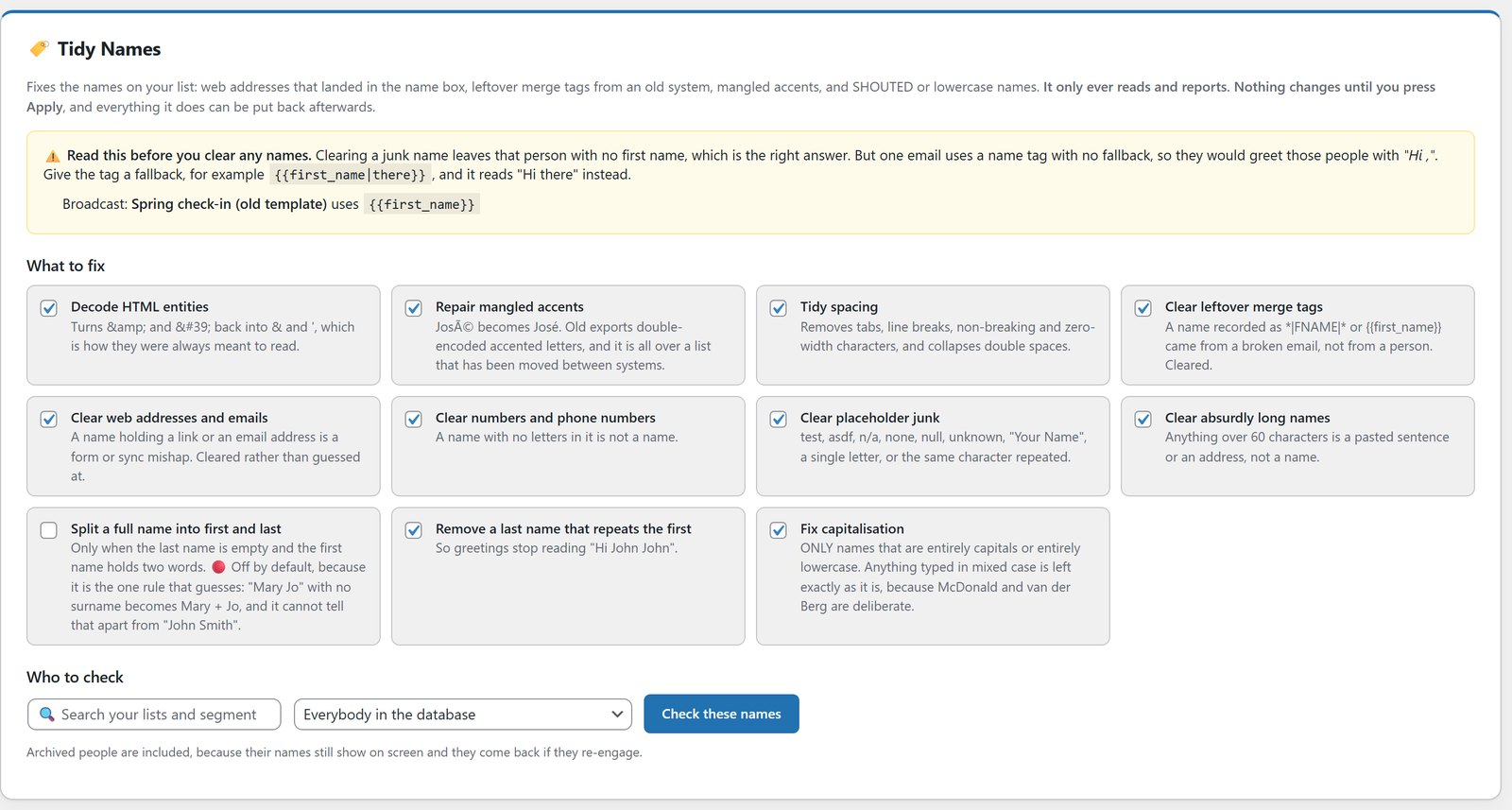
- Shouted or lowercase names: MARTIN HOLBROOK and petra lindqvist. By far the biggest group for me, 6,566 of the 7,243.
- Web addresses or email addresses in the name field: a form or import that put the wrong column in the wrong place. 282 of mine.
- Mangled accents: José where José should be, from an export that encoded the text twice.
- Leftover merge tags: a name stored literally as *|FNAME|* from an email gone wrong, not a person.
- Placeholder junk: test, asdf, n/a, none, unknown, “Your Name”.
- Numbers: a phone number typed into the name box. If there’s no letter in it, it isn’t a name.
Where Damaged Names Come From
Almost none of this is anyone’s fault. A CSV gets opened and saved in a spreadsheet that changes the text encoding, and every accent turns to gibberish. A form on an old landing page maps the website field into the first name box. A sync between two tools copies a merge tag instead of the value behind it. Someone signs up on a phone with caps lock on.
Each one is small. Over years and a couple of moves between platforms, they add up to thousands of names, and they all surface at the same moment: the first time you send to the whole list from somewhere new.
The Rule That Matters Most: Don’t Guess
This is where most list cleaners go wrong, so I’ll be blunt about it.
A blanket “capitalise everything” pass looks like a fix and is actually damage. It turns McDonald into Mcdonald, MacLeod into Macleod and van der Berg into Van Der Berg. Those spellings were typed on purpose by the person who owns the name.
The right rule is narrower than most people expect. Only touch a name that is entirely capitals or entirely lowercase. Mixed case is evidence that someone meant it, so it’s left exactly as typed. A shouted name still comes back properly, with the Mc and the apostrophe handled, so mcdonald becomes McDonald, not Mcdonald.
The same thinking decides what happens to junk. If the name field holds a web address, the honest answer is to clear it, not to try to pull a name out of it. A blank first name is safe. An invented one isn’t.
The One Rule That Ships Switched Off
There’s exactly one rule in Tidy Names that guesses, and it’s off by default: splitting a full name into first and last. “John Smith” sitting in the first name box with an empty last name is almost certainly two names. “Mary Jo” is one. Nothing in the data can tell them apart, so that rule waits until you choose to switch it on.
If you take one idea from this guide into whatever tool you use, make it this one. Anything that guesses belongs behind a box you have to tick.
There’s also a small rule I like: if the last name just repeats the first, it’s removed, so your greetings stop reading “Hi John John”.
Preview, Apply, Undo
A bulk edit across thousands of records isn’t something to trust blind. Three things make it safe.
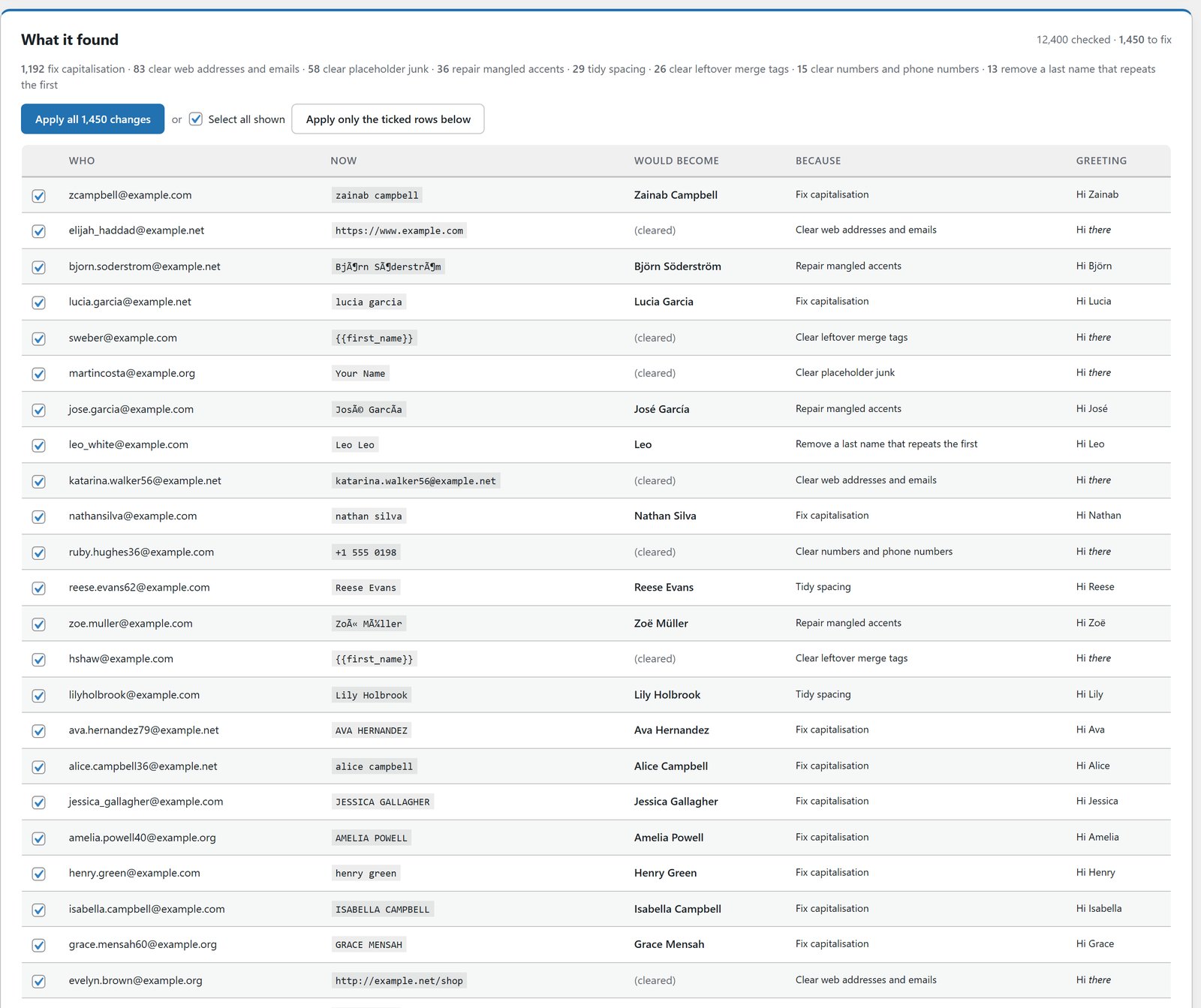
It reads and reports first. The check produces a list of what it would change and stops there. Nothing changes until you press Apply.
Every row shows its reasoning. What the name is now, what it would become, and a greeting column showing exactly what your email will say.
The original is kept. One button undoes the entire run and puts every name back exactly as it was. You can apply everything, or untick the few you disagree with and apply the rest.
The Trap Nobody Warns You About
Clearing a junk name leaves that person with no first name, which is the right answer. But if your emails greet people with a bare merge tag, those people now get an email that opens “Hi ,”.
The answer is a fallback on the tag, so {{first_name|there}} reads “Hi there” when the name is empty. Before you clear anything, Tidy Names scans your broadcasts and templates for name tags with no fallback and tells you which ones would greet people with “Hi ,”. It’s the kind of check you only think to build after it’s caught you once.
Fixing It At The Source, Not Just Once
Cleaning a list once is satisfying and temporary. If the junk came in through a sync or an import, the next run puts it straight back.
Two things stop that. First, the cleanup runs on the source as well as your subscriber list, so a sync can’t quietly bring the mess back next week. Second, new subscribers are checked on the way in, so a link arriving from a form, an import or a sync can never be stored as somebody’s first name again.
If you move contacts between tools, WP Sync carries the names and fields across, and the check on the way in keeps them clean.
What To Do With Your Own List
Run the check on everybody. It only reads, so there’s no risk in looking.
Read the summary. The breakdown by rule tells you what happened to your data over the years.
Fix any bare name tags in your emails first, before you clear anything.
Apply. Then spot-check twenty records, and undo the run if anything looks wrong.
Names are only one part of list hygiene. The next step is verifying your leads without deleting your best customers, and then scoring them by what they actually do.
Mistakes People Make Cleaning Names
Running a blanket capitalisation pass. It feels tidy and it rewrites names people spelled on purpose.
Inventing names. Pulling “Yoursite” out of a web address and greeting someone with it is worse than “Hi there”.
Clearing names before fixing the greeting. Do the fallbacks first, or the cleanup creates a new problem.
Cleaning once and walking away. If you don’t fix the source, the next sync puts it all back.
See It Working
Frequently Asked Questions
How Do I Clean Up Email List Names After An Import?
Run a check that only reads first, fix names that are entirely capitals or entirely lowercase, clear junk like web addresses and placeholders instead of guessing, make sure every name tag in your emails has a fallback, then apply with an undo ready. In ResultsAiX Mailer that’s the Tidy Names screen.
Will It Change Names I've Spelled On Purpose?
No. Capitalisation is only changed on names that are entirely capitals or entirely lowercase. Anything typed in mixed case, like McDonald, MacLeod or van der Berg, is left exactly as it is.
What Happens To A Name That's Just A Web Address?
It’s cleared, not guessed at. A blank first name is safe because your emails can fall back to a neutral greeting like “Hi there”.
Can I Undo It?
Yes. The original name is kept for every change, so one button puts the whole run back exactly as it was.
Does It Fix Accented Names That Came Through As Gibberish?
Yes. Text that was encoded twice is repaired, so José goes back to being José.
Will The Mess Come Back After My Next Import?
Not if you let it check new subscribers on the way in. Names arriving from a form, an import or a sync are checked as they arrive, and the cleanup can run on the source too.
Is My List Sent Anywhere To Do This?
No. Tidy Names runs inside your own WordPress against your own database. Nothing is uploaded anywhere.
Do I Have To Apply All Of The Changes?
No. You can apply everything the check found, or untick the few you disagree with and apply the rest.
What Does ResultsAiX Mailer Cost?
$97 a year for 3 sites, with no subscriber limits from me and a 30-day money-back guarantee. Tidy Names, Verify Leads, lead scoring and List Health are all included. It’s also in the ResultsAiX Bundle.
Stop Sending "Hi MARTIN HOLBROOK"
Every change previewed before a single record is written. One button undoes the entire run. New subscribers checked on the way in, so it never happens twice.


