ResultsAiX Podcasts runs your podcast on your own WordPress site, under any theme. Your shows, your episodes, your listeners and your numbers all live in your own WordPress, and nothing is rented from a podcast host.
Use it when you want a public show that reaches Apple Podcasts and Spotify, a private show for paying members, or a private series you hand to people by email with no account at all. All three can run side by side on one site.
The three kinds of show:
- Public shows, with one feed you give to Apple Podcasts, Spotify and every other podcast app once. New episodes reach every app by themselves.
- Members-only shows, where every member gets a private link of their own on the My Podcasts page.
- Private shows with no login, for anyone you add by email: no account and no password.
You can run as many shows of each kind as you like. See The Three Kinds Of Show: Public, Members-Only And Private With No Login for which one to pick.
What it adds to your site:
- A player that matches your site, in four looks: card, slim bar, listen button and playlist. Its colours follow your theme, or you pick Light or Dark.
- Episode pages that build themselves: the player at the top, your show notes, the transcript folded away underneath, and a list of more episodes from the same show.
- Listeners with no login: add them one by one, import a CSV, or let people sign up with the Podcast Signup block. Each one gets a welcome email with one-tap buttons for Apple Podcasts, Overcast, Pocket Casts and Podcast Addict.
- Release the way you want: every episode at once, each on its own date, or one at a time after someone joins (drip). Any episode can close a set number of days after it opens.
- Video to audio: drop a Zoom call, webinar replay or phone recording on an episode and your browser takes the sound out. Only the sound is uploaded.
- AI with your own key: transcripts, show notes, chapters, SEO and a blog post from any episode.
- Stats per episode and per listener, so you see who listens most and what each person heard.
- An embed player for your public episodes on other websites.
- It works with your other ResultsAiX plugins the moment they are installed: Membership, Mailer, WP Sync, Speech, Webinars, WP Conversion Tracker and Search.
Where to find it:
After you activate it, a Podcasts menu appears in your WordPress admin with Episodes, Add Episode, Shows, Dashboard, Listeners, Stats and Settings.
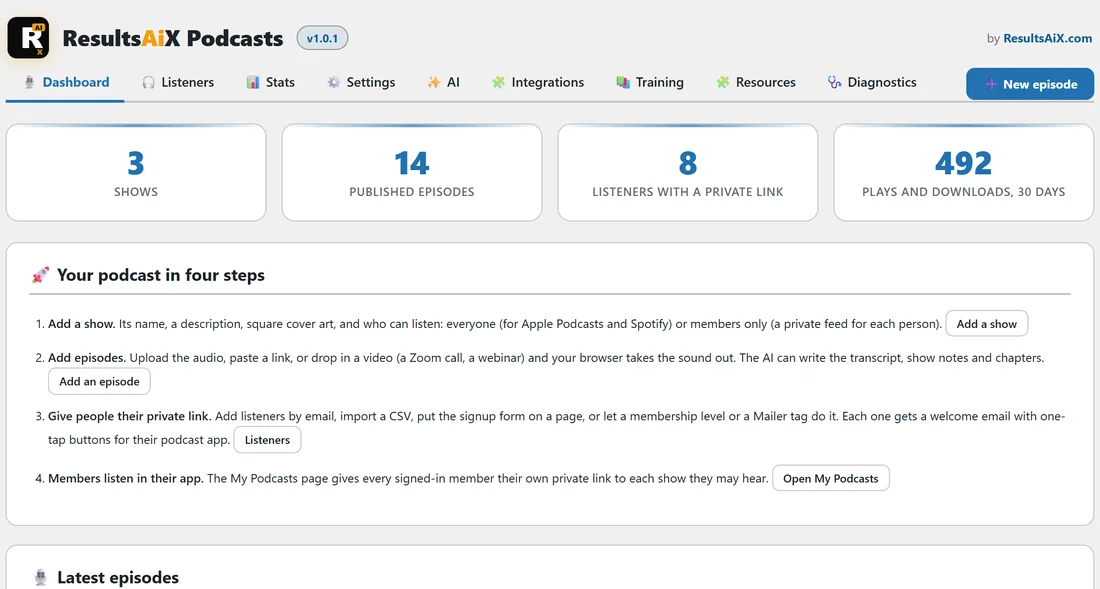
Dashboard, Listeners, Stats and Settings open the plugin's own screen. It has the tabs Dashboard, Listeners, Stats, Settings, AI, Integrations, Training, Resources and Diagnostics, plus a New episode button on the right of the tab bar.
Episodes, Add Episode and Shows are WordPress's own lists and editors, with the plugin's boxes added: Show settings on a show, and Episode audio and details plus Transcript and AI on an episode.
The Dashboard tab:
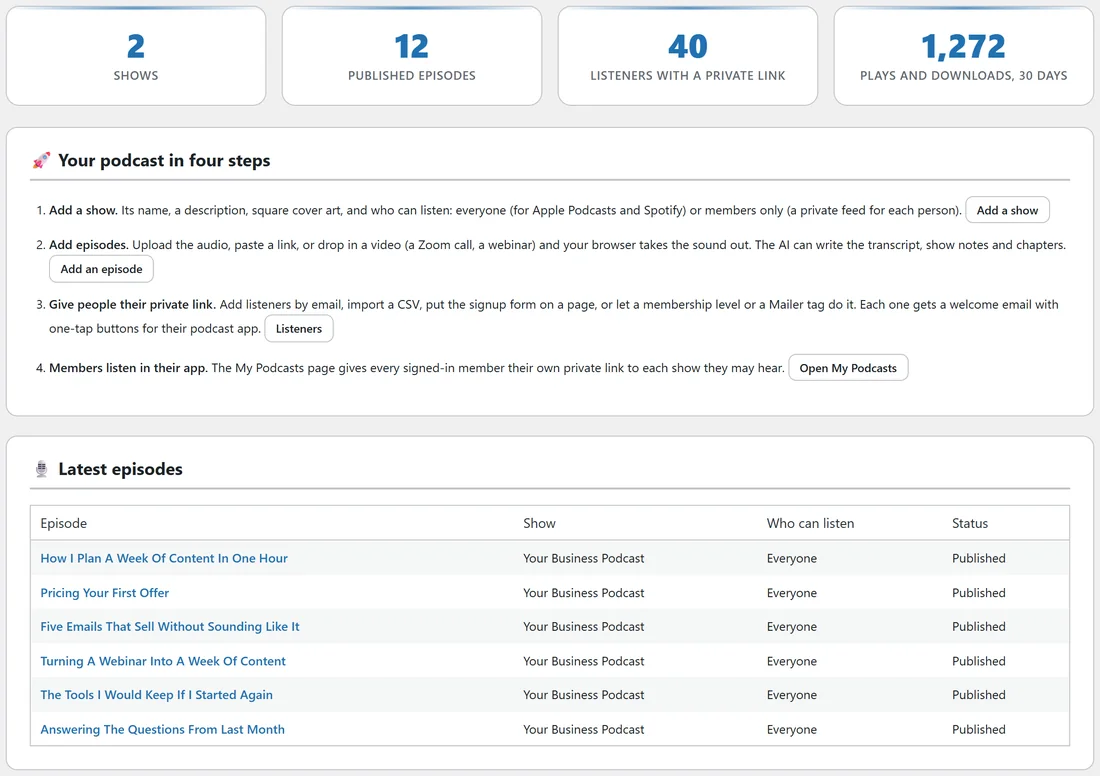
The Dashboard tab is the first screen you see. Along the top are four numbers: Shows, Published episodes, Listeners with a private link, and Plays and downloads over the last 30 days.
Under them is Your podcast in four steps, with a button for each step.
- Add a show, with the Add a show button.
- Add episodes, with the Add an episode button.
- Give people their private link, with the Listeners button.
- Members listen in their app, with Make the My Podcasts page (or Open My Podcasts once the page exists).
At the bottom, Latest episodes lists your six newest episodes with their show, who can listen and their status (Published, Draft or Scheduled). Click a title to open it.
A real example:
Say you run yoursite.com and want two things: a free weekly show called Your Business Podcast to grow your audience, and a six-lesson Client Onboarding Series that only paying clients hear. You make two shows, set the first to Everyone and the second to Members only, and submit the first one's feed to Apple Podcasts and Spotify once. New clients get the onboarding series by email, one lesson a week, with drip.
Already have Podcasts in the ResultsAiX Theme?
The same podcast engine is built into the paid ResultsAiX Theme. When the plugin is active, the theme's copy steps aside and the plugin takes over, using the very same shows, episodes, feeds and private links. See Using ResultsAiX Podcasts With The ResultsAiX Theme.
What you need:
ResultsAiX Podcasts needs WordPress 6.0 or newer and PHP 7.4 or newer. This documentation describes version 1.0.2.
Next steps:
- Installing ResultsAiX Podcasts And Activating Your Licence.
- Your First Show: Cover Art, Feeds And Who Can Listen.
- Adding Episodes: Audio Files, Links And Episode Details.