Products tell the plugin what each testimonial is about. A review of your yoga membership can then show on the yoga page, and a review of your coaching on the coaching page, without you sorting anything by hand.
One list powers every picker in the plugin: Add New, the importers, the public form dropdown, the display builder, gift campaigns and the Wall of Love filter. New names typed anywhere else are added to this list automatically.
Where to find it:
Click AiX Testimonials, then the Products tab.
The product list:
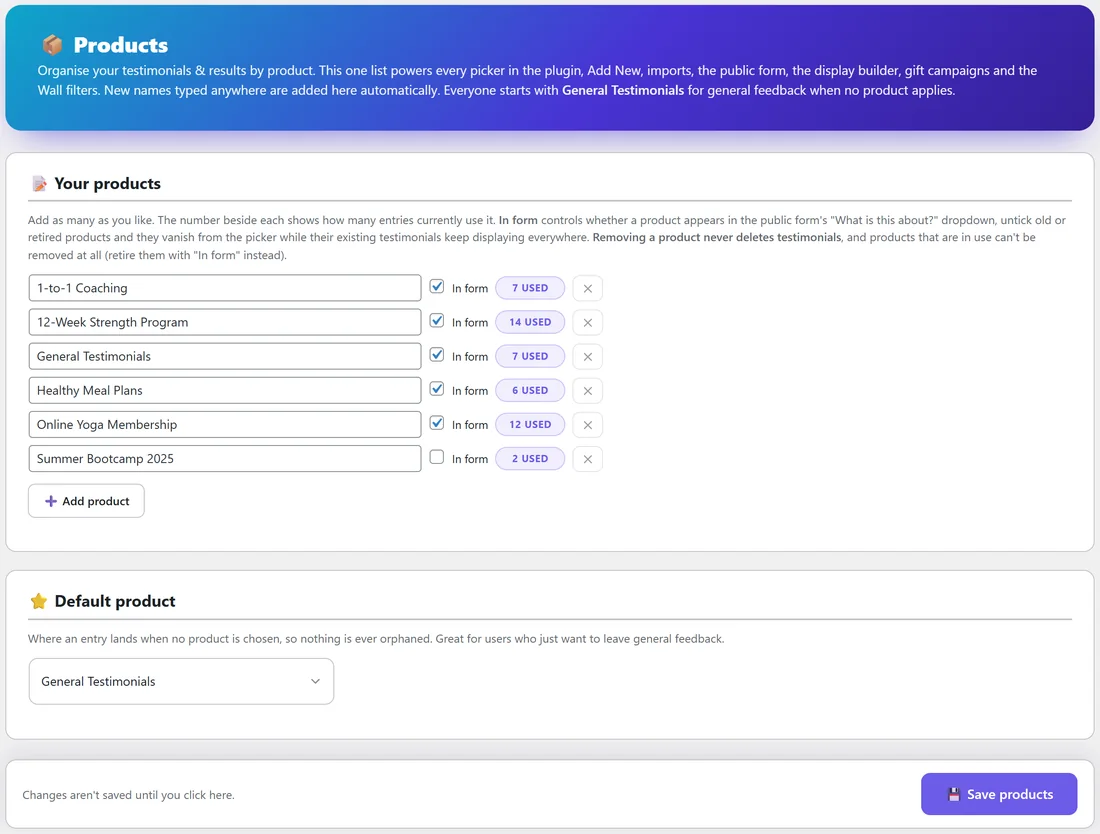
Each row under Your products has:
- The product name, which you can edit in place
- In form: when ticked, the product appears in the public form's What is this about? dropdown
- A USED count: how many testimonials currently use that product
- The ✕ button, which removes the product from the list
Every install starts with General Testimonials, for feedback that is not about one product.
Adding products:
- Click Add product.
- Type the name exactly as customers know it, for example Online Yoga Membership.
- Repeat for each product.
- Click Save products at the bottom.
Retiring an old product:
When you stop selling something, untick In form beside it and click Save products. It disappears from the form's dropdown, and its testimonials keep showing everywhere they already appear.
Removing a product never deletes testimonials. A product that is in use cannot be removed at all, so In form is the way to retire it.
The default product:
Under Default product, choose where an entry lands when nobody picks a product. That way nothing is ever left without a home. General Testimonials is a good choice, because it is meant for general feedback.
A real example:
Fit at Home Academy lists five products: 1-to-1 Coaching, 12-Week Strength Program, General Testimonials, Healthy Meal Plans and Online Yoga Membership. Last summer it also ran Summer Bootcamp 2025. That product has In form unticked, so new visitors never see it in the form, while its 2 old reviews are still there in the list as 2 USED.
Products from other plugins:
Developers can add a product from their own plugin or theme with one guarded line: if ( function_exists( 'autoproof_register_product' ) ) { autoproof_register_product( 'My Product' ); } The name then appears in every picker.
Tips:
- Use the same product names as your sales pages, so shortcodes like [autoproof product="Online Yoga Membership"] are easy to write.
- Keep the list short and clear. Visitors pick from it on your form.
- After adding products, set a gift per product on the Gifting tab if you want different rewards. See The Built-In Gifting System.