Sales pages, landing pages and anything else WordPress does not build can show the same banner as your site. You paste one line into the page, and every choice made there goes into your site's Consent log, with the address of the page it was made on.
Where to find it:
AiX Consent, Banner tab, the last box: Show this banner on your other pages.
The line to paste:
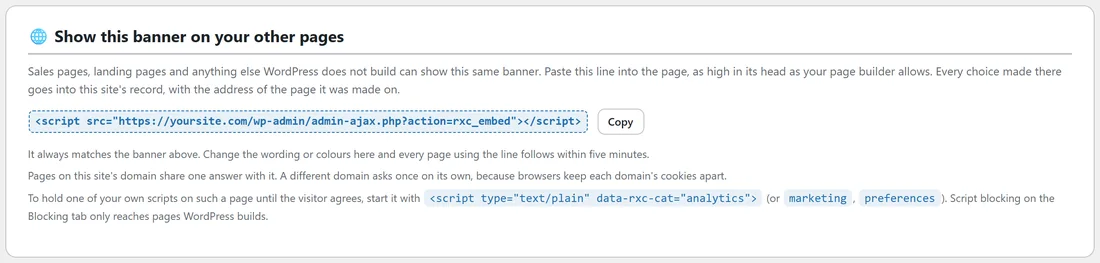
The box shows a single script line, made for your site, with a Copy button next to it. On yoursite.com it reads:
<script src="https://yoursite.com/wp-admin/admin-ajax.php?action=rxc_embed"></script>
If the banner is switched off, the box says the line shows nothing until you switch it on.
Step by step:
- Open the Banner tab and scroll to Show this banner on your other pages.
- Press Copy.
- Open your landing page in the tool that builds it.
- Paste the line into the page, as high in its head as your page builder allows.
- Publish the page and open it in a private window. The banner appears.
- Press Accept all, then open the Consent log tab. Your answer is the newest row, with the landing page's address in the Page column.
How it stays in step:
- It always matches the banner on the Banner tab. Change the wording or colours there and every page using the line follows within five minutes.
- Pages on your site's domain share one answer with it. A visitor who answered on yoursite.com is not asked again on a landing page at yoursite.com.
- A different domain asks once on its own, because browsers keep each domain's cookies apart.
Holding your own scripts on those pages:
Script blocking on the Blocking tab only reaches pages WordPress builds. On a page outside WordPress, mark up a script yourself so it waits for a yes. Start it with <script type="text/plain" data-rxc-cat="analytics"> instead of a plain script tag. Use marketing or preferences in place of analytics for those groups.
A real example:
Juniper Lane Pottery runs a spring class sale on a page built in a separate page builder, at yoursite.com/spring-classes/. The owner pasted the line into the page's head and changed the Meta Pixel snippet on that page to start with <script type="text/plain" data-rxc-cat="marketing">. Visitors see the same Cookies at Juniper Lane banner, the pixel waits for Marketing, and every answer shows up in the Consent log with the spring classes address.
Tips:
- Put the line as high in the head as you can, so the banner is ready before other scripts.
- Test each landing page once in a private window after adding the line.
Next steps:
See Working With The ResultsAiX Theme Cookie Notice, WP Consent API And Other Plugins, and For Developers: PHP Hooks, The JavaScript Event And Shortcodes for marking up your own scripts.