ResultsAiX Membership can be driven from outside the WordPress screens. An app, an automation tool or an AI agent can look up members, give or take a level, check access and read payments through the REST API or the WordPress abilities. The same actions run from the command line with WP-CLI. And webhooks send every change to another system as it happens.
All four use the same code underneath, so the same call always does the same thing, whichever way it arrives.
Where to find it:
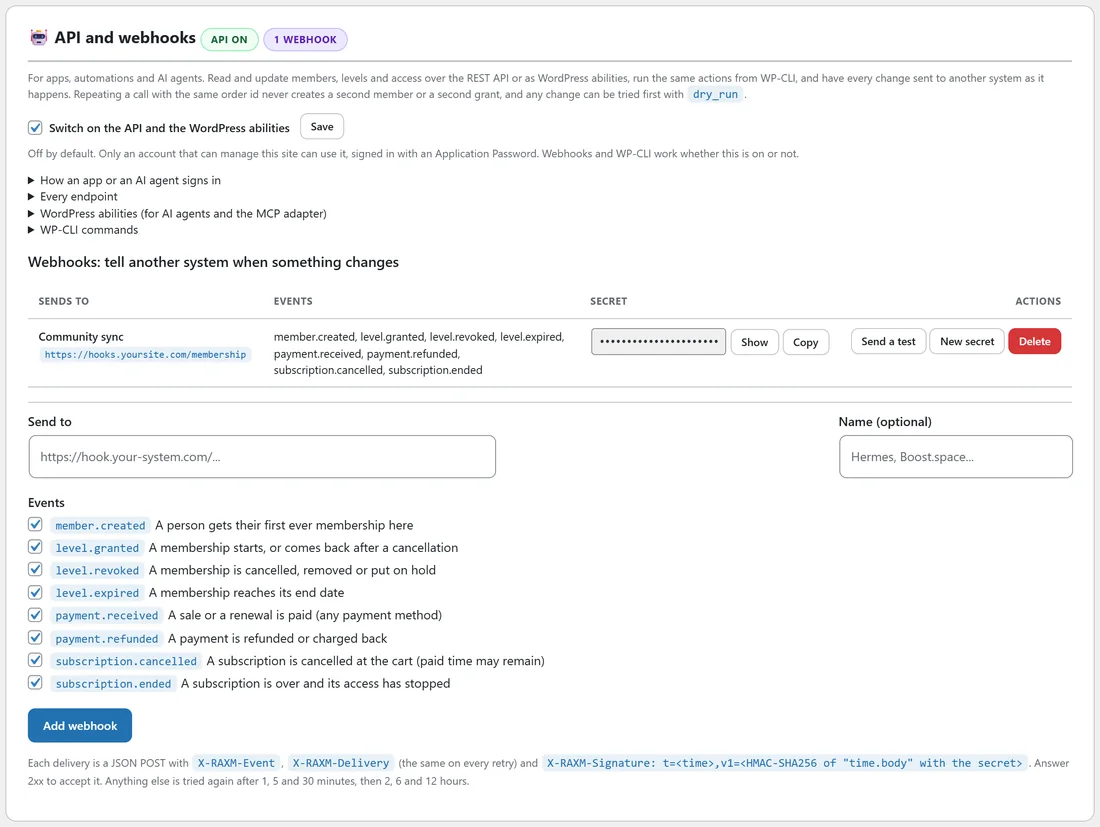
Open AiX Membership, then the Integrations tab, and scroll to API and webhooks. The badges next to the heading show API on or API off, and how many webhooks are set up.
Switching the API on:
The API and the WordPress abilities are off until you switch them on.
- Tick Switch on the API and the WordPress abilities.
- Press Save next to it.
Only an account that can manage the site can use the API, signed in with an Application Password. Webhooks and WP-CLI work whether this switch is on or off.
How an app or an AI agent signs in:
- In WordPress, open Users, then your profile (or a dedicated administrator account for the app).
- Under Application Passwords, type a name such as Membership app and press Add New Application Password.
- Copy the password WordPress shows once.
- The app sends the username and that password with each request (HTTP Basic sign-in) over https.
The open section How an app or an AI agent signs in on the screen repeats these steps for your site.
Every endpoint:
The addresses start with your site address and /wp-json/raxm/v1. Open Every endpoint on the screen for the full list with every option.
- GET /levels: every level, with price, buy link and member count. GET /levels/ plus an id or slug for one level.
- GET /members: members, newest first. Filter with search, level, status (active, cancelled, expired, pending or removed) and updated_since; page through with page and per_page (50 by default, 200 at most).
- POST /members: create or update a member and optionally give them levels. Found by user_id, then email; created only when neither matches. create false only updates; notify true emails a new account its login link.
- GET /members/ plus an id or email: one member with every membership, current access and referring affiliates.
- POST /members/ plus a member, then /levels: give a level, or bring a cancelled one back, with an optional expires_at.
- DELETE /members/ plus a member, then /levels/ plus a level: take a level away. mode is cancel (the default), remove or expire. The record is kept, so it can be given back.
- GET /access with member and level: whether that person can open that level right now, and why (they hold it, it comes with a bundle, it was cancelled and so on).
- GET /orders: payments recorded on the site, Stripe and every marketplace, newest first.
- GET /products: marketplace products and the levels each one gives.
- GET /activity: the API activity log.
- POST /webhooks/test: send a test event to every active webhook, or to one.
Safe to repeat, safe to try:
Every change accepts an order_id (or an Idempotency-Key header). The same change with the same id is answered from the first time and changes nothing, so a retried request never creates a second member or a second grant. Add dry_run=true to any change to see what it would do without doing it. Dates come back in ISO 8601 with the site's time zone.
WordPress abilities for AI agents:
On WordPress versions with the Abilities API, the same actions are registered as abilities in a category called Membership, so any AI agent that speaks the standard, including through the MCP adapter, finds and uses them without custom code. They are list levels, find members, get a member, check access, list payments, create or update a member, give a level and take a level away. They are only registered while the API switch is on.
WP-CLI commands:
On a server with WP-CLI, the same actions run as wp raxm commands:
- wp raxm levels
- wp raxm members, with --search, --level, --status, --page, --per_page and --format (table, json or csv)
- wp raxm member followed by an id or email
- wp raxm upsert --email=... with --levels=gold,pro-coaching and the other options
- wp raxm grant followed by a member and a level
- wp raxm revoke followed by a member and a level, with --mode=cancel, remove or expire
- wp raxm access followed by a member and a level
- wp raxm orders and wp raxm activity
- wp raxm webhooks test
Add --dry-run to any change to see it without making it. Every change is written to the activity log.
Webhooks: tell another system when something changes:
A webhook sends a JSON message to an address of yours the moment something happens.
- Under Webhooks: tell another system when something changes, type the address in Send to, starting with https://.
- Optionally give it a Name, such as Community sync.
- Tick the Events to send. All eight are ticked to start with.
- Press Add webhook. The secret is shown once: copy it into the receiving system.
The eight events:
- member.created: a person gets their first ever membership here.
- level.granted: a membership starts, or comes back after a cancellation.
- level.revoked: a membership is cancelled, removed or put on hold.
- level.expired: a membership reaches its end date.
- payment.received: a sale or a renewal is paid, by any payment method.
- payment.refunded: a payment is refunded or charged back.
- subscription.cancelled: a subscription is cancelled at the cart, with paid time possibly left.
- subscription.ended: a subscription is over and its access has stopped.
Each delivery carries the headers X-RAXM-Event, X-RAXM-Delivery (the same on every retry) and X-RAXM-Signature, an HMAC-SHA256 of the time and the body made with your secret, so the receiver can prove it came from your site. Answer with any 2xx code to accept it. Anything else is tried again after 1, 5 and 30 minutes, then 2, 6 and 12 hours.
Each webhook row has Show and Copy for the secret, Send a test, New secret and Delete. Recent deliveries lists what was sent, the result and the answer, with a button to send a failed one again.
A real example:
Yoursite Academy runs its student community on a separate platform.
- A webhook to https://hooks.yoursite.com/membership, named Community sync, sends level.granted and level.revoked. The community adds and removes people from the Gold group as they come and go.
- The owner's AI assistant uses the abilities to answer "Does ella.nash@example.com have Gold right now?" with check access, and to give a member the preset pack with give a level, using a dry run first.
- A nightly script on the server runs wp raxm members --level=gold --format=csv to feed a spreadsheet.
Tips:
- Give each app its own Application Password, so you can revoke one without touching the others.
- Always send an order_id with changes from a payment system: it makes retries harmless.
- Start a new integration with dry_run=true until the answers look right.
- The API activity log on the same screen shows every change, dry run and replay, newest first.
Related guides: Developer Hooks: Payments And Automation, AI Helper: Ask, And Build, Managing Members.