If Paid Memberships Pro runs this site today, or ran it in the past, its levels, members, protected pages and payments are still in your database. ResultsAiX Membership reads them straight from those tables and rebuilds them here, so you can move without asking a single member to sign up again.
Their plugin does not have to be switched on, and its tables are never changed. Switching it back on later puts you exactly where you were.
Where to find it:
Open AiX Membership, then the Import / Export tab. When Paid Memberships Pro data is found, a section called Migrate from Paid Memberships Pro appears. The box at the top lists what was found, for example "3 levels, 181 memberships, 24 protected pages, 1 protected category, 140 payments".
The steps, in order:
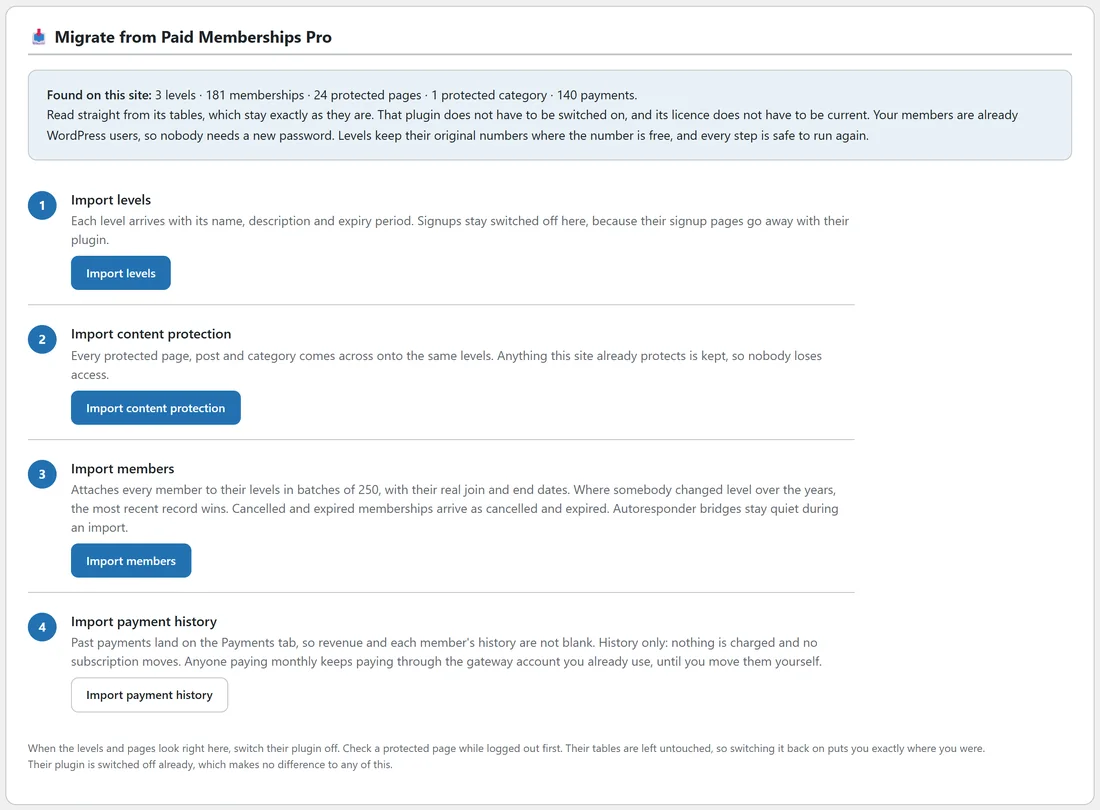
Every step can be run again and nothing doubles up. A tick and the time appear next to each step once it has run.
- Import levels. Press Import levels. Each level arrives with its name, description and expiry period. Levels keep their original numbers where the number is free here. Signups stay switched off, because their signup pages go away with their plugin.
- Import content protection. Press Import content protection. Every protected page, post and category comes across onto the same levels. Anything this site already protects is kept, so nobody loses access.
- Import members. Press Import members. Every member is attached to their levels in batches of 250 with a progress bar, with their real join and end dates. Where somebody changed level over the years, the most recent record wins. Cancelled and expired memberships arrive as cancelled and expired. Autoresponder bridges stay quiet during an import.
- Take over their protected downloads folder. This step only appears when their downloads folder is found. Their plugin seals that folder and serves the files itself, so once it is switched off members could not open their own downloads. Press Protect the downloads folder and the folder is placed behind your levels here instead. A copy of their rule is kept beside it as .htaccess-before-resultsaix.
- Import payment history. Press Import payment history. Past payments land on the Payments tab, so revenue and each member's history are not blank. It is history only: nothing is charged and no subscription moves. Anyone paying monthly keeps paying through the gateway account you already use, until you move them yourself.
The line under the steps tells you whether their plugin is switched on or off. Either way works.
Your members carry on as before:
Paid Memberships Pro members are already WordPress users, so nobody needs a new password and nobody has to log in again. Their join dates come across, so drip content continues from each member's real start date.
Pages built for Paid Memberships Pro:
Many sites wrap lessons in their membership shortcode, or in their content visibility block. When their plugin stops running, WordPress would normally print what is inside to everybody.
ResultsAiX Membership takes care of that for you. Once levels have been imported from Paid Memberships Pro, and while their plugin is switched off, this plugin answers their membership shortcode and their content visibility block with the same rules against your imported levels. This happens on its own, without the compatibility mode switch.
- The membership shortcode with a level, or several levels, shows its content only to members of those levels. Its delay setting counts days from when the member joined.
- A level named in the shortcode that was never imported shows the content to nobody, rather than to every signed in member.
- Their account, login, member profile and member field shortcodes are answered by this plugin's own equivalents.
- Their checkout, levels, billing, confirmation and invoice shortcodes print nothing, which reads better than raw brackets on a live page.
A worked example:
Before Yoursite Academy moved, it sold Basic, Premium and Coaching through Paid Memberships Pro, with 24 protected pages and one protected category.
- Press Import levels. Basic, Premium and Coaching appear on the Levels tab.
- Press Import content protection, then open Protect Content. The 24 pages and the category are listed with their levels.
- Press Import members and wait for the bar.
- Press Import payment history. The Payments tab now shows past payments.
- Open a protected lesson in a private window: you see the protection message.
- Log in as a member through the View as button on the Members tab and open the same lesson: you see it.
- Switch Paid Memberships Pro off on the Plugins screen.
Before you switch their plugin off:
- Check a protected page while logged out.
- Look at the Payments tab and at a few members on the Members tab.
- If you sold recurring payments through their plugin, plan how those subscribers will move to your new checkout, because their billing keeps running on the gateway account until you move them.
Tips:
- Import levels first, always. Protection and members are matched against them.
- Use Settings, then Login & redirects, to point members at your new login and members home pages.
- Turn on registration only for levels you want people to join on this site, on each level's edit screen.
Next, read Charging For Membership: Connecting Your Own Stripe Account if you want this site to take new payments, and Look At The Site As One Of Your Members to check access through a member's eyes.