This guide follows a sale from the moment a buyer pays to the day they renew, and shows where each step appears on your Payments tab.
Where to find it:
Open AiX Funnels, then Payments. Below the Stripe card are four figures, then Products, Add A Product and Orders.
The figures at the top:

- Paid Orders: live orders that are paid
- Net Of Refunds: live revenue with refunds taken off
- Started, Not Paid: checkouts that were opened and not completed
- Test Orders: shown only when you have test orders, which are never counted as money
Access comes from Stripe, not from the browser:
A buyer is only marked paid when Stripe's webhook confirms the payment. If somebody closes the tab the second after paying, they still get their order, their receipt and their download. Nothing depends on them reaching your thank you page.
The receipt page:
Every buyer lands on a receipt page that belongs to the plugin, so nobody can be dropped on a broken address straight after paying. It carries the download link, and a Continue button into the next step of your funnel when the product has a Page after buying.
Delivery:
- Digital products are delivered twice: on the receipt page and by email, so a closed tab never costs somebody the file they just bought. The email's subject is Your download is ready, followed by the product name.
- Download links are signed and time limited. They work for 30 days, and the real file address is never shown to the buyer.
- Stripe sends the money receipt itself, so the email from your site is only about delivery. Two receipts for one purchase would look like a double charge.
- Paid physical orders show a Mark fulfilled button. Pressing it marks the order fulfilled and emails the buyer that it is on its way, with the delivery address it is going to. The row then shows Fulfilled.
The Orders table:
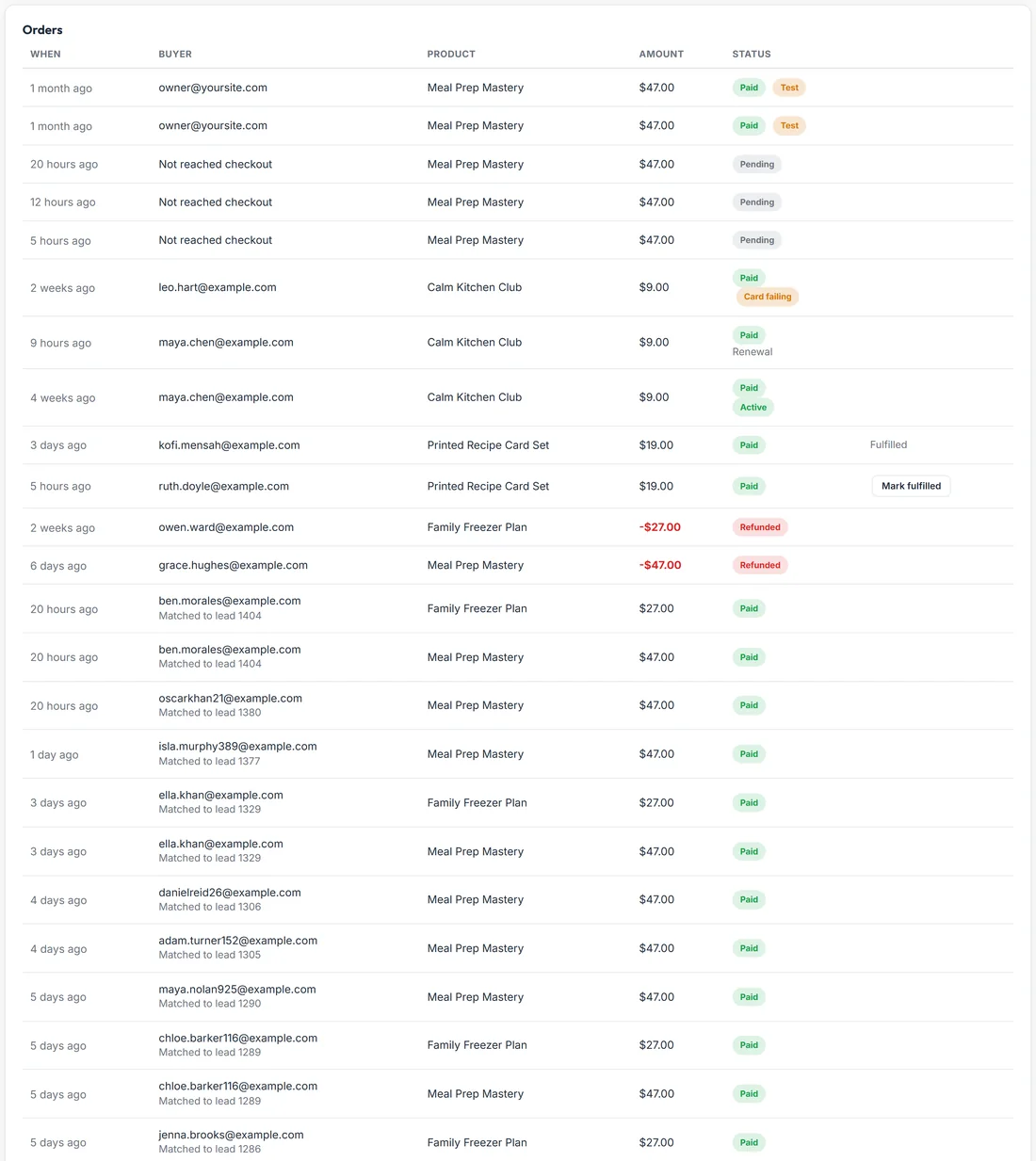
Each order shows When, Buyer, Product, Amount and Status. Status reads Paid, Pending or Refunded, with a Test tag on test orders. A pending checkout with no email yet shows Not reached checkout.
Orders and leads together:
When a buyer's email matches somebody on your Leads screen, the order says Matched to lead and the lead's number. You can follow one person from optin to sale.
Refunds:
Refund in Stripe as you normally would. The refund arrives here on its own as its own row, in red with a minus amount, and is taken off Net Of Refunds and off the Revenue on the Stats tab. You never record anything by hand, and a refund is never counted twice.
Subscriptions:
- Renewals arrive on their own and appear as their own rows marked Renewal, so a year of payments reads as a year of payments
- The first payment shows Active under Paid
- Subscribers get a link to their own Stripe billing page to update a card, read invoices or manage their plan, which keeps it off your support desk
- A renewal that fails shows Card failing. Stripe keeps retrying for several days, and nothing changes for the buyer on a single failed payment
What Started, Not Paid means:
It counts checkouts that were opened and never completed. A few is normal: people change their mind at the card form. If many people reach checkout and none are ever recorded, a card at the top of the Payments tab tells you, and the fix is the webhook. Check the endpoint address and signing secret in Stripe. See Taking Payments: Connecting Your Own Stripe Account.
A real example:
Ben opted in for the free guide, bought Meal Prep Mastery and then added the Family Freezer Plan. Both orders show Matched to lead with his lead number. Ruth bought the Printed Recipe Card Set this morning, so her row has a Mark fulfilled button. Leo's Calm Kitchen Club renewal shows Card failing while Stripe retries. Grace's course purchase was refunded in Stripe, and the red minus row appeared on its own.
Tips:
- Press Mark fulfilled as soon as you post something. The buyer's email reassures them it is coming.
- Check Started, Not Paid after your first live launch. A handful is normal.
- Give each product a Page after buying so buyers carry on into your funnel.