Some businesses route every AI request through their own gateway. It might log usage across a team, apply company rules, or sit in front of a provider for privacy reasons. ResultsAiX Funnels can send its requests there instead of straight to the provider.
Most people never need this. If you do not run a gateway, leave the boxes empty and nothing changes.
Where to find it:
Open AiX Funnels, then Connect AI. Below the Routing card there is a card called Advanced. Click Advanced to open it.
What the Advanced card holds:
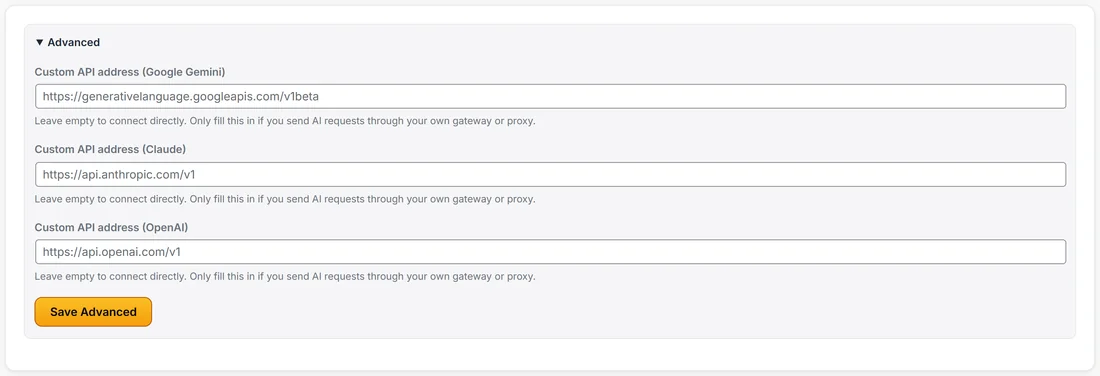
- Custom API address (Google Gemini)
- Custom API address (Claude)
- Custom API address (OpenAI)
- Save Advanced
Each box shows the provider's own address as its placeholder, so you can see what you are replacing. The note under each box says: leave empty to connect directly, and only fill this in if you send AI requests through your own gateway or proxy.
Setting it up, step by step:
- Ask whoever runs your gateway for the base address it gives each provider.
- Open Connect AI, then click Advanced.
- Paste the address into the matching box. Use the base address only. The plugin adds the rest of the path itself, exactly as it does for the provider.
- Click Save Advanced.
- Scroll up to that provider's card and click Test Connection to confirm the gateway answers.
Once an address is saved, the provider card shows a small through line under its status, with the address in use. That way you always know which route a provider is taking.
Using wp-config.php instead:
A site owner can also set the address for the whole site in wp-config.php. The constants are RAIX_AI_BASE_ANTHROPIC, RAIX_AI_BASE_OPENAI and RAIX_AI_BASE_GEMINI. When one is set and the box on the Advanced card is empty, the card shows Using the address set in wp-config.php with the address beside it.
The order the plugin uses:
- The address saved on the Advanced card, if there is one.
- Otherwise the constant in wp-config.php, if there is one.
- Otherwise the provider's own address.
When a gateway makes sense:
- A team that wants every AI call from every tool logged in one place
- A company with rules about which data may leave its network
- An agency that gives each client its own usage limits through one gateway
- Testing a new provider set up behind a compatible address
If none of these describe you, connect directly. It is the simplest and fastest route.
A real example:
Calm Kitchen does not run a gateway, so Sarah leaves all three boxes empty. A larger agency running funnels for clients might paste its company gateway into the Claude box, click Save Advanced, then press Test Connection on the Claude card and see the through line appear.
Tips:
- Change one provider at a time and test it before moving on.
- Your key still lives on the provider card. The gateway only changes where the request is sent.
- To go back to direct, clear the box and click Save Advanced.