Your Profile holds the things that go on every bonus page you make. Fill it in once and every new bonus page, guide and email uses it.
Where to find it:
Click the Your Profile tab. It is also the first screen you see when you start, until you save it once. While your name is empty, a Start with your profile note shows on the other tabs.
The four steps at the top:
Ticks show what is done: your name, your photo, your AI key and your defaults. Your AI key opens the AI tab.
You, on every bonus page:
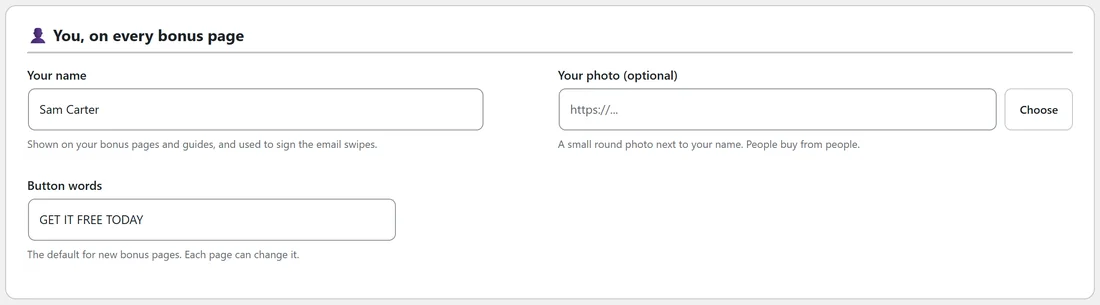
- Your name. Shown on your bonus pages and guides, and used to sign the email swipes.
- Your photo (optional). A small round photo next to your name on the page. Click Choose to pick one from your Media Library, or paste an image address.
- Button words. The default words for buttons on new bonus pages. Each page can change its own on step 4. It starts as GET IT FREE TODAY.
Your AI key:
Shows whether an AI key is connected, with a button to the AI tab if not. See Connecting Your AI Provider.
Writing:

- Words per bonus. From 1,500 to 12,000, in steps of 500. 6,000 makes a solid guide. Longer bonuses take a little longer and use more of your AI credit.
- Bonus ideas per round. From 5 to 15. This is how many ideas you get each time on step 2.
Works with your ResultsAiX plugins:
Each ResultsAiX plugin on your site is marked Installed, with what it does with Bonus Builder. See Working With Your Other ResultsAiX Plugins.
Tracking codes on your pages:
Codes such as a Facebook Pixel or Google Analytics that run on every Bonus Builder page. See Tracking Codes On Your Bonus Pages.
The Made with credit and reading sales pages:
The Made with credit is explained in The Made With Credit And Your Own Affiliate Link. Reading sales pages switches the page-reading service on or off; see Step 1: Adding The Product You Are Promoting.
Saving:
Click Save my profile (Save once it has been saved before). The next step is shown at the top: connect your AI key, or start your first project.
A real example:
Sam set Your name to Sam Carter. It shows in the Why this page section of every bonus page, as From Sam Carter on the guides, and at the end of every email.