With an AI key connected, ResultsAiX Optimize does more than write copy. It builds a whole test from one sentence, reads your Analytics and any heatmap, explains your test reports and writes the first lines of your Monday email. You always check what it made before anything runs.
Where to find it:
- Build a test with AI: AiX Optimize, Tests, at the top of the All view.
- The AI read of Analytics: the What this means panel on the Analytics tab.
- The AI read of a heatmap: What this heatmap says, in the heatmap viewer.
- Explain this test: In plain English, on any test report.
Each of these needs an AI key on the AI tab. See AI Features: Challenger Copy, Report Explanations And Test Ideas With Your Own Key.
Build a test with AI:

- Open the Tests tab.
- In Build a test with AI, paste the page address, for example yoursite.com/offer/. It can be a page on this site, or on another of your sites with the one line of code.
- Say what to try in plain words, for example a headline about the result, and a bigger orange Buy button.
- Press Build it. The AI reads the page's real headlines, buttons, prices and pictures, and makes version B as a draft.
- The builder opens with the note The AI built this draft from your idea. Check each change in the editor, where the page shows version B, adjust anything you like, then press Save and start.
What the AI changes:
- The text of a heading, button, paragraph or price line.
- Colours and sizes, as CSS on the element.
- A link or a picture.
- Hiding a block.
It uses only elements that are really on the page, makes one to six changes, keeps new copy close to the length of the old, and leaves prices alone unless you ask. It never invents claims, numbers, reviews or guarantees. The test stays a draft until you press Save and start.
The AI read of Analytics:
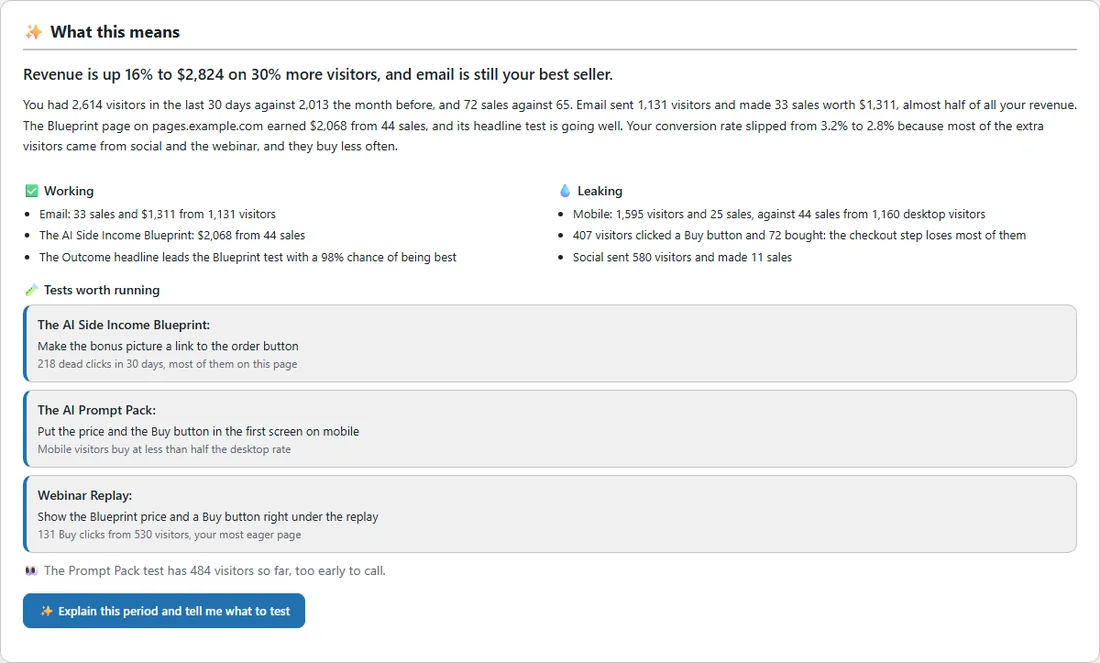
On the Analytics tab, Explain this period and tell me what to test reads the numbers for the filters you chose, against the period before. You get a one line headline, a short summary, Working, Leaking, Tests worth running (each with a page and the number behind it) and one thing to watch. It uses only numbers in the data, and says so when numbers are still too small to read much into.
The AI read of a heatmap:
In the heatmap viewer, Read it with AI reads the scroll, the attention, the most clicked elements, the dead and rage clicks, the Buy clicks, the sales and the page text. You get a headline, three to five findings with a fix for each, and two or three tests. Build this test under any of them sends it straight to the test builder, as above.
Your reports and your week:
- On any report, Explain this test writes a verdict, a summary and next steps from the versions table.
- The weekly email report opens with a short read of the week when AI is on. See The Weekly Email Report.
A real example:
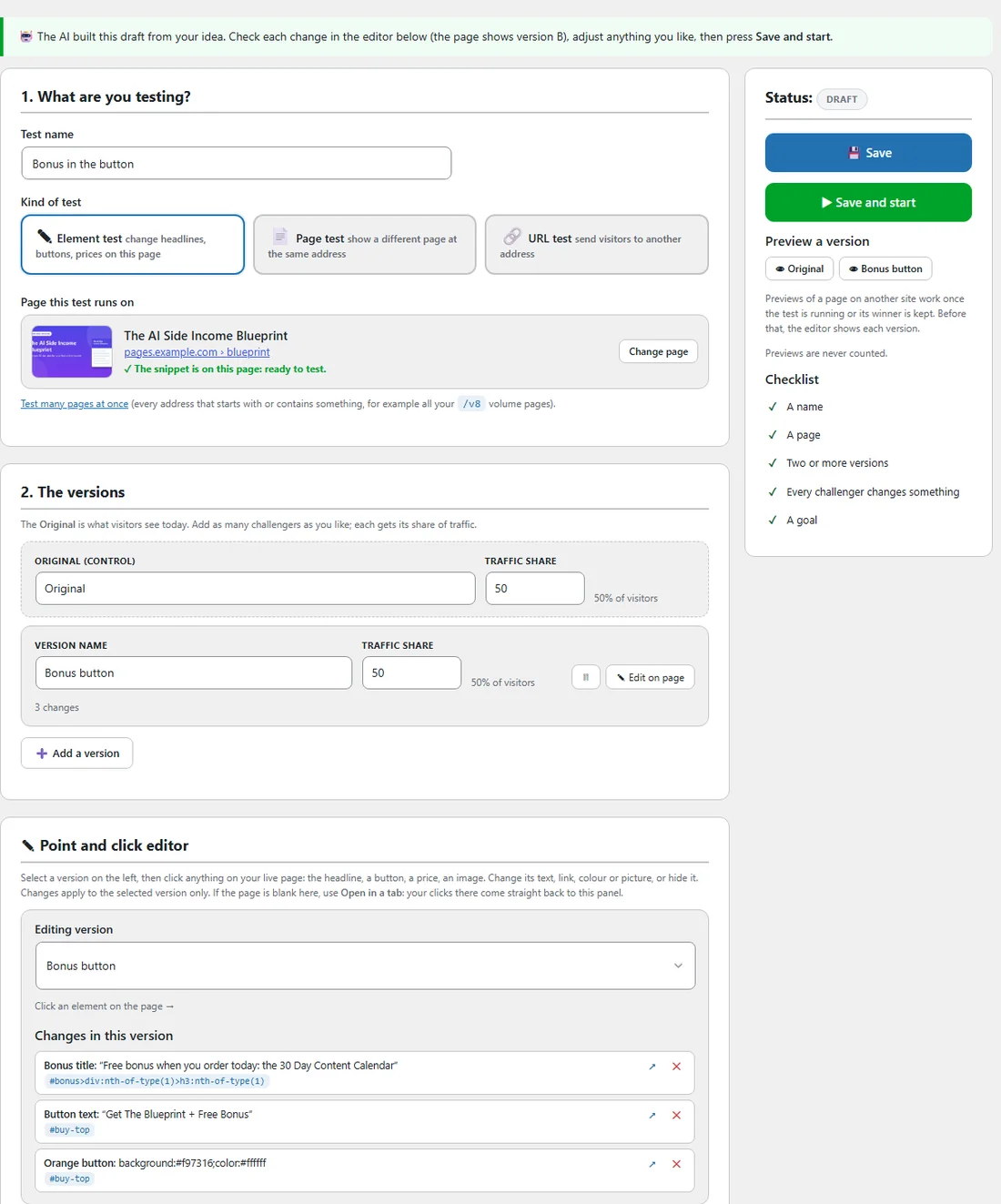
Side Income Lab typed pages.example.com/blueprint/ into Build a test with AI, with the idea put the free bonus in the Buy button and make the button orange. Moments later the builder opened a draft called Bonus in the button, with version B named Bonus button and three changes: a new bonus title, the button text Get The Blueprint + Free Bonus, and an orange button. The page line said The snippet is on this page: ready to test. The owner checked version B in the editor and pressed Save and start.
Tips:
- Describe one idea per test. One clear sentence gives the cleanest version B.
- Read the changes under Changes in this version and edit any words you would say differently.
- Ask for the Analytics read once a week. It points to the page and the step worth testing next.