ResultsAiX Publisher is a WordPress plugin that makes books. You describe an idea, pick a book type and an art style, and the plugin writes the page plan, generates every page in the background and builds print ready PDFs for Amazon KDP and other stores.
You stay in charge the whole way. You review every page, reroll the ones you do not love, edit the words, and only then build the files.
Where to find it:
After you activate your licence, an AiX Publisher item appears in your WordPress admin menu. Everything lives on that one page, split into tabs: Dashboard, New Book, My Books, Publish, Providers, Settings, Training, Diagnostics and Resources.
The four kinds of book it makes:
- Coloring Book: black and white line art pages to color in, 8.5 by 11 inches.
- Activity Book: mazes, dot to dot, counting and tracing pages built by real puzzle code, plus picture puzzles such as spot the difference, 8.5 by 11 inches.
- Journal / Planner: lined, dot grid, habit tracker, daily planner and prompt pages drawn as clean vector lines, 6 by 9 inches.
- Story / Picture Book: a full color picture book with the story written for you and one approved character on every page, 8.5 by 8.5 inches with bleed.
What you get at the end:

- A KDP Interior PDF with a title page and a copyright page added for you.
- A KDP Cover PDF: one wraparound sheet with back, spine and front, the spine width worked out from your page count and paper type.
- A Digital PDF that puts the front cover and the whole interior in one file, ready to sell as a download.
- A Pages ZIP with every page image.
- A KDP Listing Kit: three title ideas, a subtitle, an HTML description, exactly seven keywords, two categories and an age range, each with a Copy button.
- A KDP Upload Checklist in the same order as the KDP upload form, filled in with your own book details after an export.
- A Book Mockup: a 3D style picture of your book drawn in your browser, ready to download as a PNG.
The Dashboard at a glance:
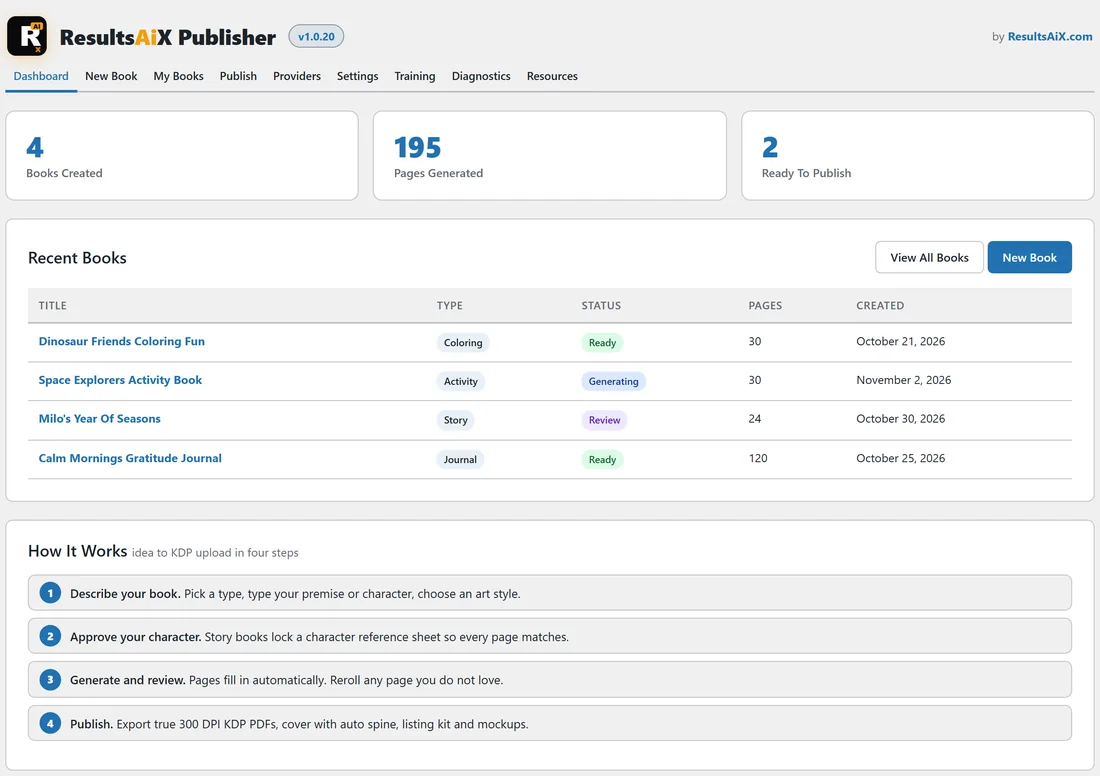
The Dashboard shows three counters (Books Created, Pages Generated and Ready To Publish), your five most recent books with their type, status, page count and date, and a short How It Works list. Click any book title to open it on the Publish tab.
A real example:
Ella runs a small author business at yoursite.com. In one afternoon she made four books with the plugin: Dinosaur Friends Coloring Fun (30 coloring pages, exported and ready), Calm Mornings Gratitude Journal (120 journal pages, exported and ready), Milo's Year Of Seasons (a 24 page story book about an orange cat, generated and in review) and Space Explorers Activity Book (30 activity pages, still generating). The screenshots in these docs follow her books.
Bring your own keys:
The plugin does not sell credits. You use the free keyless image provider that is ready out of the box, or you add your own keys for the providers you like and pay them directly. Your keys are stored encrypted on your own site and are only sent to the provider they belong to.
Where your work lives:
Page images go into your normal WordPress media library. Exported files go into a folder for each book inside your uploads folder. Your books stay on your own server.
Tips:
- Start with a coloring book. It needs no keys at all, so it is the quickest way to see the whole journey. See Quick Start: Your First Book In Four Steps.
- Add one free Google AI key when you are ready for story books and the AI writer. See Connecting An Image Provider And The Keyless Option.
- Read The KDP Upload Checklist before your first upload so you know what each file is for.