SendFox connects with a Personal Access Token from your SendFox account. Once it is connected, your SendFox lists show in the list dropdowns and each opt-in is added to the list you choose.
SendFox only allows API access on its Lifetime or Empire plan, and the card says so before you connect.
Where to find it:
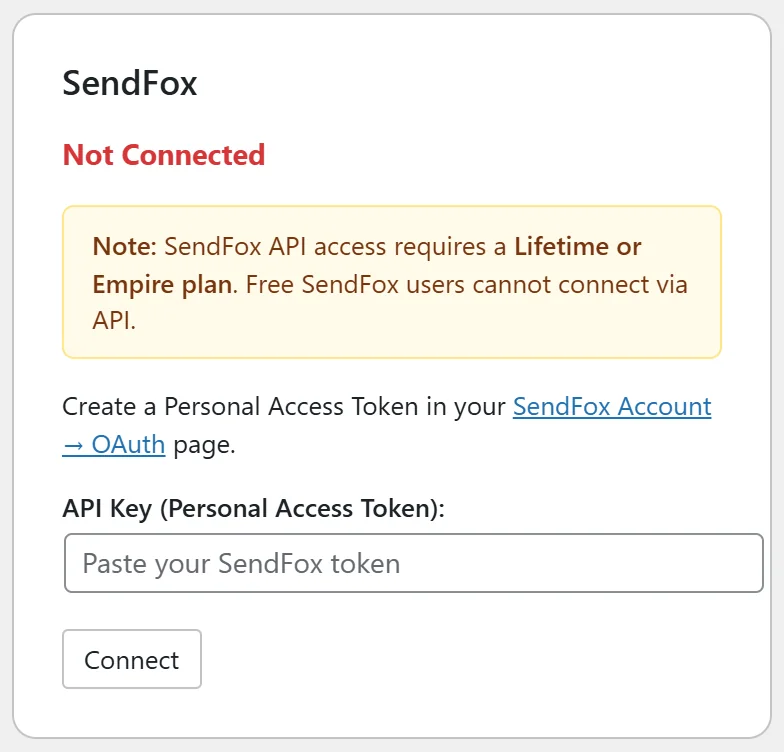
Go to Free List Building → Autoresponders and find the SendFox card.
Where to find your token:
- Log in to SendFox.
- Open your account settings and go to the OAuth (Personal Access Tokens) page. The card's SendFox Account → OAuth link opens it.
- Create a new token and copy it.
Step by step:
- Paste the token into API Key (Personal Access Token).
- Click Connect, then Test Connection.
- Pick your list in Default List. If you see "No lists found", create a list in SendFox first, then click Refresh Lists.
- Use the Apply buttons to set the list on your funnels.
What happens on each opt-in:
The contact is added to the chosen SendFox list with their email and first name (when you collect names).
Per funnel:
On a funnel's edit page choose SendFox in Autoresponder Provider and enter that funnel's list ID in the list field, or leave it blank to use the default.
A real example:
A podcaster friend of Sam Rivera uses SendFox for their show newsletter. They connect the token, pick the list Show Notes, and apply it to all funnels. Every new subscriber gets the next episode email.
Tips:
- Keep the token somewhere safe; SendFox shows it only once.
- If your SendFox account reaches its contact limit, new opt-ins are written to the Debug Log so you can see why.
- See Autoresponder Management Features for Refresh Lists and the Apply buttons.