Analyse my business is the quickest way to know how your business is doing. One click and AiX Brain reads every ResultsAiX plugin on your site for the last 30 days, compares them with the 30 days before, and writes you a short report: a summary, what is working, what needs attention, and your next steps with a link to each one.
Where to find it:

Analyse my business is the first card in every new AiX Brain chat: on the AiX Brain tab, in the box on the Overview, and in the bubble on every other ResultsAiX screen. After the Hub is installed or updated, or after you connect AI, the card is highlighted once with a New label, so you see it the first time.
Step by step:
- Open the AiX Brain tab and press New chat, or open the box on the Overview.
- Press Analyse my business on the card at the top.
- Watch it work: Reading every plugin, Counting the last 30 days, Comparing with the 30 days before, Checking what needs attention, Writing your analysis, with the seconds so far.
- Read the report, then click Take me there on a next step to go straight to that screen.
The analysis is saved as its own chat, named Business analysis and the date, so you can come back to it in Chat history and compare it with next month's.
What it reads:
Every lookup AiX Brain has for the plugins switched on here, in one go, without a planning step:
- The Overview's business numbers for the last 30 days, today included, and for the 30 days before
- WP Conversion Tracker and ResultsAiX Mailer for the same 30 days, and your five latest broadcasts
- ResultsAiX Pulse for the last 7 days
- Support Desk tickets waiting now, your site's setup, and your AI costs
- Each plugin's own lookup, such as Webinars, Funnels, Membership, Forms, Testimonials, WP Sync, Launch Manager or Community, for the same 30 days
- Your linked sites, each under the name you gave it, with its members and its own checkout sales
Ticket search, one ticket's story, the knowledge search and the community's post by post list need a question of their own, so the analysis leaves them out. Long lists are shortened to the top ten, which keeps one analysis quick and its cost low.
What the report looks like:
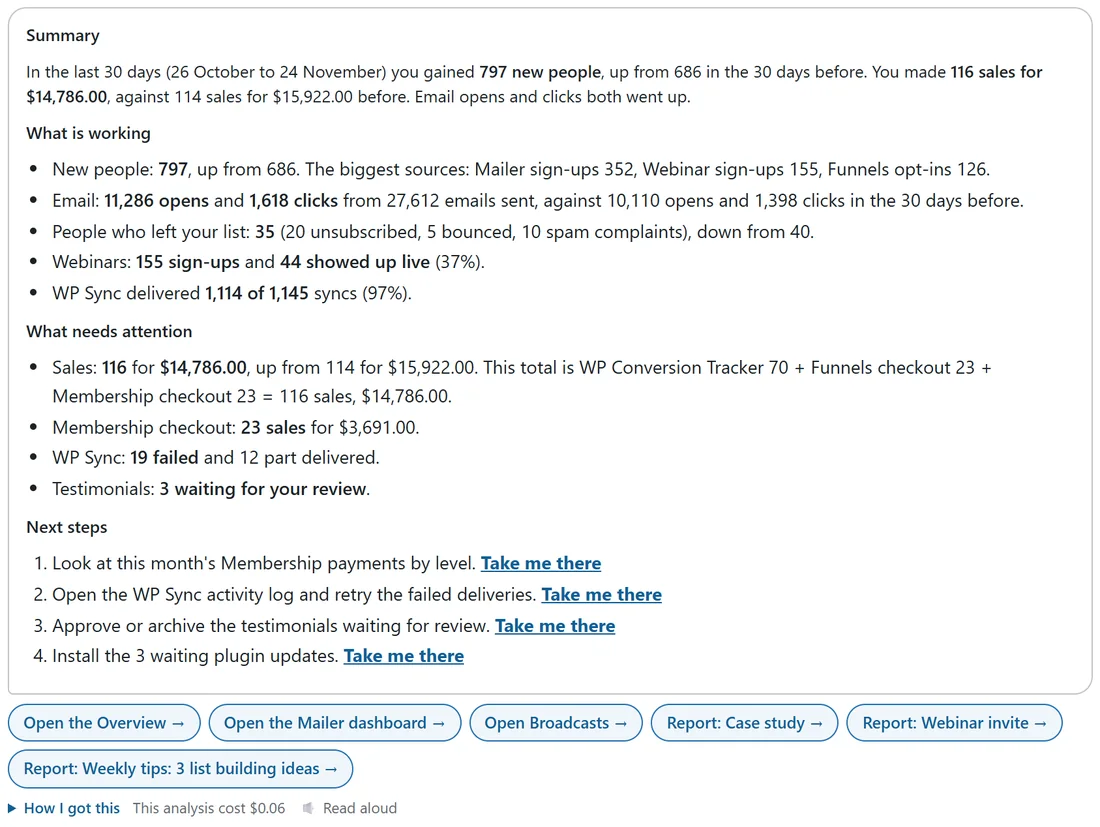
- Summary: three sentences at most
- What is working: the figures that grew or held up, each with its numbers
- What needs attention: the figures that fell or need a look, each with its numbers
- Next steps: three to five actions in order, each ending with a Take me there link to the right screen
Each linked site gets its own bullets under its name, and its numbers are never added into this site's totals. The analysis only reads: it never prepares a change. It follows the same rules as every AiX Brain answer: every number comes from your plugins, it compares with the 30 days before only where both periods have the figure, sales add up, new people are counted once, and it does not guess at causes. See How AiX Brain Gets Its Numbers, And What Each Answer Costs.
A new site with little data:
When almost nothing happened in the last 30 days, a full analysis would be empty, so you get a getting started read instead: which ResultsAiX plugins are set up, what to connect first, such as licences, an AI key, email sending, tracking links and forms, what each plugin will show once data arrives, and three to five next steps.
What it costs:

An analysis costs up to about $0.15, and usually a few cents. The exact amount shows under the report as This analysis cost, and it counts towards your AiX Brain daily spending cap. Before it starts, AiX Brain checks that your cap has room for it. If it does not, it tells you how much of today's cap is left and that you can raise the cap on the AI tab or run it tomorrow.
It needs one AI key: until one is connected, the card says so and its button reads Connect an AI key, which opens the AI tab.
A real example:
Jamie presses Analyse my business on yoursite.com. The report opens with the summary: 797 new people in the last 30 days, up from 686, and 116 sales for $14,786.00, against 114 sales for $15,922.00 before. What is working lists the new people by source, email opens and clicks, up to 11,286 and 1,618, the people who left the list, 35 by reason and down from 40, the webinar show-up rate of 37% and WP Sync's 1,114 of 1,145 deliveries. What needs attention lists the sales total with how it is made, the Membership checkout with 23 sales, the 19 failed WP Sync deliveries and the 3 testimonials waiting for review. The next steps each end in Take me there: Membership payments, the WP Sync activity log, the testimonials list and My Plugins for the waiting updates.
Tips:
- Run it on the same day each month and keep the chats: Chat history makes month on month comparison easy.
- Follow the first next step straight away while the report is open.
- Want one number rather than the whole picture? Ask it as a question instead: see AiX Brain: Ask About Your Business In Plain Words.
- Act on a next step from the same chat: ask AiX Brain to do it, such as approve the 3 testimonials, and press the button on its card.
- Want a shorter read every week without asking? The Complete weekly report email includes AiX Brain's read of the week: see The Weekly Report Email: Your Week In Your Inbox.