Sometimes one person deserves a personal note: a thank you for a review, an answer to a question, a nudge about a replay. AiX Brain can write that email in your own voice and send it, to that one person only, from AiX Mailer. You see the subject and every word before anything goes.
Where to find it:
Ask in any AiX Brain chat, or press Send email on a person card (see The Person Card: Everything About One Person In One Answer). The action is called Write and send ONE personal email to ONE person on the AiX Mailer card in What I can do.
It needs ResultsAiX Mailer on this site with its AI set up: the email is written by the Mailer's own AI writer, the one Broadcasts use, trained on your voice.
Step by step:
- Ask, with the person's email address and what to say, for example Email grace.murphy587@example.com to thank her for her review and tell her the webinar replay is up until Sunday. Add a link if you want one in the email, and a subject if you want to choose it.
- Press Ask. The Mailer's AI writes a short personal email, between about 60 and 160 words, plain and warm, the way one person writes to another.
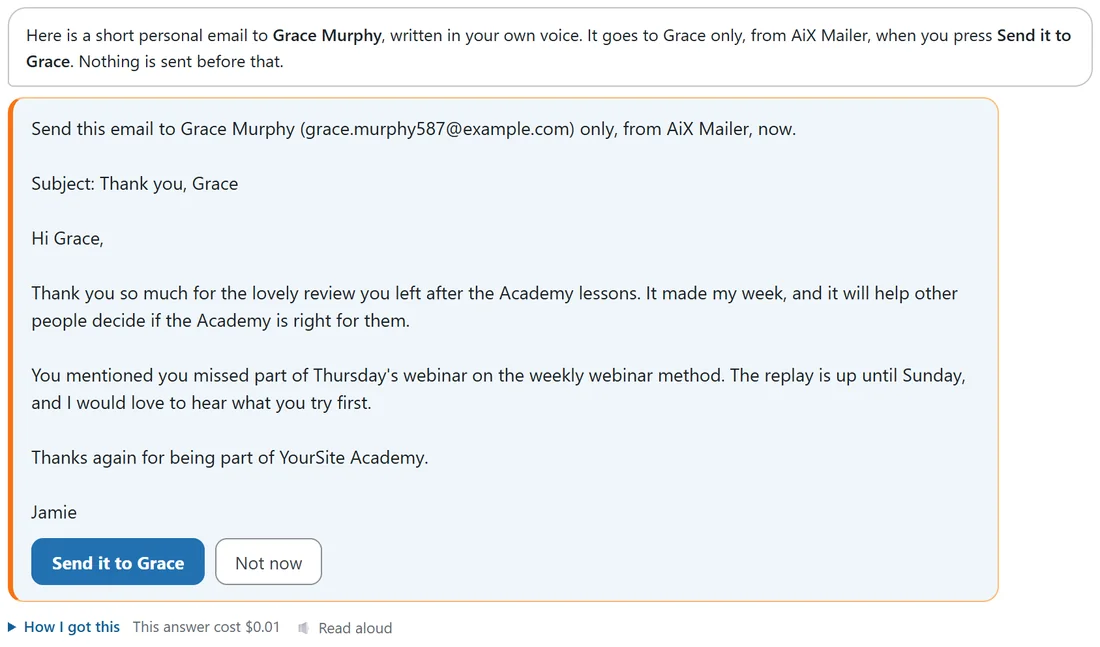
- Read the card. It says Send this email to, with the name and email address, only, from AiX Mailer, now, then the subject, then the whole email.
- Press the button, which says Send it to followed by their first name, or Not now.
- The next message says Sent, with the subject and their address, and a button to open their profile in the Mailer.
The card has an orange edge, because it sends an email to a person.
If you leave out who or what, AiX Brain asks: Who should I email? Give me their email address, or What should the email say? Tell me in your own words.
What it writes:
- A personal one to one email, never a marketing broadcast
- In your trained voice, short, plain and friendly
- No long dashes and no emoji
- It never offers a phone or video call
- It never quotes a price you did not give
- Any link you gave is kept exactly as you gave it
The greeting uses their first name from the Mailer. When the Mailer has no first name for them, the greeting simply says Hi, with nothing missing. When you give no subject, a short personal subject line is written for you; if that cannot be written, the subject is A quick note.
Who it never emails:
It goes to the one person you named and nobody else. It never emails someone who is:
- Not in AiX Mailer: add them as a subscriber first
- Unsubscribed, bounced or marked as spam
- On your suppression list
- Archived in the Mailer
The card says so instead of offering the button. If their status changes between the card and your click, the click is refused and nothing is sent.
How it is sent:
Through AiX Mailer's own sending connections, so everything you set in the Mailer still applies: Safe Mode, your sending limits and your From name and address. If no From address is set in the Mailer, your site's admin address is used, with your site's name.
A real example:
Grace Murphy left a lovely review of the Academy lessons. Jamie asks AiX Brain to email grace.murphy587@example.com to thank her for her review and tell her the webinar replay is up until Sunday. The card reads Send this email to Grace Murphy (grace.murphy587@example.com) only, from AiX Mailer, now, with the subject Thank you, Grace and a short note that thanks her, mentions the replay is up until Sunday and signs off as Jamie. Jamie reads it, likes it and presses Send it to Grace.
From the person card:
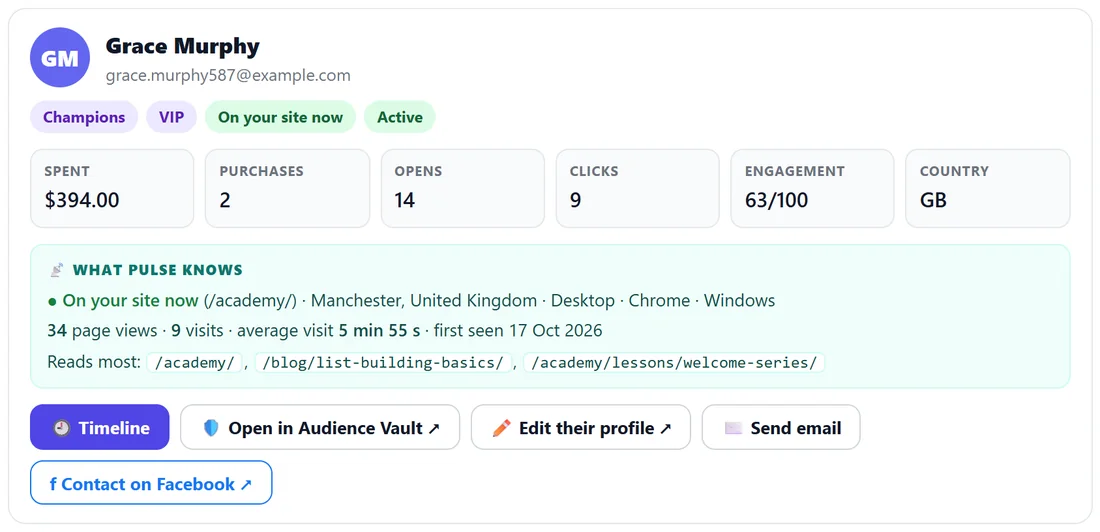
Press Send email on someone's person card. The question box fills with Send an email to their address about, and you finish the sentence with what it should say. The button only shows for people the Mailer can email.
Tips:
- Say what you want in your own words, with any detail that matters, such as the replay is up until Sunday. The more you give, the better the email.
- Not quite right? Press Not now and ask again with a change, such as make it shorter or mention the Academy Annual level.
- For a group of people, ask for a broadcast instead: Write a new broadcast to the engaged people about the replay. It is saved as a draft for you to check.