A lot of useful content is not in the page body. Course codes, tutor names and the text of your PDF handouts are a few examples. Extra Indexing pulls them into search.
It is part of PRO.
Where to find it:
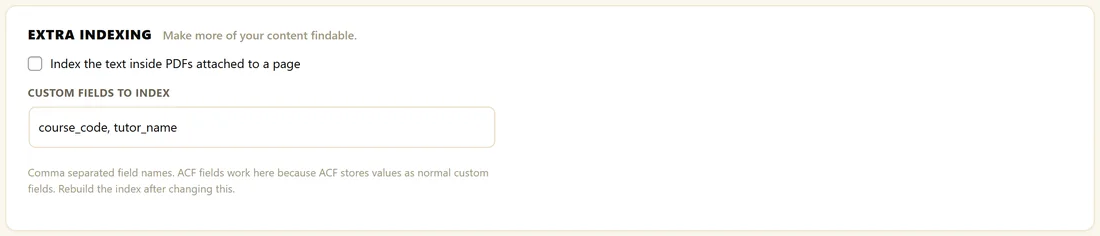
Open AiX Search, then Settings, click PRO Settings, and scroll to Extra Indexing.
Custom fields, including ACF:
- In Custom Fields To Index, type the field names you want searchable, separated by commas, for example subtitle, author_name, course_code.
- Click Save PRO Settings.
- Open the Dashboard and click Rebuild Index.
Advanced Custom Fields works here with nothing special, because ACF stores its values as ordinary custom fields. Use the field name you gave the field in ACF. Fields that hold lists of values are flattened into plain words.
PDFs:
- Tick Index the text inside PDFs attached to a page.
- Click Save PRO Settings.
- Rebuild the index.
The text of each PDF attached to a page then becomes searchable as part of that page. A PDF counts as attached when it was uploaded while editing that page, so its parent in the Media Library is the page.
How PDFs are read:
- Up to five PDFs per page are read
- If a PDF's Description in the Media Library has text, that text is used instead of reading the file. It is a handy way to choose exactly what is searchable
- Files larger than 4 MB are skipped, so a rebuild never runs out of memory
- Scanned or image-only PDFs have no text inside, so they add nothing
- Each file is read once and its text is kept, so later rebuilds are quick
A real example:
The Home Bakery Club stores a course code and a tutor name on each course page, in custom fields called course_code and tutor_name. With those listed under Custom Fields To Index and the index rebuilt, a member who types SD-201 or Priya Hart lands on the Sourdough Masterclass.
Tips:
- Always rebuild the index after changing Extra Indexing.
- For a scanned handout, type a short summary into the PDF's Description in the Media Library.