A member report shows one member's whole story on a single screen: how much they read, what they read, and what they searched for. It works with no AI key. With a key, one more click adds a short AI read of the member.
Use it before you reply to a member's support message, when you plan a personal email, or when you want to know why someone went quiet.
Where to find it:
Open AiX Search, then Insights PRO AI, and scroll to Member Reports.
How to open one:

- Type part of a name or an email address into the box.
- Click Find Member.
- Up to 20 matching members appear, the most recently active first, each with their pages, views and when they were last seen.
- Click Open Report.
Or, on the Member Activity tab, click Full report under any member in the Recently Active Members table. The report opens on Insights PRO AI, ready to read.
What a report shows:
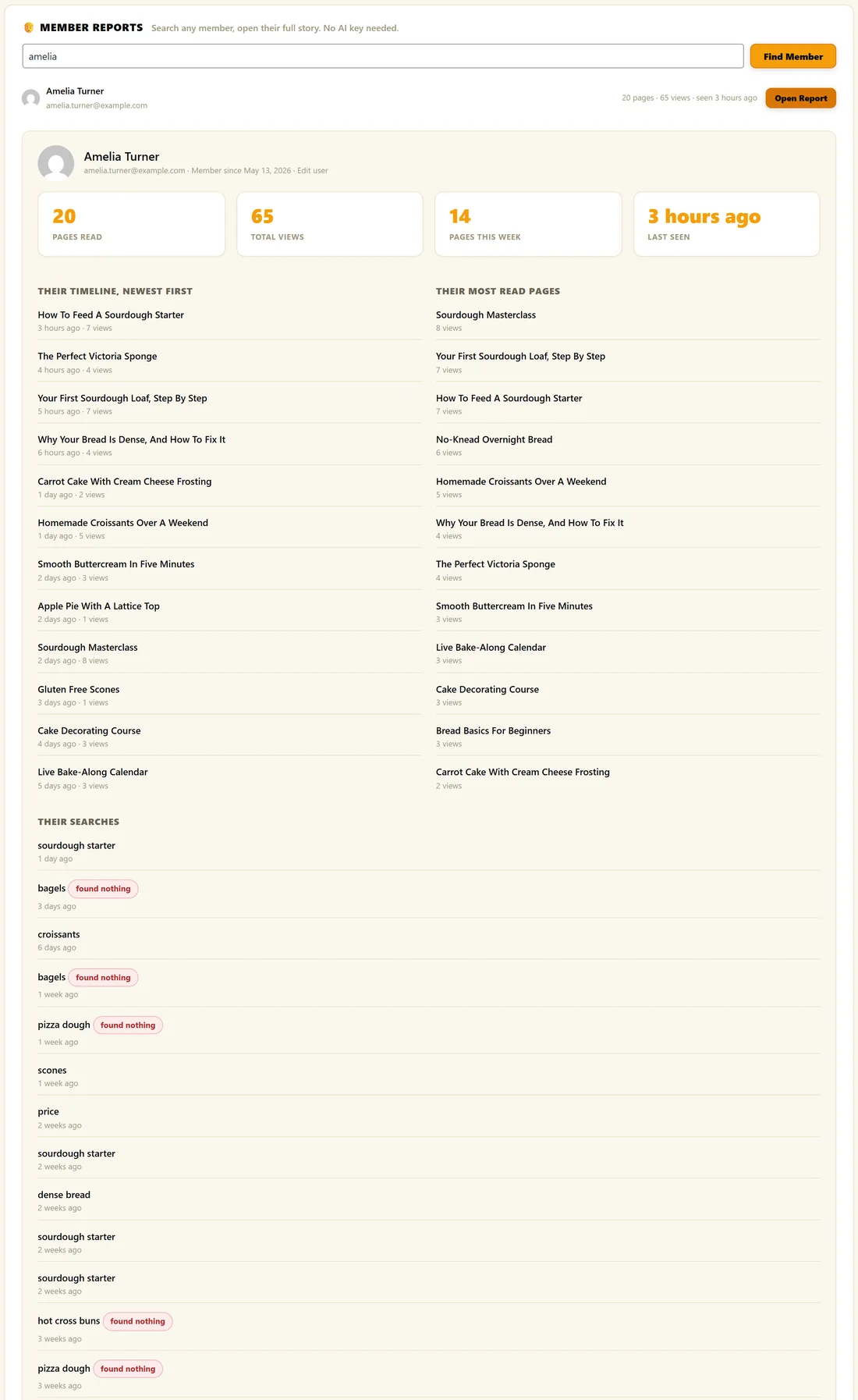
- The member's name, email, the date they became a member, and an Edit user link
- Pages read, Total views, Pages this week and Last seen
- Their timeline, newest first: the last 12 pages they opened, with how long ago and how many views each page has had
- Their most read pages: their top 12, with view counts
- Their searches: the last 15, with a found nothing tag on any search that returned nothing
If a member has not read anything yet, the report says so. It fills in the moment they read a page while signed in.
The AI read:
With an AI key connected, click AI Read On This Member under the report. You get a short read of four to six sentences: how engaged they are, what they are clearly interested in, any risk such as going quiet or hitting locked content, any opportunity such as being very engaged, and one specific suggested action.
Without a key, the report works the same and the AI box links to Add your free key.
Ways to use a report:
- Before you answer a member's support message, see what they have read and searched for
- Before a personal email, find the course or recipe they keep coming back to
- When a member goes quiet, check their last pages and searches for a clue
- When a member searched for something that found nothing, tell them when you make it
A real example:
Amelia Turner, a member of The Home Bakery Club, has read 20 pages with 65 views, 14 of them this week. Her timeline is full of sourdough, and her searches show bagels and pizza dough, both tagged found nothing. The owner emailed her personally when the bagel recipe went live.
Tips:
- Searches are linked to members who were signed in when they searched.
- Each AI read appears as member_read in AI Usage.
- See Member Activity: What Your Members Read for the site wide view.