A score answers one question at a glance: who is warm right now? On the Scoring screen you decide how many points each action is worth. The Mailer then keeps Score 1 up to date for everybody, and you can sort, filter and build audiences on it.
Every point is recorded against the thing that earned it, so you can always open somebody and see exactly why they are on the number they are on.
Where to find it:
Audience, then Scoring.
The three scores:
- Score 1 (calculated): worked out on this screen from your rules.
- Score 2 and Score 3: for scores from another system, for example a contact score from your old email tool. These rules never touch them. You can type them on a person's profile and filter on them. An empty box means no score, and 0 is a real score.
The two numbers at the top show how many people have a score and how many actions have been scored so far.
Setting the rules:
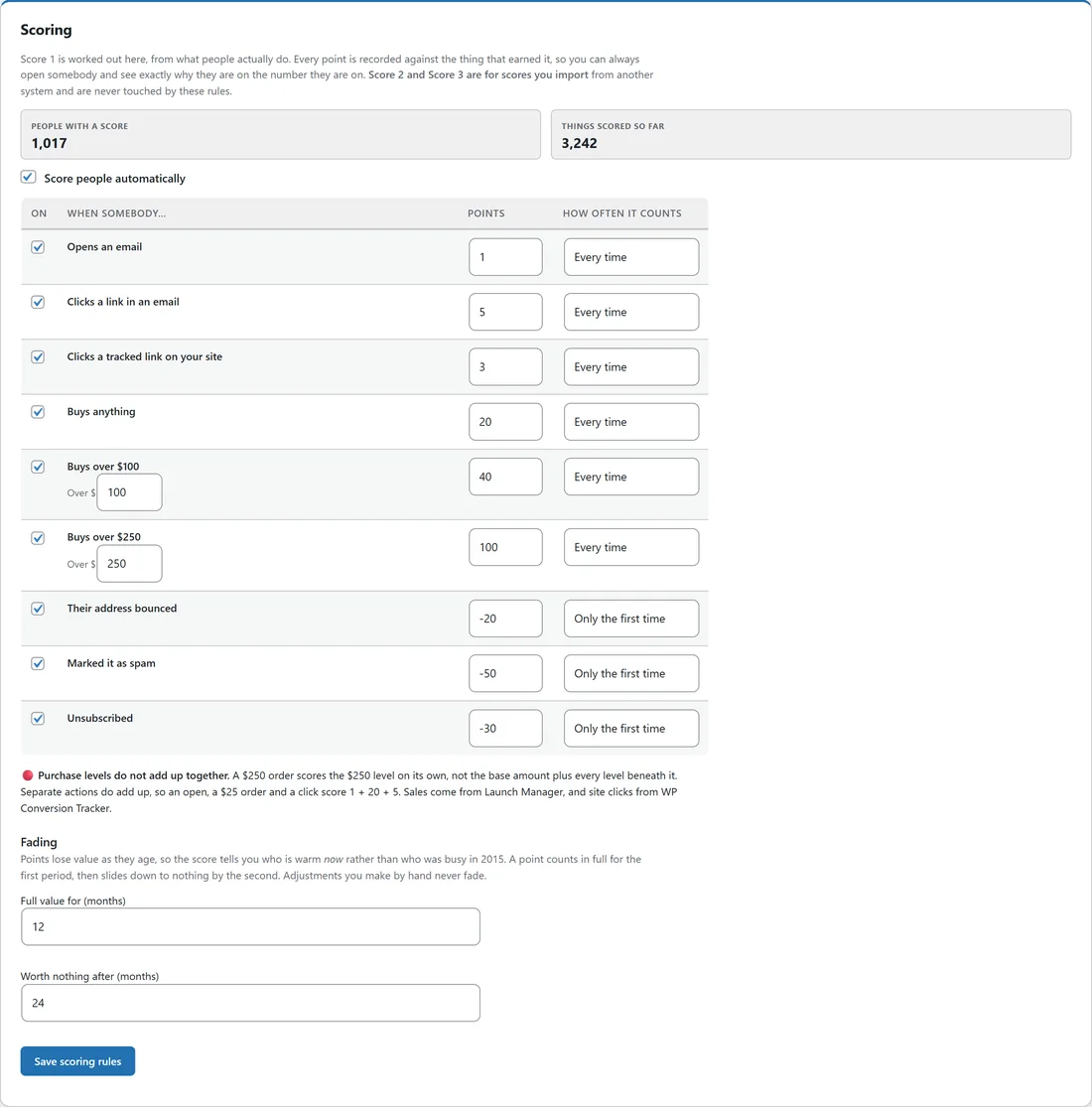
Tick Score people automatically, then set each rule.
- On: tick to use the rule.
- When somebody: the action.
- Points: how many points it is worth. Use a negative number to take points away.
- How often it counts: Every time, or Only the first time.
The starting rules:
- Opens an email: 1 point, every time.
- Clicks a link in an email: 5 points, every time.
- Clicks a tracked link on your site: 3 points, every time. This needs WP Conversion Tracker.
- Buys anything: 20 points, every time.
- Buys over $100: 40 points, every time. The amount can be changed.
- Buys over $250: 100 points, every time. The amount can be changed.
- Their address bounced: minus 20, only the first time.
- Marked it as spam: minus 50, only the first time.
- Unsubscribed: minus 30, only the first time.
Purchase levels do not add up together. An order scores the highest level it reaches on its own, not the base amount plus every level below it. Separate actions do add up, so an open, a small order and a click score 1 + 20 + 5.
Opens, clicks, bounces, spam reports and unsubscribes are scored the moment they happen. Purchases and site clicks are picked up once a day.
Fading:
Points lose value as they age, so the score shows who is warm now rather than who was busy years ago.
- Full value for (months): a point counts in full for this long. 12 by default.
- Worth nothing after (months): after this, it is worth nothing. 24 by default.
Between the two, a point slides down evenly. Points you give by hand never fade. Press Save scoring rules after any change.
Giving a group of people points:

For scores you already know in your head, for example everyone who came to your live workshop:
- In Give a group of people points, pick a list or segment under Group.
- Type the Points, 5 by default. A negative number takes points away again.
- Type a reason under Why. It shows in each person's explanation.
- Press Apply and confirm.
A tag can be turned into a segment first, then scored here in one go.
Why this score:
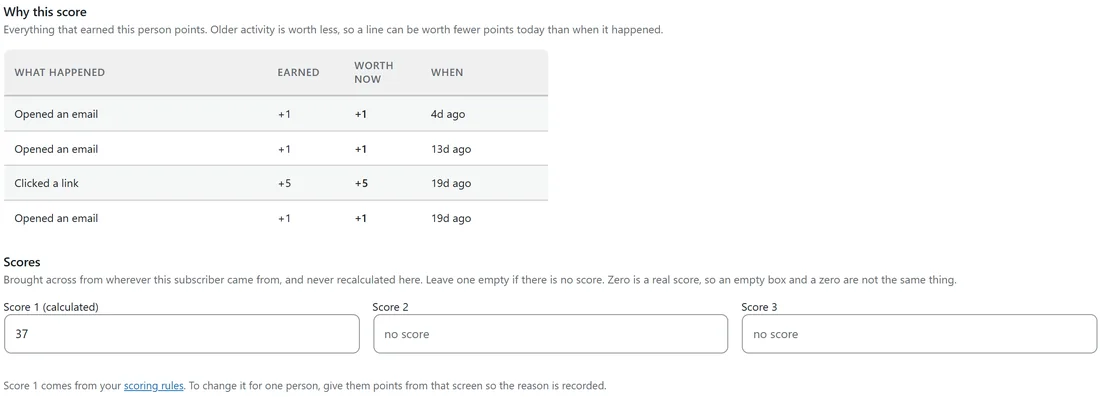
Open any subscriber from the Subscribers screen. Why this score lists every action that earned them points, what it earned, what it is worth today after fading, and when it happened. Under Scores you see all three scores. Score 1 is shown but cannot be typed over, because the next recalculation would undo it. Give points from the Scoring screen instead, so the reason is recorded.
Using the score:
- Subscribers screen: add the Score 1 (calculated) column, sort by it, or filter with Score 1 min and max. See The Subscribers Screen.
- Audience builder: the filter Score 1 (calculated) is at least, at most or between. See Building A Custom Audience.
- Automations: the trigger Their score crosses a number starts an automation when someone's score rises past a number you choose. See Automation Triggers Explained.
A real example:
Leafwise Gardening kept the starting rules. Oscar opened three emails and clicked one link in the last three weeks, and his profile lists each of those with the points it earned. Anna filtered the Subscribers screen to Score 1 min 30, saved that as the segment Warm readers, and sends that segment her early-access emails before everyone else.
Tips:
- Keep clicks worth clearly more than opens. Opens are the weakest signal.
- Use Only the first time for actions that should only ever cost points once.
- Keep the score from your old tool in Score 2 and filter on it in the audience builder.
- See Behavior Tagging: Tag People By What They Do for tags that record what people did.