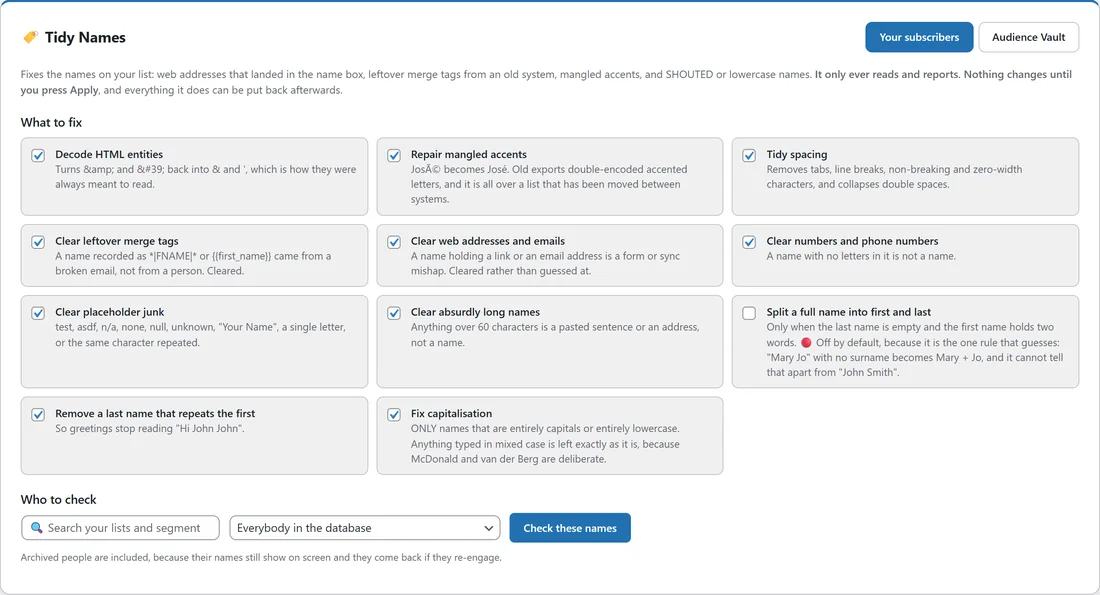
A greeting like Hi JOHN, Hi *|FNAME|* or Hi http://... tells your reader the email came from a machine. Lists that have moved between a few tools collect names like that. Tidy Names finds them, shows you each change it would make side by side, and fixes them in one go when you press Apply.
It only reads and reports until you press Apply, and every change it makes can be put back afterwards.
Where to find it:
Audience, then Tidy Names.
What to fix:
Each rule has a tick box. All of them are ticked by default except Split a full name into first and last.
- Decode HTML entities: turns & and ' back into & and the apostrophe.
- Repair mangled accents: José becomes José. Old exports often double-encoded accented letters.
- Tidy spacing: removes tabs, line breaks, non-breaking and zero-width characters, and turns double spaces into single ones.
- Clear leftover merge tags: a name recorded as *|FNAME|* or {{first_name}} came from a broken email, not from a person, so it is cleared.
- Clear web addresses and emails: a name holding a link or an email address is cleared rather than guessed at.
- Clear numbers and phone numbers: a name with no letters in it is not a name.
- Clear placeholder junk: test, asdf, n/a, none, null, unknown, "Your Name", a single letter, or the same character repeated.
- Clear absurdly long names: anything over 60 characters is a pasted sentence, not a name.
- Split a full name into first and last: only when the last name is empty and the first name holds two words. It is off by default because it is the one rule that guesses: "Mary Jo" with no last name would become Mary and Jo.
- Remove a last name that repeats the first: so greetings stop reading Hi John John.
- Fix capitalisation: only names that are entirely capitals or entirely lower case. Anything typed in mixed case is left exactly as it is, because McDonald and van der Berg are deliberate.
Checking names:
- Tick the rules you want.
- Under Who to check, pick Everybody in the database or a single list or segment. The search box narrows the choices.
- Press Check these names and wait for the progress line to finish.
Archived people are included, because their names still show on screen and they come back if they re-engage.
Reading the result:
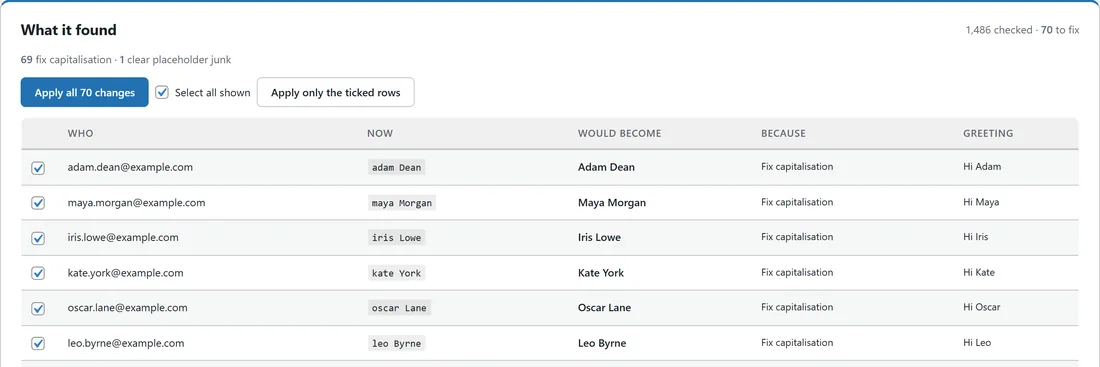
The box called What it found shows how many names were checked and how many need fixing, then a count for each rule, for example 69 fix capitalisation · 1 clear placeholder junk. The table below shows up to 200 of the changes:
- Who: the email address.
- Now: the name as it is stored today.
- Would become: the new name, or (cleared) when the name is removed.
- Because: the rule that made the change.
- Greeting: how Hi will read with the new name. A cleared name reads Hi there.
Applying the changes:

- Apply all N changes: fixes every name the check found, including the ones beyond the 200 shown.
- Apply only the ticked rows: fixes just the rows ticked on screen. Untick any row you want to keep as it is.
After applying, applied rows turn pale and ↩ Undo this run appears. Undo puts every name from that run back exactly as it was.
If a greeting would read Hi with no name:
When one of your emails uses a name tag with no fallback, a note at the top of the screen lists those emails. Clearing a junk name leaves that person with no first name, so give the tag a fallback, for example {{first_name|there}}, and the email reads Hi there instead. See Merge Codes And Tag Codes.
Your subscribers and the Audience Vault:
With WP Conversion Tracker installed, two buttons appear at the top: Your subscribers and Audience Vault. The Vault is where many names come from, and its sync copies them into your subscribers, so clean both. Each is its own run.
New names coming in through forms, imports and syncs already pass through the first eight rules on the way in, so once your list is tidy it tends to stay tidy. Splitting names, repeated last names and capitalisation are never changed on the way in, because those are about how somebody chose to write their own name.
A real example:
Anna at Leafwise Gardening checked Everybody in the database with the default rules. 1,486 names were checked and 70 needed fixing: 69 were all capitals or all lower case, such as MARY O'BRIEN, john mcdonald and jean van der berg, which became Mary O'Brien, John McDonald and Jean van der Berg, and one, test test, was cleared. She pressed Apply all 70 changes. Her greetings now read Hi Mary, Hi John and Hi there.
Tips:
- Run Tidy Names right after a big import. See Importing Subscribers From A CSV.
- If you only want tidy greetings without changing what is stored, use the setting described in Capitalising Names As They Send.
- Keep Split a full name into first and last off unless you know your list only holds first and last names.