Beyond answering posts, the AI can keep spam out and make the community easier to read and write in. Each feature has its own switch.
Where to find it:
Open Grow, then AI, and scroll to AI moderation and AI for members and staff.
AI moderation:
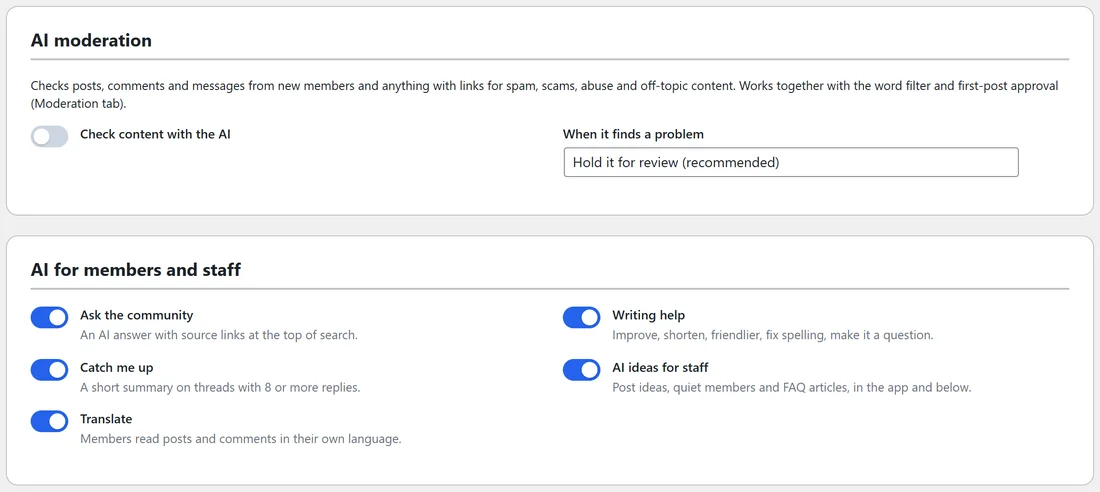
- Check content with the AI: checks posts, comments and messages from new members, and anything with links, for spam, scams, abuse and off-topic content. Off by default.
- When it finds a problem: Hold it for review (recommended); Publish, then hide it and report it; or Allow it, just report it to moderators.
It works together with the word filter and first-post approval on the Moderation tab. Held items appear in the moderation queue with the AI's reason. See Moderation: The Queue, Word Filter And Limits.
AI for members and staff:
- Ask the community: an AI answer with source links at the top of search.
- Catch me up: a short summary on threads with 8 or more replies.
- Translate: members read posts and comments in their own language.
- Writing help: Improve, Shorten, Make it friendlier, Fix spelling, Make it a question.
- AI ideas for staff: post ideas, quiet members and FAQ articles, in the app and on this tab.
Each is on by default once the AI is connected. Untick any you do not want and click Save AI settings.
Ask the community:
A member types a full question into search. The AI reads your posts and lessons and answers at the top of the results with links to its sources. If it finds related posts but no clear answer, it says it would rather not guess.
Catch me up:
On a long thread, Catch me up writes a short summary of what was said, so a member can join in without reading every reply.
Translate:
Translate under a post or comment rewrites it in the member's language, with Show original to switch back. Translations are kept, so the same post is not translated twice.
Writing help:
In the post editor, Writing help offers Improve, Shorten, Make it friendlier, Fix spelling and Make it a question. The member sees the new text and can Undo.
A real example:
A brand-new account posted Make money fast, click my link in General discussion. The word filter held it, and the moderation queue showed it to Alex with the reason, ready to Reject. Real members never saw it.
Tips:
- Turn AI moderation on if spam gets past the word filter. It only checks new members and posts with links, so it costs little.
- Translate is a quiet win for international communities: members write in their own language and still understand each other.