This is the classroom from a member's side. It is built to make finishing easy: progress is always visible, Resume picks up where they stopped, and every lesson has its own discussion.
The classroom page:

Click Classroom in the sidebar. Each course is a card with its cover, name, short description and a progress bar, for example 66% complete. Locked courses show what unlocks them.
The course page:

Click a course to see its cover, description, the number of lessons, total length and students, and the member's progress. Resume opens the next lesson, with its name beside the button. Below, sections list their lessons with ticks for finished ones, Free preview labels, Quiz labels and lesson lengths.
A lesson:
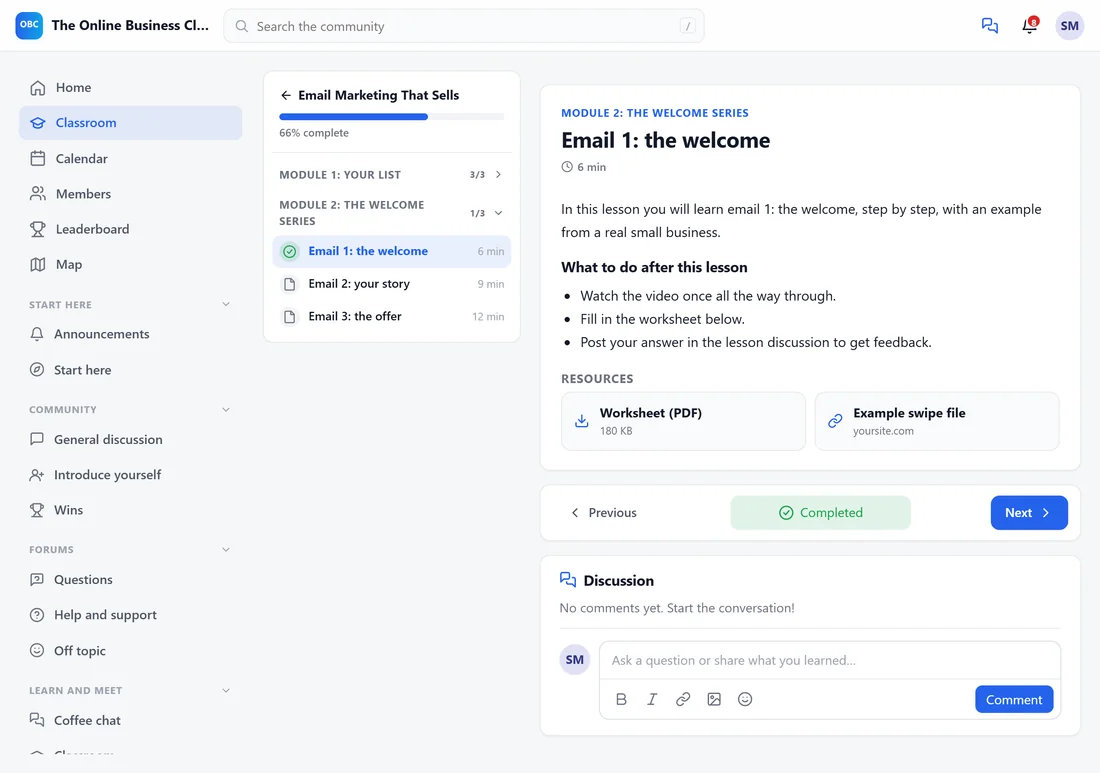
- The outline on the left shows every section and lesson, with the current one highlighted and progress at the top.
- The lesson has its video, the text, and Resources with downloads and links.
- Previous and Next move through the course. The middle button marks the lesson complete; it shows Completed once done.
- Discussion, under the lesson, is a comment thread just for this lesson.
Locked lessons:
A lesson can be locked because it drips later (This lesson opens on a date), because lessons go one at a time (Finish the lesson before this one to open it), or because the course is locked.
Progress and points:
Completing a lesson and a course can earn points, set under Gamification. Finishing a course can also earn the Graduate badge and a certificate.
The certificate:
When the course gives one, finishing the last lesson shows You finished the course! with a link to the certificate. See Course Access, Drip, Cohorts And Certificates.
A real example:
Sofia has finished four of six lessons in Email Marketing That Sells. Her course card shows 66% complete, and Resume takes her straight to Email 3: the offer, which ends with the quiz.
Tips:
- Point new members to a free preview lesson in your welcome message. It is the easiest first step.
- Finishing the first lesson is one of the getting started steps, so it also earns a point.