Badges are small awards that show on a member's profile. They celebrate moments points cannot: a first post, finishing a course, a long visit streak. Members get a notification when they earn one.
Where to find it:
Open Community, then Gamification, and scroll to Badges.
The starter badges:
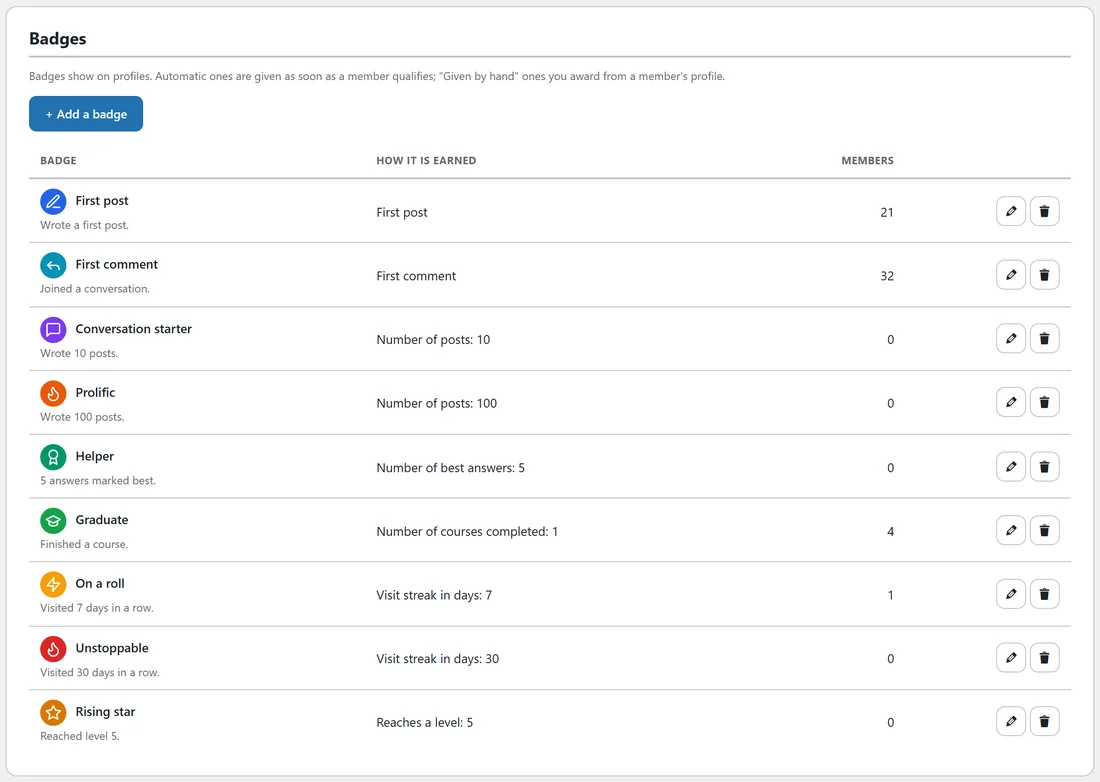
Every community starts with nine badges.
- First post: wrote a first post.
- First comment: joined a conversation.
- Conversation starter: wrote 10 posts.
- Prolific: wrote 100 posts.
- Helper: 5 answers marked best.
- Graduate: finished a course.
- On a roll: visited 7 days in a row.
- Unstoppable: visited 30 days in a row.
- Rising star: reached level 5.
The table shows how each one is earned and how many members have it.
Add or edit a badge:
- Click + Add a badge, or the pencil on a badge.
- Give it a Name and a short Description.
- Under Icon and colour, click Pick to choose an icon and set its colour.
- Under How it is earned, choose a rule and a Number where it needs one: First post, First comment, Number of posts, Number of comments, Number of best answers, Number of courses completed, Visit streak in days, Reaches a level, or Given by hand.
- Click Save badge.
Automatic badges are given as soon as a member qualifies.
Give a badge by hand:
Badges with the rule Given by hand are awarded from a member's profile in the app. Open the profile while logged in as staff and award it from the staff tools.
Where members see them:
Badges show on the profile under Badges, and members get a notification such as You earned the "Graduate" badge.
A real example:
Alex added a Given by hand badge called Workshop speaker with a microphone icon in orange, and gives it to every member who runs a session on the Saturday call.
Tips:
- Keep the list short. A few badges that mean something beat many that nobody notices.
- Pair a badge with a level lock: Rising star at level 5 makes level 5 feel like an event.