The Emails tab decides who community emails come from, how they are sent, and the weekly digest that brings quiet members back.
Where to find it:
Open AiX Community, then Grow, then Emails.
Sender:
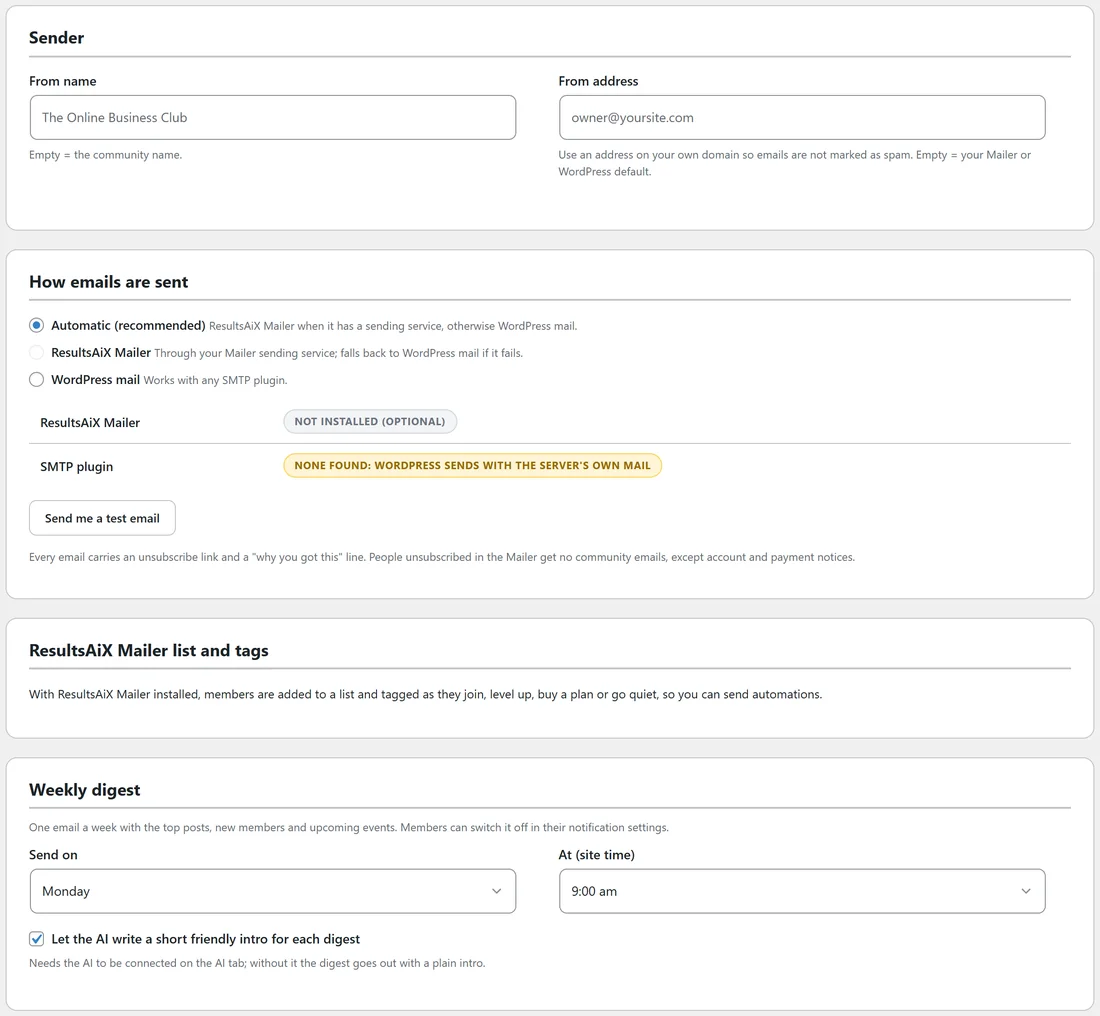
- From name: empty means the community name.
- From address: use an address on your own domain, such as hello@yoursite.com, so emails are not marked as spam. Empty means your Mailer or WordPress default.
How emails are sent:
- Automatic (recommended): ResultsAiX Mailer when it has a sending service, otherwise WordPress mail.
- ResultsAiX Mailer: through your Mailer sending service, and WordPress mail if that fails.
- WordPress mail: works with any SMTP plugin.
The status lines show whether ResultsAiX Mailer is installed and whether an SMTP plugin was found.
Send me a test email:
Sends a test to your address so you can check it arrives and how it looks.
What every email includes:
Every email carries an unsubscribe link and a line saying why the person got it. People unsubscribed in the Mailer get no community emails, except account and payment notices.
ResultsAiX Mailer list and tags:
With ResultsAiX Mailer installed, members are added to a list and tagged as they join, level up, buy a plan or go quiet: community-joined, community-level-N, community-plan-... and community-quiet. Use them to run automations in the Mailer.
Weekly digest:
One email a week with the top posts, new members and upcoming events. Members can switch it off in their notification settings.
- Send on: a day of the week, or Never (no weekly digest).
- At (site time): the hour.
- Let the AI write a short friendly intro for each digest. This needs the AI to be connected; without it the digest goes out with a plain intro.
Click Save emails.
Announcements:
A post marked Announcement: also email everyone is emailed to each member who has not switched announcements off. See Post Options: Polls, Tags, Scheduling, Anonymous And More.
A real example:
Alex set From name to Alex at The Online Business Club and the From address to hello@yoursite.com, kept Automatic, and sends the digest on Mondays at 9 am with the AI intro. Quiet members who see three good posts in the digest often come back the same day.
Tips:
- If test emails do not arrive, set a From address on your own domain, or use an SMTP plugin or ResultsAiX Mailer.
- Members choose their own email rhythm. See Notifications, Email Choices And The Member's Own Settings.