ResultsAiX Community takes payments through your own Stripe account. The money goes straight into your Stripe balance, never through us, and Stripe handles cards, receipts and the payment pages.
Where to find it:
Open AiX Community, then Money, then Plans and payments. The Stripe section is near the top.
Money at a glance:

The first box shows MRR (monthly recurring revenue), Paying members, On a free trial, Churn (30 days) and Revenue for 30 days and all time. Switch between Live and Test to see each mode's numbers.
Connect Stripe:
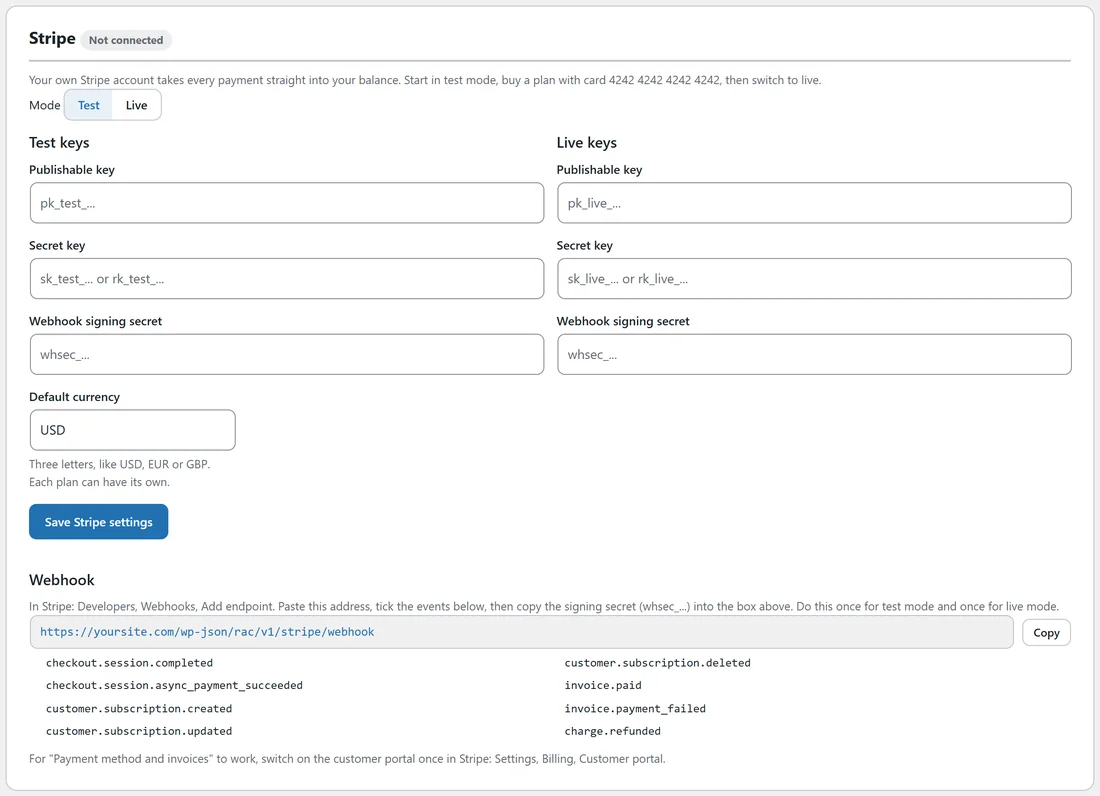
- In your Stripe account, open Developers, then API keys. Copy the Publishable key and the Secret key. Start with the test keys.
- In Plans and payments, set Mode to Test.
- Paste the keys under Test keys: Publishable key and Secret key. A restricted key also works.
- Type your Default currency, three letters such as USD, EUR or GBP. Each plan can have its own.
- Click Save Stripe settings. The badge beside Stripe changes from Not connected to Test mode.
Add the webhook:
Stripe tells your site about payments through a webhook.
- Click Copy beside the webhook address shown under Webhook. It looks like yoursite.com/wp-json/rac/v1/stripe/webhook.
- In Stripe, open Developers, then Webhooks, then Add endpoint, and paste it.
- Tick the events listed on the screen, starting with checkout.session.completed.
- Copy the signing secret (it starts with whsec_) into Webhook signing secret and save.
Do this once for test mode and once for live mode.
Switch on the customer portal:
For Payment method and invoices to work in each member's Billing screen, switch on the customer portal once in Stripe: Settings, Billing, Customer portal.
Test, then go live:
- Create a plan. See Plans, Tiers And Coupons.
- Log in as a test member and buy the plan with Stripe's test card 4242 4242 4242 4242, any future date and any security code.
- Check the member got access and the payment shows under Payments.
- Paste your live keys and live webhook secret, set Mode to Live and save.
A real example:
Alex connected test keys first, bought the Members plan with the test card from a spare account, saw the Mastermind space unlock, then switched to Live the same afternoon.
Tips:
- Plans you create are created in your Stripe account for you, along with their prices and coupons.
- Diagnostics shows whether Stripe is connected and in which mode.
- Paid plans are optional. A free community works without Stripe.