Moving your community should not mean starting from zero. ResultsAiX Community imports members from a file and copies whole forums and groups from other plugins on the same site.
Where to find it:
Open AiX Community, then Grow, then Import and export.
Import members from a file:
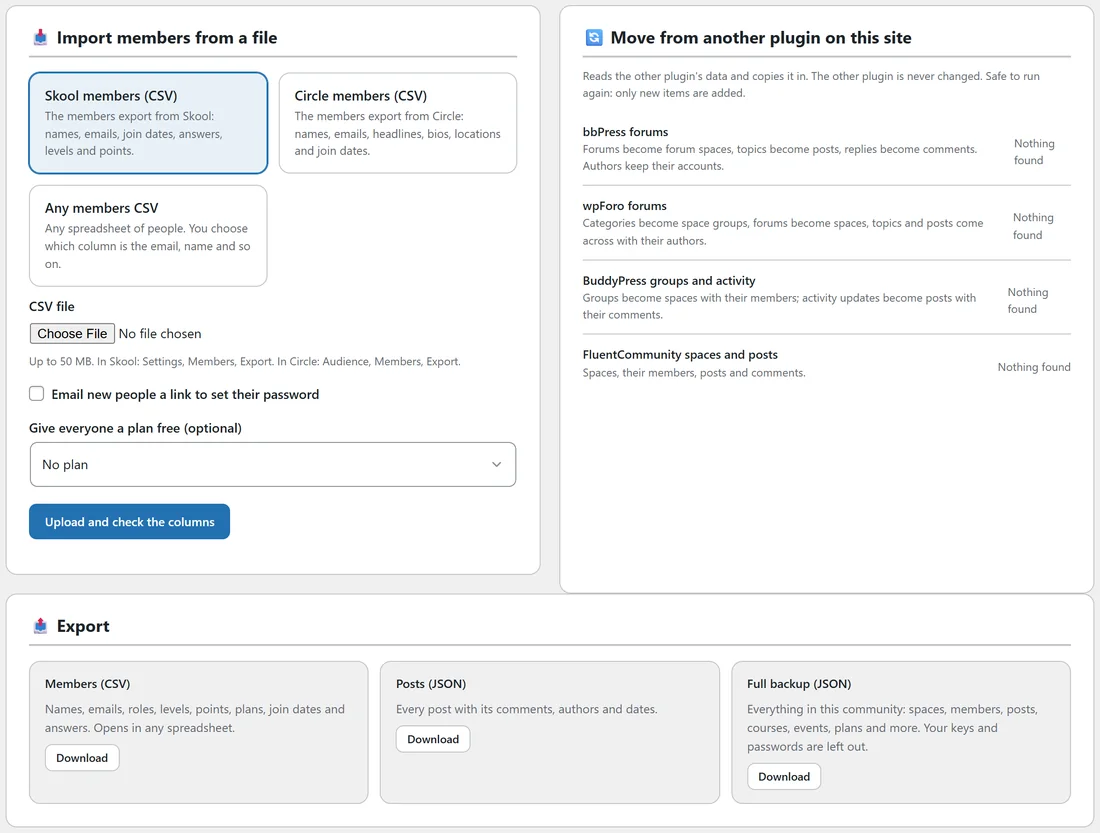
Pick the kind of file.
- Skool members (CSV): the members export from Skool, with names, emails, join dates, answers, levels and points.
- Circle members (CSV): the members export from Circle, with names, emails, headlines, bios, locations and join dates.
- Any members CSV: any spreadsheet of people. You choose which column is the email, name and so on. Only the email is needed.
In Skool the export is under Settings, Members, Export. In Circle it is under Audience, Members, Export. Files can be up to 50 MB.
Step by step:
- Pick the kind of file and choose your CSV file.
- Decide on Email new people a link to set their password.
- Optionally pick a plan under Give everyone a plan free.
- Click Upload and check the columns.
- Check how the columns are matched, change any that are wrong, and press Start.
- A progress bar shows the import running in steps. You can close the page and press Resume later.
Move from another plugin on this site:
- bbPress forums: forums become forum spaces, topics become posts, replies become comments. Authors keep their accounts.
- wpForo forums: categories become space groups, forums become spaces, and topics and posts come across with their authors.
- BuddyPress groups and activity: groups become spaces with their members, and activity updates become posts with their comments.
- FluentCommunity spaces and posts: spaces, their members, posts and comments.
Each one shows what it found on your site, or Nothing found. The other plugin is never changed.
Running an import again:
Imports are safe to run again: only new items are added, so nothing is duplicated.
A real example:
Alex moved 400 members from Skool. Alex exported the members CSV from Skool, picked Skool members (CSV), left Email new people a link to set their password off, checked the columns and pressed Start. Their levels and points came across. Alex then emailed everyone personally with the community link, and members used Forgot it? on the login page to set a password.
Tips:
- Leave the password email off, announce the move yourself, then send everyone to the login page. Forgot it? works for imported people.
- Import members before you open the doors, so the community looks alive on day one.
- Need your data out? See Exports And Backups.