ResultsAiX Community works on its own, and it gets more useful next to your other ResultsAiX plugins. It only reads them and uses their own features; it never changes another plugin.
Where to find it:
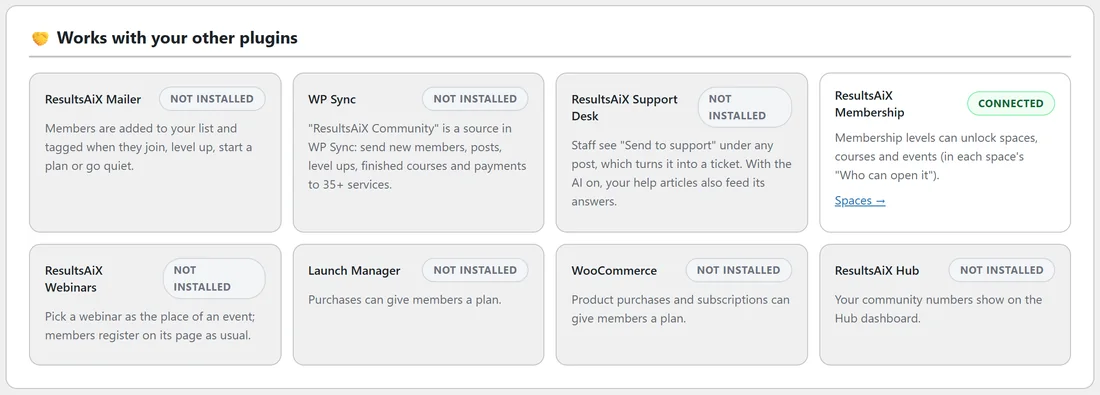
Open AiX Community, then Grow, then Integrations. Works with your other plugins shows each one as Connected or Not installed.
ResultsAiX Membership:
Membership levels can unlock spaces, courses and events, in each one's Who can open it. A community plan can also give a Membership level, and buying a Membership level can give a community plan. Lessons can link to protected Membership pages. See Access From Membership, Launch Manager, WooCommerce And Roles.
ResultsAiX Mailer:
Members are added to your list and tagged when they join, level up, start a plan or go quiet. Community emails can be sent through the Mailer's sending service. See Emails And The Weekly Digest.
WP Sync:
ResultsAiX Community is a source in WP Sync: send new members, posts, level ups, finished courses and payments to 35+ services.
ResultsAiX AI Support Desk:
Staff see Send to support under any post, which turns it into a ticket. With the AI on, your help articles also feed its answers, and Turn into an FAQ can save a draft article in your knowledge base.
ResultsAiX Webinars:
Pick a webinar as the place of an event. Members register on its page as usual, and the Webinars emails go out as normal.
Launch Manager:
Purchases can give members a plan, and purchases are checked again once a day.
WooCommerce:
Product purchases and subscriptions can give members a plan.
ResultsAiX Hub:
Your community numbers show on the Hub dashboard, the Hub link sits in the menu, and the AI can use keys saved in the Hub.
Diagnostics:
Family connections in Diagnostics lists every one of these plugins and whether it is installed. See Diagnostics And Troubleshooting.
A real example:
Alex runs Membership, Mailer and Webinars next to the community. VIP Coaching members get the community Members plan automatically, every new member lands on the Mailer list tagged community-joined, and the monthly masterclass on the calendar links to its Webinars room.
Tips:
- None of these are needed. Add them one at a time as your community grows.
- The ResultsAiX menu and colours are shared, so every plugin feels the same.